
On this page
Start here
Quick answer
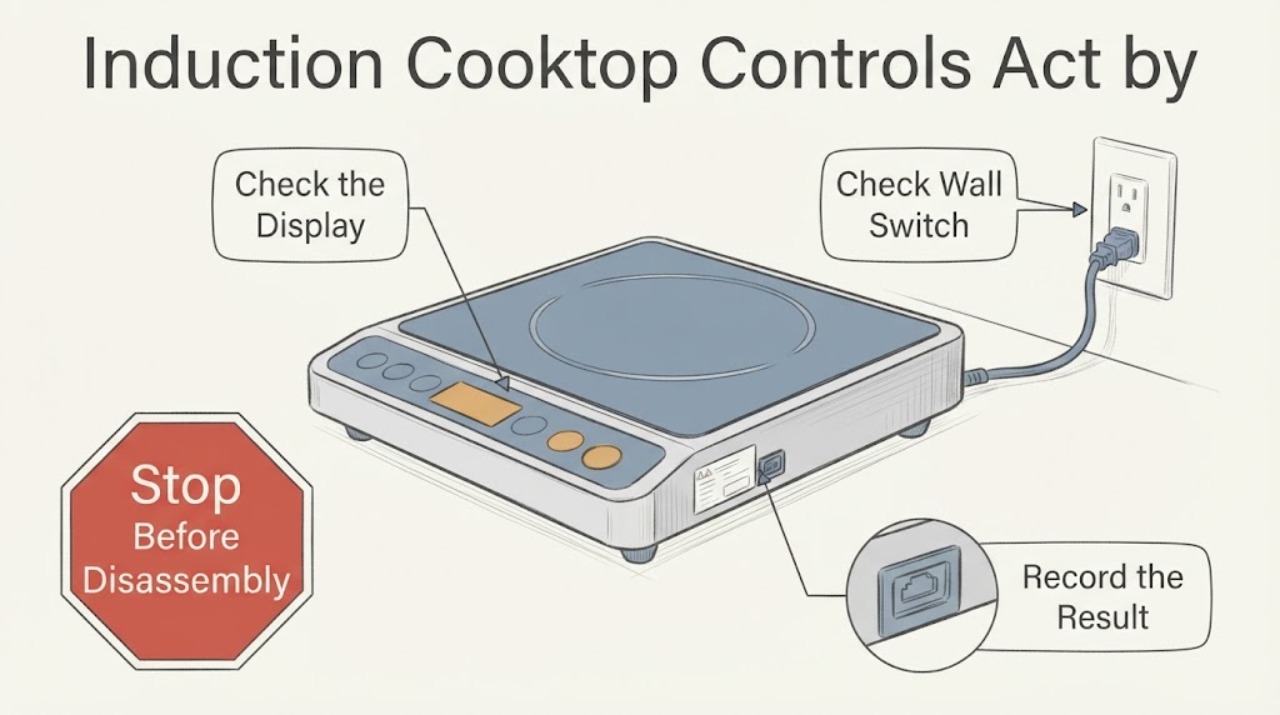
First distinguish a hot-surface indicator or an automatic shutoff from a cooking zone that actually starts heating without a touch. Remove pans and objects, dry the glass touch panel, and keep the controls clear. If a zone heats, the controls light up by themselves, or the cooktop responds repeatedly after the surface is dry, turn the cooktop off at its accessible isolator or circuit breaker and leave it out of service; do not open the glass or diagnose the control board. Exact reset times and lock sequences vary by model, so use the model manual or arrange qualified service after the safe external checks.
Work through in order
Diagnostic checks
Use only checks that match the exact appliance or system and its official guide.
-
Check 1
Stop cooking and remove all pans, utensils, cloths and other objects from the glass and control area. From a safe position, note whether only a residual-HOT indicator is lit or whether a zone is actually warming a pan or producing heat without a touch. Do not touch a pan to test it; use the indicator and the absence of a new cooking command as the observation.
Expected result: Only a HOT indicator remains after a recent cooking cycle, or a control/display or heating zone activates without a user touch.
Next step: If actual heating or repeated self-activation is present, switch the cooktop off at the safe accessible isolator or breaker and keep it out of service. Do not reach over a hot pan or open the appliance.
Why this matters
Why: A residual-hot indication can remain after cooking, while controls lighting or a zone heating by itself is an abnormal activation pattern. Direct sunlight or a pan left on the surface can also explain some indications without proving a board failure.
-
Check 2
After the surface is cool, isolate power using the model's normal switch or circuit breaker before cleaning. Wipe the touch panel and the glass completely dry with a soft cloth, remove residue, and leave no cloth, pan edge or utensil over the controls. Do not spray liquid into gaps or use a sharp tool on the panel.
Expected result: The behavior occurred after a spill, condensation, boil-over, grease or an object rested over the control area, or it continues with a clean, dry, empty panel.
Next step: Allow the panel to dry fully and follow the exact manual's lock/unlock instructions. If the controls still act without touch, leave power isolated and book service.
Why this matters
Why: Moisture or contact near capacitive controls can create false or unresponsive touches and automatic shutoff behavior. Continued self-activation with no surface interference is not explained by cleaning alone.
-
Check 3
With the panel dry and the cooktop empty, perform only the power reset specified by the exact manual. If no model instruction is available, do not repeatedly cycle the breaker; use one safe isolation and restoration only if the appliance is cool, dry and not heating by itself. Check whether the lock indicator or normal control display returns without any touch.
Expected result: The cooktop returns to normal and remains idle, or the controls light, beep, change settings or heat a zone again without a touch.
Next step: Stop using the cooktop and isolate its circuit if the symptom repeats, especially if a zone heats. Record the model, display behavior, moisture history and reset result for the technician.
Why this matters
Why: A one-time recovery after moisture or a transient control state does not identify a failed part. Recurring self-activation after a dry reset requires service; the control board is only one possible internal cause and cannot be diagnosed externally.
-
Check 4
Check only the outside of the installation for a burning smell, smoke, crack, damaged cable, hot isolator, tripped breaker or signs of liquid entering the controls. Do not remove the glass, lift the cooktop, probe terminals, bypass a lock or perform live voltage tests.
Expected result: Any electrical damage, smoke, burning odor, repeated breaker trip or continued heating is present, or the outside is dry and undamaged but the controls still act automatically.
Next step: Keep the circuit isolated from a safe position and contact the manufacturer or a qualified appliance/electrical service provider. Do not restore power for another test until the appliance is inspected.
Why this matters
Why: Electrical or heating symptoms create a stop-use condition. An intact exterior does not clear internal power electronics or make opening the appliance safe.
Use your observations
Decision map
Find the observation that best matches what you see, then follow the next safe action.
-
PATH 01Next step
What you see
Only a residual HOT indicator remains after cooking, no zone is heating, and the controls do not light or change without a touch.
Do this next
Keep cookware off the controls and wait for the surface to cool according to the exact manual; arrange service if the indication remains when the surface is cool.
Why this path and its safety boundary
Why it matters: The indication can be a normal residual-heat warning rather than automatic switch activation.
-
PATH 02Next step
What you see
The panel was wet, dirty or covered by an object and the behavior stops after the cooktop is isolated, dried and cleared.
Do this next
Keep the control area dry and unobstructed, use the exact manual's lock function when appropriate, and monitor without opening the appliance.
Why this path and its safety boundary
Why it matters: Surface interference is a supported explanation for false touch responses or automatic shutoff; it does not prove a control-board fault.
-
PATH 03Next step
What you see
The controls light up, change settings or a cooking zone heats without a touch after the panel is dry and the cooktop is empty.
Do this next
Turn the cooktop circuit off and leave the appliance unused. Arrange qualified service with the exact model and a description of what physically heated or changed.
Why this path and its safety boundary
Why it matters: This is abnormal self-activation and cannot be safely reduced to a dirty panel or a confirmed board diagnosis.
-
PATH 04Next step
What you see
There is smoke, burning odor, a crack, water entering the controls, a hot electrical connection, a repeated breaker trip or any need to open the cooktop.
Do this next
Isolate power from a dry safe position and contact qualified service or an electrician as appropriate. Do not perform live testing, bypass a safety lock or continue cooking.
Why this path and its safety boundary
Why it matters: The electrical and burn risks exceed safe user troubleshooting.
Helpful context
Understand the symptom
Separate normal protection from an unsafe self-start
Induction controls can switch off because of a spill, an object on the control area, overheating, a timer or pan-detection condition. Those behaviors differ from a cooking zone that actually energizes without a user command. This task has no brand or model, so the checks below stay at the external family level and do not assign a control-board cause.
Common questions
FAQ
Can water make an induction cooktop appear to switch itself?
Yes. Official support guidance describes moisture or objects on the touch area causing false or unintended control behavior or automatic shutoff. Isolate power as directed by the manual, dry the panel completely and keep the area clear; recurring activation needs service.
Should I keep testing if a cooking zone heats on its own?
No. Turn the cooktop circuit off from a safe accessible position and leave it unused. Do not open the appliance, probe the terminals or bypass a lock; provide the exact model and symptom to qualified service.
Read the exact guide
Official sources
- Hob displays message "—"Zanussi · Official Zanussi hob-family guidance used for spills/objects on the control panel, overheating and automatic shutoff. It does not identify the unspecified cooktop or authorize internal repair.
- Indicator or Display Flashing - Electric and Induction CooktopWhirlpool · Official Whirlpool guidance used for objects/water over controls, clearing the surface, model-manual scope, one-minute power isolation and service routing. It does not diagnose a control board or apply to every brand.
- Symbols respond without direct contactMiele USA · Official Miele guidance used only to support the general external observation that liquid can affect touch symbols and that the display should be dried; it is not model-specific evidence for the assigned cooktop.
- Touch buttons are not working or respondingNEFF · Official NEFF guidance used for drying a wet touch panel, safe power isolation, lock-mode check and escalation. It is not a model-specific diagnosis for the assigned cooktop.
- Induction Cooktop Turns On by Itself | FAQ | Sub-Zero, Wolf, and CoveSub-Zero, Wolf, and Cove · Official Wolf guidance used for the distinction between a hot indicator and actual controls turning on, removing cookware, one breaker reset and service escalation. It is family guidance, not a diagnosis for an unspecified cooktop.
Community feedback
Share a repair observation
Share a plain-text repair observation. Accepted observations are published automatically; this page may take a moment to update.