
On this page
Start here
Quick answer
Stop a Crosley dryer that is unusually hot, smells scorched, produces smoke, or shows signs of fire. Keep it off and arrange professional help for those symptoms. If there is no smoke, burning odor, damaged wiring, or fire risk, let the dryer cool completely, then check the lint screen, the visible vent path, the outside exhaust hood, the load size, and the selected cycle without opening the cabinet. A loose, damaged, blocked, or missing lint screen must not be used. If airflow is still poor or the dryer overheats again after accessible cleaning and correction, stop using it and have the complete vent system and appliance inspected by a qualified servicer.
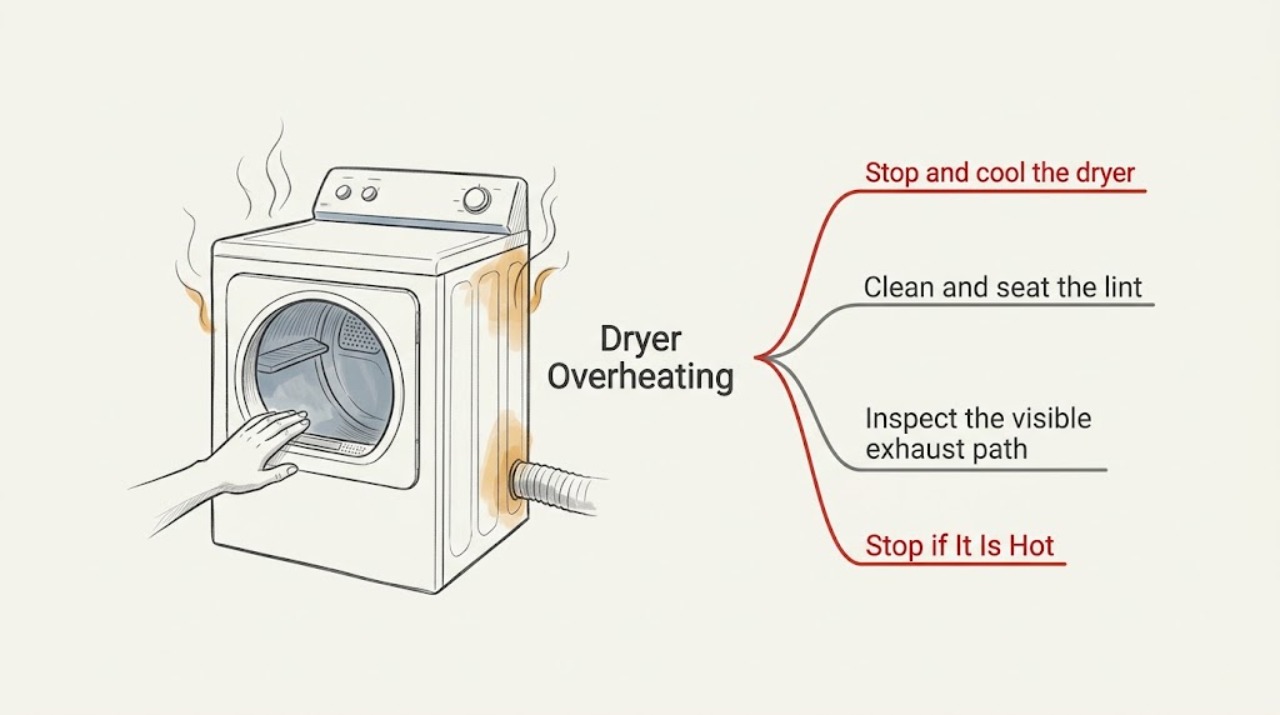
Work through in order
Diagnostic checks
Use only checks that match the exact appliance or system and its official guide.
-
Stop and cool the dryer before any check
Stop the Crosley dryer and keep clear if the cabinet or laundry is unusually hot, or if you notice smoke, scorching, sparks, or a burning odor. If there is no immediate fire hazard, disconnect power only by the accessible plug after the appliance has stopped and the area is dry; otherwise leave the area and call for help.
Expected result: The heat may subside as the dryer cools, or smoke, odor, visible damage, or a rapidly worsening condition may remain.
Next step: Follow the stop-and-service branch for any fire or electrical warning. If the dryer is fully cool and there is no hazard, continue only with the external lint and airflow checks.
Why this matters
Why: Cooling does not prove the fault is gone. Smoke, scorching, visible damage, or a recurring abnormal temperature means the dryer should not be tested again by an ordinary user.
-
Clean and seat the lint screen
With the dryer cool and disconnected, remove lint from the screen with your fingers and refit the screen firmly in its holder. Inspect it for damage or a heavy residue layer; do not run the dryer with the screen loose, blocked, damaged, or missing.
Expected result: The screen may be visibly loaded with lint or residue, may not have been seated fully, or may be damaged and unable to filter correctly.
Next step: If the screen is sound and clean, inspect the accessible vent path. If it is damaged or heat symptoms remain, stop using the dryer and arrange qualified service.
Why this matters
Why: A restricted or incorrectly seated screen reduces airflow and can contribute to overheating. A damaged screen is not corrected by brushing it and should not be used until the model-appropriate replacement is confirmed.
-
Inspect the visible exhaust path without running the dryer
With the dryer cool and disconnected, look behind it and at the outside exhaust hood for a crushed, kinked, detached, lint-filled, or visibly blocked vent. Clear only loose debris that is safely reachable from outside the appliance; do not open the cabinet or push tools into hidden ductwork.
Expected result: The vent may be visibly compressed or obstructed, the outside hood may be blocked, or the visible path may look clear while airflow remains uncertain.
Next step: Do not run the dryer when the path is crushed, blocked, detached, or uncertain after an overheating event. Have the complete vent run cleaned or inspected by a qualified venting professional; persistent overheating also needs appliance service.
Why this matters
Why: Restricted exhaust can trap heat and moisture. A clear-looking connection does not rule out lint deeper in the home vent or lint inside the cabinet.
-
Match the load and cycle to the model guide
Once the dryer is cool and the airflow path is known to be safe, check that the load is loose enough to tumble, that heavy items are not packed into one load, and that the selected temperature and cycle match the fabric-care labels and the exact Crosley manual.
Expected result: A tightly packed load, heavy mixed load, or high-temperature selection can explain excessive heat or slow drying; a small, correctly sorted load can still overheat if airflow or an internal control is faulty.
Next step: If the dryer becomes unusually hot again with a suitable load and documented cycle, stop using it and arrange qualified appliance service rather than repeating cycles.
Why this matters
Why: Load and cycle changes can reduce normal over-drying, but they cannot fix restricted ductwork, cabinet lint, a failed thermostat, or another internal fault.
Use your observations
Decision map
Find the observation that best matches what you see, then follow the next safe action.
-
PATH 01Safety boundary
What you see
Smoke, flame, sparks, a burning odor, melted material, or rapidly worsening heat is present.
Do this next
Stop the dryer if safe, leave the area, and contact the appropriate emergency service. Do not open the cabinet, use water on an electrical or appliance fire, or restart the dryer.
Why this path and its safety boundary
Safety stop: True
-
PATH 02Safety boundary
What you see
The lint screen is blocked, damaged, loose, or missing.
Do this next
Do not operate the dryer. Clean and correctly seat a sound screen, or obtain model-confirmed service for a damaged screen before use.
Why this path and its safety boundary
Safety stop: True
-
PATH 03Safety boundary
What you see
The vent is crushed, kinked, detached, blocked, or has weak or uncertain exhaust after an overheating event.
Do this next
Keep the dryer off and have the full exhaust path inspected or cleaned by a qualified venting professional. Do not run repeated test cycles to judge airflow.
Why this path and its safety boundary
Safety stop: True
-
PATH 04Safety boundary
What you see
The visible screen and vent path are clear, but the dryer overheats again or remains unusually hot with a suitable load.
Do this next
Stop using the dryer and arrange qualified appliance service. Internal lint, heating controls, thermal protection, and other cabinet components are outside these user checks.
Why this path and its safety boundary
Safety stop: True
Helpful context
Understand the symptom
Treat smoke and scorching as a stop condition
If the dryer emits smoke, a burning or scorched odor, sparks, or visible flame, stop the cycle if it is safe to do so without reaching into the hazard, leave the area, and contact the appropriate emergency service. Do not open a hot cabinet to search for lint and do not use water on an electrical or appliance fire. Keep the dryer out of use until it has been assessed.
Overheating is usually an airflow question first
A dryer needs a clear path for warm, damp air to leave. A dirty lint screen, crushed or kinked vent, blocked outside hood, packed load, or unsuitable cycle can make clothes and the cabinet feel hotter and extend drying. These are external checks only; lint inside the cabinet, a heating control, or a thermal safety fault needs qualified service.
Do not use a repeated test cycle as proof
After correcting an accessible airflow issue, stop if the dryer becomes unusually hot again. Repeatedly running a dryer with restricted airflow can worsen heat and fire risk. Keep the lint screen installed and use the exact Crosley guide for the model's cycle and vent requirements.
When checks do not resolve it
Need a professional?
Professional help is required when overheating returns after accessible lint, vent, load, and cycle checks, or whenever smoke, fire signs, electrical damage, cabinet lint, or an internal fault is suspected.
Common questions
FAQ
Why is my Crosley dryer overheating?
Start with restricted airflow: a blocked lint screen, crushed or obstructed exhaust, or blocked outside hood can trap heat. A large load or unsuitable cycle can also over-dry. If the dryer remains unusually hot after accessible checks, stop using it and arrange service.
Can I run a Crosley dryer without the lint screen to test it?
No. Crosley warns not to operate the dryer with the lint screen loose, damaged, blocked, or missing. Keep the screen installed and stop if the dryer overheats.
What should I do if my Crosley dryer smells burnt or produces smoke?
Stop the dryer if safe, leave the area, and contact the appropriate emergency service for an active fire or rapidly worsening hazard. Do not restart it, open the hot cabinet, or use water on an electrical or appliance fire.
Can I clean lint from inside a Crosley dryer cabinet myself?
Do not open the cabinet for internal lint removal. Crosley states that the appliance interior and exhaust duct should be cleaned periodically by qualified service personnel. Arrange service when cabinet lint or persistent overheating is suspected.
Read the exact guide
Official sources
- CDE-G7006 Dryers U C GuideCrosley · Crosley dryer overheating, lint-screen use, exhaust airflow, load and cycle checks, and service boundary
- Crosley Commercial Grade Dryer Use & Care GuideCrosley · Crosley dryer fire prevention, lint and exhaust maintenance, qualified service, and overheating safety
Community feedback
Share a repair observation
Share a plain-text repair observation. Accepted observations are published automatically; this page may take a moment to update.