
On this page
Start here
Quick answer
First check whether the refrigerator has power and whether either temperature control is OFF or set too warm. Confirm that packages are not holding a door open, the gasket contacts the cabinet all the way around, food is not blocking interior air vents, and the exterior grille/clearance is not obstructed. Keep the refrigerator level and away from direct sun or nearby heat; Crosley's XTS21 instructions specify clearance for airflow and identify a blocked grille or a dusty condenser as causes of weak cooling. A newly installed XTS21 refrigerator may need 24 hours to cool completely, and a large food load or frequent door openings can temporarily lengthen operation, so do not judge it immediately after setup or loading. If the freezer and refrigerator remain warm after the exact model's settings, door, airflow, and recovery checks, or if the compressor/fan repeatedly clicks, a fan is stopped, frost is abnormal, or cooling fails in both compartments, the cause may be a defrost, control, compressor, or sealed-system fault. Stop and arrange qualified service for a hot or damaged cord, burning smell, refrigerant/oil leak, water near electrical parts, repeated breaker trips, or any repair that requires panels, live testing, refrigerant, or the sealed system.
Before you begin
Safety first
- The user may check power without opening the appliance, controls, door closure/gasket, food placement, visible airflow clearance, ambient location, and the exact model's documented recovery period. Condenser cleaning is allowed only where the exact manual gives a safe unplugged procedure. Electrical enclosure, compressor/start device, fan wiring, defrost controls, refrigerant, sealed-system, and live testing work are for qualified personnel.
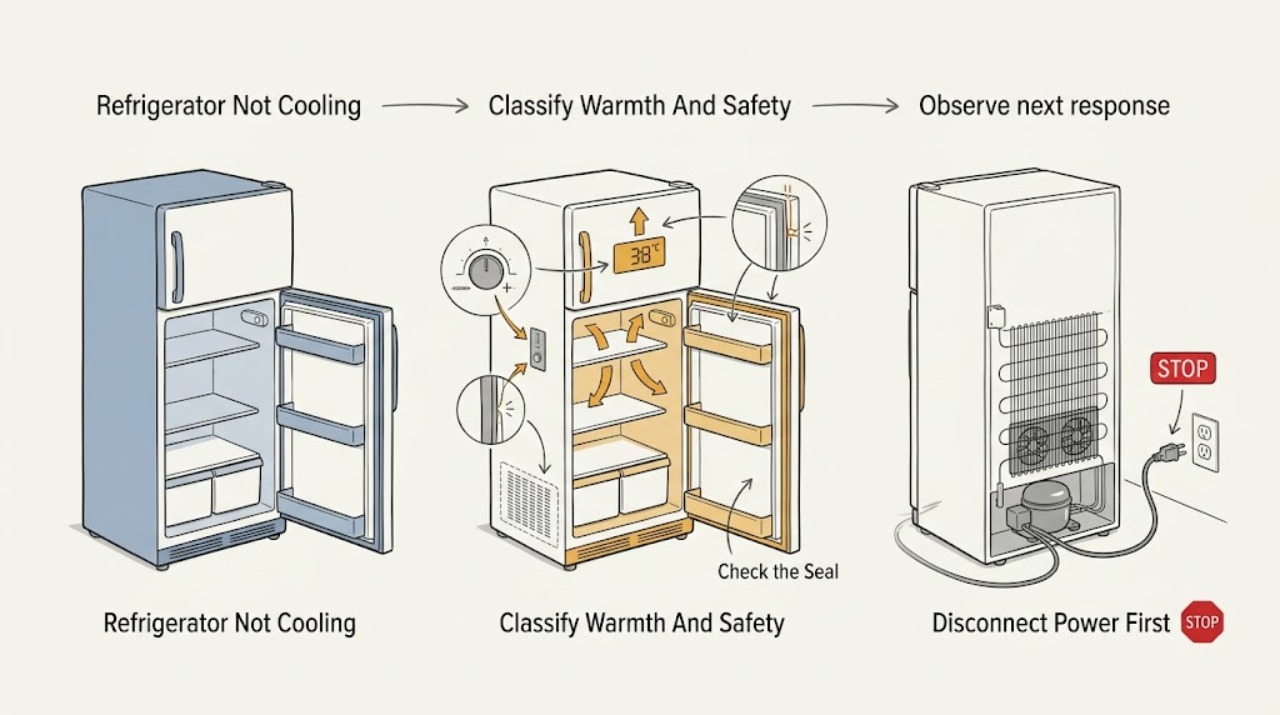
Work through in order
Diagnostic checks
Use only checks that match the exact appliance or system and its official guide.
-
Check 1
Record whether the refrigerator compartment, freezer compartment, or both are warm; whether the interior light or display works; and whether the compressor/fan runs, clicks, or stays silent. Look only for a hot or damaged cord, burning smell, smoke, sparks, water near electrical parts, oil-like residue, or a breaker that trips when the refrigerator runs.
Expected result: Both compartments are warm, only one compartment seems warm, the unit has no power, it runs continuously, or a hazard sign is present.
Next step: For smoke, burning odor, sparks, dangerous heat, damaged wiring/cord, water near electrics, or repeated breaker trips, isolate power only from a safe position and arrange service. Otherwise continue with the visible settings and door checks.
Stop if: Do not touch wiring, tubing, the compressor, or a fan with power connected, and do not keep running the refrigerator when a hazard sign is present.
Why this matters
Why: No power is a supply/control branch. One warm compartment can reflect airflow, door, load, or model-specific distribution. Both warm after normal operation raises the likelihood of a system-level cooling, defrost, control, compressor, or sealed-system problem. A burning, electrical, liquid, or repeated-trip symptom is unsafe to diagnose by continued operation.
-
Check 2
From a dry position, check that the plug is fully inserted into the correct grounded outlet, any installation wall switch is on, and neither temperature control is OFF. Set the control only according to the exact model manual and note the starting position; do not turn directly to the coldest setting expecting instant cooling.
Expected result: The refrigerator was unplugged, an outlet/fuse/breaker or wall switch was off, a control was OFF or too warm, or power and controls are normal but the cabinet remains warm.
Next step: Correct a safe supply or control setting once, close the doors, and allow the exact model time to stabilize. If the breaker trips again or the unit remains unpowered, stop and arrange electrical/appliance service.
Stop if: Do not use an extension cord or adapter contrary to the exact manual, modify grounding, repeatedly reset a tripping breaker, or open the electrical compartment.
Why this matters
Why: A supply or OFF-control condition can explain no operation without a refrigeration failure. Crosley's XTS21 table says to check the plug, fuse/breaker, and controls. Changing to the coldest setting does not make either compartment cool immediately; a normal power/control path with continued warmth needs the next checks.
-
Check 3
Inspect both door openings without removing hinges: move bins, shelves, or packages that hold a door open; look for a folded, dirty, torn, or visibly separated gasket; and close each door fully. Keep food away from the model's interior air vents and avoid repeatedly opening the doors while the cabinet recovers.
Expected result: A package blocked closure, the gasket does not contact the cabinet, frost or moisture is concentrated near a gap, or the doors close and seal visibly but temperatures remain warm.
Next step: Correct only a package or shelf-position issue and clean a gasket contact surface with a suitable damp cloth if the exact manual permits; dry it and allow recovery. A damaged gasket, hinge, or door alignment needs model-specific service.
Stop if: Do not force the door, remove hinges, use heat to reshape a gasket, chip frost with a sharp tool, or keep the door open while testing cooling.
Why this matters
Why: An open door or poor gasket seal admits warm air and can explain excessive run time and weak cooling. Frost near a gap supports air leakage, but it does not prove the gasket is the only fault. A good visible seal with persistent warmth makes settings, airflow, defrost, or the cooling system more likely.
-
Check 4
Check that the refrigerator is not in direct sun or beside a range, that the room is within the exact model's allowed climate range, and that the lower/front grille, rear clearance, and surrounding space are not blocked by dust, cabinets, boxes, or cloth. For a model whose manual explicitly permits condenser cleaning, unplug first and follow that manual; otherwise leave panels closed.
Expected result: The grille or rear clearance is blocked, the cabinet is in an unusually hot or cold location, dust is visible at a permitted accessible condenser area, or airflow and location are normal.
Next step: Restore the model's specified clearance and remove only loose exterior dust using the exact manual's safe method. If panel removal, a fan, compressor, wiring, or tubing must be accessed, stop and arrange qualified service; then allow the cabinet to recover.
Stop if: Do not run the refrigerator with an access cover removed, touch the condenser/fan/compressor while energized, spray water into the grille, or move a connected water line by force.
Why this matters
Why: Crosley's XTS21 installation instructions require clearance for airflow and identify unsuitable ambient temperatures as conditions that impair temperature maintenance. Its manual also says condenser dust can reduce cooling effectiveness. These checks can explain weak performance but cannot distinguish a clean-condenser unit from a failed fan, compressor, or sealed system.
-
Check 5
If the refrigerator was newly installed, unplugged, moved, subjected to a power interruption, or loaded with a large amount of food, close the doors and allow the model's documented recovery period before judging the temperature. The Crosley XTS21 manual specifies 24 hours for a new refrigerator to cool completely; it does not make that a universal timer for every Crosley model or every outage.
Expected result: Temperatures improve after the documented recovery period, the motor runs longer after a new installation or large load, or the refrigerator remains warm despite stable power, closed doors, clear airflow, and adequate recovery time.
Next step: Keep doors closed and verify temperatures with the exact manual's method. If there is no improvement or food-safety temperatures cannot be maintained, protect the food and arrange service rather than extending an arbitrary wait.
Stop if: Do not leave food in an unsafe-temperature appliance while waiting, repeatedly unplug/replug it as a reset, or declare a compressor failure before the model-specific recovery period has elapsed.
Why this matters
Why: Improvement after recovery supports a startup, load, ambient, or door-opening condition. Continued warmth after the exact model's recovery guidance makes a control, fan, defrost, compressor, or sealed-system fault more likely and is not a reason to keep changing the control to colder settings.
-
Check 6
After the safe checks and recovery period, record compartment temperatures, control positions, door/gasket condition, clearance, frost or moisture pattern, and sounds such as repeated clicking, a stopped fan, or a compressor that never starts. Do not remove sealed-system covers or perform electrical or refrigerant tests.
Expected result: Both compartments remain warm, the compressor or fan behaves abnormally, frost is excessive or localized, the refrigerator repeatedly clicks or trips protection, or the cabinet has a leak, odor, hot cord, or damaged part.
Next step: Keep the refrigerator out of service if a hazard is present and arrange Crosley/authorized or qualified appliance service. Provide the exact model and the observed compartment temperatures, timing, sounds, frost, and prior checks.
Stop if: Do not add refrigerant, pierce tubing, bypass a thermostat or defrost control, test live voltage, replace a compressor/start component, or remove panels without qualified procedures.
Why this matters
Why: The remaining possibilities include a defrost, fan, sensor/control, compressor/start device, wiring, or sealed refrigeration-circuit fault. These symptoms do not identify a replacement part, and internal access can expose shock, sharp, pressure, or refrigerant hazards.
Use your observations
Decision map
Find the observation that best matches what you see, then follow the next safe action.
-
PATH 01Next step
What you see
The interior light/display is off, the plug or installation switch is off, a fuse/breaker is open, or a temperature control is OFF or set too warm.
Do this next
Restore only a safe supply or documented control setting once and allow the model to stabilize. If power will not stay on, arrange electrical or appliance service.
Why this path and its safety boundary
Why it matters: A supply or control setting is more likely than a sealed-system failure. Crosley's XTS21 troubleshooting table lists the plug, fuse/breaker, defrost interval, and controls under no-operation causes.
-
PATH 02Next step
What you see
The refrigerator was newly installed, recently reconnected or moved, or has just received a large food load or many door openings.
Do this next
Close the doors, verify the controls, and allow the exact model's documented recovery period while protecting temperature-sensitive food. If temperatures remain warm afterward, proceed to service diagnosis.
Why this path and its safety boundary
Why it matters: Longer operation and temporarily warm temperatures can be normal during recovery. The cited XTS21 manual says a new refrigerator may need 24 hours to cool completely and that larger loads require more operating time.
-
PATH 03Next step
What you see
A package holds a door open, the gasket is folded/dirty/separated, food blocks an interior vent, or the refrigerator lacks the required external clearance.
Do this next
Correct the visible obstruction, clean and dry the accessible seal as the model permits, restore clearance, and allow recovery. Damaged doors/gaskets or persistent warmth need model-specific service.
Why this path and its safety boundary
Why it matters: Warm-air infiltration or restricted air/heat movement is more likely than an immediate compressor diagnosis. Frost or moisture near the seal supports leakage but is not proof of a single failed part.
-
PATH 04Next step
What you see
The unit is in direct sun, beside a heat source, outside its allowed ambient range, or has a blocked grille/dusty condenser area where the exact manual permits cleaning.
Do this next
Restore location and airflow, and follow only the exact manual's unplugged condenser-cleaning procedure. If access requires exposed wiring or the problem remains, arrange service.
Why this path and its safety boundary
Why it matters: Heat rejection and ambient conditions can make cooling less effective. The XTS21 manual identifies unsuitable room temperatures, required rear clearance, and condenser dust as performance factors.
-
PATH 05Safety boundary
What you see
Both compartments remain warm after stable power, correct controls, closed/sealed doors, clear airflow, and the model-specific recovery period, or the symptom includes repeated clicking, stopped fan, abnormal frost, burning odor, damaged cord, leak, or breaker trips.
Do this next
Protect food, stop use for any hazard symptom, and arrange Crosley/authorized or qualified refrigeration service. Provide model, temperatures, sounds, frost pattern, and completed checks.
Why this path and its safety boundary
Why it matters: A defrost, sensor/control, fan, compressor/start, wiring, or sealed refrigeration-system fault is more likely. A symptom pattern cannot safely select a part or justify opening the cabinet.
Safety stop: Do not pierce refrigerant tubing, add refrigerant, bypass controls, test live circuits, or repeatedly restart a refrigerator that trips protection.
Helpful context
Understand the symptom
Not cooling can be a setting or recovery issue before it is a refrigeration failure
A control left OFF, an open door, a large new food load, or a refrigerator that has just been installed can all make the cabinet feel warm. Crosley's XTS21 troubleshooting table treats a newly plugged-in unit and frequent door openings as conditions that can require more operating time. Give the appliance the model-specific recovery period before concluding that the compressor or refrigerant circuit has failed.
Door sealing and airflow affect both temperature and run time
A package holding the door open lets warm, humid air in continuously. Food pressed against an interior vent can interfere with cold-air distribution, while insufficient rear or lower clearance can limit heat rejection. Check these visible conditions without dismantling the cabinet. A gasket that is torn, folded, or no longer contacts the cabinet needs service or model-specific replacement guidance rather than an improvised adjustment.
Condenser cleaning is model- and access-dependent
The cited XTS21 manual describes dust on the condenser as a cause of less effective cooling and gives a panel-removal and vacuum procedure. That is not permission to work around exposed wiring while energized. Use only the exact model's instructions, unplug before any panel is removed, replace every cover before restoring power, and stop if access is difficult or a wire, fan, compressor, or refrigerant tube would be disturbed.
The sealed cooling circuit stays behind the service boundary
A persistent warm cabinet after basic checks can involve a fan, thermostat or electronic control, defrost problem, compressor, or sealed refrigerant circuit. Temperature alone cannot identify the part. Do not pierce tubing, add refrigerant, bypass a control, or perform live electrical measurements; give a qualified technician the model, compartment temperatures, sounds, frost pattern, and timing of the failure.
Safety boundary
Stop conditions
- Stop using the refrigerator for burning smell, smoke, sparks, a hot/damaged cord or plug, water near electrical parts, refrigerant/oil residue, repeated breaker trips, or a damaged cabinet; isolate power only from a safe dry position.
- Do not open electrical or sealed-system panels, touch wiring/fans/compressor while energized, perform live voltage tests, pierce tubing, add refrigerant, or bypass a thermostat, defrost control, or safety device.
- Do not use heat guns or sharp tools to remove frost, force doors or hinges, reshape a damaged gasket with heat, or spray water into grilles, controls, fans, or the base.
- Do not use an arbitrary coldest setting or repeated unplug/replug cycles as a substitute for the exact model's recovery guidance; protect food if safe temperatures cannot be maintained.
- Do not remove access covers and restore power until every panel, screw, and protective part is correctly replaced as the exact manual directs; stop if panel access exposes wiring, tubing, or a moving fan.
When checks do not resolve it
Need a professional?
Arrange Crosley/authorized or qualified refrigeration service when both compartments remain warm after the exact model's power, controls, door seal, load, airflow, clearance, and recovery checks; when a gasket, hinge, fan, defrost system, compressor/start device, control, wiring, or sealed circuit may be involved; or when temperatures cannot safely protect food. Stop immediately for smoke, burning/electrical odor, sparks, a hot or damaged cord, water near electrics, refrigerant/oil residue, or repeated breaker trips.
Safety scope: The user may check power without opening the appliance, controls, door closure/gasket, food placement, visible airflow clearance, ambient location, and the exact model's documented recovery period. Condenser cleaning is allowed only where the exact manual gives a safe unplugged procedure. Electrical enclosure, compressor/start device, fan wiring, defrost controls, refrigerant, sealed-system, and live testing work are for qualified personnel.
Common questions
FAQ
Why is my Crosley refrigerator not cooling after installation?
Confirm the plug and controls, close both doors, clear vents and external airflow, and allow the exact model's recovery period. Crosley's XTS21 manual says a newly plugged-in refrigerator may need 24 hours to cool completely. If it remains warm afterward, arrange service rather than repeatedly setting the control colder.
Can a bad door gasket make a Crosley refrigerator warm?
Yes. A package holding the door open or a gasket that is folded, dirty, or separated can admit warm air. Correct visible obstructions and clean/dry the accessible contact surface as the exact manual permits. A torn gasket, hinge, or alignment problem needs model-specific service.
How does airflow affect a Crosley refrigerator that is not cooling?
Keep food away from interior air vents and keep the front grille, rear clearance, and surrounding space unobstructed. Crosley's XTS21 instructions require clearance for air circulation and say condenser dust can reduce cooling effectiveness. Panel-based condenser work should follow the exact manual and be done unplugged.
Why is my Crosley refrigerator running but still warm?
Check the controls, door seal, food load, airflow, ambient location, and recovery time first. If both compartments remain warm after those checks, a fan, defrost, control, compressor/start, wiring, or sealed-system fault is possible, but the symptom cannot select a part. Arrange qualified refrigeration service.
How long should I wait for a Crosley refrigerator to get cold?
Use the exact model manual. The Crosley XTS21 manual specifies 24 hours for a new refrigerator to cool completely; a large food load or frequent door openings can also extend operation. Do not leave temperature-sensitive food in an appliance that cannot maintain safe temperatures while waiting.
When should I stop using a Crosley refrigerator that is not cooling?
Stop for smoke, burning/electrical odor, sparks, a hot or damaged cord, water near electrical parts, refrigerant/oil residue, repeated breaker trips, severe frost damage, or a refrigerator that cannot safely protect food. Isolate power only if safe and arrange qualified service; do not add refrigerant or open the sealed system.
Read the exact guide
Official sources
- CRT206QW B/S - CROSLEY HOME PRODUCTSCrosley Home Products · Confirms that Crosley refrigerator families have model-specific layouts, capacities, controls, shelves, doors, and optional ice makers; the matching user guide controls cooling checks and service procedures.
- Top-Freezer Refrigerators Owner’s Manual and Installation InstructionsCrosley · Model-family guidance for temperature controls, door/gasket, airflow clearance, condenser cleaning, ambient limits, startup recovery, normal sounds, warm compartments, and qualified service boundaries; other Crosley models may differ.
Community feedback
Share a repair observation
Share a plain-text repair observation. Accepted observations are published automatically; this page may take a moment to update.