
On this page
Start here
Quick answer
Dacor manuals identify frost around vents as a possible result of food blocking the vents, and frost on interior walls as a possible result of a door that is not closing properly; their first user checks are to clear the door/airflow path and clean the door gasket. Confirm the exact model before applying any procedure because Dacor columns, French-door, and side-by-side refrigerators have different layouts. Do not chip frost with a knife, heat the liner, remove an evaporator cover, or test a heater or sensor live. If heavy frost returns after the door and airflow checks, frost covers an internal panel, the fan is obstructed, cooling changes, water leaks, or an alarm recurs, leave the refrigerator on the model-safe setting or unplug only when safe and arrange Dacor service. Repeated frost after a complete, safe defrost points toward an internal defrost, drain, sensor, or control issue that requires professional diagnosis.
Before you begin
Safety first
- The user may identify the model, clear accessible food obstructions, clean and inspect a reachable door gasket, verify normal settings, and follow only the exact model's documented safe shutdown/defrost procedure. Evaporator covers, fans, drains, heaters, thermistors, defrost controls, wiring, refrigerant circuits, and live electrical tests are for qualified service personnel.
Work through in order
Diagnostic checks
Use only checks that match the exact appliance or system and its official guide.
-
Check 1
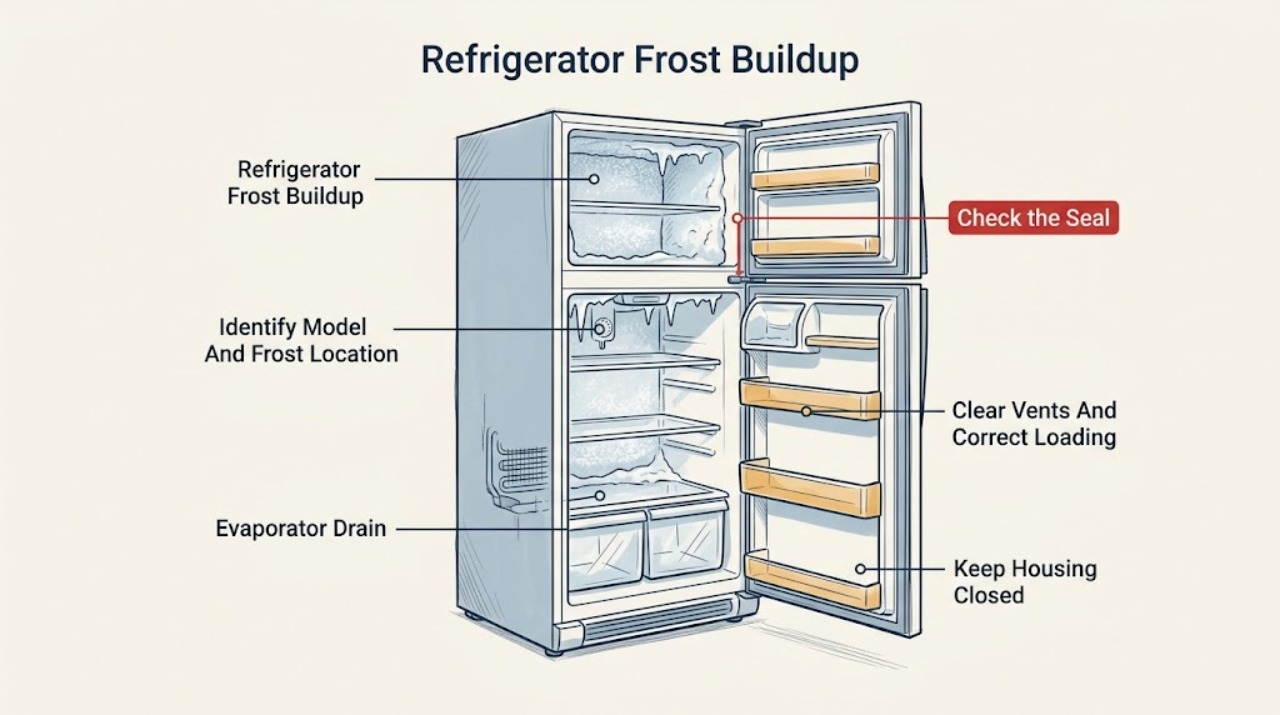
Read the Dacor model and serial label and photograph the frost pattern before moving food. Record whether the frost is around a vent, along the door edge, on an interior wall, on a rear evaporator cover, or in a drawer/compartment, and note any display alarm or temperature change.
Expected result: The model and frost location are known, or the frost is behind a panel, accompanied by an alarm, or the model cannot be identified.
Next step: Use the model-specific Dacor user-and-care manual or product resources. If frost affects a hidden panel, fan, cooling, or food safety, move food to safe storage and arrange service without removing the panel.
Stop if: Do not scrape, pry, drill, or remove an evaporator cover or liner to identify the frost source.
Why this matters
Why: Dacor refrigeration families have different door, vent, evaporator, and control layouts. A vent/door-edge pattern supports accessible airflow or seal checks; a hidden-panel pattern or alarm requires the exact manual and may already be a service symptom.
-
Check 2
Inspect the closed door from the front and sides. Remove any package, shelf, drawer, or ice container that prevents full closure, then examine the accessible gasket for dirt, folds, gaps, tears, or sections pulled out of the channel. Wipe it with a soft damp cloth and dry it; do not use solvents or force the gasket.
Expected result: The door was held open, the gasket is dirty/folded/damaged, a gap is visible, or the door closes evenly with a clean intact gasket.
Next step: Correct only the accessible obstruction or clean the gasket. If a gap, tear, hinge problem, or frost return remains, stop repeated use and request Dacor service.
Stop if: Do not bend the door, adjust hinges, glue or trim the gasket, or force the door against a frost bank.
Why this matters
Why: Dacor manuals link interior-wall frost with an improperly closed door and direct the owner to ensure food does not block the door and to clean the gasket. A torn gasket, misalignment, or persistent gap is not a cleaning-only issue.
-
Check 3
Check the refrigerator and freezer compartments for packages pressed against rear or side vents, shelves overloaded enough to obstruct circulation, and uncovered high-moisture food. Leave the vents and door path clear and seal moist food. Do not reach behind a fan grille or evaporator cover.
Expected result: Food was blocking a vent or door, airflow is now unobstructed, or there was no accessible blockage.
Next step: After correcting the load, allow the refrigerator to stabilize according to the exact model manual and observe whether new frost forms. Escalate if the frost remains heavy, airflow is weak, or the fan contacts ice.
Stop if: Do not insert tools into vents, touch a fan, remove covers, or place packages against the rear wall to test airflow.
Why this matters
Why: Dacor troubleshooting guidance identifies food blocking vents as a cause of frost around vents. Clearing an accessible obstruction can correct the cause; frost with clear vents suggests a seal or internal cooling/defrost issue.
-
Check 4
Review the exact model's temperature, Power Cool/Freeze, vacation, door-alarm, and humidity-related settings. Note frequent or prolonged door openings, hot food recently loaded, and whether frost is accompanied by condensation or a cooling complaint. Return settings only to the model manual's normal range; do not make extreme changes to force a test.
Expected result: A special cooling setting or repeated warm-air/moisture entry coincided with frost, or settings and usage are normal but frost continues.
Next step: Correct the documented setting or usage issue and monitor. If frost continues, the compartment warms, or the alarm returns, stop experimenting and contact Dacor service.
Stop if: Do not disable alarms, set the refrigerator to an extreme temperature, or keep opening the door to inspect frost.
Why this matters
Why: Temporary moisture entry or a special cooling mode can change frost conditions, but persistent frost with normal use is less likely to be explained by settings alone. A temperature alarm or cooling loss increases the need for service.
-
Check 5
If frost is heavy enough to block a drawer or accessible vent, follow only the exact Dacor model manual's shutdown/defrost procedure, or arrange service. Protect food, turn the appliance off as directed, and allow ice to melt naturally; keep doors positioned as the manual permits and dry water before restoring operation.
Expected result: Frost melts completely without liner damage, or ice is behind a cover, returns rapidly, causes water leakage, or cannot be safely cleared.
Next step: Restore operation only as the model manual directs and record how soon frost returns. If the pattern recurs, cooling changes, or water leaks, leave the unit out of service as appropriate and request professional diagnosis.
Stop if: Do not use a knife, pick, scraper, heat gun, hair dryer, boiling water, salt, or chemical defroster; do not leave water near electrical parts.
Why this matters
Why: A complete safe melt can distinguish an air-entry or loading event from a recurring automatic-defrost or drainage problem. Hidden or rapidly returning frost is not an invitation to remove a panel or energize an iced fan.
-
Check 6
If frost returns after the door, gasket, vents, loading, settings, and safe defrost checks, or if the fan, drain, alarm, temperature, or internal panel is involved, stop further testing. Photograph the frost and record the model, time to return, compartment temperature, and any water or noise.
Expected result: Frost stays away after the accessible correction, or it returns quickly, blocks airflow, causes a fan noise/leak, or accompanies an alarm or temperature change.
Next step: Contact Dacor support or use the Dacor servicer finder with the model, serial information, photos, and time-to-return. Keep food in safe temperatures and avoid repeated defrost/restart cycles.
Stop if: Do not test the defrost heater, thermistor, fan, drain heater, wiring, or control board live; do not remove internal panels or bypass a sensor.
Why this matters
Why: A resolved access or loading issue is different from repeatable frost with an intact seal and clear vents. Rapid return can indicate an automatic-defrost, drain, sensor, fan, or control fault, which cannot be identified safely from the exterior.
Use your observations
Decision map
Find the observation that best matches what you see, then follow the next safe action.
-
PATH 01Safety boundary
What you see
Frost is concentrated around a vent and food or a shelf is visibly blocking that vent, with normal door closure and no alarm.
Do this next
Move food away from the vent as the exact manual permits and monitor after the compartment stabilizes. Call service if frost persists, airflow remains weak, or a fan contacts ice.
Why this path and its safety boundary
Why it matters: An accessible airflow obstruction is more likely than an automatic-defrost failure.
Safety stop: Do not reach through a grille, remove the fan cover, or chip frost from a vent.
-
PATH 02Safety boundary
What you see
Frost is on an interior wall or along the door edge and the door is held open, blocked by food, or the gasket has a visible gap, fold, dirt, or tear.
Do this next
Clear the door path and clean a reachable gasket. If the gasket is damaged, the door is misaligned, or frost returns, arrange Dacor service.
Why this path and its safety boundary
Why it matters: Warm moist air entering through the door is more likely than a hidden defrost fault.
Safety stop: Do not glue, trim, force, or replace a gasket without exact model confirmation.
-
PATH 03Safety boundary
What you see
Frost began after prolonged door opening, hot/high-moisture food, or a temporary special cooling setting, while the gasket and vents are clear.
Do this next
Return to the documented normal setting, cover moist food, limit door opening, and monitor. Escalate if frost returns heavily or cooling changes.
Why this path and its safety boundary
Why it matters: A temporary moisture or operating-condition event is possible, but frost should not repeatedly build under normal use.
Safety stop: Do not repeatedly change temperatures or leave the door open to inspect the result.
-
PATH 04Safety boundary
What you see
Frost is behind an evaporator cover, blocks a fan/vent, returns quickly after a complete safe melt, or is accompanied by water, abnormal noise, or weak cooling.
Do this next
Stop repeated defrost/restart cycles and arrange Dacor or qualified refrigeration service. Preserve photos and the time-to-return information.
Why this path and its safety boundary
Why it matters: An automatic-defrost, evaporator-drain, fan, sensor, or control problem is more likely and cannot be safely isolated by exterior checks.
Safety stop: Do not remove panels, heat the evaporator, test a heater or sensor live, or bypass a fan/defrost control.
-
PATH 05Safety boundary
What you see
Frost is accompanied by a temperature alarm, food warming, water near electrical parts, smoke/burning smell, damaged cord, or visible product damage.
Do this next
Stop using the affected function, protect food, isolate power only from a safe dry location if needed, and contact Dacor support or a qualified technician. Use emergency services for an uncontrolled fire.
Why this path and its safety boundary
Why it matters: This is a food-safety, water/electrical, or appliance-damage concern rather than routine frost maintenance.
Safety stop: Do not operate a damaged or smoking refrigerator, touch wet electrical parts, or continue cooling tests after a burning smell.
Helpful context
Understand the symptom
Frost location matters more than the amount at first
A light patch around a vent after a door was left open is not the same pattern as a solid sheet behind an evaporator cover. Note where frost starts: at a vent, along the front door edge, on an interior wall, or behind a rear panel. Check whether food is pressed against the door or vents, and whether the door closes evenly. Dacor's published troubleshooting tables specifically connect vent frost with blocked vents and wall frost with poor door closure and a gasket needing cleaning.
Warm moist air and blocked airflow are safe first suspects
A door left open, a package holding the door ajar, a dirty or folded gasket, or food blocking a vent can add moisture or restrict the cold-air path. Clear only accessible obstructions, wipe the gasket with a soft damp cloth, and keep moist food covered. Do not use a sharp scraper, boiling water, heat gun, hair dryer, or any tool that can damage the liner, gasket, wiring, or refrigerant path.
Fast frost return changes the diagnosis
If the frost is heavy, use the exact Dacor manual's shutdown and defrost instructions or have service handle it; never remove an evaporator cover to accelerate the process. After a complete safe melt, monitor whether the same pattern returns. Frost that quickly returns with clear door closure and open vents is less consistent with loading and more consistent with an automatic-defrost, evaporator-drain, temperature-sensor, fan, or control fault. Those parts are behind the professional-service boundary.
Safety boundary
Stop conditions
- Do not chip, scrape, drill, or pry frost; do not use a knife, pick, heat gun, hair dryer, boiling water, salt, or chemical defroster near the liner, wiring, fan, or refrigerant path.
- Do not remove an evaporator cover, rear panel, fan grille, drain assembly, heater, sensor, or control board, and do not perform live electrical tests or bypass a defrost or temperature safety control.
- Stop using the refrigerator and isolate power only from a safe, dry location for smoke, burning odor, damaged cord, water near electrical parts, abnormal heat, or a serious alarm; arrange qualified service.
- Do not force a door against frost, bend hinges, glue or trim a gasket, or restore power while meltwater is near electrical components.
- Do not transfer a defrost or temperature procedure between Dacor columns, French-door, and side-by-side models; confirm the exact model manual first.
Only after diagnosis
Potential parts
- Dacor refrigerator door gasket
Consider this category only when the exact model's gasket is confirmed torn, deformed, or unable to seal after cleaning and closure checks; frost alone does not prove the gasket is the cause.
Match the complete Dacor model and door configuration before ordering or fitting. - Dacor refrigerator defrost heater, sensor, drain, fan, or control
These are technician-diagnosis categories only when frost returns with a clear seal and unobstructed vents; do not order a component from frost pattern alone.
Require exact model diagnosis and qualified service; internal panels, defrost parts, wiring, and controls are not user checks.
When checks do not resolve it
Need a professional?
Arrange Dacor or qualified refrigeration service when frost returns rapidly after the door, gasket, vent, loading, setting, and exact-model safe-defrost checks; when frost is behind a panel or blocks a fan; when cooling, temperature alarms, drainage, or water are involved; or when the gasket, door, cord, wiring, heater, sensor, fan, or control is damaged or suspected. Treat smoke, burning odor, or water near electrical parts as an immediate stop-use condition.
Safety scope: The user may identify the model, clear accessible food obstructions, clean and inspect a reachable door gasket, verify normal settings, and follow only the exact model's documented safe shutdown/defrost procedure. Evaporator covers, fans, drains, heaters, thermistors, defrost controls, wiring, refrigerant circuits, and live electrical tests are for qualified service personnel.
Common questions
FAQ
Why is frost forming around the vents in my Dacor refrigerator?
Dacor manuals list food blocking a vent as a possible cause. Move accessible packages away from vents and keep the door path clear, then monitor the pattern. If frost remains heavy, blocks a fan, or returns with clear vents, arrange service rather than removing a cover.
Can a Dacor refrigerator door gasket cause frost buildup?
Yes. Dacor troubleshooting tables associate frost on interior walls with a door that is not closing properly and direct the owner to clear food from the door path and clean the gasket. A torn, folded, or persistently gapped gasket requires model-specific service or replacement guidance.
Can I melt heavy Dacor refrigerator frost with a hair dryer?
Do not use a hair dryer, heat gun, boiling water, knife, or scraper. Follow only the exact Dacor manual's safe shutdown/defrost procedure, or arrange service. Heat and sharp tools can damage the liner, wiring, fan, gasket, or refrigerant path.
What if frost comes back quickly after defrosting a Dacor refrigerator?
Recheck door closure, gasket condition, food placement, vents, and the exact model's normal settings. If those are correct and heavy frost returns quickly, an automatic-defrost, drain, fan, sensor, or control fault is more likely and needs qualified diagnosis. Do not remove internal panels or test a heater live.
Read the exact guide
Official sources
- Dacor DRF36C500SR User ManualDacor · Dacor DRF36C500SR French-door family; the manual's settings and component layout are not universal to every Dacor refrigerator.
- 30-Inch Column RefrigeratorDacor · Dacor DRR30980RAP/DA and panel-kit configurations; other Dacor refrigeration families have different layouts and resources.
- Dacor 30-inch Column Refrigerator Panel-Ready User Care ManualDacor · Dacor DRR30980 column refrigerator family; controls, compartments, and safe procedures differ on other Dacor models.
- Find a Dacor ServicerDacor · Dacor US service-finder page; availability depends on ZIP code, product, and region.
- Dacor Built-In Refrigerator DRF365 User ManualDacor · Dacor DRF365 built-in French-door family; model-specific controls, alarms, and safe defrost procedures vary.
- Product SpecificationsDacor · Dacor product-resource navigation; exact manual and specification depend on the complete model number.
- Self RepairDacor · Dacor self-repair policy and safety guidance; exact repair eligibility and instructions are product- and part-specific.
- Owners — Luxury Kitchen AppliancesDacor · Dacor owner support navigation; model, region, warranty, and service availability vary.
Community feedback
Share a repair observation
Share a plain-text repair observation. Accepted observations are published automatically; this page may take a moment to update.