
On this page
Start here
Quick answer
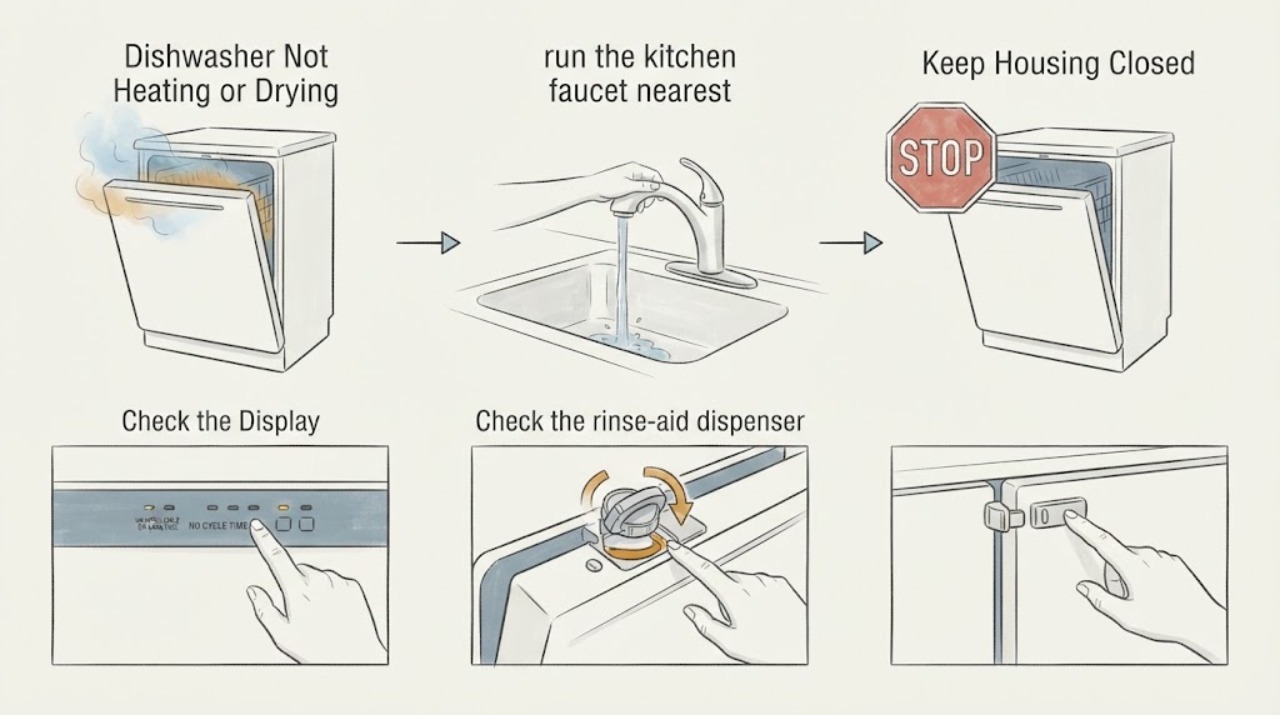
The GE DDT575SMFES can leave dishes wet without having a failed heater: no-heat drying, cool incoming water, an empty rinse-aid dispenser, crowded loading, and water pooled in dishware can all reduce drying. Run the nearest faucet until the water is hot, verify that the selected cycle has Heated Dry or an available heat option, and check the rinse-aid dispenser and loading. GE's DDT575SMFES Owner Center confirms the exact model and links its owner manual; GE's support guidance says incoming water should be at least 120°F, Heated Dry turns on the dishwasher heating element, and service is appropriate if the supported external checks do not restore heating or drying. Do not remove the inner door or test the heater yourself.
Before you begin
Safety first
- Do not remove the inner door or panels, touch the heating element, bypass a door or thermal safety device, perform electrical measurements, or order a heater or control part solely from the no-heat symptom.
Work through in order
Diagnostic checks
Use only checks that match the exact appliance or system and its official guide.
-
Check 1
Confirm the model from the label inside the dishwasher door and open GE's DDT575SMFES Owner Center. Use the linked owner manual to identify the available Heated Dry, Hi-Temp Wash/Rinse or other heat option for this exact hidden-control model.
Expected result: The label reads DDT575SMFES and the manual shows a heat/dry option, or the option is absent, unavailable for the selected cycle, or the model label does not match.
Next step: Use only the option and cycle combination listed for DDT575SMFES. If the label differs, stop using this model-specific path and retrieve the manual for the actual model.
Why this matters
Why: GE's Owner Center establishes the exact model and its manual route. GE also notes that heat options vary by dishwasher model and cycle, so a generic button sequence cannot prove that the heater should have operated.
-
Check 2
Before starting a cycle, run the kitchen faucet nearest the dishwasher until the water is hot, then check the running water with a thermometer if one is available. Start the dishwasher promptly after the hot-water line is purged.
Expected result: The incoming water is at least 120°F, or it remains below GE's recommended range; the dishwasher then completes a cycle with warm or cold water.
Next step: Correct only the external hot-water supply condition and run the exact manual-approved cycle once. If the water is hot but the dishwasher still never warms the wash or final rinse, move to service rather than opening the appliance.
Why this matters
Why: GE says water entering the dishwasher should be at least 120°F and that 120–140°F supports best wash and dry performance. Cool supply water can make the load look like a heating failure even when the dishwasher's own heat option is selected.
-
Check 3
Check the rinse-aid dispenser and fill it according to the DDT575SMFES manual if it is empty. Load dishes so they do not touch, leave space for spray arms, and place cups and bowls so they cannot retain a large pool of water.
Expected result: The dispenser is empty, dishes touch or block a spray arm, or the load is properly spaced and still exits cold and wet.
Next step: Correct the dispenser or loading condition and compare one complete cycle using the appropriate heat option. If the result is unchanged, record whether the wash water and final load were warm and arrange service if heating remains absent.
Why this matters
Why: GE says rinse aid improves water sheeting and drying, while contact between dishes, blocked wash parts and pooled water can leave items wet without proving a failed heating element.
-
Check 4
Run one normal or manual-recommended heated cycle without interrupting it, then observe the result after the cycle ends. Do not touch the exposed heating area or open panels to feel for heat; compare only the dishes, remaining water pattern and whether the cycle completed.
Expected result: The cycle dries better with heat and rinse aid, plastics remain wet while other dishes dry, or all dishes remain cold and wet despite hot inlet water and the selected heat option.
Next step: Use the exact model manual and arrange GE or qualified appliance service for persistent no-heat results. Do not remove the inner door, bypass a safety device or perform electrical tests.
Why this matters
Why: GE says plastics and pooled water may remain wet during otherwise normal drying. If all dishes remain cold and wet after the external conditions are correct, the symptom is more consistent with a dishwasher heating/drying fault that needs diagnosis, but it still does not identify a specific part.
-
Check 5
Prepare the DDT575SMFES model and serial information, selected cycle and heat option, incoming water temperature, rinse-aid status, whether the tub or dishes were warm, and whether any lights or fault indications appeared.
Expected result: The dishwasher repeatedly completes with cold water and no drying after the supported checks, or the manual does not explain the observed control behavior.
Next step: Schedule qualified GE appliance service. Keep the dishwasher intact; do not order a heater or remove the door liner based on the symptom alone.
Why this matters
Why: GE's poor-drying guidance directs service when the listed external suggestions do not correct the situation. The observation supports a service request but cannot distinguish a heater, sensor, wiring or control issue remotely.
Use your observations
Decision map
Find the observation that best matches what you see, then follow the next safe action.
-
PATH 01Next step
What you see
The incoming water is below 120°F, Heated Dry or another heat option was not selected, or the DDT575SMFES cycle does not use that option.
Do this next
Purge the hot-water line, use the exact model-approved heat option and run one complete cycle before considering an internal fault.
Why this path and its safety boundary
Why it matters: The external setup can explain cold wash water or slow/natural drying without establishing a failed dishwasher heater.
-
PATH 02Next step
What you see
The load is warm at the end, but plastics, cups with pooled water, or tightly touching dishes remain wet.
Do this next
Use rinse aid, space the load, unload the lower rack first and allow natural drying time or the manual-approved heated option.
Why this path and its safety boundary
Why it matters: GE identifies plastic behavior, pooled water and loading as ordinary drying limitations; the result does not prove that heating failed.
-
PATH 03Next step
What you see
The water supply is hot, rinse aid and loading are appropriate, a supported heat option is selected, and all dishes still finish cold and wet.
Do this next
Arrange qualified service for the exact DDT575SMFES and report the completed checks. Do not open the door liner or test the heater yourself.
Why this path and its safety boundary
Why it matters: This is beyond GE's basic external drying checks. It supports a service decision, but the public evidence does not identify the failed component.
-
PATH 04Next step
What you see
The model label does not read DDT575SMFES or the available manual does not match the control panel.
Do this next
Stop the model-specific procedure and retrieve the manual for the actual model before changing settings or ordering parts.
Why this path and its safety boundary
Why it matters: The exact-model evidence no longer applies; GE heat-option names and cycle behavior vary across dishwasher models.
Helpful context
Understand the symptom
Not drying does not automatically mean the heater failed
GE separates several drying conditions from an internal repair diagnosis. Natural-convection drying can leave plastics and water pooled in cups wet; rinse aid helps water sheet off dishes; and a Heated Dry option turns on the heating element. A dishwasher that never warms the wash water after the hot-water and cycle checks deserves service, but a cold or lightly wet load by itself is not enough to name a heater, thermostat or control-board failure.
Use the exact DDT575SMFES manual for controls
GE's Owner Center identifies DDT575SMFES and links the model's owner manual. Use that document for the exact button names and option combinations on this hidden-control dishwasher. General GE pages describe common options, but they do not authorize opening the door liner, accessing the heater, or performing electrical measurements.
When checks do not resolve it
Need a professional?
Arrange qualified service if hot incoming water, an appropriate DDT575SMFES heat option, rinse aid and correct loading do not restore warm wash water or drying. Keep the dishwasher intact and do not perform internal electrical or heater tests.
Safety scope: Do not remove the inner door or panels, touch the heating element, bypass a door or thermal safety device, perform electrical measurements, or order a heater or control part solely from the no-heat symptom.
Have this ready
- Provide DDT575SMFES, serial information, selected cycle and heat option, incoming water temperature, rinse-aid and loading checks, end-of-cycle warmth, and any display or light behavior.
Common questions
FAQ
Does wet plastic prove that the GE DDT575SMFES is not heating?
No. GE says plastic dishes may not dry well even during normal operation, and water pooled in cups can remain after a cycle. Check the overall load warmth, incoming water, heat option, rinse aid and loading before treating the symptom as an internal heating fault.
What water temperature should enter the DDT575SMFES?
GE's general dishwasher guidance says the incoming water should be at least 120°F, with 120–140°F supporting best wash and dry performance. Run the nearest faucet until hot before starting and measure the running water if a thermometer is available.
Should I select Heated Dry when the dishes are wet?
If the DDT575SMFES manual lists Heated Dry or another heat option for the selected cycle, use that option. GE says Heated Dry turns on the heating element and heat options improve drying; exact option names and cycle availability remain model-specific.
When should I stop troubleshooting and call for service?
Call for qualified service when the water supply is hot, the supported heat option is selected, rinse aid and loading are appropriate, and the dishwasher still finishes cold and wet. GE's poor-drying guidance directs service when those checks do not correct the situation.
Read the exact guide
Official sources
- User Manual & Care for DDT575SMFESGE Appliances · Opened the exact GE Appliances Owner Center page. It identifies DDT575SMFES as a GE stainless-steel-interior dishwasher with hidden controls, dates its manufacture range and links the exact owner manual; it is used for identity and model-specific manual routing, not as a substitute for unseen manual text.
- Dishwasher - Hi-Temp Wash and Rinse OptionsGE Appliances · Opened official GE support article. It explains the difference between visible/calrod and hidden heater arrangements at a family level and says Hi-Temp Rinse can improve drying; it does not authorize internal testing on DDT575SMFES.
- Dishwasher - How to Get the Best Wash PerformanceGE Appliances · Opened official GE support article. It supports external water-temperature, rack-loading and rinse-aid checks and points back to the exact owner manual for model-specific details.
- GE Stainless Steel Interior Dishwasher with Hidden Controls - DDT575SMFESGE Appliances · Opened the official GE product page for the exact model. It confirms the model number and hidden-control dishwasher identity and links owner support; no unsupported internal repair claim is taken from the product listing.
- Dishwasher - Dry Cycle OperationGE Appliances · Opened official GE support article. It supports family-level drying behavior used for the exact DDT575SMFES page, while the exact manual remains the authority for the model's controls.
- Dishwasher - Using Rinse Aid ProperlyGE Appliances · Opened official GE support article. It supports checking and filling the rinse-aid dispenser and defers model-specific dispenser access to the owner manual.
- Dishwasher - Poor DryingGE Appliances · Opened official GE support article. It supports external checks for water temperature, loading, rinse aid and heat options, and directs service if those checks do not correct poor drying; it does not identify a failed part.
Community feedback
Share a repair observation
Share a plain-text repair observation. Accepted observations are published automatically; this page may take a moment to update.