
On this page
Start here
Quick answer
Treat “not spinning” as a brush-bar or cleaner-head symptom, not as proof that the whole Dyson vacuum motor has failed. First switch the machine off and unplug it, then identify the exact floor tool and check whether the brush bar is intentionally off, the cleaner is upright when the model only spins while reclined, or the bar is jammed with hair and fibers. Dyson says an obstructed brush bar can stop automatically and its manuals require power to be off before clearing blockages. Clear only the accessible brush-bar, cleaner-head neck, inlet, and approved base-plate area described for the model, refit every part securely, and retest only when safe. If the bar stops on every compatible head, the head contacts or cleaner-head drive may be faulty, or there is smoke, arcing, a burning smell, heat, damaged wiring, or a blockage that cannot be cleared, stop and contact Dyson or an authorized repair service.
Before you begin
Safety first
- The owner may use model-documented brush-bar controls, switch off and unplug, clear accessible hair/debris, inspect the visible neck/inlet, care for filters, and refit approved parts. Qualified service must handle internal cleaner-head drive or contacts, control circuitry, wiring, sealed body access, and live diagnosis.
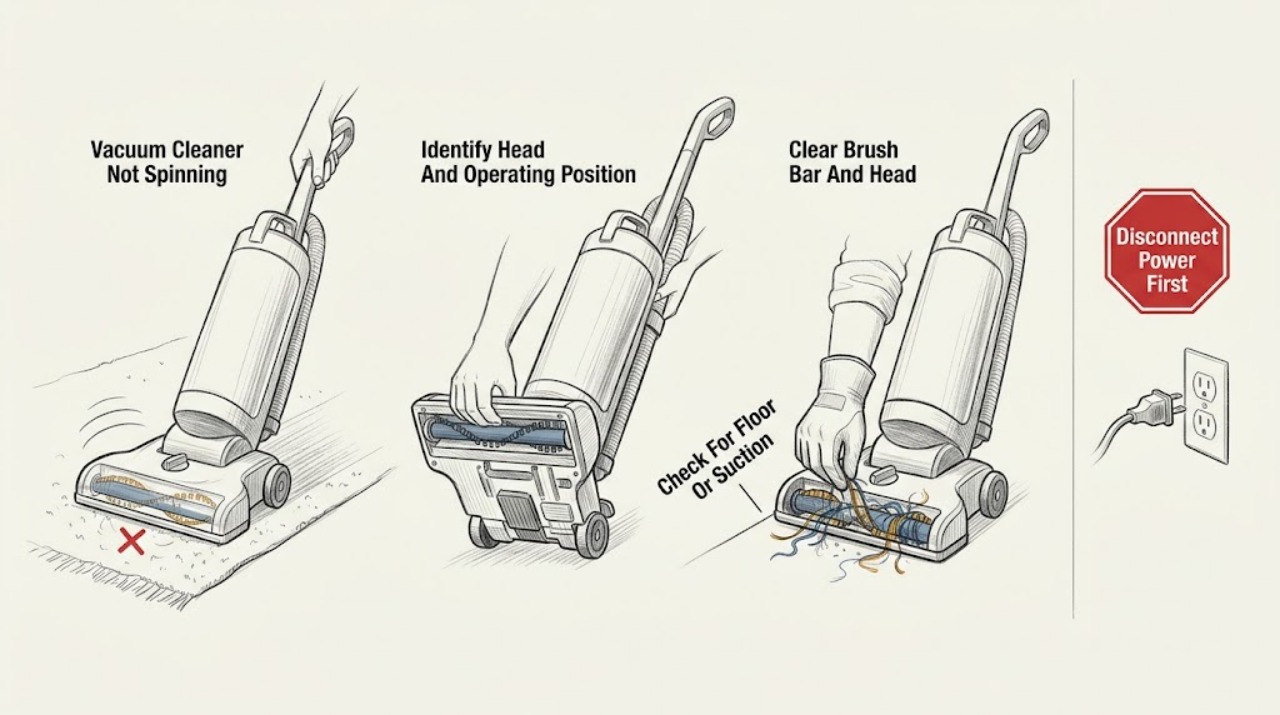
Work through in order
Diagnostic checks
Use only checks that match the exact appliance or system and its official guide.
-
Check 1
Identify the exact Dyson model and floor tool or cleaner head. For an upright model, place the cleaner in its normal reclined vacuuming position and check the brush-bar control; for a cordless or other design, use the model's support flow rather than assuming an upright control sequence.
Expected result: The bar spins when the upright is reclined, the bar is intentionally switched off, one head fails, or every compatible head fails.
Next step: Use the exact model guide to select the brush-bar setting and operating position. If the bar remains stopped, switch off and unplug before inspecting the tool; do not treat the result as a main-body motor diagnosis.
Why this matters
Why: A position or head-specific state can explain the symptom without implicating the whole vacuum. Failure on every compatible head is a different decision path from failure on one cleaner head.
-
Check 2
If the bar stops only on a particular carpet, rug, or deep-pile surface, stop pushing the head and inspect the floor-tool setting described for that model, such as a suction-control slider or brush-bar switch. Follow the flooring manufacturer's care guidance.
Expected result: The bar stops only on deep pile or a delicate surface, responds to the documented tool setting, or stops on every surface and setting.
Next step: Use the safer documented floor setting or turn the bar off for a surface that should not be brushed. If the bar stops everywhere, continue only after power is removed and inspect the cleaner head.
Stop if: Do not force the head against carpet, hold a protection switch in place, or continue if the tool becomes hot or smells of burning.
Why this matters
Why: Dyson says some floor tools stop the bar to protect the machine and carpet, so a surface-specific stop can be intentional. A failure across surfaces is more consistent with obstruction, fitment, contact, or cleaner-head drive trouble.
-
Check 3
Switch the vacuum off and unplug it, or disconnect it from its charger as the cordless model requires. Remove only the model-approved brush bar or cleaner-head cover, then clear hair and fibers from the bar, both ends, the drive cog or end cap, the head neck, and the small gap around the bar. Beware of sharp objects.
Expected result: Hair/fibers or a foreign object are wrapped around the bar or neck, the bar turns freely after removal, the end cap/base plate was not fully secured, or no accessible obstruction is visible.
Next step: Refit the bar, end cap, base plate, and cleaner head exactly as the manual shows, then test briefly on a safe surface. If the bar still does not spin, do not enlarge the disassembly; move to the single-head/all-head comparison and service boundary.
Stop if: Do not inspect with power applied, insert fingers near the bar, use a sharp tool toward the drive, or remove sealed covers.
Why this matters
Why: A visible wrap or blocked neck is a direct explanation for a stopped brush bar; Dyson documents automatic brush-bar shutoff when obstructed. A clear bar with correct reassembly makes a contact, drive, control, or different model-specific fault more likely.
-
Check 4
With the machine unpowered, inspect the visible inlet, wand/neck, and cleaner-head airway for a blockage, and confirm the model's filters are installed and cared for as instructed. Do not run the vacuum without required filters or with a removed head/base plate.
Expected result: A blockage or heavily loaded filter is visible, the machine has been pulsating or cutting out, the filter/head is missing or damp, or the air path is clear and the brush bar remains stopped.
Next step: Clear only accessible debris and clean or dry the filter exactly as the model guide permits; allow any thermal cut-out cooldown stated by that guide. If the bar remains stopped, stop repeating filter care and arrange model-specific support.
Stop if: Do not run with a damp or missing filter, use detergents or lubricants, or probe the airway with a sharp object.
Why this matters
Why: Dyson manuals link blocked airways to overheating and automatic cut-out, and require filters and parts to be correctly fitted. A clear, correctly assembled airway does not prove a brush-bar drive failure, but it removes a common external cause.
-
Check 5
After the external cleaning and complete reassembly, compare the same vacuum body with another compatible cleaner head only if the model's design supports that comparison. Inspect accessible connection surfaces for dust and confirm the head clicks fully into place; do not scrape, bend, or bridge contacts.
Expected result: One head spins while another does not, every compatible head fails, the head connection is loose/dirty, or the head and connection are secure but the bar remains stopped.
Next step: Clean only accessible dust as the manual allows and reseat the head. If the problem remains localized or affects every head, contact Dyson with the model and comparison result; keep the machine unpowered if any contact is damaged.
Stop if: Do not use improvised heads, bypass electrical contacts, perform voltage tests, or open the body to reach the connection.
Why this matters
Why: One-head failure localizes the symptom to that cleaner head or its fitment. All-head failure points toward a shared connection/control path, but neither observation identifies a part that should be replaced without the exact model diagnosis.
-
Check 6
Record the model, head name, surface, brush-bar switch/position, obstruction result, filter/airway result, and whether the failure affects one or every compatible head. Stop immediately for smoke, sparks, burning odor, abnormal heat, damaged wiring, or a blockage that cannot be cleared safely.
Expected result: The brush bar resumes normally, the symptom returns after a clear reassembly, the head drive or contacts appear damaged, or a hazard symptom is present.
Next step: Leave the vacuum off for a persistent, damaged, or hazardous condition and contact Dyson or an authorized repair service. Provide the recorded comparison and photos taken only while the machine is unpowered.
Stop if: Do not continue testing a hot or arcing tool, open the main body, replace internal wiring or drive parts, or perform live electrical measurements.
Why this matters
Why: A one-time obstruction or operating-position fix supports an external cause. A returning or all-head failure, damaged head, or hazard symptom requires professional assessment; it is not evidence that the vacuum's main motor needs replacement.
Use your observations
Decision map
Find the observation that best matches what you see, then follow the next safe action.
-
PATH 01Next step
What you see
The brush bar spins when an upright model is reclined, or it stops only on a deep-pile/particular floor surface and responds to the documented tool setting.
Do this next
Use the model's normal reclined position and appropriate brush-bar/suction setting. Stop using the bar on a surface that the flooring manufacturer says could be damaged.
Why this path and its safety boundary
Why it matters: An operating-position or floor-protection behavior is more likely than a failed cleaner-head drive. Dyson documents both upright-position behavior and surface-specific protection on applicable tools.
-
PATH 02Next step
What you see
Only one floor tool fails while another compatible head spins, and the affected head has hair, fibers, a blocked neck/inlet, loose end cap, or incomplete connection.
Do this next
With power removed, clear and refit only the affected head as the exact manual describes. If its bar remains stopped or the drive/contacts are damaged, arrange a model-specific head repair or replacement assessment.
Why this path and its safety boundary
Why it matters: The symptom is localized to the brush bar or cleaner head, not the vacuum's main body. An obstruction or fitment issue is more likely than a shared control fault.
-
PATH 03Next step
What you see
Every compatible head fails, the machine has pulsated/cut out, airflow is restricted, a filter is loaded or damp, or the obstruction remains after a safe cooldown.
Do this next
Unplug, clear accessible airways, and care for filters only as the model manual permits. If all-head failure persists, do not keep testing; contact Dyson service.
Why this path and its safety boundary
Why it matters: A shared airflow restriction or protection response may be involved, but the external pattern cannot establish whether the cleaner-head connection or another protected circuit is at fault.
-
PATH 04Next step
What you see
The brush bar remains stopped after the matching head is clear and correctly fitted, the cleaner-head drive or contacts look damaged, or smoke, sparks, burning odor, abnormal heat, or damaged wiring occurs.
Do this next
Keep the vacuum off and arrange Dyson or authorized service. Give the technician the model, head, symptom scope, obstruction result, and hazard details; do not open the main body or head beyond the model-approved access.
Why this path and its safety boundary
Why it matters: An internal cleaner-head drive, contact, control, or electrical fault is more likely, and the hazard symptom takes priority over further brush-bar testing. This does not identify a whole-vacuum motor failure.
Helpful context
Understand the symptom
Define what is not spinning
This page is about the rotating brush bar inside a powered floor tool or cleaner head. A vacuum can still have suction while that bar is stopped, and a bar that works on one head but not another points to the affected tool, its neck, or its electrical contacts. Dyson's support flow asks owners to identify the floor tool and whether the brush bar fails on every head. That distinction is more useful than calling the symptom a failed main-body motor.
Position and floor type can be intentional
Some Dyson upright models do not rotate the brush bar while standing upright; the cited DC41 manual says to recline the appliance for cleaning. Dyson also notes that some carpets or deep-pile rugs can make a brush bar stop to protect the machine and carpet, and some floor tools have a suction-control setting. Check the tool's model instructions and the flooring manufacturer's care guidance before treating that behavior as a fault.
Clear only an unpowered, accessible obstruction
Hair, fibers, and debris can wrap around the bar, block the neck where the head meets the wand, or obstruct the inlet. Dyson's manuals permit model-specific access to the cleaner head or base plate, but require the machine to be switched off and unplugged and warn about sharp objects. Remove only what the exact manual identifies as accessible, refit the end cap or base plate completely, and do not pull the trigger while inspecting a cordless machine.
A persistent single-head or all-head failure changes the next step
If one cleaner head remains stopped after its bar and neck are clear, that head's bar, drive, contacts, or fitment is more likely. If every compatible head fails while the vacuum body otherwise runs, the shared connection or control path becomes more likely. Neither pattern identifies a replaceable part with certainty. Smoke, arcing, burning odor, excessive heat, damaged wiring, or an obstruction that will not clear is a stop-and-service condition.
Safety boundary
Stop conditions
- Switch off and unplug, or disconnect from the charger as applicable, before touching the brush bar, cleaner head, airway, filter, or blockage.
- Do not pull the trigger, hold a protection switch, bypass contacts, or insert fingers or sharp tools near a powered brush bar.
- Do not operate with a missing, damp, loose, or incompletely refitted filter, end cap, base plate, or cleaner head.
- Do not open the main body, perform live electrical tests, replace internal wiring or drive electronics, or generalize a brush-bar symptom to the whole vacuum motor.
- Do not continue testing after smoke, sparks, burning smell, abnormal heat, damaged wiring, or repeated thermal cut-out.
Only after diagnosis
Potential parts
- Dyson brush bar or cleaner-head assembly
Consider this category only when the exact model's head remains stopped after the bar, neck, inlet, end cap, base plate, and connection are clear and correctly fitted, especially when another compatible head works.
Confirm the complete Dyson model and the exact cleaner-head design and fit information before ordering; brush bars and heads are not universal across Dyson machines.
When checks do not resolve it
Need a professional?
Contact Dyson or an authorized repair service when the brush bar remains stopped after the exact model's unpowered obstruction and reassembly steps, when every compatible cleaner head fails, when the head connection or drive appears damaged, or when the bar repeatedly stops. Stop immediately for smoke, sparks, burning odor, abnormal heat, damaged wiring, or a blockage that cannot be safely cleared.
Safety scope: The owner may use model-documented brush-bar controls, switch off and unplug, clear accessible hair/debris, inspect the visible neck/inlet, care for filters, and refit approved parts. Qualified service must handle internal cleaner-head drive or contacts, control circuitry, wiring, sealed body access, and live diagnosis.
Common questions
FAQ
Why is my Dyson vacuum cleaner brush bar not spinning?
Check whether the bar is intentionally off, the upright is still standing upright, the floor surface triggers a protection behavior, or hair and fibers are jammed around the bar or cleaner-head neck. Turn the machine off and unplug before clearing anything, then follow the exact model guide.
Does a Dyson brush bar spin while an upright vacuum is standing upright?
Not on the cited DC41 design: its manual says the brush bar rotates when the appliance is reclined for cleaning and not while it is upright. Other Dyson models may differ, so use the matching manual.
What should I check if hair is wrapped around my Dyson brush bar?
Switch off and unplug the machine, then clear only the bar, ends, cleaner-head neck, and cover/base-plate areas that the exact model manual identifies. Refit every part securely before a brief retest, and stop if the obstruction cannot be cleared safely.
What does it mean if the brush bar does not spin on any Dyson cleaner head?
That pattern is different from one failed floor tool and can involve a shared connection or control path after accessible obstructions are cleared. Do not treat it as proof of a failed whole-vacuum motor; record the head comparison and contact Dyson if the problem persists.
When should I stop troubleshooting a Dyson brush bar?
Stop for smoke, sparks, burning odor, abnormal heat, damaged wiring, repeated cut-out, or a blockage that will not clear with the model-approved unpowered steps. Do not bypass contacts, open the body, or perform live tests; arrange Dyson or authorized service.
Read the exact guide
Official sources
- Support | Troubleshooting | DysonDyson · Opened official Dyson troubleshooting page for a floor-tool brush-bar complaint; its flow distinguishes floor-tool types, a bar stopped on one head, and a bar stopped on every cleaner head.
- Operating manualDyson · Opened official Dyson DC50 manual; it provides a second model-specific example of obstruction shutoff, cooldown, secure refit, and contacting Dyson when clearing is unsuccessful.
- OPERATING MANUALDyson · Opened official Dyson DC41 manual; position, brush-bar, blockage, filter, thermal cut-out, and reassembly instructions are limited to the DC41 design and illustrate why model matching matters.
- Support | Brush bar not spinningDyson · Opened official Dyson support page; it identifies brush-bar jamming, debris clearing, model selection, and the requirement to turn off and unplug before blockage removal.
Community feedback
Share a repair observation
Share a plain-text repair observation. Accepted observations are published automatically; this page may take a moment to update.