
On this page
Start here
Quick answer
If the spinning brush on a Samsung vacuum cleaner is not turning, switch the vacuum off and disconnect power before checking the brush head. Remove hair, thread, and other foreign matter from the brush roll and confirm the cover, brush, and attachment are fitted and aligned for the exact model. Check the display for a clogged or spinning-brush warning, and empty the dustbin and clear the pipe if airflow is restricted. Reassemble the head and try one or two controlled restarts. If the brush motor overheated, leave the vacuum off for about 30 minutes before trying again. If the brush still will not spin, or the vacuum shows smoke, burning odor, abnormal heat, or damaged wiring, stop using it and request qualified Samsung service.
Before you begin
Safety first
- Stop using the vacuum for smoke, burning odor, abnormal heat, damaged wiring, a damaged battery, or repeated electrical shutdowns. Disconnect it only from a safe dry location and do not open the battery, motor, or sealed wiring housing.
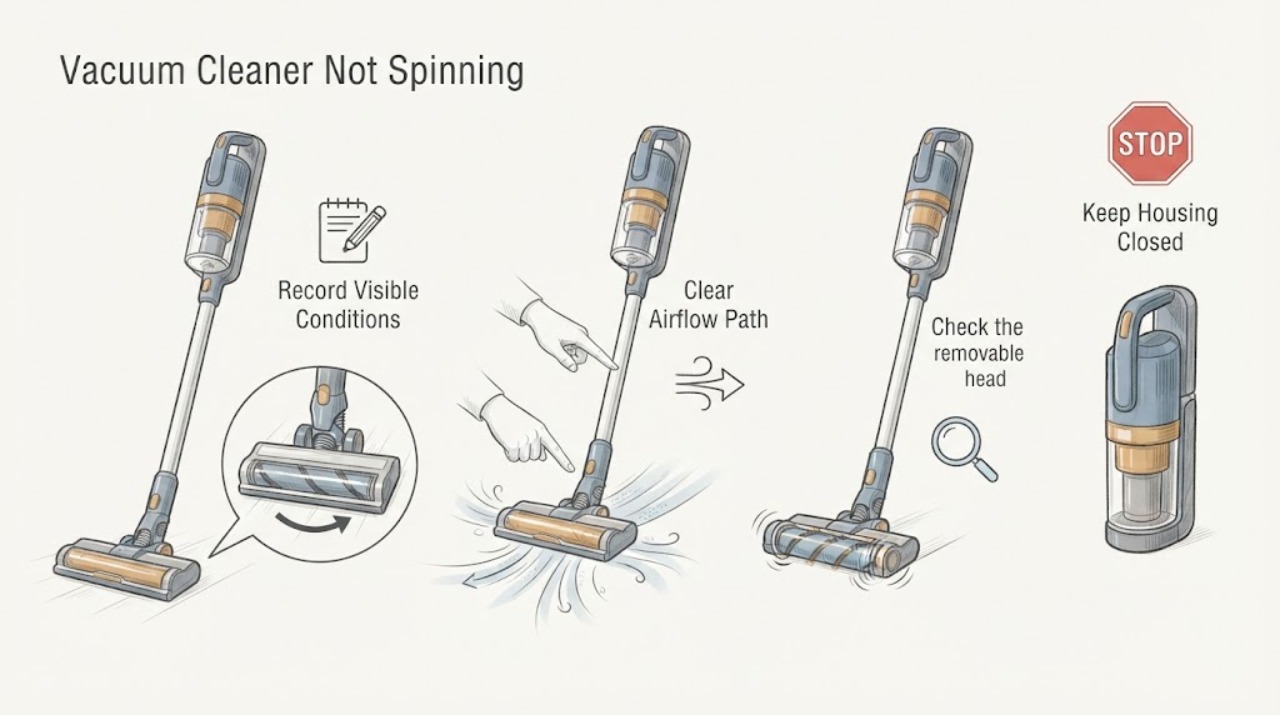
Work through in order
Diagnostic checks
Use only checks that match the exact appliance or system and its official guide.
-
Check 1
Switch the Samsung vacuum off and identify what is not spinning: the main floor brush, a side or mini motorized brush, or the whole vacuum. Record any display icon, warning, or change in suction before disconnecting power.
Expected result: The display shows a spinning-brush-stuck warning, a clogged warning, no-filter warning, or no warning; the brush is blocked while the vacuum still has suction; or the vacuum itself is not running.
Next step: Continue with the matching brush, airflow, and attachment checks. Use the exact model instructions for an icon that is not identified in the opened Samsung guidance.
Why this matters
Why: A spinning-brush warning points toward debris at the brush, while a clogged warning points toward the dustbin, pipe, or suction path. A no-filter warning can mean the washable filter is not assembled correctly. A brush-only symptom separates the floor head from a whole-vacuum power problem.
-
Check 2
With power disconnected, remove the floor-head cover or brush roll only by the release method shown for the exact model. Inspect the roll, end caps, belt area when the model has one, and intake for hair, thread, string, or packed debris. Remove accessible material with the model-approved tool, then refit the roll and cover.
Expected result: Hair or thread is wound around the roll, the intake is packed, a belt is visibly loose or damaged on a model that exposes one, or the brush path is clear.
Next step: Clear only accessible debris and reassemble the head exactly as documented. Do not force the roll, open a sealed motor, or order a belt or head from the symptom alone.
Why this matters
Why: Foreign matter and packed debris can mechanically stop the brush. A visibly worn belt can prevent brush rotation on applicable models, but a clean brush does not prove that the belt or motor is the failed part.
-
Check 3
Check the removable head and operating settings after cleaning. Confirm the brush is fully inserted, the cover is locked, the wand and head connectors are seated, the floor mode matches the surface, and the vacuum's power setting is appropriate for the attachment.
Expected result: The brush or cover is misaligned, a connector is not fully seated, the floor mode or power setting is unsuitable, or all parts and settings are correct.
Next step: Correct only the accessible fit or setting described in the exact manual, then perform one controlled test with the head on the floor. Do not hold the brush in your hand while it is powered.
Why this matters
Why: An attachment that is not seated or aligned cannot transfer drive to the brush. Samsung also identifies floor mode, power settings, and brush installation as checks when a brush does not work.
-
Check 4
Empty the dustbin and inspect the pipe and suction opening for a clog before testing again. If the vacuum stopped after long use or the brush became hot, leave it switched off and allow the brush motor to cool for about 30 minutes before one restart.
Expected result: The dustbin is full, the pipe or suction path is blocked, the brush or body is unusually warm after use, or airflow and temperature appear normal.
Next step: Clear only the accessible airflow path, let the vacuum cool fully, and run one supervised restart. Stop if the unit remains hot or the same shutdown returns.
Why this matters
Why: Samsung says a full dustbin or blocked suction path can contribute to overheating and shutdown. Its brush guidance says overheating protection can temporarily stop the brush motor and require a cooling period.
-
Check 5
After the head is clean, seated, and cool, perform one or two controlled restarts as Samsung describes and observe whether the brush starts while the vacuum is operating normally. Record whether suction is present, the brush stops again, or an icon returns.
Expected result: The brush resumes and stays running, it starts briefly then stops, it never starts, or the same warning returns.
Next step: Stop testing after the controlled restarts. If the brush remains inoperative, arrange qualified Samsung service with the model, attachment, icon, and result of the cleaning and cooling checks.
Why this matters
Why: A brush that resumes after clearing or cooling is consistent with a temporary blockage or motor-protection event. A brush that never starts or repeatedly stops after those checks leaves an attachment, belt, brush motor, power, or control fault possible.
Use your observations
Decision map
Find the observation that best matches what you see, then follow the next safe action.
-
PATH 01Next step
What you see
A spinning-brush-stuck warning is present and hair, thread, or packed debris is found at the brush roll or intake.
Do this next
Keep the vacuum disconnected, clear only the accessible material, refit the cover and roll, and perform one supervised test. Request service if the warning returns with a clear brush.
Why this path and its safety boundary
Why it matters: A mechanical obstruction is more likely than a failed brush motor.
-
PATH 02Next step
What you see
The brush is clear but the vacuum or brush head became hot after long use, a clog, a full dustbin, or restricted airflow, and the brush does not start until the unit cools.
Do this next
Empty the dustbin, clear the documented accessible airflow path, leave the vacuum off for about 30 minutes, and try one controlled restart. Stop if it remains hot or stops again.
Why this path and its safety boundary
Why it matters: Overheating protection may have temporarily stopped the brush motor. This pattern does not establish permanent motor damage.
-
PATH 03Next step
What you see
The brush is clear and cool, but the head, brush, cover, wand connector, floor mode, or power setting is incorrect.
Do this next
Use the exact model manual to seat and align the head and select the correct floor and power setting, then perform one supervised floor test.
Why this path and its safety boundary
Why it matters: An attachment or operating-state problem can interrupt brush drive without proving an internal failure.
-
PATH 04Next step
What you see
The brush path, airflow, attachment fit, mode, and power state are correct, but the brush never spins or stops again after one controlled restart and cooling period.
Do this next
Stop repeated restarts and arrange qualified Samsung service with the exact model, head or accessory used, display state, suction behavior, and the checks already completed.
Why this path and its safety boundary
Why it matters: A worn belt on an applicable model, brush motor, head connector, battery, or control fault remains possible. The symptom does not identify a replacement part.
-
PATH 05Next step
What you see
The vacuum has smoke, a burning smell, abnormal heat, damaged wiring, a damaged battery, or repeated electrical shutdowns while the brush is not spinning.
Do this next
Stop using the vacuum, disconnect it only from a safe dry location, keep clear of smoke or damaged battery parts, and arrange qualified appliance or electrical service. Do not open the battery or motor housing.
Why this path and its safety boundary
Why it matters: This is an electrical or thermal safety boundary rather than a brush-cleaning branch.
Helpful context
Understand the symptom
A non-spinning brush is a floor-head symptom, not automatically a failed vacuum motor. The first useful distinction is whether the brush is physically blocked, the vacuum has stopped the brush to protect an overheated motor, the head is not seated or aligned, or the vacuum has a clog that restricts airflow. Samsung's controls and brush covers vary across Jet, Bespoke Jet, and other vacuum models, so use the exact model manual for any release, cover, or belt procedure.
Only clean an accessible brush and attachment with the vacuum switched off and disconnected from power. Do not bypass an interlock, test a moving brush with fingers near the roll, or open the battery, motor, or sealed wiring compartment.
Only after diagnosis
Potential parts
- vacuum brush roll or floor head
Consider a replacement only when the exact model documentation or a qualified technician identifies a damaged brush roll or floor head after accessible debris, fit, mode, airflow, and cooling checks.
Confirm the exact vacuum model and the manufacturer's fit information before ordering; a non-spinning brush alone does not establish compatibility. - vacuum brush belt
Consider this only for a model that has an accessible belt and when the belt is visibly worn or a qualified technician connects it to the persistent no-spin result.
Confirm that the exact model uses a replaceable belt and verify fit through Samsung's model-specific information before ordering.
When checks do not resolve it
Need a professional?
Arrange qualified Samsung service when the brush remains inoperative after accessible cleaning, correct reassembly, airflow checks, cooling, and one or two controlled restarts, or when a persistent icon or attachment fault returns.
Safety scope: Stop using the vacuum for smoke, burning odor, abnormal heat, damaged wiring, a damaged battery, or repeated electrical shutdowns. Disconnect it only from a safe dry location and do not open the battery, motor, or sealed wiring housing.
Have this ready
- Provide the exact model, brush or floor-head name, surface and mode used, display icon, suction behavior, whether the head was hot, what debris was found, and the result after cooling and reassembly.
Common questions
FAQ
Why is my Samsung vacuum cleaner brush not spinning?
Samsung identifies foreign matter at the brush, a clogged dustbin or pipe, overheating protection, incorrect brush installation or alignment, unsuitable floor or power settings, and wear in an applicable brush belt or motor as possible causes. Turn the vacuum off, clear accessible debris, refit the head, let it cool if hot, and test once.
How long should I wait if the Samsung brush overheated?
Samsung's Jet Stick brush guidance says overheating protection may require about 30 minutes to cool the brush motor. Clear a full dustbin or accessible clog first, leave the vacuum off, and do not keep restarting a hot unit.
What does the spinning-brush warning mean?
Samsung describes that warning as foreign matter clogged at the spinning brush. Disconnect power, inspect the brush roll and intake using the exact model procedure, and request service if the warning returns after the brush is clear and correctly reassembled.
Should I buy a replacement brush or belt right away?
No. A clean, cool, correctly fitted brush that still does not spin may have a belt, motor, connector, battery, or control problem, but the symptom does not identify the part. Confirm the exact model and have Samsung or a qualified technician identify the failed assembly before ordering.
Read the exact guide
Official sources
- Use your Jet Stick's accessoriesSamsung · Samsung Jet Stick brush and accessory use, model variation, and liquid-use limitations
- Icon appears on the Samsung Jet StickSamsung · Samsung Jet Stick display icons for clogs, spinning-brush blockage, and filter assembly
- Vacuum cleaner brush is not workingSamsung · Samsung Jet-series vacuum brush stoppage, clogs, overheating, belt, installation, floor mode, and power checks
- Samsung Jet Stick suddenly stops during cleaningSamsung · Samsung Jet Stick overheating, dustbin, clog, cooling, and service checks
- Brush stops spinning Samsung Jet StickSamsung · Samsung Jet Stick spinning-brush stoppage, foreign matter, restart, overheating protection, and service
Community feedback
Share a repair observation
Share a plain-text repair observation. Accepted observations are published automatically; this page may take a moment to update.