
On this page
Start here
Quick answer
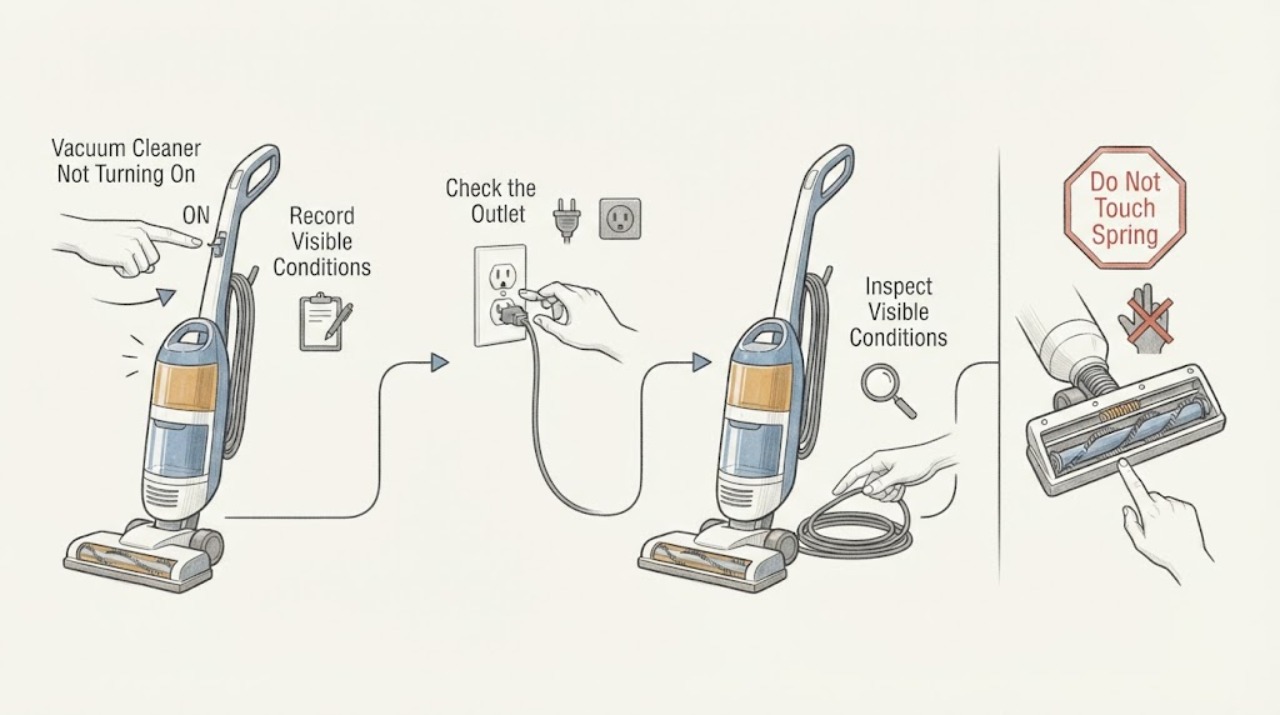
First identify whether your Samsung vacuum is a corded canister or upright, a cordless Jet Stick, or a Jet Bot robot, because the power path is different. For a corded vacuum, firmly press the center of the power button and plug the cord into a known-working outlet. For a Jet Stick, confirm the battery is fully inserted and charging on its stand or cradle. For a Jet Bot, cycle the underside power switch, then align it with a powered dock. If the vacuum starts and quickly stops, empty the dustbin, clear accessible clogs or brush debris, and let it cool before trying again. If there is still no response, repeated self-shutdown, a damaged cord, unusual heat, or a burning smell, stop and request Samsung service.
Before you begin
Safety first
- Stop user troubleshooting if the vacuum or charger is wet, unusually hot, smells burnt, has a damaged cord or plug, or still will not power on after the applicable outlet, charging, power-cycle, and accessible obstruction checks.
Work through in order
Diagnostic checks
Use only checks that match the exact appliance or system and its official guide.
-
Check 1
Identify the form factor and symptom before changing anything: note whether the vacuum is a corded canister or upright, a cordless Jet Stick, or a Jet Bot robot, and record whether it is completely dark or starts and then stops.
Expected result: The vacuum has a wall cord, a removable battery and charging stand, or a robot dock and underside power switch; the failure is either no response or a short run followed by shutdown.
Next step: Follow only the branch for the identified Samsung family. Use the exact model manual when the buttons, battery, dock, or removable parts do not match.
Why this matters
Why: The form factor determines whether the next check is the wall outlet and cord, battery charging, or the robot's dock and power switch. A short run points toward a clog, full dustbin, brush obstruction, or protective shutdown rather than a simple dead outlet.
-
Check 2
For a corded Samsung canister or upright, firmly press the center of the power button and make sure the power cord is fully inserted into a known-working outlet. Test that outlet with a lamp or another small appliance, and inspect the accessible cord and plug for visible damage.
Expected result: The outlet works but the vacuum stays dark, or the vacuum turns on and off by itself.
Next step: Do not open the motor housing or keep cycling the switch. Leave the vacuum unplugged if the cord or plug is damaged and request Samsung service.
Why this matters
Why: A working outlet with no response or repeated self-shutdown leaves the vacuum's switch, cord connection, motor, or internal protection as the likely fault; the outlet itself is less likely.
-
Check 3
For a cordless Samsung Jet Stick, confirm the battery is fully seated in the vacuum or charging stand, make sure the charging stand is plugged into power, and observe the battery indicator while it charges. On Bespoke models, use the accessory cradle only as described in the model guide.
Expected result: The battery indicator blinks while charging and later shows a full state, or it stays dark and the vacuum remains unresponsive after the battery is seated and the stand is powered.
Next step: Retry the Power button after a normal charge. Do not substitute an unverified charger or open the battery; request service if the indicator remains absent or the vacuum still will not run.
Why this matters
Why: A charging indicator shows that the battery and charging path are making contact, so a depleted battery may explain the no-start condition. No indicator after the stand, outlet, and battery seating are checked suggests a battery, charger, stand, or vacuum fault.
-
Check 4
If the Jet Stick starts and then stops, turn it off, empty the dustbin, and inspect the pipe, suction opening, filter area, brush, and any extension tool for accessible clogs or foreign matter. If the brush or motor area is warm, leave the vacuum off to cool before retrying.
Expected result: The dustbin is full, suction is blocked, hair or debris is wrapped around the brush, or the vacuum works again after it cools; all accessible paths are clear but it still stops.
Next step: Reassemble only the user-removable parts listed in the model guide and retry once. If the Jet Stick remains off or stops again, request Samsung service.
Why this matters
Why: Samsung identifies a full dustbin, a clog, and heat protection as causes of a Jet Stick that stops during cleaning. If those conditions are absent or the stop returns, the fault needs service-level diagnosis.
-
Check 5
For a Samsung Jet Bot robot, turn off the underside power switch, wait at least five seconds, turn it back on, and press Start/Stop on the robot itself. If it remains dark, plug the dock into a known-working outlet, align the charging contacts, and place the robot on the dock for the model's charging indication.
Expected result: The Jet Bot responds to its own button, shows a charging indication on the dock, or remains dark after the power cycle and aligned dock check.
Next step: Allow it to charge and retry from the robot. If it still will not turn on or charge, stop testing and request Samsung service rather than opening the battery or dock.
Why this matters
Why: A response after the cycle points to a temporary state or command issue. A stable charging indication supports a depleted battery as the immediate cause. No response after both checks points to the battery, dock, or internal power system.
Use your observations
Decision map
Find the observation that best matches what you see, then follow the next safe action.
-
PATH 01Next step
What you see
A corded Samsung vacuum remains dark or repeatedly cycles on and off after its power button, cord, and known-working outlet have been checked.
Do this next
Unplug it and arrange Samsung service. Do not bypass the switch or open the motor housing.
Why this path and its safety boundary
Why it matters: The household power source is less likely, leaving the cord connection, switch, motor, or internal protection as the likely problem.
-
PATH 02Next step
What you see
A Jet Stick shows no charging indicator after the stand or cradle is powered and the battery is fully seated, or it still will not start after charging.
Do this next
Use only the documented Samsung charging equipment and request service if the indication does not return. Do not open or rebuild the battery pack.
Why this path and its safety boundary
Why it matters: The battery, charging stand, charger, or vacuum is not completing the charging path; a clog alone cannot explain a completely absent charge indication.
-
PATH 03Next step
What you see
A Jet Stick runs briefly and stops, with a full dustbin, restricted suction path, stuck brush, or a warm motor area.
Do this next
Empty the dustbin, clear accessible debris, and let the vacuum cool before one retry. Escalate if the stop returns or no obstruction is found.
Why this path and its safety boundary
Why it matters: The pattern fits reduced airflow, brush resistance, or the vacuum's overheating protection more than a dead power source.
-
PATH 04Next step
What you see
A Jet Bot remains dark after the underside power cycle and does not show charging on a powered dock with aligned contacts.
Do this next
Leave the robot and dock alone and request Samsung service. Do not open the battery or use a different adapter without model confirmation.
Why this path and its safety boundary
Why it matters: The dock, charging contacts, battery, or internal power system is more likely than a remote command or cleaning schedule.
-
PATH 05Next step
What you see
The vacuum or charger is unusually hot, smells burnt, has liquid exposure, or has a damaged power cord or plug.
Do this next
Stop using it, disconnect power only if safe, keep it away from combustible materials, and arrange Samsung service. Do not perform further live tests.
Why this path and its safety boundary
Why it matters: Continued operation could worsen an electrical, battery, or motor fault.
Helpful context
Understand the symptom
Identify the Samsung vacuum family first
A Samsung vacuum cleaner may be a corded canister or upright, a cordless Jet Stick, or a Jet Bot robot. A corded model depends on its wall outlet and power cord; a Jet Stick depends on its removable battery and charging stand; a Jet Bot depends on its underside power switch and docking station. Check the label or manual for the family and model before ordering a part or using a reset procedure.
No power is different from a protective stop
If there are no lights, sounds, or motor response, start with the applicable power or charging path. If the motor runs and then stops, Samsung identifies a full dustbin, a clog, or overheating as checks for Jet Stick models. Let a warm vacuum cool and clear the cause before treating the symptom as an electrical failure.
Keep electrical and battery work limited
Do not open the battery pack, bypass a safety device, or continue testing a vacuum with a damaged cord, liquid exposure, unusual heat, or a burning smell. Use only the model's documented charging equipment and user-removable cleaning steps. Samsung's support guides direct owners to service when the basic checks do not restore operation.
Only after diagnosis
Potential parts
- model-specific vacuum battery
Consider this only when the model documentation and a verified charging-path check indicate that the battery is the failed part.
Match the exact model and electrical specifications in Samsung documentation; do not assume batteries from another Samsung vacuum family fit. - model-specific charging stand or charger
Consider this only after the outlet, cable connection, battery seating, and charging indication have been checked and the model identifies the stand or charger as failed.
Confirm the exact vacuum model and approved charging equipment before ordering. - model-specific brush assembly
Consider this only if the brush remains damaged or seized after accessible hair and debris are removed and the model guide permits replacement.
Verify the exact model and user-replacement instructions before ordering or opening the floor head.
When checks do not resolve it
Need a professional?
Arrange Samsung service for no response after a verified power or charging check, repeated self-shutdown after clogs and overheating have been addressed, a recurring fault, or any battery, motor, wiring, or dock concern.
Safety scope: Stop user troubleshooting if the vacuum or charger is wet, unusually hot, smells burnt, has a damaged cord or plug, or still will not power on after the applicable outlet, charging, power-cycle, and accessible obstruction checks.
Have this ready
- Provide the exact model code, vacuum family, LED or display behavior, whether it charges, whether it starts locally, the outlet or dock checks completed, and any repeated shutdown pattern.
Common questions
FAQ
Why does my Samsung vacuum have power but stop right away?
For Jet Stick models, empty the dustbin and clear accessible clogs, the pipe, suction opening, and brush. Samsung says overheating protection can also stop the vacuum, so let it cool before one retry. A repeated stop needs service.
How can I tell whether my Samsung cordless vacuum is charging?
Place the battery or vacuum on its documented charging stand or cradle and check the battery indicator. Samsung describes a blinking indicator during charging and a changed or dimmed indication when charging is complete; the exact display depends on the model.
Can I use another Samsung vacuum charger or battery?
Do not assume equipment from another Samsung vacuum family is compatible. Use the charger, stand, cradle, and battery specified for the exact model manual or confirmed by Samsung service.
When should I stop testing a Samsung vacuum?
Stop if it is unusually hot, smells burnt, has liquid exposure, or has a damaged cord, plug, charger, or battery. Disconnect power safely and arrange service instead of opening the motor or battery housing.
Read the exact guide
Official sources
- Install, set up, and charge your Jet StickSamsung · Samsung Jet Stick charging stand, battery installation, charging indication, and Bespoke accessory cradle
- Canister or upright vacuum will not turn onSamsung · Samsung canister and upright vacuum power-button, cord, outlet, and service checks
- Samsung Jet Stick suddenly stops during cleaningSamsung · Samsung Jet Stick protective shutdown, dustbin, clog, cooling, and service checks
- Jet Bot will not turn onSamsung · Samsung Jet Bot power cycle, local Start/Stop control, charging dock, contact alignment, and service checks
- Brush stops spinning Samsung Jet StickSamsung · Samsung Jet Stick brush obstruction, restart, cooling, and service checks
Community feedback
Share a repair observation
Share a plain-text repair observation. Accepted observations are published automatically; this page may take a moment to update.