
On this page
Start here
Quick answer
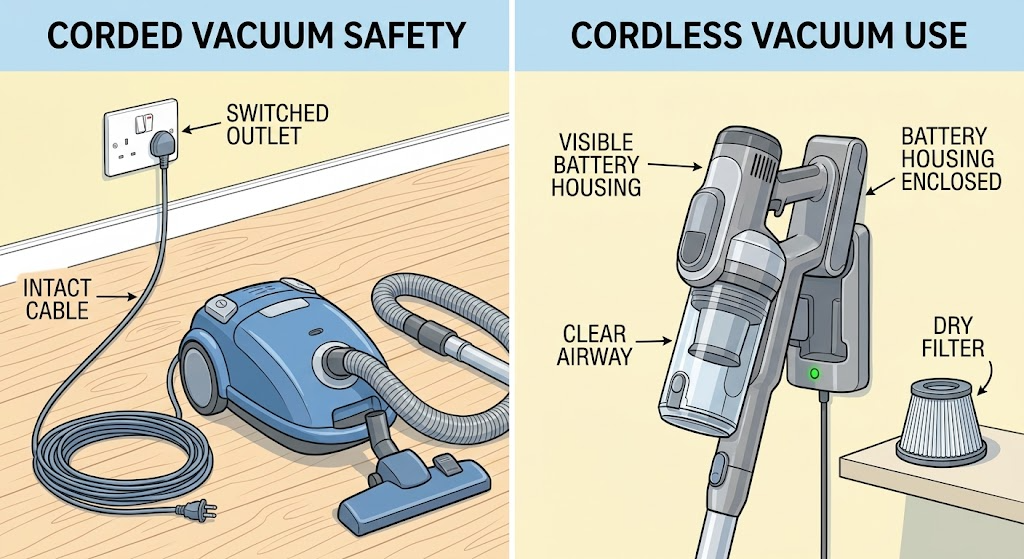
First identify whether your Dyson vacuum is corded or cordless, because the safe first checks differ. For an upright or cylinder model, inspect the cable from outside, try the switched wall socket, and check the plug or fuse only as the model instructions allow; do not plug in a damaged cable. For a cordless model, charge the battery using the documented dock or charger and inspect the battery housing for cracks or other damage. A blocked airway or filter can also trigger a safety cutout, so with the machine switched off and disconnected from its charger or outlet, clear only ordinary-access blockages and refit a completely dry filter as the exact manual directs. If there are no lights after a correct charge, the battery housing is damaged, the machine repeatedly cuts out, the cable or charger is damaged, or there is a burning smell, sparking, or a hot electrical connection, stop using it and arrange Dyson or qualified service rather than opening the battery or main body.
Before you begin
Safety first
- This article covers external power or charging, visible damage, ordinary-access airway and filter checks, and model-specific indicator reading only. Battery, charger, motor, switch, trigger, control, wiring, and main-body work belongs to qualified service.
Work through in order
Diagnostic checks
Use only checks that match the exact appliance or system and its official guide.
-
Check 1
Identify the Dyson vacuum family and full model from its label, manual, or account, and stop the machine before inspecting it. Look only from outside for smoke, burning or acrid smell, sparking, a hot connection, a damaged cable, liquid exposure, or a cracked cordless battery housing.
Expected result: The machine is corded or cordless and has no immediate hazard; or a cable, battery housing, electrical connection, liquid exposure, smoke, or burning symptom is abnormal.
Next step: Record the model and continue only when the machine is safe and switched off. For damage or an immediate hazard, do not plug in or charge it; arrange Dyson or qualified service from a safe location.
Stop if: Do not open the battery, charger, motor housing, or main body, and do not operate a machine with damaged cable or battery housing.
Why this matters
Why: The corded-versus-cordless split determines the next safe check. Visible electrical or battery damage is not a no-power troubleshooting branch.
-
Check 2
For a corded Dyson upright or cylinder vacuum, inspect the cable and plug from outside, confirm the wall socket is switched on and works with a safe known appliance, and follow the exact model guidance for any plug-fuse check.
Expected result: The cable is intact and the socket supplies power; the socket or plug fuse is not supplying power; or the cable, plug, or vacuum remains damaged or unresponsive.
Next step: Restore only an external supply condition allowed by the model instructions. If the socket and cord are sound but the vacuum remains dead, stop and arrange service rather than opening the cleaner.
Stop if: Do not use an extension workaround, bypass a fuse, repair a cable, or plug in a damaged machine.
Why this matters
Why: A failed socket or permitted plug-fuse issue can explain no power before the vacuum is at fault. An intact supply with no response shifts attention to the switch, thermal protection, motor, or internal wiring.
-
Check 3
For a cordless Dyson vacuum, place it on the documented charging dock or connect the supplied charger as the exact model manual shows, then observe the battery indicators. Inspect the battery housing and charger connection without removing the battery pack or opening the charger.
Expected result: Charging indicators appear and later show a usable charge; there are no charging indicators; the battery housing is cracked or swollen; or a charger or connection is visibly damaged.
Next step: Use the exact model's charging and indicator guidance. If the machine still will not start after a documented charge or any battery or charger fault is suspected, preserve the indicator pattern and arrange service.
Stop if: Do not open, puncture, press on, substitute, or repair the battery pack or charger, and do not charge a cracked or damaged battery.
Why this matters
Why: A normal charge response supports a discharged-battery path. No response with a sound connection can involve the charger, battery, or main body; damaged battery or charger hardware is a stop-use condition.
-
Check 4
With a corded vacuum unplugged or a cordless vacuum disconnected from its charger and switched off, inspect only the ordinary-access bin, airway, hose, wand, cleaner head, and filter areas for a visible blockage. Clean or wash a filter only by the exact model instructions and refit it only when completely dry.
Expected result: A visible blockage is removed and the filter is correctly seated and dry; the airway is clear but the vacuum still has no power; or the machine had cut out after restricted airflow and cuts out again.
Next step: Reassemble only the parts the manual identifies as owner-removable and make one normal test. If the fault remains, stop repeated testing and arrange service with the model and indicator history.
Stop if: Do not run the vacuum with a wet or missing filter, probe deep passages, use liquid in the motor or battery area, or dismantle a cleaner head or main body beyond the manual.
Why this matters
Why: A blockage, missing filter, incorrectly fitted filter, or restricted airflow can prevent starting or trigger protective shutdown on some Dyson models. A clear path with persistent no power or repeated cutout points beyond ordinary cleaning.
-
Check 5
After the power, charge, filter, and visible-airway checks, use the normal control or trigger once and record whether the vacuum is completely dark, shows a battery, filter, or blockage indication, starts and immediately cuts out, or has a trigger or switch that will not operate normally.
Expected result: The vacuum starts normally; a model-specific battery, filter, or blockage indicator remains; it starts then cuts out or pulses; or the trigger or switch is stuck, intermittent, or physically damaged.
Next step: Follow only the exact model's indicator guidance and make no more than one normal retest after the documented correction. For a persistent indicator, cutout, or damaged control, arrange service.
Stop if: Do not hold a stuck trigger, bypass a switch, bridge contacts, or continue operating a machine that smells hot, sparks, or repeatedly cuts out.
Why this matters
Why: An indicator or repeatable cutout gives a model-specific path, while a damaged or intermittent control or persistent no-light condition makes a component or main-body fault more likely than a simple empty battery.
-
Check 6
If the correct external supply or charge is present, the battery housing and cord are sound, the filter and visible airway follow the model instructions, and the Dyson vacuum still will not turn on, stop owner-level diagnosis.
Expected result: The machine remains dark or unresponsive, a charger or battery fault is indicated, the main body or switch is suspected, or the vacuum repeatedly cuts out after cleaning and cooling.
Next step: Arrange Dyson or qualified vacuum service and provide the full model, corded or cordless type, indicator pattern, charge or outlet result, blockage and filter result, and whether the fault began during use.
Stop if: Do not open the main body, battery, charger, motor, or control area, and do not perform energized electrical tests.
Why this matters
Why: The remaining possibilities can include the battery, charger, trigger or switch, thermal protection, motor, control, or internal wiring; these cannot be separated safely by random parts or repeated starts.
Use your observations
Decision map
Find the observation that best matches what you see, then follow the next safe action.
-
PATH 01Safety boundary
What you see
A corded Dyson has a damaged cable, dead socket, fuse issue, or no response despite an intact cable and working socket.
Do this next
Correct only the external condition allowed by the exact manual. If the corded machine remains dead, arrange service without opening it.
Why this path and its safety boundary
Why it matters: A supply condition is possible when the socket or permitted plug-fuse check fails; an intact external supply with no response makes an internal switch, thermal, motor, or wiring fault more likely.
Safety stop: Do not use a damaged cable, bypass a fuse, or repair the power cord yourself.
-
PATH 02Safety boundary
What you see
A cordless Dyson shows normal charging after a depleted battery, or shows no charge response with a sound connection and undamaged housing.
Do this next
Follow the model's charging indicator guidance once. If no response persists, preserve the indicator pattern and arrange service.
Why this path and its safety boundary
Why it matters: Normal charge response supports a discharged-battery path. No charge response leaves the charger, battery, or main body unresolved and is not proof of a single failed part.
Safety stop: Do not charge a cracked or damaged battery or open the pack or charger.
-
PATH 03Safety boundary
What you see
The vacuum ran and then stopped, pulses, or cuts out, especially with a visible blockage, dirty or mis-seated filter, or restricted cleaner-head airway.
Do this next
Switch off and disconnect the machine, perform only model-approved blockage and filter care, ensure the filter is completely dry, and make one normal retest. Escalate if it cuts out again.
Why this path and its safety boundary
Why it matters: Dyson identifies blocked airflow, filters, and blockages as possible contributors to safety cutout or loss of operation; a repeat cutout after the path is clear needs service.
Safety stop: Do not run without a correctly fitted dry filter or keep restarting a hot or repeatedly cutting-out vacuum.
-
PATH 04Safety boundary
What you see
The Dyson shows a battery, filter, or blockage indication, or the trigger or switch is stuck, intermittent, or does not respond normally after the external checks.
Do this next
Use the exact model's indicator guidance once and arrange service for a persistent warning or damaged control.
Why this path and its safety boundary
Why it matters: The indicator can identify a model-specific owner check, while a persistent or physical control symptom makes a battery, filter fit, trigger, switch, or main-body fault more likely.
Safety stop: Do not bypass the control, bridge contacts, or open the main body to test the switch.
-
PATH 05Safety boundary
What you see
The cable, plug, charger, or battery housing is damaged, there is smoke, sparking, burning smell, abnormal heat, liquid exposure, or the vacuum remains dead after the model-approved external checks.
Do this next
Disconnect power or charging only when safe, keep the machine away from people and combustibles, and arrange Dyson or qualified service with the model and symptom record.
Why this path and its safety boundary
Why it matters: This is a stop-use and service path. The available owner guidance cannot distinguish internal battery, motor, control, thermal, or wiring faults safely.
Safety stop: Do not plug in, charge, operate, open, or electrically test the damaged machine.
Helpful context
Understand the symptom
Start with the vacuum type, not a replacement part
Dyson supports several vacuum families, including cordless sticks, wet and dry vacuums, uprights, canisters, handhelds, and robots. A corded upright or cylinder needs a cable and outlet check; a cordless cleaner needs a charge, battery housing, airway, and model-specific indicator check. Record the model before choosing a battery, charger, filter, or reset procedure.
A vacuum that stopped during use may be protecting itself
Dyson explains that blocked airflow can make a machine cut out for safety, and its vacuum troubleshooting identifies filters and blockages as possible causes of overheating or shutdown. A machine that starts after cooling but stops again is not proven repaired: compare the filter, airway, cleaner head, and bin condition using only the exact manual's access and cleaning steps.
Keep batteries and electrical parts outside the owner check
Do not open a battery pack, charger, switch, motor housing, or main body to find the fault. A cracked battery housing, damaged cord, acrid smell, sparking, or heat at a connection is a stop-use condition. Provide the full model, indicator pattern, charging history, and whether the machine cut out or never responded to Dyson support or a qualified repair provider.
Safety boundary
Stop conditions
- Stop using the vacuum for a damaged cable, plug, charger, cracked or damaged battery housing, smoke, burning or acrid smell, sparking, liquid exposure, or a hot electrical connection.
- Do not run a vacuum with a wet or missing filter, keep restarting a machine that repeatedly cuts out, or probe deep airways and cleaner-head mechanisms.
- Battery-pack, charger, switch, trigger, motor, control, wiring, and main-body access or energized testing require Dyson or qualified service for the exact model.
Only after diagnosis
Potential parts
- cordless battery
Consider this only when the exact model's charge path is correct and qualified diagnosis identifies a depleted, failed, or damaged battery rather than a charger or main-body fault.
Match the complete Dyson model and approved fit information; do not use or charge a damaged battery housing. - charger or charging dock
Consider this only when the battery housing is sound, the outlet is working, and qualified diagnosis isolates the charger or dock after the model's charge check.
Confirm the exact Dyson model and charger specification; do not substitute an unverified charger. - washable or post-filter
Consider this only when the model-specific filter is missing, damaged, or cannot be restored by the documented cleaning and complete-drying procedure.
Filter design and wash instructions differ by Dyson model; refit only a completely dry, correctly seated filter. - trigger, switch, or main-body assembly
Consider this only after supply, charge, filter, and visible-airway checks pass and qualified diagnosis identifies a physical control or main-body fault.
This is internal service work; confirm the exact model and diagnosis before selecting any assembly.
When checks do not resolve it
Need a professional?
Arrange Dyson or qualified vacuum service when the correct socket or charge is present but the machine remains unresponsive, a battery or charger fault persists, a cord or battery housing is damaged, the trigger or switch is abnormal, or the vacuum repeatedly cuts out after model-approved blockage and filter care.
Safety scope: This article covers external power or charging, visible damage, ordinary-access airway and filter checks, and model-specific indicator reading only. Battery, charger, motor, switch, trigger, control, wiring, and main-body work belongs to qualified service.
Common questions
FAQ
Why will my Dyson vacuum not turn on at all?
The first split is corded versus cordless. A corded Dyson needs an intact cable, working switched outlet, and model-approved plug-fuse check. A cordless Dyson needs a normal charge response, undamaged battery housing, and a clear model-approved airway and filter path. Persistent no power after those checks needs service.
Can a blockage make a Dyson vacuum stop turning on?
Yes. Dyson says blocked airflow can trigger a safety cutout, and model support pages list blockage or filter conditions among causes of cutout or no-power symptoms. Switch off and disconnect the machine, clear only ordinary-access blockages, and refit a completely dry filter as the exact manual directs.
What if my cordless Dyson has no charging lights?
Check the model's dock or charger connection and use its exact indicator guidance, then inspect the battery housing without opening it. No charge response with a sound connection can involve the charger, battery, or main body; do not substitute parts or open the battery pack to decide which one.
Should I wash the Dyson filter when the vacuum will not start?
Only if the exact model manual identifies that filter as washable and gives the procedure. The filter must be completely dry and correctly fitted before operation; a wet, missing, or incorrectly fitted filter can create another fault or unsafe test condition.
When should a Dyson no-power problem become a service call?
Arrange service for a damaged cable, charger, or battery housing; smoke, sparking, burning smell, or abnormal heat; no response after the correct socket or charge and model-approved blockage checks; a stuck or intermittent trigger; or repeated cutout after cleaning and cooling.
Read the exact guide
Official sources
- Support | Dyson Cyclone V10™ cordless stick vacuum (big bin)Dyson · Dyson official support page for the Cyclone V10 big-bin cordless stick vacuum; it is an example of model-specific guidance, not a universal procedure.
- Support | Dyson V11™ cordless stick vacuum (screw in/LCD screen)Dyson · Dyson official support page for the V11 screw-in LCD-screen cordless stick vacuum; procedures and alerts are model-specific.
- Support | No Power | DysonDyson · Dyson official support guidance covering corded upright and cylinder vacuum cleaners and cordless vacuum cleaners.
- Support | Vacuum cleaners | DysonDyson · Dyson official vacuum support category listing cordless stick, wet and dry, upright, canister, handheld, and robot vacuum families.
Community feedback
Share a repair observation
Share a plain-text repair observation. Accepted observations are published automatically; this page may take a moment to update.