
On this page
Start here
Quick answer
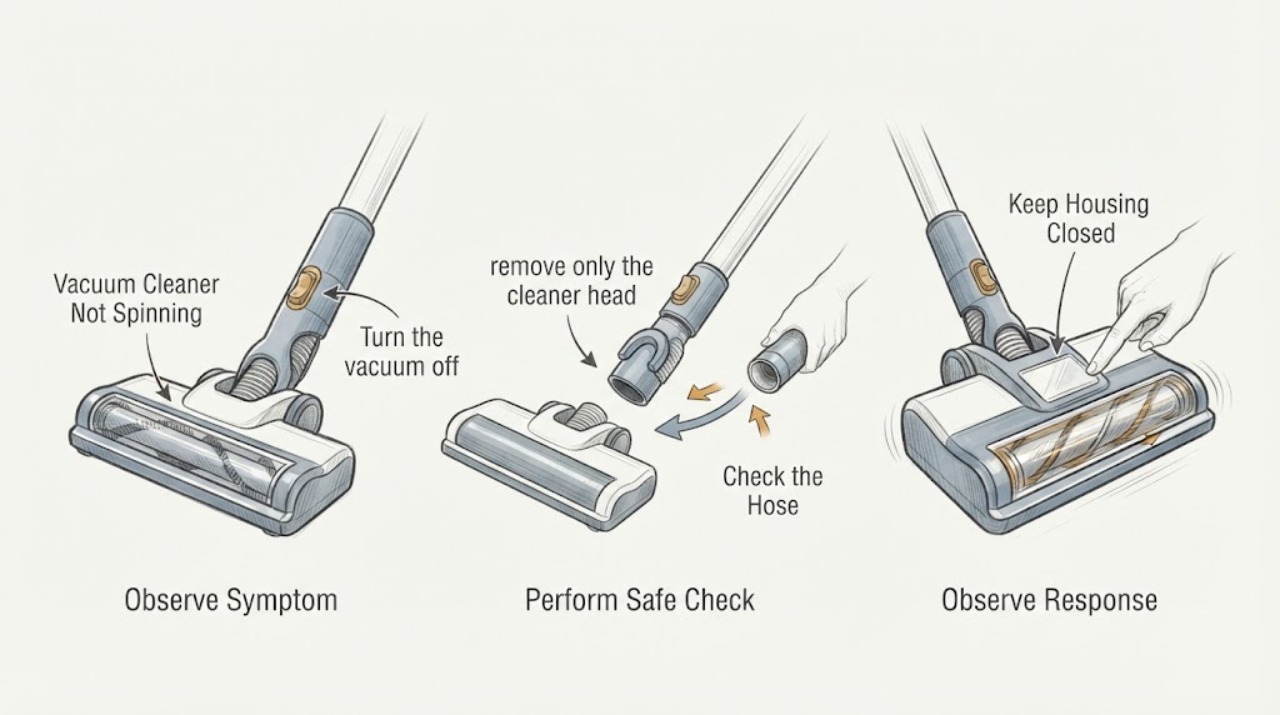
If a vacuum cleaner’s brush or floor head is not spinning, first distinguish an upright-position control state from a jam. Turn it off and unplug it before removing hair or debris, then check the cleaner-head connection, brush control, and suction path. If the brush remains stopped, the belt/head is damaged, or the machine cuts out, keep it off and arrange model-specific service.
Work through in order
Diagnostic checks
Use only checks that match the exact appliance or system and its official guide.
-
Check 1
Turn the vacuum off and unplug it; note whether the head is upright, reclined, attached, and whether the brush is selected on.
Expected result: The vacuum is upright/brush disabled, or it is reclined with the brush command on and still stopped.
Next step: Set the machine in the approved cleaning position and follow the exact manual; keep hands away from the brush while powered.
Stop if: Stop for sparks, smoke, burning odor, hot housing, or a damaged cord/battery.
Why this matters
Why: An upright or disabled brush can be normal; a stopped brush in the intended cleaning position needs blockage/connection checks.
-
Check 2
With power disconnected, remove only the cleaner head or brush access permitted by the manual and clear hair, thread, and visible debris.
Expected result: The brush rotates freely after clearing, or it remains seized/damaged.
Next step: Reassemble fully and make one brief test; do not cut or pry near bristles, bearings, or wiring.
Stop if: Do not reach into a motorized head while connected to power.
Why this matters
Why: A jam is a common cause; a seized, damaged, or loose brush needs service rather than force.
-
Check 3
Check that the cleaner head, wand, hose, and bin are fully seated and inspect the visible inlet for blockage; compare suction with the machine off before reassembly.
Expected result: A connector was loose, an inlet is blocked, or suction is weak with clear paths.
Next step: Refit and clear only accessible paths; arrange service for persistent weak suction or damage.
Stop if: Do not operate with a split hose, cracked head, or missing guard.
Why this matters
Why: Poor connection or airflow can stop some motorized heads; weak suction with clear paths points to a larger service issue.
-
Check 4
After one correction, run a short supervised test in the intended reclined position and watch for cutout or intermittent spinning.
Expected result: The brush spins normally, spins intermittently, or the vacuum cuts out again.
Next step: Stop, cool, and arrange service if the problem recurs; do not repeat power cycles indefinitely.
Stop if: Stop immediately for heat, smoke, odor, or electrical damage.
Why this matters
Why: Normal spinning supports a resolved jam/position issue; intermittent operation or thermal cutout needs diagnosis and cooling per the model manual.
Use your observations
Decision map
Find the observation that best matches what you see, then follow the next safe action.
-
PATH 01Next step
What you see
The brush spins when reclined but not when upright.
Do this next
Use the vacuum in the intended position and confirm the exact model behavior.
Why this path and its safety boundary
Why it matters: This can be a normal position interlock described by Dyson.
-
PATH 02Next step
What you see
Hair/debris is found and the brush spins after a safe clear.
Do this next
Keep the head clean and monitor for recurrence.
Why this path and its safety boundary
Why it matters: A brush-head obstruction was the likely cause.
-
PATH 03Next step
What you see
The brush remains stopped with clear paths or the head is damaged.
Do this next
Keep it unplugged and arrange service.
Why this path and its safety boundary
Why it matters: A motorized head, belt, switch, or connection needs model-specific service.
-
PATH 04Next step
What you see
The machine cuts out, overheats, or produces smoke.
Do this next
Stop use, unplug if safe, and seek qualified service.
Why this path and its safety boundary
Why it matters: A thermal or electrical safety fault overrides brush troubleshooting.
Helpful context
Understand the symptom
What to check first
Dyson’s official troubleshooting says a brush bar may stop when the vacuum is upright, can be reset with its control or a power cycle, and must be cleared only with power disconnected. It separates cleaner-head blockages, wand/hose suction, damage, and thermal cutout. The exact brush design varies, so do not infer a belt or motor failure from “not spinning” alone.
When checks do not resolve it
Need a professional?
Arrange qualified appliance service when the safe checks do not resolve the symptom or when the exact model manual calls for service. Give the technician the model, observed pattern, and checks already completed. Do not open sealed, gas, high-voltage, or mains compartments.
Common questions
FAQ
Why is the brush not spinning when the vacuum is upright?
Some Dyson models automatically stop the brush in the upright position. Recline it and follow the exact model controls.
Can I pull hair out while it is plugged in?
No. Turn off and unplug first before clearing a brush-bar blockage.
When is a brush replacement justified?
Only after the exact model’s checks show damage or persistent failure. The symptom alone does not establish fitment.
Read the exact guide
Official sources
- Support | Brush bar not spinningDyson · Dyson vacuum cleaners
- Support | Troubleshooting | DysonDyson · Dyson vacuum cleaners
Community feedback
Share a repair observation
Share a plain-text repair observation. Accepted observations are published automatically; this page may take a moment to update.