
On this page
Start here
Quick answer
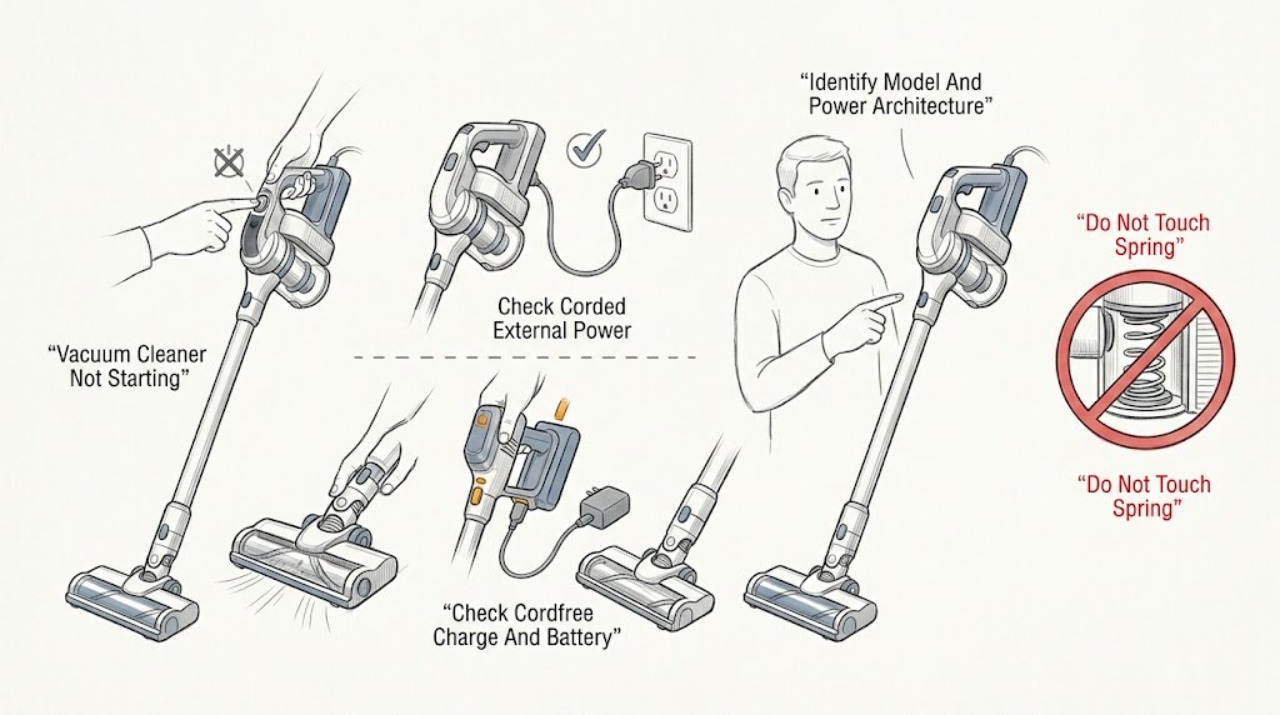
First identify the exact Dyson model and whether it is corded, cord-free, upright, cylinder, stick, handheld, or another vacuum design. A corded Dyson that will not start should not be plugged in if its cable is damaged; otherwise Dyson says to check a switched-on working wall socket and the plug fuse. A cord-free Dyson should have a charged battery, an intact battery casing, and an unobstructed airway; Dyson warns that blocked airflow can make the machine cut out for safety. If you have a V11, its support page adds model-specific checks for the battery being fitted securely and the trigger functioning, and lists battery, charger, and main-body faults as different possibilities. Remove only accessories or filters that the exact manual identifies as user-removable. If a filter is washed on a V11, Dyson says to use cold water and leave it to dry for at least 24 hours before reinserting it. A damaged cable or cracked battery case, burning smell, smoke, sparking, liquid exposure, repeated cutout, or a switch/trigger that will not operate is a stop-and-service condition. Do not probe the charger, bypass a trigger or interlock, run with a wet filter, open the battery pack or motor, or keep trying to start the vacuum after a hazard.
Before you begin
Safety first
- The user may identify the model, inspect an undamaged external cable or battery casing, check a working socket or model charger, remove only documented user-accessible blockages, and clean a model-documented washable filter with the required drying time. Dyson or qualified personnel must handle battery packs, chargers, switches, triggers, motor, control, wiring, thermal protection, and live testing.
Work through in order
Diagnostic checks
Use only checks that match the exact appliance or system and its official guide.
-
Check 1
Read the rating label or model information and record the full Dyson model. Classify it as corded or cord-free and note whether it is completely unresponsive, starts briefly and stops, pulses, or shows a battery, filter, or blockage alert. Do not open the machine to identify the architecture.
Expected result: The exact model and power architecture are known, or the model is unknown; the vacuum has no light/sound, a momentary start, a flashing alert, or an abnormal odor/heat.
Next step: Select the exact model's Dyson support route before using model-specific instructions. If odor, heat, smoke, liquid, or visible damage is present, stop and isolate the appliance from power when safe.
Stop if: Do not disassemble the vacuum just to locate the model or bypass a battery, trigger, or interlock.
Why this matters
Why: Corded and cord-free Dyson vacuums have different first checks, and Dyson documents several vacuum families. A complete no-response symptom is not the same as a safety cutout after starting. An unknown model prevents safe use of a specific charger, filter, trigger, or reset procedure.
-
Check 2
For a corded Dyson upright or cylinder, inspect the power cable and plug externally for cuts, crushed insulation, exposed conductors, scorching, or liquid. If intact, confirm the wall socket is switched on and working, and check the plug fuse only as the model and local plug design permit. Do not use damaged cable or plug equipment.
Expected result: The cable or plug is damaged; the socket is off or not working; the plug fuse is open; or the corded vacuum has an intact supply but remains completely unresponsive.
Next step: Do not plug in a damaged machine; arrange Dyson support or qualified repair. If the external supply is normal, stop repeated outlet swaps and provide the model and symptom to service rather than opening the motor or switch.
Stop if: Do not repair a cable, bypass a fuse, use an extension as a workaround, probe the plug, or perform live-voltage tests.
Why this matters
Why: Dyson treats cable damage as a no-use condition and identifies the socket and plug fuse as the initial corded supply checks. An intact external supply with no response shifts suspicion to the switch, thermal protection, internal wiring, or main body, which cannot be identified by a user-level check.
-
Check 3
For a cord-free Dyson, use the exact model charger or dock and allow the documented charging period. Inspect only the outside of the charger lead, charging connector, dock, and battery casing. On a V11, remove and refit the battery only as Dyson describes, supporting it and sliding it back until it clicks securely; do not open the pack.
Expected result: The charger or dock gives no expected charging indication, the battery casing is cracked or damaged, the battery fits securely and the vacuum starts, or the battery is secure but the vacuum remains unresponsive.
Next step: Stop using a damaged battery or charging lead and contact Dyson support. If the battery is secure but the machine does not start, record the charge indication and arrange model-specific service instead of opening the pack or charger.
Stop if: Do not charge a cracked, swollen, hot, wet, or leaking battery, substitute a charger by appearance, or bridge battery contacts.
Why this matters
Why: Dyson identifies charge level, battery casing condition, charger, battery fit, and main body as separate possibilities. A cracked case is unsafe to use. A secure battery with no response after correct charging makes the charger, battery, trigger, or main body more likely, but the observation does not select one part.
-
Check 4
With power disconnected or the cordless machine not on its charger, inspect only the user-accessible trigger or switch, bin, wand, hose, cleaner head, and airway openings identified by the model manual. On a V11, check that the trigger moves normally and the battery is secure. Remove loose visible debris from an accessible opening without inserting tools, then note whether the vacuum had started and cut out.
Expected result: The trigger or switch is stuck, broken, or will not remain in its operating position; the airway or cleaner head is visibly blocked; the vacuum starts after a loose blockage is removed; or no accessible blockage is found and it still does not start.
Next step: Follow only the exact model's user-level blockage procedure. If the trigger is damaged, the blockage is hidden, or the vacuum remains dead or repeatedly cuts out, stop and arrange Dyson service.
Stop if: Do not force a trigger, defeat a switch, insert tools into the motor or airway, or run the machine with a removed filter or cover.
Why this matters
Why: A V11 trigger fault is a documented service possibility, while Dyson says blocked airflow can cause a safety cutout. A clear airway with no response makes a power, control, or main-body fault more likely; a brief recovery after clearing supports airflow restriction but does not prove the motor is healthy.
-
Check 5
Only if the exact Dyson manual identifies a user-washable filter, remove it with the machine off and disconnected from charging. For a V11, wash the filter in cold water without detergent, allow at least 24 hours of good-airflow drying, and refit it until it clicks; do not substitute these instructions for another model's filter procedure.
Expected result: The model's filter is dirty, the V11 filter is not completely dry or does not click into place, the filter is clean and correctly fitted, or the filter is fixed/damaged and not identified as user-removable.
Next step: Dry and refit only the model-documented filter. If the alert persists, the filter is damaged, or the vacuum still will not start or repeatedly cuts out, keep it out of service and contact Dyson support.
Stop if: Do not reinstall a damp filter, use detergent or a dishwasher unless the model manual explicitly allows it, bypass a filter sensor, or operate without the filter.
Why this matters
Why: Dyson identifies filter condition as a contributor to V11 blockage, performance, and cutout behavior, and a filter attachment alert means the filter is not fitted correctly. A wet, fixed, or damaged filter is not a safe test part; a clean fitted filter shifts attention back to airflow, battery, trigger, or main body.
-
Check 6
Document the full model, corded or cord-free architecture, cable/socket or charging result, battery light, trigger or switch behavior, blockage/filter result, and whether the machine stopped suddenly or never responded. Do not keep cycling the power or repeatedly charging a damaged unit.
Expected result: The vacuum starts normally after a safe external correction; it remains dead with the external checks normal; it starts and repeatedly cuts out; or a cable, battery, charger, trigger, main body, or liquid/heat hazard is present.
Next step: Monitor only a normally operating, undamaged machine. For persistent or hazardous symptoms, unplug or remove from charging when safe and arrange Dyson or qualified service with the recorded model and observations.
Stop if: Do not open a battery pack or motor, perform live measurements, bypass thermal or trigger protection, or order a part from the symptom alone.
Why this matters
Why: Recovery after an accessible correction supports that specific external condition as the immediate cause. Persistent no-start or repeat cutout may involve the charger, battery, trigger, switch, thermal protection, wiring, motor, control, or main body; the symptom does not identify a replacement part.
Use your observations
Decision map
Find the observation that best matches what you see, then follow the next safe action.
-
PATH 01Safety boundary
What you see
The cord or plug is damaged, the battery casing is cracked or damaged, there is liquid exposure, smoke, burning smell, sparking, or abnormal heat.
Do this next
Disconnect from charging or do not plug in, isolate the machine from a safe position, and contact Dyson support or qualified service.
Why this path and its safety boundary
Why it matters: Dyson treats damaged cable or battery casing as a do-not-use condition; continuing to plug in or charge can create an electrical or fire hazard.
Safety stop: Do not tape a cable, open the battery, charge a damaged pack, or attempt a live test.
-
PATH 02Safety boundary
What you see
A corded Dyson has an intact cable, a switched-on working socket, and a correct external plug-fuse check, but remains completely unresponsive.
Do this next
Stop outlet swapping and arrange model-specific Dyson service. Provide the model and the external supply results.
Why this path and its safety boundary
Why it matters: The documented external power path is normal; a switch, thermal protection, internal wiring, or main-body problem is more likely than a simple outlet issue.
Safety stop: Do not open the switch or motor, bypass the fuse, or probe the live supply.
-
PATH 03Safety boundary
What you see
A cordless Dyson has no expected charge indication, the battery is not seated, the V11 trigger does not operate, or the machine remains dead after the documented charging and battery-fit checks.
Do this next
Stop using damaged charging equipment and contact Dyson with the model, charge indication, battery fit, and trigger behavior.
Why this path and its safety boundary
Why it matters: A charger, battery, battery fit, trigger, or main-body issue is possible. V11 support lists these as separate causes, so a replacement battery cannot be inferred from no-start alone.
Safety stop: Do not bridge contacts, use an unapproved charger, open the battery, or force the trigger.
-
PATH 04Safety boundary
What you see
The Dyson starts briefly, pulses, or cuts out and the user-accessible airway, cleaner head, bin, cyclone, or filter shows a blockage or incorrect filter fit.
Do this next
Follow the exact model's blockage and filter procedure, ensuring any washed V11 filter is fully dry before refitting. Arrange service if the cutout returns or the blockage is hidden.
Why this path and its safety boundary
Why it matters: Dyson says blocked airflow can trigger a safety cutout; on V11, blockage and filter-attachment alerts are documented. Clearing a safe visible restriction may restore operation, but the motor or control is not thereby proven good.
Safety stop: Do not run without a filter, insert tools into the motor, or defeat a blockage or filter sensor.
-
PATH 05Safety boundary
What you see
The model-specific power, charging, trigger/switch, airway, and filter checks are normal, but the vacuum remains dead, repeatedly cuts out, or has abnormal internal noise or heat.
Do this next
Keep the machine out of service and arrange Dyson or qualified repair. Give the technician the model, alerts, timing, and results of each safe check.
Why this path and its safety boundary
Why it matters: A charger, battery, trigger, switch, thermal protection, motor, wiring, control, or main-body fault is possible; accessible symptoms cannot choose the failed component.
Safety stop: Do not open the motor or battery, test live wiring, bypass protection, or order an internal part solely from the symptom.
Helpful context
Understand the symptom
Identify the power architecture before troubleshooting
A Dyson upright or cylinder vacuum connected to the wall does not use the same first checks as a cordless stick or handheld. Dyson's support hub lists multiple vacuum families, and its no-power page explicitly separates corded cable/socket/fuse checks from cord-free battery/airway checks. Read the rating label or the model information in the Dyson support route, and describe whether the machine is completely dark, starts and stops, pulses, or shows a battery or blockage alert.
Use only the low-risk checks for that architecture
For a corded model, an intact cable, switched-on working socket, and correct plug fuse are the relevant external checks. For a cordless model, charge the battery using the model's charger or dock and inspect the battery casing without opening it. Dyson's V11 page adds that the battery must click securely into place and that a non-functioning trigger needs service. These observations distinguish supply or fit problems from a main-body fault; they do not justify live electrical measurements.
Treat airflow and filter state as a safety branch
Dyson says a blocked airway can make a cord-free machine cut out for safety. A vacuum that starts briefly and then stops is therefore different from one with no response at all. Check only the hose, wand, cleaner head, bin, cyclone, or filter sections named by the exact manual. For the V11 procedure, wash the filter in cold water only and leave it to dry for at least 24 hours before fitting it back; never operate with a wet filter.
Stop before the fault becomes a battery or motor repair
A cracked battery casing, damaged power cable, smoke, burning smell, liquid exposure, a stuck switch or trigger, or repeated cutout after the accessible checks is not a home electrical repair. Dyson directs customers to its support and service routes for unresolved power problems, and the V11 page identifies main-body, charger, battery, and trigger faults as separate service possibilities. Give the technician the exact model, power architecture, light or alert, and what changed after charging, reassembly, or blockage checks.
Safety boundary
Stop conditions
- Do not plug in a Dyson with a damaged cable or charge a vacuum with a cracked, swollen, hot, wet, or damaged battery casing; isolate it safely and arrange service.
- Stop for smoke, sparking, burning smell, abnormal heat, liquid exposure, repeated protection trips, or a charger/plug that becomes unsafe.
- Do not open a battery pack, charger, motor, control housing, or internal wiring; do not perform live-voltage, continuity, or battery-contact tests.
- Do not bypass a trigger, switch, thermal cutoff, filter sensor, or blockage protection, and do not force a stuck switch or trigger.
- Do not operate with a wet or missing filter, insert tools into the airway or motor, or keep cycling a vacuum that repeatedly cuts out.
Only after diagnosis
Potential parts
- Dyson vacuum battery
Consider only after the exact model is identified and Dyson or qualified diagnosis confirms the battery or charging path is faulty after the charger, fit, and external safety checks.
Battery fitment and charging design vary by Dyson model; confirm the full model and manufacturer fit information before ordering. A no-start symptom alone does not establish battery failure. - Dyson vacuum filter
Consider only when the exact model identifies a replaceable filter and the existing filter is damaged or cannot be cleaned and fitted correctly after the model procedure.
Filter shape and attachment vary by Dyson vacuum family; confirm the exact model and drying/fit instructions before ordering or operating the machine.
When checks do not resolve it
Need a professional?
Contact Dyson support or qualified service when the cord or plug is damaged, the battery casing or charger is damaged, the correct socket or charging path is normal but the vacuum remains dead, a V11 trigger will not function, the vacuum repeatedly cuts out after the airway and model-specific filter checks, or internal motor, control, wiring, or battery access would be needed.
Safety scope: The user may identify the model, inspect an undamaged external cable or battery casing, check a working socket or model charger, remove only documented user-accessible blockages, and clean a model-documented washable filter with the required drying time. Dyson or qualified personnel must handle battery packs, chargers, switches, triggers, motor, control, wiring, thermal protection, and live testing.
Common questions
FAQ
Why will my Dyson vacuum cleaner not start?
First separate corded from cord-free. For a corded model, check only an undamaged cable, a switched-on working socket, and the plug fuse. For a cord-free model, check charge, battery casing, and airway blockage. The exact model matters because Dyson vacuum families use different batteries, triggers, filters, and controls.
What if my Dyson vacuum starts and then cuts out?
Dyson says blocked airflow can cause a cord-free machine to cut out for safety. Check only the model-documented airway, cleaner head, bin, and filter areas. On a V11, follow its filter procedure and leave a washed filter to dry for at least 24 hours before refitting. Repeated cutout after that needs service.
How do I know whether a Dyson V11 battery or charger is the problem?
Record whether the machine charges, whether the battery casing is intact, whether the battery clicks securely into place, and whether the trigger operates. Dyson lists battery, charger, main-body, and trigger faults separately, so no-start alone does not identify which part has failed.
Can I wash a Dyson vacuum filter and reinstall it immediately?
Not for the V11 procedure cited here. Dyson says to wash the V11 filter in cold water without detergent and leave it in good airflow for at least 24 hours so it is completely dry before reinserting it. Other Dyson models may have different instructions.
When should I stop using a Dyson vacuum that will not start?
Stop for a damaged cable or plug, cracked or damaged battery casing, smoke, sparking, burning smell, liquid exposure, abnormal heat, a stuck trigger or switch, or repeated cutout. Do not open the battery, charger, motor, or wiring; arrange Dyson or qualified service with the model and recorded checks.
Read the exact guide
Official sources
- Support | Vacuum cleaners | DysonDyson · Supports the existence of multiple Dyson vacuum families and the need to select the exact machine support route before applying troubleshooting steps.
- Support | Dyson V11 cordless stick vacuum (screw in/LCD screen)Dyson · Directly supports V11-specific battery, charger, trigger, alert, blockage, and filter-washing details; those details must not be generalized to other Dyson models.
- Support | No Power | DysonDyson · Directly supports the corded cable/socket/fuse checks, cord-free battery/casing checks, and blocked-airway safety-cutout boundary; exact model instructions control the detailed procedure.
Community feedback
Share a repair observation
Share a plain-text repair observation. Accepted observations are published automatically; this page may take a moment to update.