
On this page
Start here
Quick answer
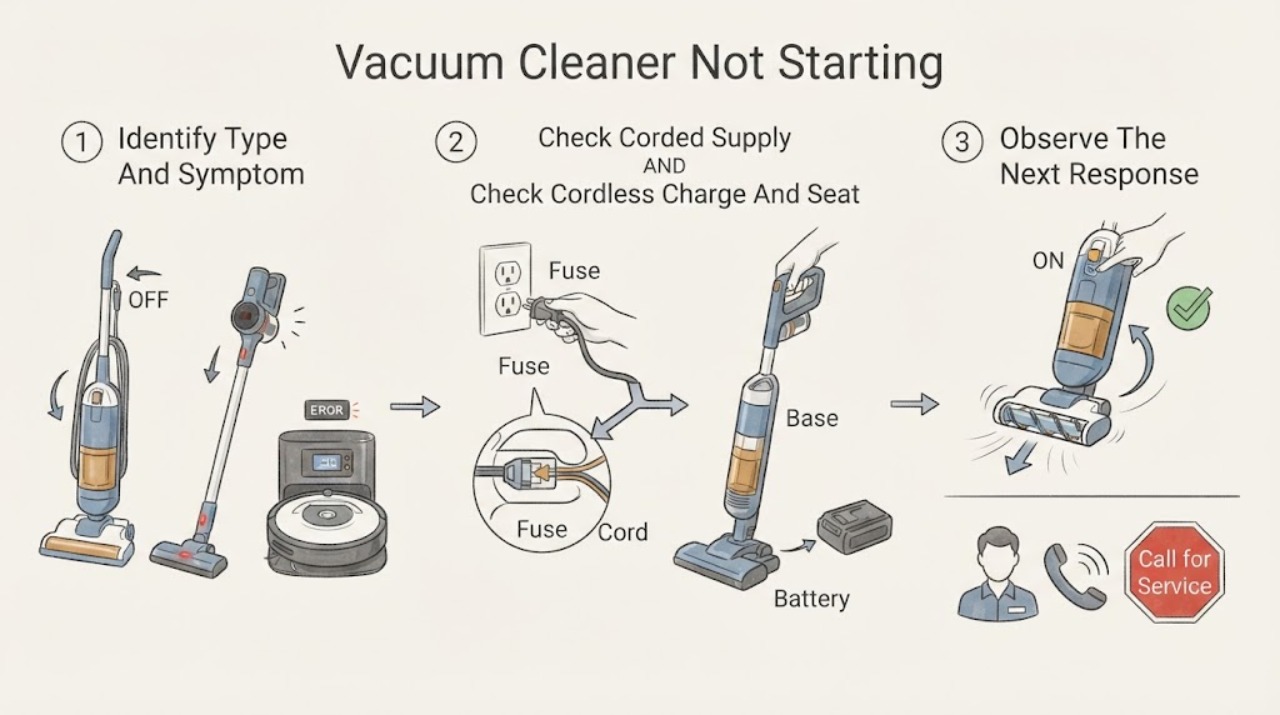
First identify whether this Hoover is corded, cordless, or a robot, because the safe checks are different. For a corded cleaner, check the switched socket with another safe appliance and inspect the accessible plug and supply; Hoover's official no-power guidance says to use a different socket or a competent electrician when the outlet supply is the problem. For a cordless model, use only its supplied charger or charging base, leave the cleaner switched off while charging, and confirm the battery is seated; Hoover's opened H-Free manual lists a charged and correctly assembled battery as the first no-start checks. On Hoover Freedom stick models, a blocked brush roll can activate a safety cut-out and make power stop with a flashing red charge light; switch off before clearing only the accessible brush as the model guide directs. If the unit remains dead after the correct supply or charge check, the fuse fails again, the battery or charger becomes hot or damaged, or there is a burning smell, smoke, sparks, or damaged wiring, stop and arrange qualified Hoover service. Do not open a battery pack, bypass a cut-out, or test live wiring.
Before you begin
Safety first
- The owner may identify the model, check a safe socket, use the supplied charger, confirm the battery or dock is seated, and clear an accessible brush only under the exact model guide. Qualified personnel must handle motors, switches, wiring, batteries, chargers, control boards, internal fuses, safety devices, and live diagnosis.
Work through in order
Diagnostic checks
Use only checks that match the exact appliance or system and its official guide.
-
Check 1
Record the model or product code and classify the cleaner as corded, cordless stick, handheld, or robot. Note whether it is completely dark, shows a charge or error light, starts then stops, or has a brush that will not turn.
Expected result: The cleaner uses a mains plug; it uses a removable battery or dock; it shows no light; it flashes a red or other indicator; or it stops after a brush blockage.
Next step: Use the matching corded, cordless, or safety-cut-out action. Use Hoover's model lookup before copying a release, charging, or indicator procedure.
Stop if: Stop for smoke, sparks, burning odor, a hot or damaged charger, battery, cord, plug, socket, or exposed wiring.
Why this matters
Why: The architecture selects the safe branch. A dark corded cleaner needs a supply check, a dark cordless cleaner needs a model-specific charge and battery check, and a stop with a brush indicator may be a safety cut-out rather than a dead battery.
-
Check 2
For a corded Hoover, with dry hands and the cleaner disconnected before inspection, check that the plug and accessible cord are intact and that the switched wall socket is on. If safe, plug another small appliance into the same socket or try the vacuum at a different known-good socket.
Expected result: The socket is dead; a household isolator or fuse is tripped; another socket makes the cleaner start; the plug or cord is damaged; or the supply works but the cleaner remains dead.
Next step: Use a competent electrician for a faulty socket or household supply. Arrange Hoover service when the supply is good but the cleaner remains dead; do not open the plug or cleaner unless the exact manual permits a user fuse procedure.
Stop if: Do not repeatedly reset a breaker, touch a hot or wet socket, use a damaged cord, or continue if the plug sparks or smells burnt.
Why this matters
Why: A dead socket or tripped supply is external to the vacuum. Recovery at another safe socket supports a supply issue. A working socket with no response makes the cleaner's cord, switch, motor, or control more likely.
-
Check 3
For a cordless Hoover, switch the cleaner off, use only the supplied charger or charging base, and confirm the charger is firmly connected and the battery is seated exactly as the model manual shows. Allow the documented charging period before pressing start.
Expected result: A charge indicator responds; the cleaner was not fully seated on the dock; the battery was loose; the indicator remains dark; the battery will not hold charge; or the charger becomes hot or damaged.
Next step: Repeat only the exact model's charge procedure and use Hoover's support for a battery or charger decision. Arrange service for a failed or damaged battery or charger; do not substitute another appliance's charger.
Stop if: Never remove or open a battery while the charger is connected, and stop for swelling, leakage, excessive heat, smoke, odor, or damaged charging contacts.
Why this matters
Why: A corrected dock, plug, or battery fit can explain no-start. A persistent dark indicator or failed charge points toward the charger, base, battery, or charging circuit. Battery behavior is model-specific and cannot establish a compatible replacement from the symptom alone.
-
Check 4
If a listed Hoover Freedom stick stopped with a flashing red charge light, switch off the continuous-running control and disconnect or remove the battery as the model guide directs. Inspect the accessible brush roll and nearby hose opening for hair, thread, or debris; clean only with the documented release method and refit it before testing.
Expected result: The brush roll is jammed; the red indicator clears after cleaning and refitting; the brush is free but the cleaner remains dead; or the model is not one of the listed Freedom sticks.
Next step: Use the exact model manual or arrange Hoover service. Do not force the brush, bypass the cut-out, remove a motor cover, or test while fingers or clothing can contact moving parts.
Stop if: Do not clear a brush with power connected, use a tool that can damage wiring or bristles, or continue if the housing, battery, or motor smells burnt.
Why this matters
Why: A brush blockage supports the model-specific safety cut-out explanation. No recovery after the permitted cleaning suggests a deeper drive, sensor, battery, or control fault. If the model is different, this procedure cannot be assumed.
-
Check 5
After the correct external supply, charging, and model-permitted cut-out checks, record the model, indicator behavior, timing, socket or charger result, battery seating, brush condition, and any heat or odor. Do not recreate an intermittent or hazardous failure.
Expected result: The vacuum starts normally; it remains dead with a confirmed supply or charge; it starts then stops again; the battery or charger is abnormal; or an electrical or burning symptom appears.
Next step: Arrange Hoover service and provide the exact model and recorded sequence. Use qualified electrical help for a faulty socket, supply, or damaged cord; keep the vacuum disconnected when unsafe.
Stop if: Do not open the motor or battery pack, bypass a safety cut-out, test live wiring, repeatedly insert a damaged charger, or keep operating after smoke, sparks, burning odor, or excessive heat.
Why this matters
Why: A restored start supports an external connection, charge, or accessible blockage. Persistent no-start or repeated stopping makes an internal switch, motor, battery, drive, safety, or control fault more likely, but the symptom does not select a part.
Use your observations
Decision map
Find the observation that best matches what you see, then follow the next safe action.
-
PATH 01Safety boundary
What you see
A corded Hoover is completely dark, and the socket is dead or a household isolator, fuse, or breaker is open.
Do this next
Leave the vacuum disconnected and use a competent electrician for the socket or household protection. Try another safe socket only if the vacuum and cord are undamaged.
Why this path and its safety boundary
Why it matters: The immediate fault is more likely the household supply than the vacuum's motor or switch.
Safety stop: Do not reset protection repeatedly, touch a hot or wet outlet, or use a damaged cord or plug.
-
PATH 02Safety boundary
What you see
A corded Hoover remains completely unresponsive at a confirmed working socket, with no visible cord or plug damage.
Do this next
Arrange model-specific Hoover service and provide the socket result and model code. Keep the cleaner disconnected until inspected.
Why this path and its safety boundary
Why it matters: An internal cord connection, switch, motor, thermal or control fault is more likely than a socket problem; the exact failed part is not established.
Safety stop: Do not open the cleaner, bridge the switch, replace internal protection, or perform a live test.
-
PATH 03Safety boundary
What you see
A cordless Hoover shows no usable charge or does not start after the supplied charger or dock, correct off-state, battery seating, and model-specific charge period have been checked.
Do this next
Use Hoover's exact model support and arrange service or an approved battery/charger assessment. Do not substitute another charger or open the battery pack.
Why this path and its safety boundary
Why it matters: The charger, dock, battery, or charging circuit is more likely than the floor head; the model must determine whether any battery access is user-approved.
Safety stop: Stop for swelling, leakage, excessive heat, smoke, odor, damaged contacts, or a charger that becomes abnormally hot.
-
PATH 04Safety boundary
What you see
A listed Hoover Freedom stick stopped while its brush was obstructed and the charge light flashed red, then the accessible brush is cleaned with the switch off.
Do this next
Refit the brush exactly and test briefly. If it remains dead or the brush jams again, arrange service; do not bypass the cut-out.
Why this path and its safety boundary
Why it matters: The official model guide's brush-roll safety cut-out is more likely than a total battery failure if operation returns after cleaning.
Safety stop: Do not apply power while clearing, defeat the safety switch, or transfer this brush-release procedure to another Hoover range.
-
PATH 05Safety boundary
What you see
The vacuum remains stopped after architecture-appropriate checks, or there is smoke, a spark, burning odor, excessive heat, damaged wiring, a damaged battery, or repeated fuse or breaker operation.
Do this next
Stop using it and arrange Hoover service; use a competent electrician for the household supply. Disconnect power only when doing so is safe and keep the device away from combustible material.
Why this path and its safety boundary
Why it matters: The condition exceeds user-level troubleshooting and may involve a motor, switch, battery, charger, control, wiring, or safety fault.
Safety stop: Do not reconnect to reproduce the fault, open a battery pack, bypass a cut-out, remove motor covers, or perform live tests.
Helpful context
Understand the symptom
Identify the vacuum architecture before checking it
A corded upright or canister needs a mains and plug check; a cordless stick needs a battery and supplied-charger check; a robot may need its dock and model-specific start procedure. Record the model or product code from the information plate before following a guide. Hoover's vacuum support page explicitly separates cordless ranges and model-specific troubleshooting, and its manual portal retrieves instructions by product code. A light or display that turns on but no motor starts is a different state from a completely dead cleaner.
For corded cleaners, prove the supply without opening the cleaner
With dry hands and no visible damage, confirm the wall socket is switched on. Hoover's official no-power advice suggests plugging another appliance into the socket, checking a switched or tripped isolator or fuse box, and trying a different socket. If the outlet or household protection is faulty, use a competent electrician. If the socket works but the Hoover remains dead, do not replace internal wiring or repeatedly reset a protective device; the fault may be in the cord, switch, motor, or control and requires service.
For cordless cleaners, charging is a model-specific test
Use only the charger or dock supplied for the cleaner and charge it with the power switch off. Hoover's cordless advice says a product may need to sit fully on its charging base, have its charger firmly connected, and remain off while charging; the opened H-Free manual begins with a charged and correctly seated battery. A charge light or display that never responds after the model's documented charging period points to the charger, base, battery, or charging circuit, but not to a safe user-replaceable part for every model.
Treat a safety cut-out as a stop signal, not a reset button
On Hoover Freedom stick models listed by the Advice Centre, debris or hair around the brush roll can prevent rotation, activate the safety cut-out, stop power, and flash the charge light red. Switch the continuous-running control off and clear only the brush area using the model's documented release method. Do not assume this procedure applies to another Hoover range, and do not bypass the cut-out or keep pressing start while the brush is jammed.
Stop at the service boundary
If a known-good supply or the correct charging procedure does not restore operation, the remaining possibilities include a cord, switch, battery, charger, motor, brush drive, thermal or safety device, or control fault. Hoover's H-Free manual says not to open and repair the battery pack yourself and directs persistent problems to customer service. Arrange model-specific service for internal diagnosis, and stop immediately for smoke, sparks, burning odor, a hot or damaged charger, plug, cord, or battery, or exposed wiring.
Safety boundary
Stop conditions
- Stop and disconnect power only when safe for smoke, sparks, burning odor, excessive heat, a hot or damaged charger, battery, cord, plug, or socket.
- Do not repeatedly reset a breaker or fuse, use a damaged cord or charger, or reconnect a vacuum that repeatedly trips protection.
- Do not open a battery pack, bridge a switch, bypass a safety cut-out, remove motor covers, or perform live electrical tests.
- Use only the exact Hoover model guide for charging, battery removal, brush release, indicator meaning, and replacement decisions; do not combine corded, cordless, robot, or Freedom procedures.
- Keep the cleaner off and away from combustible materials when a battery, charger, motor, or electrical part is hot, damaged, wet, swollen, or emitting an odor.
When checks do not resolve it
Need a professional?
Arrange Hoover service when a corded vacuum remains dead at a confirmed working socket, a cordless vacuum will not start after the exact supplied-charger and battery-seating procedure, a model-specific safety cut-out returns after permitted brush cleaning, or the motor, switch, drive, control, charger, or battery needs diagnosis. Use a competent electrician for a dead or repeatedly tripping household socket or circuit. Stop immediately for smoke, sparks, burning odor, excessive heat, a swollen or leaking battery, a hot or damaged charger, a damaged cord or plug, or exposed wiring. The owner may identify the model, check an accessible socket, use the supplied charger, confirm a battery or dock is seated, and clear an accessible brush only when the exact model guide permits it. Internal motors, switches, wiring, batteries, control boards, chargers, and live tests require qualified service.
Safety scope: The owner may identify the model, check a safe socket, use the supplied charger, confirm the battery or dock is seated, and clear an accessible brush only under the exact model guide. Qualified personnel must handle motors, switches, wiring, batteries, chargers, control boards, internal fuses, safety devices, and live diagnosis.
Common questions
FAQ
Why is my corded Hoover vacuum completely dead?
Check the switched socket with another safe appliance, check for a switched or tripped isolator or fuse box, and try another safe socket if the vacuum and cord are undamaged. If the socket works but the vacuum remains dead, arrange Hoover service rather than opening the cleaner or repeatedly resetting protection.
Why will my cordless Hoover vacuum not start after charging?
Use only the supplied charger or dock, leave the cleaner switched off while charging, confirm the charger and battery are seated as the model shows, and allow the documented charging period. The opened H-Free manual lists a charged and correctly assembled battery as no-start checks; persistent failure needs model-specific service.
What does a flashing red charge light mean on a Hoover Freedom stick?
For the listed Freedom stick models, Hoover says a brush-roll blockage or debris can activate the safety cut-out, stop power, and flash the charge light red. Switch off before removing and cleaning the brush as that model guide directs. Do not transfer the procedure to another Hoover range.
Can I use another charger or open the Hoover battery?
No. Hoover's cordless advice says to use only the supplied charger, and the opened H-Free manual warns against opening and repairing the battery pack yourself. A battery or charger that will not charge, becomes hot, swells, leaks, or is damaged needs model-specific support or service.
When should I stop troubleshooting a Hoover vacuum that will not start?
Stop after the architecture-appropriate socket, supplied-charger, battery-seat, and model-permitted brush checks fail. Stop immediately for smoke, sparks, burning odor, excessive heat, a swollen or leaking battery, damaged cord or charger, exposed wiring, or repeated fuse or breaker operation. Keep the cleaner disconnected and arrange Hoover or qualified electrical service.
Read the exact guide
Official sources
- Won't charge up - Hoover Advice CentreHoover After Sales Service · Opened official Hoover Advice Centre page covering multiple listed vacuum models; charging layouts and times vary by model.
- Contact Hoover Customer Support, Warranty & Orders – Hoover UKHoover Home / Haier Smart Home UK&I Ltd. · Opened official Hoover contact page; used for service escalation only, without publishing region-specific telephone details.
- Vacuum Appliance Advice Centre - HooverHoover After Sales Service · Opened official Hoover vacuum support page; it directs owners to select cleaner type/range or enter a product code before applying a troubleshooting guide.
- No electrical power - Hoover Advice CentreHoover After Sales Service · Opened official Hoover Advice Centre page; its supply check is used for corded vacuum models listed on the page, while internal fuse and plug procedures remain model-specific.
- Does not switch on - Hoover Advice CentreHoover After Sales Service · Opened official Hoover Advice Centre page for the listed Freedom stick models; battery timing, indicator, brush-release, and safety cut-out details are model-specific.
- Hoover Vacuum Cleaner H-Free HF18CPT 001 Instruction Manual - Product Code 39400354Hoover After Sales Service · Opened official manual for HF18CPT 001/product code 39400354; its charged/assembled battery checks and no-self-repair battery warning are not asserted for every Hoover vacuum.
- Search and download of instruction manuals – Hoover UKHoover Home / Haier Smart Home UK&I Ltd. · Opened official Hoover manual portal; used to require exact product identification before applying battery, charging, brush, or indicator instructions.
Community feedback
Share a repair observation
Share a plain-text repair observation. Accepted observations are published automatically; this page may take a moment to update.