
On this page
Start here
Quick answer
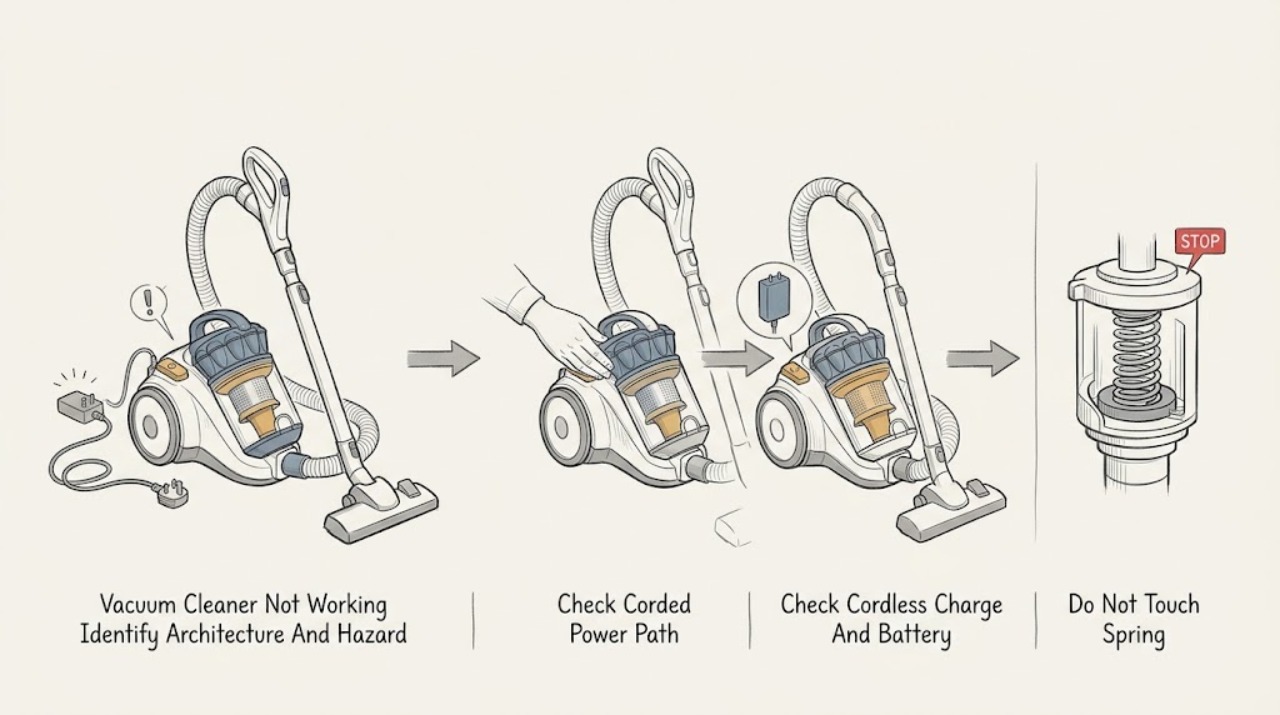
First identify the architecture: a corded Dyson upright or cylinder vacuum needs a safe cable, wall outlet, switch, and model-appropriate plug/fuse check; a cordless Dyson needs a charged battery, an undamaged battery casing, and its normal charger or dock. Dyson says not to use a machine with a damaged cable or cracked/damaged cordless battery, and says blocked airflow can trigger a safety cutout. With power disconnected, let a machine that stopped during use cool, then check only the accessible hose, wand, bin, cyclone, cleaner head, brush bar, and filter for blockages or incorrect seating. Wash a washable filter only as the exact model guide directs and refit it completely dry; do not assume a cordless filter procedure applies to a corded model. A brush bar that stops can be jammed by hair or debris, but a vacuum that remains dead, repeatedly cuts out after clear airflow, or has an electrical, battery, smoke, spark, liquid, or burning-odor warning needs qualified service. Do not open a battery, motor, control housing, or cord reel, bypass thermal protection, or perform live electrical tests.
Before you begin
Safety first
- The user may inspect a corded cable, plug, and outlet without using damaged equipment; use the normal cordless charger or dock; empty the bin; clear accessible tool/airway/brush-bar debris; and clean and fully dry a removable filter as the exact model guide permits. Cord-reel, battery-pack, motor, control, internal wiring, thermal protection, live contacts, and sealed or energized cleaner-head repairs are for qualified personnel.
Work through in order
Diagnostic checks
Use only checks that match the exact appliance or system and its official guide.
-
Check 1
From a dry position, identify whether the Dyson is corded (upright/cylinder) or cordless (stick/handheld), then note whether it is completely dead, starts and cuts out, pulses, loses suction, or only has a brush-bar problem. Look for smoke, sparks, burning/electrical odor, unusual heat, liquid, exposed wiring, a damaged cable/plug, or a cracked/damaged battery casing.
Expected result: The machine is corded or cordless; there is no response, a power/charge alert, a cutout or pulse, poor pickup, a stopped brush bar, or a safety hazard.
Next step: For a hazard, stop using and charging the vacuum and isolate it from combustible material without touching hot, leaking, or damaged parts. Otherwise take the corded or cordless power path before disassembling any accessible maintenance part.
Stop if: Stop immediately for smoke, sparks, burning/electrical odor, unusual heat, liquid near electrical parts, exposed wiring, cable/plug damage, or a cracked, swollen, leaking, or damaged cordless battery.
Why this matters
Why: The architecture determines the first power check. A dead corded unit makes outlet, switch, cable, plug/fuse, or internal power more likely; a dead cordless unit makes charge, battery, charger, or main-body power more likely. Cutout/pulsing makes airflow or thermal protection more likely, while a brush-bar-only symptom points toward the cleaner head. A hazard overrides all checks.
-
Check 2
For a corded Dyson only, unplug the machine and inspect the complete visible cable, plug, and strain relief. If they are intact, plug directly into a known working wall socket that is switched on and follow only the exact model's documented plug/fuse check. Do not open the cord reel, bypass a fuse, use damaged wiring, or substitute an extension cord as a repair.
Expected result: The cable or plug is damaged, the outlet is off or dead, the model's plug fuse check identifies a fault, the outlet becomes warm, a breaker trips, or the vacuum remains dead on a stable supply.
Next step: Do not use a damaged cable or plug. Have a qualified electrician address a warm outlet or recurring circuit trip; arrange qualified appliance service if the corded vacuum remains dead on a stable, safe supply.
Stop if: Do not plug in damaged equipment, defeat grounding or a fuse, repeatedly reset a breaker, touch a wet/hot outlet, or remove the cord-reel or motor housing.
Why this matters
Why: Dyson lists cable damage, a non-working wall socket, and a plug fuse issue among corded power checks. A warm outlet or recurring trip is an electrical fault, not a vacuum maintenance adjustment. Power at the socket with no vacuum response makes an internal switch, cord reel, motor, or control fault more likely.
-
Check 3
For a cordless Dyson only, switch the vacuum off and connect it to the normal model-specific charger or dock. Observe the expected charging indication and inspect only the accessible battery casing, charger, connector, and dock for visible damage. Do not substitute a charger, bridge contacts, or open the battery pack.
Expected result: The normal charge indication appears and operation returns; no charge indication appears; the battery casing or charger is damaged; or the vacuum stays dead after a normal charge.
Next step: Follow one normal charging check from the exact model guide. If charging remains abnormal, the casing is damaged, or the vacuum stays dead, stop and arrange qualified service; do not open or test the battery pack.
Stop if: Do not use or charge a cracked, swollen, leaking, wet, hot, or damaged battery, charger, cable, or connector.
Why this matters
Why: A restored response after charging makes a depleted battery more likely. No charging indication can involve the charger, dock, battery, contacts, or charge control. Dyson says a cracked or damaged battery casing must not be used; a sound charged battery with no response makes a battery, main-body, trigger, or control fault more likely.
-
Check 4
If the vacuum cut out, pulses, or became hot, switch it off, unplug a corded model or disconnect a cordless model from its charger, and let it cool. Then remove only the wand, hose, cleaner head, and other user-removable tools specified by the exact manual. Check the hose/wand ends, bin inlet, cyclone opening, cleaner-head neck, and visible airway for loose hair or debris.
Expected result: A blockage or full bin is visible; the vacuum runs with a tool removed but stops with it attached; the airways are clear; or the machine cuts out again immediately.
Next step: Remove only accessible debris, empty the bin, refit the user parts, and perform one normal retest. If the blockage is inaccessible or cutout recurs with clear paths, stop and arrange service.
Stop if: Do not reach into a moving brush bar, force a jam, push sharp tools deep into an airway, operate without required guards/filters, or open the motor body.
Why this matters
Why: A blockage or tool-dependent cutout makes restricted airflow more likely. Dyson describes blocked airflow as a safety cutout condition for cordless models, and its cylinder manual says a blockage can overheat and trigger thermal cutout. Clear accessible paths can restore operation; recurrence with clear paths makes a thermal, motor, or control fault more likely.
-
Check 5
With power removed, empty the bin and verify the bin base, cyclone, and filter are seated as the exact model guide shows. If the model has a washable filter and the filter is dirty or an alert points to it, wash it only by that model's instructions and leave it in good airflow until completely dry before refitting. Do not wash electrical parts or use an oven, dryer, dishwasher, or flame to dry a filter.
Expected result: The bin is overfilled, the cyclone or filter is mis-seated, the filter is dirty or damp, the filter alert clears after a fully dry refit, or the vacuum remains dead/weak/cuts out with a clear, dry, correctly assembled path.
Next step: Refit only clean, completely dry, model-correct parts and test once. If a latch will not engage, a seal is damaged, or the symptom persists, leave the machine off and arrange service.
Stop if: Do not run with a required filter, bin, guard, or seal missing or damp, immerse a cyclone/electrical body, or use forced heat to dry a filter.
Why this matters
Why: A full bin, dirty cyclone, blocked filter, damp filter, or incorrect seating can reduce airflow and prevent normal operation. Dyson's V15 guidance gives a minimum 24-hour drying period for that model, while other Dyson designs differ. Continued symptoms after correct maintenance make an electrical, battery, motor, thermal, or control issue more likely.
-
Check 6
If suction is present but the cleaner head is not picking up or the brush bar has stopped, switch off and unplug the corded vacuum or disconnect the cordless vacuum from its charger. Check the brush bar, end cap, cleaner-head neck, connector, and visible airway using only the release procedure for that model; remove loose hair or fibers without forcing the bar.
Expected result: Hair/debris is wrapped around the brush bar, the brush bar turns freely after accessible cleaning, the head works when directly connected as the model permits, or the brush bar remains stopped on a clear head.
Next step: Reassemble the head securely and test once on a suitable surface. If the bar remains stopped on a clear head, the head cannot be safely opened, or the vacuum itself cuts out, arrange service rather than bypassing the drive or protection.
Stop if: Keep hands and clothing away from a powered brush bar. Do not remove a cover without the exact model procedure, force a jam, cut wiring, or work on a motorized head while connected to power.
Why this matters
Why: Dyson says hair or debris commonly jams a brush bar and directs users to turn off and unplug before clearing it. A clear brush bar that remains stopped can indicate a cleaner-head, connector, wand, control, or motorized-drive fault; it does not prove which part failed.
-
Check 7
If the corded power path or cordless charge path is normal, the bin, cyclone, airway, cleaner head, brush bar, and fully dry filter are correctly maintained, and the vacuum still will not work or repeatedly cuts out, stop testing. Record the model, architecture, charge/outlet behavior, indicator or alert, time before cutout, tool-dependent behavior, and any heat, odor, noise, impact, liquid, or electrical event.
Expected result: The machine remains dead, trips a circuit, cuts out with no visible blockage, shows a persistent alert, has a brush bar fault after cleaning, or has abnormal heat, odor, noise, or physical damage.
Next step: Leave the vacuum out of use and arrange qualified Dyson or appliance service. Provide the model and the diagnostic record; isolate power or charging only from a dry safe position when a hazard is present.
Stop if: Do not open a battery, motor, cord reel, control, or cleaner-head housing; bypass thermal/electronic protection; probe live contacts; or perform energized tests.
Why this matters
Why: The issue has moved beyond user-level power and maintenance checks. Possible scope includes cord, switch, plug/fuse, battery, charger, thermal protection, motor, cleaner-head drive, or control electronics, but the symptom cannot safely select a replacement part.
Use your observations
Decision map
Find the observation that best matches what you see, then follow the next safe action.
-
PATH 01Next step
What you see
The Dyson is an upright or cylinder machine with no motor response, and the corded cable, plug, outlet, or switch has not yet been separated.
Do this next
Inspect the visible cable and plug, check a known working outlet, and follow only the exact model's fuse guidance. Stop for damage, heat, or recurring trips; service is needed when a stable supply does not restore operation.
Why this path and its safety boundary
Why it matters: The first decision is the mains path: damaged cable/plug, outlet or switch state, model-specific plug fuse, or an internal cord/switch/motor fault. A battery diagnosis does not apply.
-
PATH 02Next step
What you see
The Dyson is a cordless stick or handheld and shows no response or an abnormal charging indication.
Do this next
Use the model's normal charger or dock and inspect accessible casing only. If a normal charge does not restore operation or the battery/charger is damaged, arrange service without opening the pack.
Why this path and its safety boundary
Why it matters: A depleted or faulty battery, charger, dock, contacts, or main body is more likely than a cord or plug-fuse problem. A damaged battery casing is a stop-use condition.
-
PATH 03Next step
What you see
The vacuum starts but pulses, loses airflow, becomes hot, or shuts off during use.
Do this next
Disconnect power, let it cool, clear accessible airways, empty the bin, and clean/dry the filter as the exact model directs. Do not keep restarting a machine that cuts out again.
Why this path and its safety boundary
Why it matters: A blocked airway, full bin, dirty/damp filter, dirty cyclone, or cleaner-head restriction is more likely; Dyson documents airflow and thermal protection responses. If those paths are clear and the symptom recurs, a thermal, motor, battery, or control fault becomes more likely.
-
PATH 04Next step
What you see
The main vacuum runs and has suction, but one cleaner head, wand, hose, or brush bar does not work.
Do this next
With power removed, clear only visible obstructions and reassemble the tool using the exact model instructions. A clear head that still fails needs service; do not bypass the drive or test it while connected.
Why this path and its safety boundary
Why it matters: A hair/debris jam, tool airway restriction, connector issue, or motorized-head drive fault is more likely than total vacuum power failure. Dyson identifies brush-bar jams as a common condition.
-
PATH 05Safety boundary
What you see
A stable corded supply or normal cordless charge is available, accessible maintenance parts are clear and correctly fitted, but the vacuum stays dead, cuts out, shows a persistent alert, trips a circuit, or has heat, odor, smoke, sparks, liquid, or physical damage.
Do this next
Stop using or charging and arrange qualified service. Provide the model, architecture, symptom pattern, alert, and checks already completed; do not select or install an internal part from the symptom alone.
Why this path and its safety boundary
Why it matters: This is beyond a user-level check and may involve the cord, switch, battery, charger, thermal protection, motor, cleaner-head drive, or electronics. A hazard requires immediate stop-use handling.
Safety stop: Do not open housings, bypass protection, probe live contacts, or restart a hot, wet, smoking, sparking, or damaged machine.
Helpful context
Understand the symptom
Choose the corded or cordless path first
“Dyson vacuum cleaner” covers corded upright and cylinder machines as well as cordless stick and handheld designs. A dead corded machine is first an outlet, switch, cord, plug/fuse, or internal power question; a dead cordless machine is first a charge, battery, charger, or control question. The airflow and brush-bar checks overlap, but the power checks do not. Use the exact model support guide for release buttons, filter count, brush-bar access, and indicator meanings.
Corded Dyson: inspect power without energizing damaged equipment
Before plugging in a corded Dyson, inspect the entire visible cable, plug, and strain relief. Dyson says not to plug in or use a machine with cable damage. If the cable is intact, confirm the wall socket is switched on and use only the plug/fuse procedure documented for that model; do not bypass a fuse, use an extension as a workaround, or open a cord reel. A recurring trip or warm outlet is an electrical stop condition.
Cordless Dyson: check charge, battery casing, and alerts
Use the normal Dyson charger or dock and note whether the model's expected charging indication appears. Inspect only the accessible battery casing and connector. A cracked or damaged casing should not be used. If the machine starts and cuts out, allow it to cool before checking airflow; a battery alert, filter alert, or blockage alert is a direction to follow the exact model guide, not proof that a particular part should be replaced.
Clear airways, bin, filter, and brush bar with power removed
Unplug a corded vacuum or disconnect a cordless vacuum from its charger before removing a tool, bin, hose, wand, filter, or brush bar. Empty the bin, inspect the hose or wand ends, cleaner-head neck, inlet, cyclone opening, and brush bar, and remove only accessible debris. Wash filters only with the exact model's instructions; a filter must be completely dry before refitting. Do not reach into a moving brush bar, push sharp objects deep into the airway, or immerse a cyclone or electrical body.
Treat a thermal cutout as a symptom, not a reset fix
If the vacuum stopped after a blockage or the motor became hot, leave it switched off and disconnected while it cools, then clear the accessible restriction before one normal retest. Dyson's cylinder guidance describes an automatic thermal cutout when a part is blocked. If the machine cuts out again with the airway, bin, filter, and cleaner head correctly maintained, do not keep restarting it; service is needed to assess the motor, thermal protection, power path, or control.
Safety boundary
Stop conditions
- Stop immediately for smoke, sparks, burning/electrical odor, unusual heat, liquid near electrical parts, exposed wiring, a damaged cord or plug, or a cracked, swollen, leaking, hot, or damaged cordless battery or charger.
- Do not plug in or charge damaged equipment, defeat a plug fuse or grounding, bypass thermal/electronic protection, or repeatedly reset a tripping circuit.
- Switch off and unplug a corded vacuum or disconnect a cordless vacuum from its charger before changing tools, emptying the bin, checking a hose/airway, removing a filter, or clearing a brush bar.
- Do not reach into a moving brush bar, force a jam, push sharp objects deep into an airway, or operate without required bins, filters, guards, or seals.
- Do not immerse a cyclone or electrical body, refit a damp filter, use forced heat or a household appliance to dry a filter, or open the battery, motor, cord reel, control, or cleaner-head housing.
- Arrange qualified service when corded or cordless power is normal but the vacuum remains dead, cuts out with clear airflow, has a persistent alert, or a clear brush bar/tool still fails.
When checks do not resolve it
Need a professional?
Arrange qualified Dyson or appliance service when a corded vacuum remains dead on a stable supply, a cordless vacuum remains dead after a normal model-directed charge, or either architecture repeatedly cuts out after the bin, cyclone, airway, cleaner head, brush bar, and completely dry filter are correctly maintained. Stop immediately for smoke, sparks, burning/electrical odor, unusual heat, liquid near electrical parts, exposed wiring, cable/plug damage, or a cracked, swollen, leaking, hot, or damaged battery or charger. Do not open housings, bypass protection, or perform live tests.
Safety scope: The user may inspect a corded cable, plug, and outlet without using damaged equipment; use the normal cordless charger or dock; empty the bin; clear accessible tool/airway/brush-bar debris; and clean and fully dry a removable filter as the exact model guide permits. Cord-reel, battery-pack, motor, control, internal wiring, thermal protection, live contacts, and sealed or energized cleaner-head repairs are for qualified personnel.
Common questions
FAQ
What should I check first when my Dyson vacuum cleaner is not working?
First identify whether it is corded or cordless. For a corded upright or cylinder, inspect the visible cable and plug, check a working wall socket, and follow the exact model's plug/fuse guidance. For a cordless machine, check normal charging and the accessible battery casing. Then, with power removed, check for a full bin, blocked airway, dirty filter, cyclone restriction, or cleaner-head jam.
Why does my Dyson vacuum stop after running for a while?
A blockage or restricted airflow can make the vacuum overheat or trigger its protective cutout. Let it cool with power disconnected, then check the bin, hose or wand, cyclone, filter, cleaner head, and brush bar as the exact model guide directs. If it cuts out again with clear, correctly fitted parts, stop repeated restarts and arrange service.
Is the troubleshooting different for a corded and cordless Dyson vacuum?
Yes. A corded vacuum's first path is cable, plug, wall socket, switch, and the model-specific plug/fuse arrangement. A cordless vacuum's first path is battery charge, charger or dock, battery-casing condition, and charging indication. Airflow, bin, filter, and brush-bar checks overlap, but do not apply a cordless battery procedure to a corded model or open either machine's power housing.
Can a full bin or dirty filter make a Dyson vacuum stop working?
Yes. A full bin, dirty cyclone, clogged or damp filter, or blocked airway can reduce airflow and contribute to poor pickup, pulsing, or thermal cutout. Empty the bin and clean the filter only as the exact model guide allows; refit a washable filter only when completely dry. Persistent symptoms with clear airflow need service.
Why is my Dyson vacuum running but the brush bar is not spinning?
Hair, fibers, or debris can jam the brush bar or its cleaner-head airway. Switch off and unplug a corded machine, or disconnect a cordless machine from its charger, before checking the bar and visible neck for an obstruction. If it is clear but still does not spin, the cleaner head, connector, wand, or drive may need qualified service.
When should I stop troubleshooting a Dyson vacuum cleaner?
Stop for smoke, sparks, burning or electrical odor, unusual heat, liquid near electrical parts, exposed wiring, a damaged cable or plug, or a cracked, swollen, leaking, hot, or damaged cordless battery or charger. Also stop when the vacuum remains dead after a normal corded supply or cordless charge, repeatedly cuts out with clear airflow, or has a persistent alert. Do not open housings, bypass protection, or perform live tests.
Read the exact guide
Official sources
- USING YOUR DYSON MACHINEDyson · DC47-specific examples used for corded safety, unplug-before-service, bin/filter requirements, brush-bar behavior, thermal cutout, blockage inspection, and filter drying; other Dyson machines differ.
- Support | Dyson V15 Detect™ vacuum | DysonDyson · V15-specific examples used for cordless no-power, cutout/pulsing, bin/cyclone/tools, filter care, alerts, and service boundaries; other Dyson models differ.
- Support | No Power | DysonDyson · General Dyson guidance that separates corded upright/cylinder checks from cordless battery, battery-casing, and blocked-airway checks; exact model controls the detailed procedure.
- Support | Brush bar not spinning | DysonDyson · General Dyson brush-bar guidance for hair/debris jams, model-specific brush-bar access, and power disconnection before clearing; exact cleaner-head design differs.
Community feedback
Share a repair observation
Share a plain-text repair observation. Accepted observations are published automatically; this page may take a moment to update.