
On this page
Start here
Quick answer
A vacuum cleaner that will not work should be separated into no power or indication, a protection stop after brief running, and a control that lights but will not start. Check the exact model's power and charging path, then inspect only the accessible wand, head, bin, brush bar, and dry filter for blockage or seating. If it remains dead after those checks, repeatedly stops, or shows heat, odor, or cord or battery damage, stop using it and arrange Dyson or qualified service.
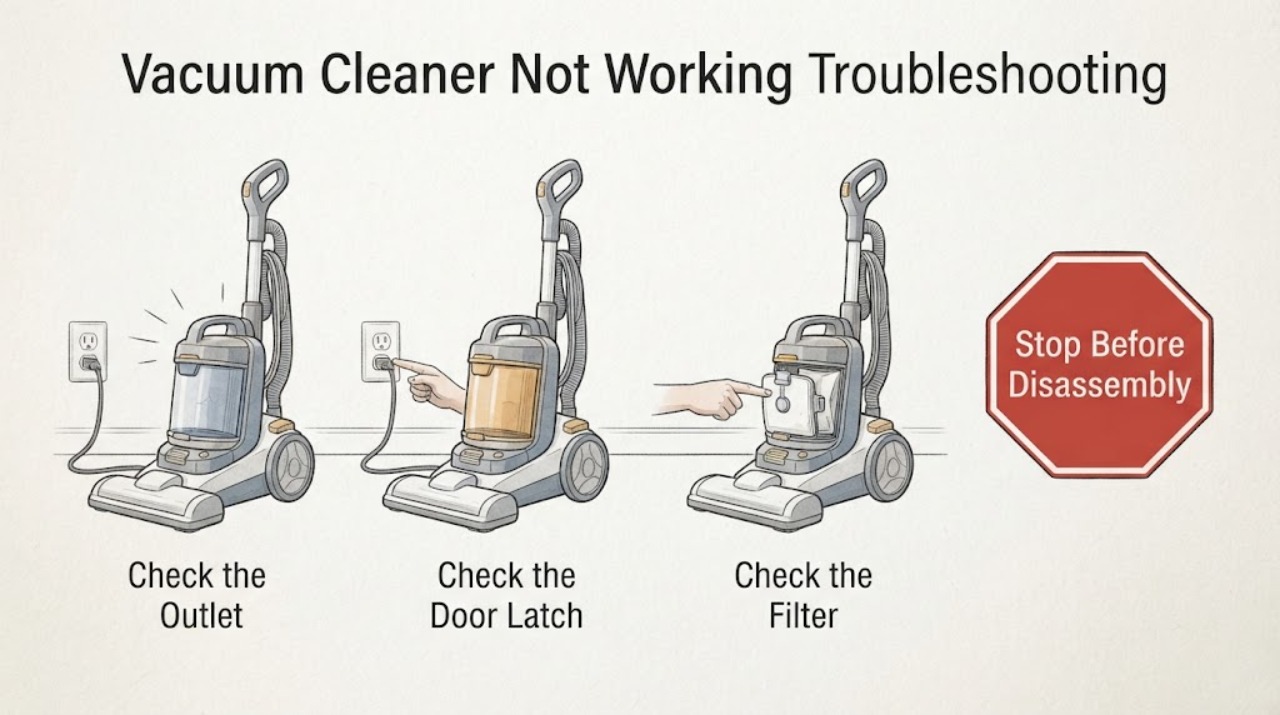
Work through in order
Diagnostic checks
Use only checks that match the exact appliance or system and its official guide.
-
Check 1
Confirm the vacuum's control state and power source: check whether the display or indicator is active, the trigger or power switch responds, and the charger is connected to a working outlet when charging is required. Do not use a damaged charger or cord.
Expected result: There is no indicator, the indicator is present but the motor does not start, the charger behaves abnormally, or the controls respond normally.
Next step: Use the exact Dyson model charging and reset procedure. If the charger, cord, or battery is hot or damaged, disconnect safely and stop using it.
Why this matters
Why: No indication points first to power, charger, battery, or control state. An active indication with no motor points toward a protection, airflow, motor, or control problem rather than a dead outlet alone.
-
Check 2
With the vacuum off and disconnected, inspect the wand, floor head, bin inlet, brush bar, and accessible air path. Remove only loose debris described by the model guide and check that the bin and head latch fully.
Expected result: The brush bar or air path is blocked, a bin or head is mis-seated, or the accessible path is clear and the vacuum remains dead.
Next step: Correct the accessible condition and make one controlled start attempt. If the motor remains off, do not open the motor or battery housing.
Why this matters
Why: A blockage or seating fault can prevent a vacuum from starting or can invoke protection. A clear path shifts attention to the battery, charger, motor, or control path.
-
Check 3
Check the filter condition and fit using the exact Dyson instructions. Note whether it is wet, heavily loaded, missing, or correctly installed; never run the vacuum with a wet or omitted filter.
Expected result: The filter or bin condition is abnormal, or it is clean, dry, correctly fitted, and the vacuum still will not run.
Next step: Clean and dry or refit only as the model guide permits, then test once. Persistent failure needs service.
Why this matters
Why: Restricted airflow or incorrect filter fit can stop operation on some models. A correct filter makes a battery, charger, switch, sensor, or motor fault more likely without identifying which one.
-
Check 4
Note whether the vacuum stops immediately, runs briefly and stops, or never starts, and whether any light or error appears after it has warmed. Record the pattern before disconnecting the charger or vacuum.
Expected result: The motor runs briefly then stops, no light appears, or a repeatable error or light occurs.
Next step: Do not repeatedly cycle a vacuum that stops or overheats. Give Dyson the timing, model, and indicator record.
Why this matters
Why: Brief operation followed by a stop can fit protection from airflow or temperature; no light keeps power and charging in focus; a repeatable code needs product-specific support.
Use your observations
Decision map
Find the observation that best matches what you see, then follow the next safe action.
-
PATH 01Next step
What you see
The vacuum starts after an accessible blockage, bin, head, or dry-filter seating issue is corrected and no heat or damage is present.
Do this next
Keep the filter and air path maintained according to the model guide and stop if the symptom returns.
Why this path and its safety boundary
Why it matters: An airflow or maintenance condition is more likely than a confirmed motor or battery failure.
-
PATH 02Next step
What you see
The charger and accessible parts appear normal but the vacuum never starts, or it runs briefly and stops again.
Do this next
Keep it out of use and contact Dyson or a qualified technician with the model and timing record.
Why this path and its safety boundary
Why it matters: A battery, charger, thermal protection, motor, switch, sensor, or control fault remains possible.
-
PATH 03Next step
What you see
The charger, cord, battery, or vacuum becomes unusually hot, smells burned, sparks, or trips the circuit.
Do this next
Stop using and charging it, isolate the supply only if safe, and arrange qualified service.
Why this path and its safety boundary
Why it matters: This is an electrical or battery safety boundary, regardless of whether the vacuum also displays an error.
Helpful context
Understand the symptom
Start with what the vacuum actually does: no indicator, an active display with no motor, or a motor that runs briefly and stops. That distinction separates power and charging checks from airflow or protection checks. Dyson's support flow is product-specific, so the full model and any indicator pattern should travel with the service request.
When checks do not resolve it
Need a professional?
Stop using the vacuum and arrange Dyson or qualified service for smoke, burning odor, sparks, a hot or damaged cord, repeated circuit trips, liquid ingress, a recurring error after the model's documented reset, or any internal battery, motor, charger, sensor, or control work.
Common questions
FAQ
Why does it run briefly and stop?
A blockage, filter condition, thermal protection, battery, or motor issue can produce that pattern. Clear only accessible parts as the model guide allows and stop if it returns.
Should I open the battery or motor housing?
No. Keep the diagnosis to external checks and the exact model guide. Internal battery, motor, charger, sensor, and control work needs qualified service.
What information helps service?
Record the model, whether an indicator appears, whether it runs briefly, the charging behavior, and every accessible check performed.
Read the exact guide
Official sources
- Support | Troubleshooting | DysonDyson · vacuum cleaner not working, product-specific troubleshooting and service escalation
- Support | Troubleshooting | DysonDyson · vacuum cleaner status or error display and product-specific support
Community feedback
Share a repair observation
Share a plain-text repair observation. Accepted observations are published automatically; this page may take a moment to update.