
On this page
Start here
Quick answer
A Dyson vacuum that becomes hot, pulses, or cuts out is often reacting to restricted airflow from a blocked airway, cleaner head, bin/cyclone, or dirty filter. Turn it off and disconnect it from the charger or mains before checking anything, then let it cool for the period specified by the exact model; Dyson manuals commonly require about 1–2 hours after a thermal cut-out. Empty the bin before the MAX mark, clear only accessible blockages, and wash a filter only when the model manual permits it, using the specified method and allowing it to dry completely before refitting. Refit every part securely before a brief supervised test. Stop using the vacuum for smoke, a burning or electrical smell, sparks, a hot or damaged cord/plug/charger, a swollen or leaking battery, repeated cut-outs after the safe checks, or overheating with no obvious airflow restriction. Do not run the machine while inspecting it, bypass the thermal cut-out, open the motor or battery, or perform live electrical tests.
Before you begin
Safety first
- The user may isolate power, allow cooling, empty the bin, inspect accessible airways, and clean or wash filters only as the exact manual permits. Motor, thermal protection, wiring, charger, battery, control electronics, hidden blockages, live testing, and internal part replacement are for Dyson or qualified personnel.
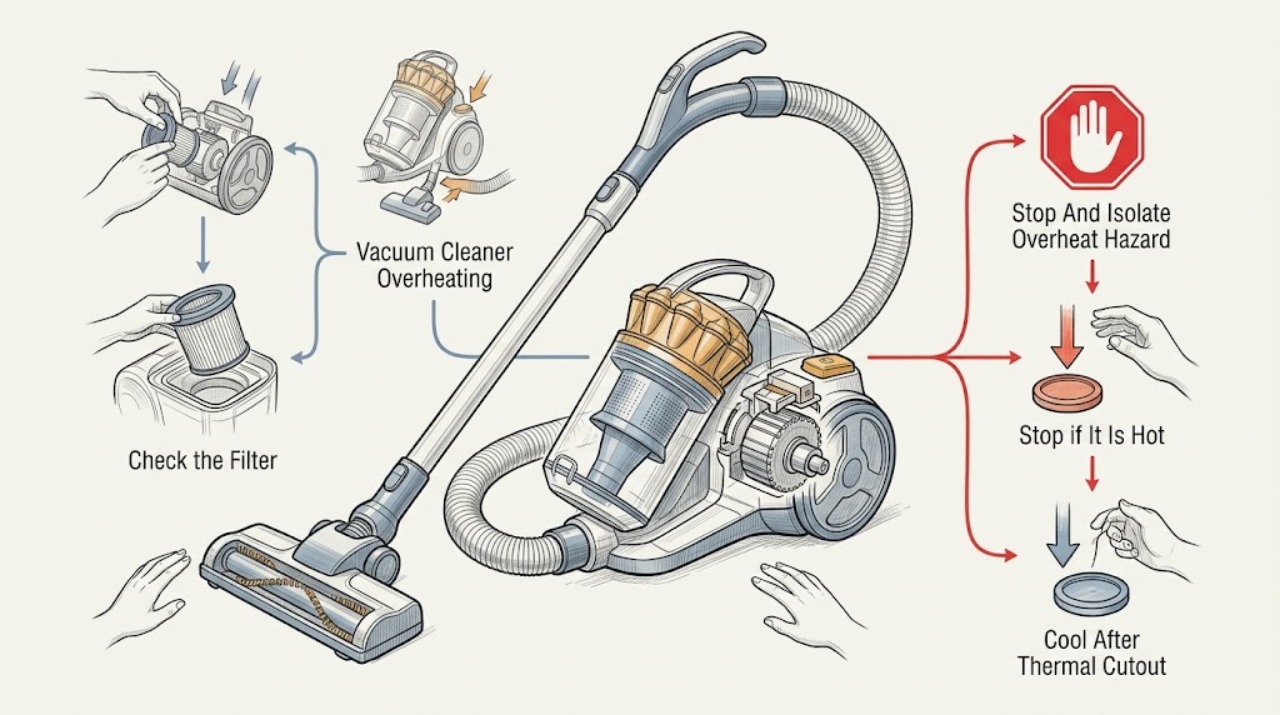
Work through in order
Diagnostic checks
Use only checks that match the exact appliance or system and its official guide.
-
Check 1
Turn the vacuum off immediately. Disconnect a corded machine from the wall or remove a cordless machine from its charger without touching a hot or wet connection. From a safe position, look for smoke, flames, burning/electrical odor, sparks, melted or discolored plastic, a hot/damaged cord, plug, charger, or battery, or liquid leaking from a battery.
Expected result: There is a fire/electrical/battery warning; the vacuum is simply hot and has stopped or pulsed; or it is warm but still running normally with no other symptom.
Next step: For any hazard, keep the machine disconnected, move people away, and obtain appropriate emergency, electrical, battery, or Dyson service help. For a non-hazardous cut-out, proceed only after the machine has cooled completely.
Stop if: Do not touch leaking battery fluid, charge a hot/damaged battery, unplug through water, restart a smoking or sparking machine, or repeatedly reset a tripping outlet.
Why this matters
Why: Smoke, burning smell, arcing, damaged power parts, or battery leakage is not an airflow-cleaning problem. A hot machine that has cut out may have activated its protective system, but its cause is not yet established.
-
Check 2
After power is isolated, note whether the motor pulsed or stopped during use, whether suction had fallen, and how long the machine had been running. Leave it to cool for the exact model's documented period before removing a filter or checking an airway; where the manual does not give a different period, Dyson vacuum guidance commonly uses a one- to two-hour cooling interval after a thermal cut-out.
Expected result: The vacuum cools and remains normal afterward; it is still hot; it cuts out again before cooling; or the model manual gives a different cooling instruction.
Next step: Wait until cool before inspection, then use the exact manual to check filters, bin, wand, hose, airways, and cleaner head. If it remains hot or cuts out again without inspection, stop and arrange service.
Stop if: Do not test the vacuum while hot, hold a trigger down to defeat a cut-out, or use a fan/heater/open flame to force cooling.
Why this matters
Why: A cool-down that restores operation once can fit a protective response to restricted airflow. Continued heat or an immediate repeat indicates that the protection is still being triggered or another fault exists; model-specific instructions take priority over a generic time.
-
Check 3
With the machine cool and disconnected, inspect the filter or filters for visible dust loading. Wash or dry-clean them only if the exact Dyson manual instructs that method: some filters are washed in cold water, while other filter meshes or cages must be brushed dry. Do not use detergent or chemicals unless the model manual explicitly says otherwise, and leave a washed filter to dry completely for the stated time before refitting.
Expected result: The filter is visibly blocked or overdue for the model's maintenance; it was recently washed but is damp; or it is clean, dry, correctly seated, and the machine still overheats.
Next step: Clean and dry the filter exactly as the model guide shows, refit it fully, and continue to the airway check. If the filter is damaged, cannot dry fully, or overheating persists after correct maintenance, keep the machine off and contact Dyson.
Stop if: Do not operate without the required filter, refit a damp filter, put it in an oven/dryer/dishwasher, use a naked flame, or wash a filter that the model guide says to clean dry.
Why this matters
Why: Dyson identifies filter restriction as a common reason for a thermal cut-out. A damp or incorrectly seated filter can itself restrict airflow, while a clean, dry filter that does not change the symptom makes a different blockage or internal fault more likely.
-
Check 4
Still disconnected, empty the clear bin before the MAX mark and check the user-accessible inlet, cyclone shroud, wand, hose, airways, cleaner head, and brush bar for lint, hair, or a lodged object. Follow the exact manual for removing only approved attachments or the brush bar. Use care around sharp debris, do not run the vacuum during the inspection, and refit each part securely.
Expected result: A blockage or overfilled bin is found; the brush bar or airway is restricted; all accessible paths are clear; or a blockage cannot be reached without opening the main body.
Next step: Remove only the visible blockage using the model-approved procedure, empty the bin, refit all components, and allow a brief supervised test only after the filter is dry. If the blockage is hidden or the cut-out returns, arrange service.
Stop if: Do not insert sharp or powered tools, operate while a part is removed, dismantle the motor/cyclone, or force an object through an airway.
Why this matters
Why: Dyson manuals link blocked tools, wands, hoses, airways, cleaner heads, or overfilled bins with reduced airflow and automatic cut-out. A hidden obstruction or clear path with continued overheating cannot be resolved safely by pushing objects deeper or opening the motor housing.
-
Check 5
Only after the vacuum is cool, the correct dry filter and bin are installed, all accessible blockages are cleared, and every latch/connection is secure, perform a short supervised test in the normal mode. Stop immediately if it becomes unusually hot, pulses, smells abnormal, loses suction, shows a fault light, or cuts out again. Record the model, serial number, runtime before the event, filter history, blockage found, and any light or smell.
Expected result: The machine runs normally without abnormal heat; it overheats or cuts out again; or it shows a power, battery, cord, charger, or fault indication.
Next step: Resume use only if the model manual permits it and operation remains normal. Otherwise leave the vacuum disconnected and contact Dyson or a qualified service provider with the recorded observations.
Stop if: Do not keep restarting to reproduce overheating, bypass the thermal cut-out, open the battery or motor, perform live tests, or use an unapproved replacement charger or part.
Why this matters
Why: A normal short test after correct maintenance supports a cleared airflow restriction, but it does not validate a machine that remains unusually hot. A repeat cut-out or electrical/battery symptom needs professional diagnosis rather than more resets.
Use your observations
Decision map
Find the observation that best matches what you see, then follow the next safe action.
-
PATH 01Safety boundary
What you see
The vacuum pulsed or stopped once, had reduced suction or a visible blockage/dirty filter, cooled fully, and then ran normally after the model-correct cleaning and refit.
Do this next
Keep the filter-maintenance and bin-emptying schedule in the exact manual and stop if the heat or cut-out recurs.
Why this path and its safety boundary
Why it matters: A temporary protective response to restricted airflow is more likely than a confirmed motor failure, but normal operation should still be monitored.
Safety stop: Do not treat a second cut-out, burning odor, smoke, or electrical symptom as normal maintenance.
-
PATH 02Safety boundary
What you see
The filter is visibly loaded, recently washed, damp, incorrectly seated, or cleaned using a method not intended for that model.
Do this next
Clean or dry the filter exactly as the model manual specifies, refit it securely, and do not test until it is completely dry.
Why this path and its safety boundary
Why it matters: Filter restriction or moisture can reduce airflow and trigger protection; a filter that is clean, fully dry, and correctly seated but still causes heat points elsewhere.
Safety stop: Do not operate without the filter or with a damp filter, and do not use heat, chemicals, or a machine dryer to speed drying.
-
PATH 03Safety boundary
What you see
Suction is weak or pulsing and lint, hair, a full bin, or an obstruction is present in the inlet, bin/cyclone, wand, hose, airway, cleaner head, or brush bar.
Do this next
Disconnect, clear the accessible obstruction, empty the bin, refit all parts, and allow a brief supervised retest after cooling and filter drying.
Why this path and its safety boundary
Why it matters: The obstruction is a plausible airflow cause of overheating and automatic cut-out, but it must be removed only through the model-approved user procedure.
Safety stop: Stop if the obstruction is hidden, sharp, stuck, or requires main-body disassembly; do not run the vacuum while inspecting it.
-
PATH 04Safety boundary
What you see
There is a burning/electrical smell, smoke, sparking, melted plastic, a hot or damaged cord/plug/charger, a swollen or leaking battery, or repeated breaker/charger behavior.
Do this next
Keep the machine disconnected, do not touch leaking battery material, and obtain appropriate Dyson, electrical, or battery service help.
Why this path and its safety boundary
Why it matters: The immediate fire, shock, or chemical risk overrides filter and blockage troubleshooting; overheating is not safely attributable to airflow.
Safety stop: Do not charge, restart, open, short, puncture, cool with water, or dispose of a damaged battery yourself.
-
PATH 05Safety boundary
What you see
The correct dry filter is installed, accessible airways are clear, the bin and attachments are secure, but the machine repeatedly becomes hot, pulses, or cuts out.
Do this next
Stop using the vacuum and arrange Dyson support or qualified service. Provide the model/serial number, timing, filter method, blockages checked, and any indicator or smell.
Why this path and its safety boundary
Why it matters: A hidden restriction, motor, thermal protection, control, power, charger, or battery fault is more likely; no user-level check identifies the failed component.
Safety stop: Do not repeatedly reset, run without filters, bypass thermal protection, or replace a motor, battery, control, or thermal component based on the symptom alone.
Helpful context
Understand the symptom
Overheating is a symptom, not a part diagnosis
Dyson vacuum families use different filters, bins, motors, batteries, and airflow paths. Most have a protective cut-out that may stop the motor when airflow is restricted, but a cut-out does not prove that the filter is the only problem. Reduced suction, pulsing, a hot body, an unusual smell, a fault light, or a machine that repeatedly stops changes the diagnosis. First distinguish a one-time cut-out after a blockage from an electrical, battery, or recurring fault.
Cool and isolate before looking for the cause
A motor that has just stopped may still be hot. Switch off and unplug a corded model, or remove a cordless model from its charger, and leave it undisturbed until the exact manual's cooling period has passed. Dyson instructions warn not to operate while checking blockages and to beware of sharp objects. Empty the bin, inspect the user-accessible filter and airways, and clean only the parts and method shown for that model. A washed filter that is still damp can restrict airflow or damage the machine when restarted.
Repeated overheating needs service
If the vacuum overheats again after the filter is correctly cleaned and fully dry, accessible blockages are cleared, and every part is correctly seated, do not keep cycling it to reproduce the problem. The remaining possibilities include a hidden restriction, motor or control fault, thermal-protection problem, damaged cord/charger, or battery issue. Burning odor, smoke, sparking, melted plastic, a hot connection, or battery leakage is an immediate stop-use boundary. Dyson limits maintenance to the manual or Dyson support advice; internal diagnosis belongs to a qualified technician.
Safety boundary
Stop conditions
- Switch off and disconnect the vacuum before cooling, filter work, bin emptying, or blockage checks; do not operate while inspecting an airway.
- Stop immediately for smoke, flames, burning/electrical odor, sparks, melted plastic, a hot/damaged cord, plug, charger, or battery, or battery leakage/swelling.
- Do not run with a missing, damp, damaged, or incorrectly seated filter, or with the bin/airway/cleaner-head parts unsecured.
- Do not bypass the thermal cut-out, open the motor or battery, bridge contacts, perform live electrical tests, or use an unapproved charger or part.
- If overheating or cut-out recurs after the exact manual's filter and blockage checks, leave the machine off and obtain Dyson or qualified service.
When checks do not resolve it
Need a professional?
Contact Dyson or a qualified service provider when the vacuum repeatedly overheats or cuts out after the model-correct filter, bin, and accessible blockage checks; when a filter cannot be fitted or dried correctly; when the bin, airway, cleaner head, cord, plug, charger, battery, or housing is damaged; or when there is smoke, burning smell, sparking, melting, battery leakage, or repeated power trouble. Provide the exact model/serial number, runtime before the event, cooling time, filter history, blockage findings, indicator lights, and any odor or visible damage.
Safety scope: The user may isolate power, allow cooling, empty the bin, inspect accessible airways, and clean or wash filters only as the exact manual permits. Motor, thermal protection, wiring, charger, battery, control electronics, hidden blockages, live testing, and internal part replacement are for Dyson or qualified personnel.
Common questions
FAQ
Why does my Dyson vacuum overheat and stop?
Dyson says its thermal cut-out commonly responds to a blocked machine or filters that need washing. A full bin, blocked wand/hose/airway/cleaner head, dirty or damp filter, or an internal fault can all affect airflow or operation. Disconnect it, allow it to cool, and follow the exact model manual before testing again.
How long should I let an overheated Dyson vacuum cool?
Use the exact manual's instruction. Dyson vacuum guidance commonly states at least one hour, while the DC50 manual specifies 1–2 hours after a thermal cut-out. Do not test the machine while it is still hot or force cooling with an improvised heater or water.
Can I run my Dyson without the filter to see if it still overheats?
No. Dyson manuals say not to use the vacuum without the required clear bin and filters. Clean or wash the filter only as the model guide permits, let it dry completely, and refit it securely before any supervised test.
What if my Dyson still overheats after washing the filter?
Confirm that the filter is fully dry and correctly seated, then check the accessible bin, wand, hose, airways, cleaner head, and brush bar for blockages. If the cut-out or abnormal heat returns with clear airways, stop using the vacuum and arrange Dyson or qualified service rather than repeatedly restarting it.
When is Dyson overheating an emergency?
Stop immediately for smoke, flames, burning or electrical odor, sparks, melted plastic, a hot or damaged cord, plug, or charger, or a swollen or leaking battery. Keep the machine disconnected and obtain appropriate Dyson, electrical, or battery help; do not open or charge a damaged battery.
Read the exact guide
Official sources
- Thermal cut-out and blockage checks - Dyson SupportDyson · The Dyson Cinetic Big Ball support flow shown; use only for the documented symptom relationship and follow the exact model route.
- Using your Dyson machine - SV11 cordless vacuum manualDyson · SV11 exact manual for its washable filter, bin, blockage, and battery instructions; other models may differ.
- Thermal cut-out and overheating - Dyson vacuum troubleshootingDyson · Dyson vacuum troubleshooting flow; exact cool-down and filter steps remain model-specific.
- BLOCKAGES - THERMAL CUT-OUT - Dyson DC50 User ManualDyson · DC50 manual for exact filter, bin, airway, and thermal-cut-out details; used to establish model variation and safe boundaries, not universal procedures for every Dyson.
- Dyson CY28 User GuideDyson · CY28 manual for its exact model; used for the general principle that maintenance beyond the manual belongs with Dyson support.
Community feedback
Share a repair observation
Share a plain-text repair observation. Accepted observations are published automatically; this page may take a moment to update.