
On this page
Start here
Quick answer
Stop the cleaner, switch it off, unplug it or remove it from its charger, and let it cool before examining anything. Warm exhaust air alone can be normal because a vacuum uses airflow to cool its motor, but a cut-out, loss of suction, hot electrical smell, smoke, sparks, damaged cord, or repeated overheating is not a reason to keep running it. Once the appliance is fully cool and power is disconnected, check only the accessible dust bag/bin, filters, hose, nozzle, and brushbar using the exact Hoover manual. Hoover documents a thermal cut-out for some models and gives model-specific reset times such as approximately 30 or 45 minutes; do not assume one time or bypass the protection. [Source-backed: Hoover says blockages or dirty filters can activate the thermal cut-out, and its safety guidance requires the cleaner to be unplugged before examination.]
Before you begin
Safety first
- The owner may switch off, disconnect power, allow cooling, empty an accessible bag/bin, clean or replace model-approved filters, and clear an accessible hose/nozzle/brushbar only as the exact manual permits. Motor, fan, belt drive, thermal cut-out, control, battery, charger, cord repair, and live electrical work require authorised Hoover or qualified service.
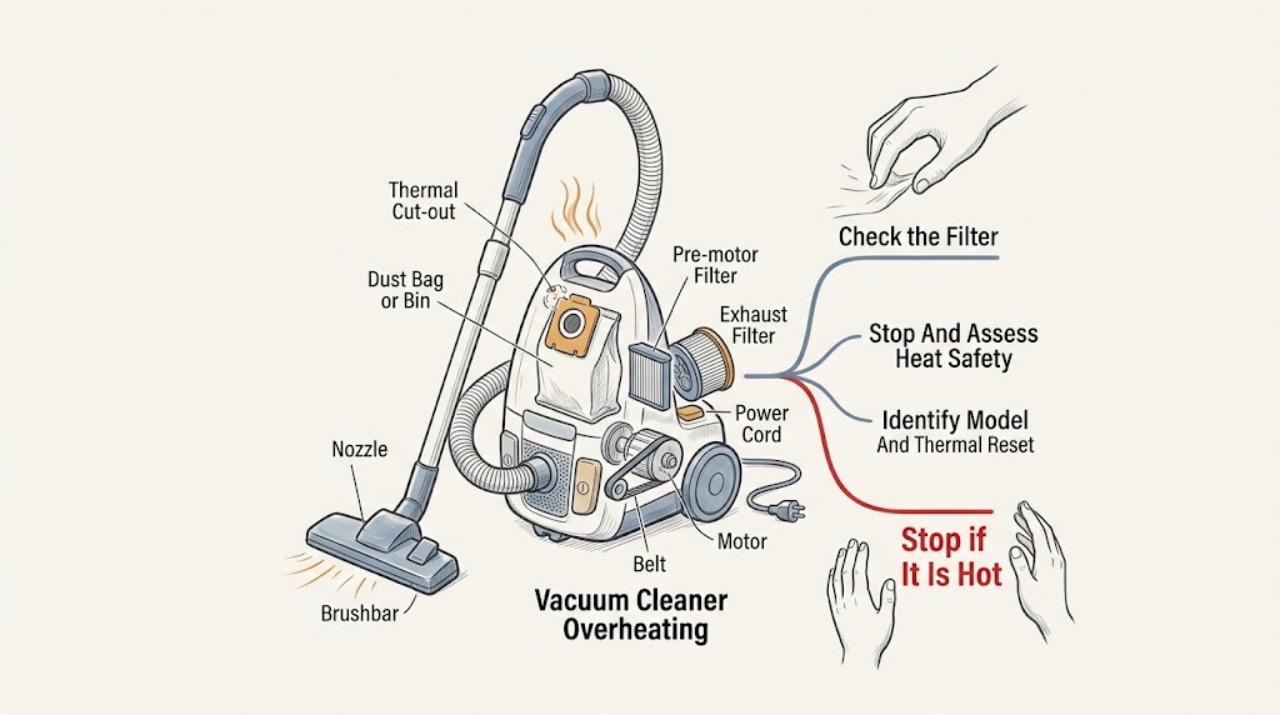
Work through in order
Diagnostic checks
Use only checks that match the exact appliance or system and its official guide.
-
Check 1
Stop vacuuming as soon as the cleaner becomes unusually hot, loses suction, cuts out, or smells hot. Switch it off and unplug it from a dry outlet, or remove a cordless cleaner from its charger; keep clear if there is smoke, sparking, a burning or melting smell, a hot plug, or a damaged cord. Do not touch a hot motor housing or try to restart it immediately.
Expected result: Only warm exhaust air was noticed and the cleaner kept operating normally; the thermal cut-out stopped it; a burning/electrical odor or smoke appeared; or the cord, plug, charger, or outlet is damaged or hot.
Next step: For any electrical warning or repeated cut-out, leave the cleaner isolated and arrange authorised Hoover or qualified electrical service. If the appliance is simply warm and unplugged, allow it to cool fully before the accessible maintenance checks.
Stop if: Do not keep running the cleaner, reset the thermal protection repeatedly, reconnect a hot or wet plug, or use it with a damaged cord.
Why this matters
Why: Warm exhaust without a cut-out can be normal on applicable Hoover models. A cut-out indicates that the thermal protection has acted or another fault has interrupted operation. Burning odor, smoke, sparks, or cord/plug damage is an electrical or fire-risk symptom, not a routine blockage check.
-
Check 2
Find the Hoover model or product code from the label or existing records without opening the motor housing, then retrieve the matching manual. Note whether the cleaner is corded or cordless, bagged or bagless, and whether it stopped by a thermal cut-out or simply lost power. Do not treat a generic reset interval as universal.
Expected result: The exact manual states a thermal cut-out and reset period; the model is unknown; the cleaner did not cut out but remains hot; or the reset period has passed and it still will not run.
Next step: Follow only the matching manual's cool-down and maintenance instructions. If the model is unavailable, use the conservative stop boundary: keep it unplugged, do not open the motor area, and contact Hoover service.
Stop if: Do not bypass a thermal cut-out, bridge a switch, open the motor or battery pack, or apply power while the cause of overheating is unknown.
Why this matters
Why: Hoover thermal protection and waiting periods vary by model. The HU300RHM manual states approximately 45 minutes, while another Hoover manual states approximately 30 minutes. A cleaner that remains hot or fails to recover after the model-specific interval needs service rather than a guessed reset or part.
-
Check 3
With power disconnected and the cleaner cool, empty the dust bin or replace an overfilled bag according to the exact manual. Remove only user-accessible filters and clean them using the specified method; if a filter is washed, leave it completely dry before refitting, and never run the cleaner without the required bag or filter.
Expected result: The bag/bin was full or packed with fine dust; a filter was visibly blocked or damaged; the filter is clean and fully dry; or the model's filter arrangement cannot be identified.
Next step: Use only a correct, fully dry filter and correctly fitted bag/bin from the exact manual, then continue to the hose and nozzle check. Arrange service if a filter is damaged, cannot be fitted correctly, or the cleaner overheats again.
Stop if: Do not use hot water or detergents unless the manual allows them, operate with a wet filter, omit a filter/bag, or open the motor housing.
Why this matters
Why: A full collection system or blocked filter restricts airflow and is a documented cause of thermal cut-out on applicable Hoover cleaners. A damaged, wet, missing, or unknown filter is not cleared for operation because it can impair airflow or expose the motor.
-
Check 4
With the cleaner still unplugged or safely removed from charging, inspect the accessible hose, tube, nozzle, intake, and brushbar for hair, thread, paper, or another blockage. Follow the model manual for removal; keep hands, hair, and loose clothing away from a brushbar, and do not use a powered nozzle to test whether it is free.
Expected result: Air cannot pass through the hose or nozzle; debris is wrapped around the brushbar; the brushbar or belt appears damaged; or all accessible air paths are clear.
Next step: Clear only the obstruction permitted by the exact manual, refit the parts securely, and let the cleaner cool for the model-specific time before any cautious return to use. If the brushbar, belt, or blockage is hidden or damaged, arrange service.
Stop if: Do not push sharp objects into the cleaner, run a brushbar with fingers near it, remove a motor-side blockage, or keep operating after a second cut-out.
Why this matters
Why: A hose/nozzle obstruction restricts airflow and can make the motor overheat; brushbar debris can also increase load on models with a powered brush. A clear accessible path makes a hidden blockage, fan/motor, control, battery, or thermal fault more likely.
-
Check 5
After the cleaner is fully cool and the accessible bag/bin, filters, hose, nozzle, and brushbar are correctly serviced, compare the next symptom without deliberately stressing the appliance. Stop immediately if it cuts out again, heats rapidly, smells burnt, trips the outlet, produces smoke or sparks, or will not reset.
Expected result: The cleaner operates normally with only warm exhaust; suction remains poor; it overheats or cuts out again; it is silent after the model reset time; or an electrical warning remains.
Next step: Stop using the cleaner and arrange authorised Hoover service for persistent or recurring symptoms. Provide the exact model, cool-down interval, maintenance performed, symptom timing, odor, cord/charger condition, and whether the outlet or charger tripped.
Stop if: Do not continue a trial run to see how hot it becomes, open internal covers, replace a fuse or battery pack, or perform live electrical measurements.
Why this matters
Why: Normal operation with warm exhaust supports normal motor cooling on applicable models. Persistent poor suction keeps an unresolved blockage, filter, seal, or airflow issue in scope. Repeated cut-outs, rapid heating, silence after reset, or electrical warnings point beyond routine owner maintenance to motor, fan, belt, control, battery, wiring, or thermal protection diagnosis.
Use your observations
Decision map
Find the observation that best matches what you see, then follow the next safe action.
-
PATH 01Safety boundary
What you see
The exhaust air feels warm, but suction and sound are normal and the cleaner does not cut out, smell burnt, or show cord/plug damage.
Do this next
Continue normal model-specific maintenance and stop if the symptom changes to rapid heating, reduced suction, a thermal cut-out, or an electrical warning.
Why this path and its safety boundary
Why it matters: Hoover says warm exhaust can be normal because airflow helps cool the motor. Warm air becomes a fault clue when it is accompanied by a cut-out, loss of suction, rapid heat, or an abnormal odor.
Safety stop: Do not cover exhaust openings or continue using the cleaner if smoke, burning odor, sparks, or a damaged cord appears.
-
PATH 02Safety boundary
What you see
The cleaner loses suction or airflow and then switches off, especially when the bag/bin, filters, hose, nozzle, or brushbar has not been serviced recently.
Do this next
Unplug, cool fully, and inspect only those accessible parts using the exact manual. Use the model-specific reset time, then arrange service if the cut-out recurs after clear, dry, correctly fitted parts.
Why this path and its safety boundary
Why it matters: A collection-system, filter, hose, nozzle, or brushbar restriction is a documented explanation for overheating and thermal cut-out on applicable Hoover models.
Safety stop: Do not restart while hot, run without a filter/bag, or push a sharp tool toward the motor or fan.
-
PATH 03Safety boundary
What you see
A burning electrical or melting-plastic odor, smoke, sparks, a hot plug/charger, or a damaged supply cord accompanies the heat.
Do this next
Keep the cleaner isolated and arrange authorised Hoover service; use qualified electrical help if the outlet or household supply is also hot, damaged, or arcing. Preserve the model and symptom information without opening it.
Why this path and its safety boundary
Why it matters: This is a stop-use electrical/fire-risk pattern. It cannot be safely distinguished at owner level between cord, plug, motor, brush drive, battery/charger, or internal wiring.
Safety stop: Do not reconnect it, charge it, reset a breaker repeatedly, touch exposed wiring, or attempt a smell-based test run.
-
PATH 04Safety boundary
What you see
The cleaner resets after the model-specific cool-down but cuts out again after the accessible bag/bin, filter, hose, nozzle, and brushbar checks are complete.
Do this next
Stop using it and arrange authorised Hoover service with the model and the time to cut out. Do not keep repeating the reset cycle.
Why this path and its safety boundary
Why it matters: The airflow restriction may be hidden or unresolved, or a motor, fan, belt, control, battery, or thermal-protection fault may remain. A successful reset does not prove the cleaner is repaired.
Safety stop: Do not bypass the thermal cut-out, run it unattended, or open the motor, battery, or control compartment.
-
PATH 05Safety boundary
What you see
The cleaner remains silent after its exact manual's cool-down period, or the user cannot identify the bag/bin, filter, hose, brush, or thermal-protection arrangement safely.
Do this next
Keep it unplugged or off the charger and contact Hoover service. Provide the exact model/product code and whether any outlet, charger, cord, odor, or breaker symptom occurred.
Why this path and its safety boundary
Why it matters: A power, switch, thermal, motor, battery, control, or hidden airflow fault remains possible. No accessible cause and no recovery are service conditions, not permission to test energized internals.
Safety stop: Do not open the motor or battery pack, replace an internal fuse, bridge a switch, or perform live voltage/resistance checks.
Helpful context
Understand the symptom
Warm air is different from overheating
Hoover explains that vacuum cleaners blow air out to keep the motor cool, so warm exhaust air by itself can be normal when the cleaner continues to operate normally. Overheating is more concerning when the cleaner loses suction, smells hot, becomes unusually hot to touch, cuts out, or repeatedly activates its thermal protection. Smoke, sparks, a burning electrical or melting-plastic smell, or a damaged cord is a stop-use condition rather than a filter-cleaning prompt.
Airflow restrictions are the safe first branch
A full bag or bin, a dirty filter, a blocked hose or nozzle, or debris around a brushbar can reduce airflow and load the motor. Hoover's official guides direct owners to disconnect the appliance before examining it and to clean or clear only the parts accessible under the model's instructions. A washed filter must be completely dry before refitting; a wet filter can create a new airflow or electrical hazard.
Thermal protection is not a diagnosis
A thermal cut-out explains why some Hoover cleaners stop and later reset, but it does not prove that a filter, hose, motor, belt, or board is the failed part. The opened HU300RHM manual uses a 45-minute safety delay, while another Hoover manual gives about 30 minutes. If the cleaner remains hot, will not reset after the model's stated time, smells burnt, trips power, or cuts out again after accessible maintenance, service is the safe next step.
Safety boundary
Stop conditions
- Stop immediately for smoke, sparks, burning or melting odor, a hot or damaged plug/charger/cord, repeated cut-outs, electrical tingling that is not clearly static, or a cleaner that heats rapidly.
- Switch off and disconnect power before examining a corded cleaner; remove cordless products from charging. Do not work on a hot appliance or reconnect it with wet filters.
- Do not bypass the thermal cut-out, run without required filters or a bag, open the motor/battery/control compartment, or perform live electrical tests.
- Do not use sharp tools, heat, flammable liquids, or powered brushbars to clear a blockage. If the accessible maintenance checks do not resolve the symptom, arrange authorised Hoover service.
Only after diagnosis
Potential parts
- bag, dust bin, pre-motor filter, exhaust filter, hose, or nozzle
Consider only when the exact manual and inspection show a missing, damaged, saturated, or model-specific part; overheating alone does not establish fitment.
Hoover collection and filtration parts vary by model. Use only the exact model's approved part and never run without required filters or a bag. - brushbar, belt, thermal protector, motor, battery, charger, or power cord
These parts are relevant only after authorised service identifies the failed circuit or mechanical load; a reset or hot smell is not a part diagnosis.
Internal electrical, battery, cord, motor, belt-drive, and thermal-protection work requires authorised Hoover or qualified service. Do not bypass a protective device.
When checks do not resolve it
Need a professional?
Arrange authorised Hoover service when the cleaner overheats or cuts out again after its model-specific cool-down and accessible bag/bin, filter, hose, nozzle, and brushbar checks; when it remains silent after reset; or when a motor, fan, belt, control, battery, or thermal fault is suspected. Stop immediately and seek qualified electrical help as well for smoke, sparks, a burning or melting smell, a hot or damaged cord/plug/charger/outlet, or repeated breaker trips. Provide the exact model/product code, cleaner type, symptom timing, reset interval, suction and brushbar behavior, maintenance performed, and any odor or visible damage.
Safety scope: The owner may switch off, disconnect power, allow cooling, empty an accessible bag/bin, clean or replace model-approved filters, and clear an accessible hose/nozzle/brushbar only as the exact manual permits. Motor, fan, belt drive, thermal cut-out, control, battery, charger, cord repair, and live electrical work require authorised Hoover or qualified service.
Common questions
FAQ
Is warm air from a Hoover vacuum cleaner always a sign of overheating?
No. Hoover says warm exhaust air can be normal because the airflow helps cool the motor. Treat it as overheating when it comes with rapid heat, loss of suction, a cut-out, burning or melting odor, smoke, sparks, or cord/plug damage. Stop and disconnect the cleaner if any of those warning signs appears.
How long should I wait before restarting a Hoover vacuum after it overheats?
Use the exact model manual. Opened Hoover manuals give different examples, including approximately 30 minutes and 45 minutes for automatic thermal reset. Unplug the cleaner, clear only the permitted accessible cause, and do not restart it while it is hot or keep repeating the reset cycle.
Can a blocked filter or hose make a Hoover vacuum overheat?
Yes. Hoover identifies dirty filters, a full bag or bin, and hose or nozzle blockages as airflow restrictions that can cause overheating or thermal cut-out on applicable models. Disconnect power first, clean or clear only the parts your manual identifies, and ensure washed filters are fully dry before refitting.
What if my Hoover vacuum smells like burning when it gets hot?
Stop immediately, disconnect it if the plug and outlet are dry and safe, and do not run it again to identify the smell. Burning or melting odor, smoke, sparks, a hot plug, or damaged cord requires authorised Hoover service and possibly qualified electrical service; do not open the motor or battery compartment.
Read the exact guide
Official sources
- Vacuum Appliance Advice CentreHoover Advice Centre · Supports identifying the exact Hoover model and selecting model-specific advice before applying a maintenance step.
- The vacuum cleaner cuts out during use – Thermal cut out has activatedHoover Advice Centre · Applies to the listed Hoover models on the opened advice entry; the thermal-protection principle is not assumed for every Hoover model without checking its manual.
- Hoover H-UPRIGHT300 Vacuum Cleaner Instructions for Safe Use and TroubleshootingHoover · Applies to the HU300RHM model family only; the 45-minute reset and component arrangement are kept model-specific.
- Vacuum Cleaner cuts out during use – Check that the hose is not blockedHoover Advice Centre · Applies to the listed Hoover models and demonstrates the hose-blockage mechanism; hose layouts and safe clearing procedures remain model-specific.
- Hoover Flash TF2005 Vacuum Cleaner Instruction ManualHoover · Applies to the TF2005/TF2006 manual family; used for safety boundaries and model-specific checklist examples, not universal component fitment.
- No suction and not picking up – Hoover Advice CentreHoover Advice Centre · The opened page contains model-group-specific filter instructions; filter location and washing requirements are not generalized to every Hoover cleaner.
- Warm air blowing out of the vacuum cleaner during useHoover Advice Centre · Applies to the listed Hoover models and supports the normal-warm-air distinction; it does not clear a model with other overheating symptoms.
- Hoover Hurricane Power Bagless Pets VR81HU01 Instruction ManualHoover · Applies to the VR81HU01 model/product code; its approximately 30- and 45-minute reset wording is not generalized to all Hoover models.
Community feedback
Share a repair observation
Share a plain-text repair observation. Accepted observations are published automatically; this page may take a moment to update.