
On this page
Start here
Quick answer
Treat “not cleaning” as a pickup or airflow problem unless the appliance is a Hoover carpet washer with a separate wet-cleaning complaint. Turn the vacuum off and disconnect the nozzle or remove the battery before checking whether the dust cup or bag is full, the filter is clogged, the hose or floor nozzle is blocked, or the brush is jammed. Hoover says cleaning filters can improve weak suction and pickup, but filter locations, washable parts, brush designs, and drying requirements vary by model; the official advice says to let washed filters dry thoroughly before refitting. If the vacuum cuts out, smells hot, gives a shock, has a damaged cord, or still leaves dirt after the exact model's accessible checks, stop and arrange service. Do not open the motor housing or replace a belt, brush, battery, or motor from the symptom alone.
Before you begin
Safety first
- The owner may disconnect power, empty a cup or replace a bag, inspect accessible filters and air paths, and clear an accessible brush obstruction as the exact manual permits. Motor, belt cover, brush drive, battery, wiring, thermal, and wet-cleaning pump work requires qualified service.
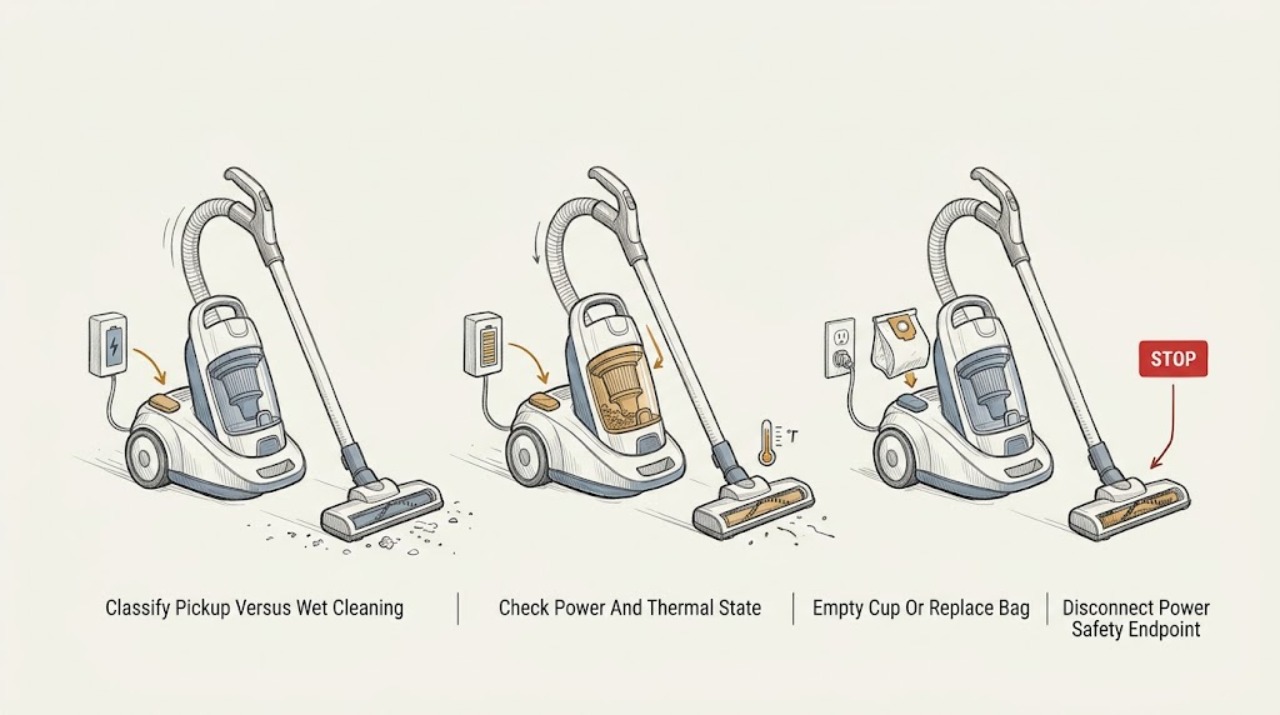
Work through in order
Diagnostic checks
Use only checks that match the exact appliance or system and its official guide.
-
Check 1
Identify the Hoover product and describe the failed result. Check whether it is a dry vacuum or a Hoover carpet washer, whether the motor runs, and whether dirt is left on carpet, hard floor, or both. Note weak suction, a non-spinning brush, no spray or extraction, a full-bag or cup indicator, a red brush light, or a thermal shutdown.
Expected result: The dry vacuum runs but leaves debris; suction is weak at the hose; the floor brush does not agitate; the unit stops hot; or the complaint is actually about spraying, washing, or extracting liquid.
Next step: For dry pickup, continue with the cup or bag, filter, hose, and floor-head checks. For a carpet washer, identify the exact model and use its wet-cleaning support material; do not add water or solution to a dry vacuum.
Stop if: Do not operate a damaged, overheating, smoking, shocking, or liquid-contaminated vacuum, and do not test a wet-cleaning feature on a dry vacuum.
Why this matters
Why: Dry pickup, floor-head agitation, thermal protection, and wet-cleaning performance use different paths. A spray or extraction complaint should follow the exact carpet-washer manual rather than the dry-vacuum checks below.
-
Check 2
With the vacuum stopped, inspect the cord, plug, charger, battery seating, and accessible switches according to the model. For a cordless cleaner, confirm the battery or charger indication matches the manual. For a corded cleaner, use a safe normal outlet check and look for a tripped household circuit. If it stopped during use, let it cool only as the manual permits before investigating blockages.
Expected result: The outlet or charger is abnormal; the cord, plug, battery, or charger is damaged or hot; the vacuum repeatedly cuts out; or power and cooling conditions appear normal but cleaning remains poor.
Next step: Correct only a safe outlet, switch, charger connection, or model-approved battery seating issue. If heat, damage, repeated cutout, or a circuit trip remains, stop and arrange qualified service.
Stop if: Do not bypass thermal protection, use a damaged cord or third-party charger, open a battery pack, or perform live electrical tests.
Why this matters
Why: A supply, battery, or thermal-protection issue can make a cleaner appear not to clean, but repeated cutout or heat can also result from restricted airflow or an internal fault. Normal power moves the check toward dirt containment and the air path.
-
Check 3
Disconnect the vacuum from mains or remove its battery as the model requires. Empty the dust cup before it is full, or replace a disposable bag when it reaches the model's fill limit. Check the cup, bag collar, lid, elbow, and seals for an obvious obstruction or poor fit, then reinstall them exactly as shown in the manual.
Expected result: The cup or bag was full; debris was packed in the cup elbow or bag inlet; the cup or bag was not sealed; or the dirt container was clear and correctly fitted.
Next step: Run one brief test with the correct empty cup or bag installed. If pickup is still poor, continue to the filter and air-path checks; if a seal or container is damaged, use the exact model parts route.
Stop if: Do not run bagless models without the cup and filter installed, reuse a disposable bag that is not designed for reuse, or force a lid or seal closed.
Why this matters
Why: A full or poorly sealed dirt container can restrict airflow and allow debris to remain on the floor. If the container is clear and sealed but suction remains weak, the filters, hose, nozzle, or internal system become more likely.
-
Check 4
Use the exact model instructions to locate every user-removable filter. With power disconnected, remove only the identified filters, brush off loose debris, and wash a filter only if the manual says it is washable. Let every washed filter dry completely for the model's required period before refitting, then confirm all covers and seals are seated.
Expected result: A filter is visibly clogged; the filter is damaged or missing; the model has more than one filter; the filter has been washed but is not dry; or the filters are clean and correctly fitted.
Next step: Clean and refit only the confirmed model-compatible filters after they are fully dry. If pickup remains weak with correct filters, continue to the hose and floor-head check or arrange service.
Stop if: Do not run the vacuum with a wet or missing filter, use heat to speed drying, wash a filter that the manual does not identify as washable, or open the motor housing.
Why this matters
Why: Hoover says clogged filters can reduce suction and pickup, but filter locations and washable construction differ across ranges. A wet, missing, torn, or incorrectly fitted filter can reduce performance or damage the motor.
-
Check 5
With power disconnected or the battery removed, inspect the hose, wand, nozzle, floor head, and accessible brush area for hair, string, paper, or compacted debris. Clear only what can be removed without dismantling the motor or sealed housing. On cordless models, check the brush indicator or jam area as the exact manual shows, and refit the hose and head securely.
Expected result: The hose or nozzle is blocked; the brush is jammed or damaged; suction is strong at the hose but weak at the head; or the accessible path is clear and correctly connected.
Next step: Remove the accessible obstruction, refit the parts, and make one brief test on the appropriate surface. Arrange service for a damaged brush, repeated jam, persistent head failure, or any fault inside the housing.
Stop if: Do not push sharp objects into a hose, cut a brush while it is connected, remove a belt cover without model instructions, or reach into a powered brush roll.
Why this matters
Why: A blockage can reduce airflow, while a floor-head or brush fault can leave debris even when the main suction path is healthy. A clear path with persistent poor pickup points to a model-specific brush drive, belt, seal, motor, or internal fault.
Use your observations
Decision map
Find the observation that best matches what you see, then follow the next safe action.
-
PATH 01Safety boundary
What you see
The motor runs, suction is weak at the hose and floor head, and the cleaner has no electrical hazard.
Do this next
Empty or replace the dirt container, clean only the exact model's filters and dry them completely, then inspect the hose and seals. Arrange service if airflow remains weak.
Why this path and its safety boundary
Why it matters: A full cup or bag, clogged or wet filter, blocked hose, or air leak is more likely than a floor-surface setting issue.
Safety stop: Do not run without the correct filter, cup, bag, or sealed cover.
-
PATH 02Safety boundary
What you see
Suction feels normal at the hose or wand, but the floor head leaves debris or the brush does not agitate.
Do this next
Disconnect power, clear only accessible head debris, check the brush indicator and surface setting as the exact manual permits, and test once. Escalate a persistent brush or drive fault.
Why this path and its safety boundary
Why it matters: A nozzle blockage, jammed or damaged brush, belt or brush-drive issue, incorrect floor setting, or poor head contact is more likely than a main motor problem.
Safety stop: Do not reach into or power a jammed brush, cut hair from a connected roll, or replace a belt without model-specific instructions.
-
PATH 03Safety boundary
What you see
A cordless Hoover stops, shows a brush warning, or runs briefly and then loses cleaning performance.
Do this next
Remove the battery or charger connection, check the accessible brush and filters, and follow the exact manual for charging and cool-down. Arrange service for repeated cutout, hot battery, or persistent warning.
Why this path and its safety boundary
Why it matters: Battery state, thermal protection, a brush obstruction, or restricted airflow is possible; the correct indicator meaning and battery procedure are model-specific.
Safety stop: Do not open the battery, use a damaged charger, bypass a thermal cutoff, or keep restarting a hot cleaner.
-
PATH 04Safety boundary
What you see
The complaint is that a Hoover appliance does not spray, extract, or wash rather than that a dry vacuum leaves debris.
Do this next
Identify the exact wet-cleaner model and follow its official manual or product support. Do not add liquid or cleaning solution to a dry vacuum.
Why this path and its safety boundary
Why it matters: This is a carpet-washer or wet-cleaning path, not a dry vacuum pickup diagnosis. Tanks, pumps, solution, nozzle, and brush procedures cannot be inferred from a vacuum model.
Safety stop: Do not run a liquid appliance with a leak, damaged tank, exposed wiring, or an unapproved solution.
-
PATH 05Safety boundary
What you see
The correct dirt container and filters are fitted and dry, accessible hose and head paths are clear, power is normal, and the vacuum still does not clean.
Do this next
Stop owner troubleshooting and arrange qualified Hoover service with the model, surface, pickup symptom, and results of each external check.
Why this path and its safety boundary
Why it matters: A seal, brush drive, belt, motor, battery, thermal, or internal airflow fault remains possible, but the broad symptom cannot identify the failed component.
Safety stop: Do not open the motor or battery housing or order a part based only on weak pickup.
Helpful context
Understand the symptom
Define the cleaning failure before opening anything
A vacuum can run normally while failing to pick up because airflow is restricted, or it can leave material behind because the floor head or brush is not contacting the surface correctly. “Not cleaning” can also be used for a Hoover carpet washer that is not spraying or extracting; that is a different product path. Record whether the motor runs, suction feels weak at the hose, the brush spins, a bag or cup is full, and whether the failure affects carpet, hard floor, or every surface.
Hoover filter instructions are model-specific
Hoover's support pages group solutions by named ranges and list the models to which each solution applies. Some models have a bag, some a dust cup, and some cordless models have different filter and brush arrangements. Find the product code before washing or replacing anything; never run a vacuum with a wet filter, missing filter, unsealed cup, or incorrectly fitted bag.
Separate a blocked airflow path from a brush problem
If suction at the hose is strong but the floor head leaves debris, the head, brush roll, belt, height setting, or surface contact becomes more relevant. If suction is weak at both the hose and head, start with the cup or bag, filters, and hose. A brush warning light or thermal shutdown also changes the next step: remove power and clear only an accessible obstruction, then stop if the motor or brush remains abnormal.
Safety boundary
Stop conditions
- Stop immediately for smoke, burning odor, sparking, shocks or tingling, a hot or damaged cord, plug, charger, or battery, exposed wiring, liquid entering a dry vacuum, or repeated circuit trips.
- Disconnect mains power or remove the battery before opening a cup, filter, nozzle, hose, or brush-access area; never reach into a moving brush roll.
- Do not run with a wet or missing filter, unsealed cup or bag, damaged brush, blocked cooling path, or bypassed thermal protection.
- If the exact model's accessible checks do not restore pickup, or if the complaint is actually wet-cleaning or self-cleaning functionality, stop and arrange model-specific qualified service.
Only after diagnosis
Potential parts
- filter, dust bag, or dust-cup seal
Consider only when the exact model and inspection confirm a damaged, missing, permanently clogged, or no-longer-sealing dirt-containment part after cleaning and correct refit.
Confirm the exact Hoover model and manufacturer fit information. Weak pickup does not prove which filter, bag, cup, or seal is needed. - floor-head brush, belt, hose, or drive component
Consider only after qualified diagnosis confirms that the hose has suction but the floor head or brush fails, or that an accessible airflow part is damaged.
Brush, belt, hose, and drive designs vary by Hoover range. Do not order or replace one from the cleaning symptom alone.
When checks do not resolve it
Need a professional?
Arrange qualified Hoover service when the vacuum still leaves dirt after the correct cup or bag, fully dry filters, hose, nozzle, and brush checks; when the brush drive, belt, motor, battery, or internal airflow may be involved; or when the cleaner repeatedly overheats or cuts out. Use the exact model's wet-cleaner support path for a spray or extraction complaint. Contact an electrician for a damaged, hot, wet, sparking, or repeatedly tripping household supply. Provide the model and product code, dry vacuum or wet cleaner type, surface affected, suction and brush observations, filter and container state, and any heat, odor, sound, or warning indication.
Safety scope: The owner may disconnect power, empty a cup or replace a bag, inspect accessible filters and air paths, and clear an accessible brush obstruction as the exact manual permits. Motor, belt cover, brush drive, battery, wiring, thermal, and wet-cleaning pump work requires qualified service.
Common questions
FAQ
Why is my Hoover vacuum running but not picking up dirt?
Check the dust cup or bag, filters, hose, nozzle, and floor brush with power disconnected. Hoover says clogged filters can reduce suction and pickup, but the locations and cleaning method depend on the model. If suction is strong at the hose but not at the head, focus on the head or brush rather than the motor.
How do I clean Hoover vacuum filters?
Find the exact model instructions first. Hoover's range-specific guidance allows brushing or warm-water washing for some filters and says washed filters must be thoroughly dry before refitting; other models may use different filter arrangements. Never run the cleaner with a wet or missing filter.
What if my Hoover brush is not picking up on carpet?
Disconnect power or remove the battery and inspect the accessible floor head for hair, string, or debris. A strong hose but poor head pickup points to a nozzle blockage, jammed brush, belt or drive issue, or surface setting. Do not reach into a powered brush or remove a belt cover without the model manual.
Is a Hoover carpet washer that does not spray the same as a vacuum that does not clean?
No. A dry vacuum's cleaning result is mainly pickup and airflow, while a carpet washer's complaint may involve water, solution, spray, pump, or extraction. Identify the exact appliance and follow its model-specific manual; do not put liquid into a dry vacuum.
When should I stop troubleshooting a Hoover vacuum?
Stop for smoke, burning odor, sparking, shocks or tingling, a hot or damaged cord, charger, or battery, liquid entering a dry vacuum, or repeated thermal cutout. Also stop after the exact model's cup or bag, filter, hose, and floor-head checks fail to restore pickup and arrange qualified service.
Read the exact guide
Official sources
- Capture Vacuum Cleaner Help and Advice from HooverHoover · Official Hoover range page for Capture products. It supports category distinctions only; no Capture-specific part, fuse, or thermal procedure is applied to the unidentified task model.
- No suction and not picking up - Hoover Advice CentreHoover · Official Hoover Advice Centre page containing range- and model-scoped solutions. Its filter locations, container procedures, and replacement interval are not generalized to an unidentified Hoover vacuum.
- H - Free Vacuum Cleaner Help and Advice from HooverHoover · Official Hoover range page for H-Free cordless products. It is used only to illustrate why brush, battery, and product architecture must remain conditional for an unidentified model.
- Frequently Asked Questions | HooverHoover · Official Hoover US vacuum FAQ. The general checks are used as a decision framework, while product-specific parts, brush, filter, and floor-surface procedures remain controlled by the exact manual.
Community feedback
Share a repair observation
Share a plain-text repair observation. Accepted observations are published automatically; this page may take a moment to update.