
On this page
Start here
Quick answer
First determine whether the fan is the only part still running, whether a timer or Continuous mode is active, or whether the compressor is actually staying on. In Electrolux's DF dehumidifier manual for the EXD1, 6DN3W, and EXD20DN3W family, normal automatic shutoff occurs after the selected amount of moisture has been removed; Continuous mode intentionally keeps the unit operating, and the Timer can program an automatic stop. A full bucket, a P1 defrost indication, or a low room temperature can also change what you hear and see. Check the humidity setting, timer/mode indicators, room openings, air path, filter, bucket seating, and drain arrangement using the exact model manual. A compressor that continues running after those external conditions are corrected, a repeated sensor/malfunction/refrigerant code, or smoke, burning odor, water near electricity, or damaged wiring requires the unit to remain off and qualified service.
Before you begin
Safety first
- The owner may record model and operating observations, use the matching manual, and perform only dry external filter, grille, bucket, and model-documented accessible drain checks with power disconnected. Qualified service must handle sensors, controls, wiring, motors, compressor components, refrigerant, and any cabinet access.
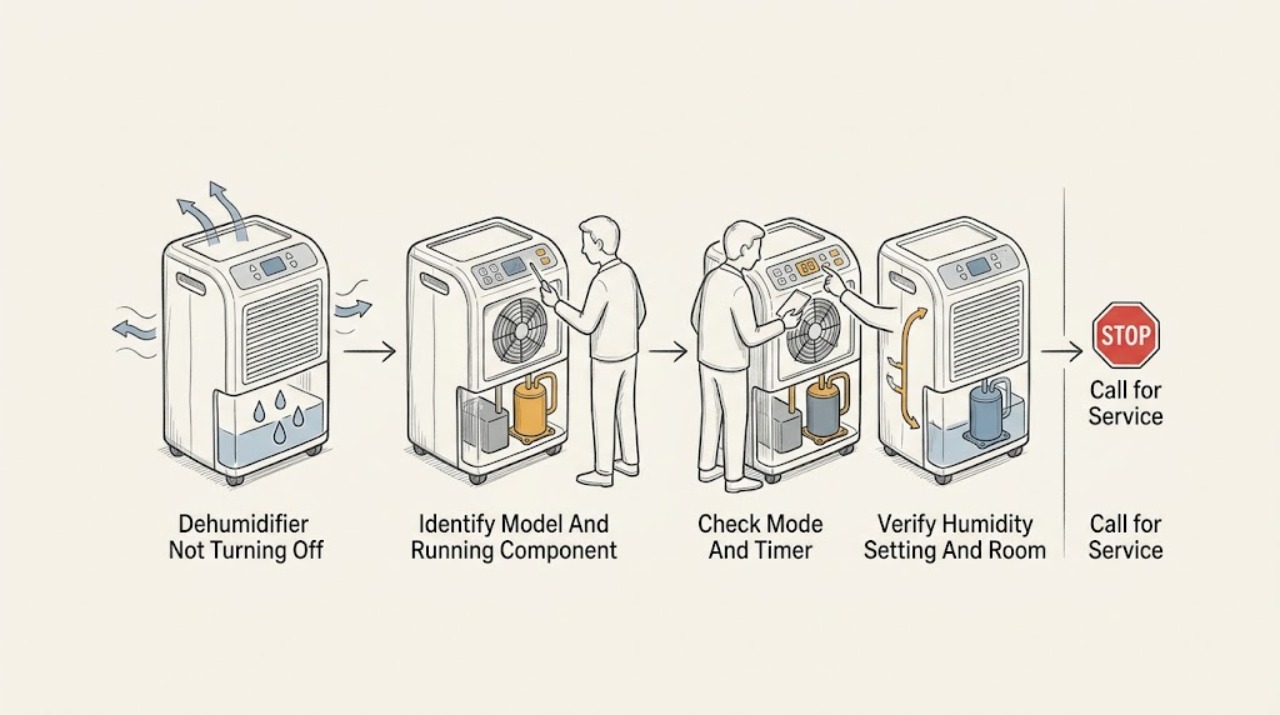
Work through in order
Diagnostic checks
Use only checks that match the exact appliance or system and its official guide.
-
Check 1
Record the complete model, PNC, and serial information from the rating plate, then note which indicators are lit and whether you hear only moving air or also the deeper compressor/refrigeration sound. Use the exact manual for the model rather than a similar Electrolux unit.
Expected result: The appliance matches the EXD1, 6DN3W, or EXD20DN3W family in the cited manual, only the fan/air movement remains, or the compressor continues audibly and the model is different or unknown.
Next step: For a different or unidentified model, locate its matching Electrolux manual through the support page. For the cited family, continue with the mode, humidity, and environment checks. Do not open the cabinet to identify a sound or component.
Stop if: Stop and arrange service for smoke, burning odor, arcing, a damaged cord, water near electrical parts, or a hot or damaged plug.
Why this matters
Why: Model identity controls the meaning of modes, codes, timer behavior, and drain instructions. Fan-only noise can be normal air movement, while compressor operation is the symptom that matters for a true not-turning-off complaint; an unverified model creates an evidence gap.
-
Check 2
With the unit operating normally and dry around the controls, read the mode and timer indicators. Check whether Continuous, SMD, Dryer, or Timer Auto Stop is selected; if the exact manual permits a mode change, return to ordinary dehumidifying and cancel a timer only through the documented control sequence.
Expected result: Continuous is lit, SMD or Dryer is selected, an Auto Stop timer is active, or no special mode/timer is shown and the unit still runs.
Next step: Allow a documented mode to complete or select the desired non-continuous mode as the manual directs. If the compressor remains on with no intentional mode or timer demand, continue to the humidity and airflow checks; do not repeatedly reset the unit.
Why this matters
Why: Continuous intentionally keeps the unit running, SMD controls humidity automatically, Dryer has a documented maximum run period, and Timer can schedule a stop. If none explains the behavior, a control or sensing issue becomes more plausible only after the environmental checks.
-
Check 3
In ordinary dehumidifying mode, compare the selected humidity setting with the displayed room humidity. Close nearby windows and doors, consider whether the space is unusually large or humid, and keep the unit in an enclosed area as the manual recommends.
Expected result: The selected humidity target is high, the room humidity remains high or is being replenished through open doors/windows, the space exceeds the unit's practical capacity, or the room is enclosed and near the target but the compressor still runs.
Next step: Adjust the setting only within the model's documented range and give the room time to respond. If the compressor still does not stop after the conditions stabilize, record the result and arrange qualified diagnosis rather than lowering the setting indefinitely.
Why this matters
Why: A high target or continuing moisture load can legitimately extend operation. When the room is enclosed, the target is reached, and no Continuous/SMD/Dryer behavior applies, persistent compressor operation is less consistent with normal humidity demand.
-
Check 4
From a powered-off, dry unit, inspect the external intake and outlet area, clearance, grille, and owner-accessible air filter. Remove only surface dust using the manual's cleaning method, reinstall the dry filter, and confirm the room is above the manual's stated 5 C/41 F operating threshold before use.
Expected result: The filter or grille is dirty, clearance is restricted, airflow is weak, the room is below the documented temperature, frost is visible, or the external air path is clear and the compressor still runs continuously.
Next step: Correct only the external placement or filter condition permitted by the manual and let the unit stabilize. If frost persists, the compressor overheats, or continuous running remains after routine care, keep the cabinet closed and contact qualified service.
Stop if: Disconnect power before cleaning; do not operate without the filter, cover the grille, or use water directly on the appliance.
Why this matters
Why: Restricted airflow and low temperature can lengthen operation, reduce drying, or lead to frost and automatic defrost. Frost that clears during the documented defrost behavior is different from a compressor that stays on after normal conditions and clear airflow are restored.
-
Check 5
Check the bucket-full indicator and, with power disconnected, confirm the bucket is empty and fully seated. If the exact model is using continuous drainage, inspect only the accessible connector, hose, cap, and downward route described in that manual; do not substitute another model's drain layout.
Expected result: P2 or a full-bucket indication is present, the bucket is not seated, the drainage hose is kinked or leaking, or the bucket/drain is correctly installed and the compressor still does not stop.
Next step: Empty and gently reseat an intact bucket or correct only the accessible hose route described for the exact model. If P2 returns, water reaches electrics, the hose connection is damaged, or the unit continues abnormally, leave it off and request service.
Stop if: Do not force the bucket, defeat its float or switch, reach behind it into the cabinet, or test a wet electrical area.
Why this matters
Why: The manual links P2 to a full or incorrectly positioned bucket and states that a full bucket stops operation. A model-approved external drain correction can resolve a water-management condition, but a correctly installed water path does not explain persistent compressor demand by itself.
-
Check 6
If a code is displayed, record it exactly before any reset. For the cited family, treat P1 as automatic defrost and allow that cycle to finish; for AS, ES, E3, or EC, follow the manual's single unplug-and-reconnect instruction only when the unit is dry and otherwise safe, then observe whether the code returns.
Expected result: P1 clears after defrost, P2 clears after a correct bucket action, a sensor/malfunction/refrigerant indication returns, or there is no code but the compressor remains on after all external checks.
Next step: Keep a returning-code or unexplained continuous-running unit off and contact an authorized Electrolux servicer. Provide the model, code, mode, room conditions, bucket/drain result, airflow result, and whether the fan or compressor continued.
Stop if: Do not remove covers, probe wiring, open the refrigeration circuit, handle refrigerant, or perform live electrical measurements.
Why this matters
Why: P1 and P2 have documented user-observable conditions. A repeating humidity-sensor, temperature-sensor, malfunction, or refrigerant-leak indication, or unexplained continuous compressor operation, points beyond settings and routine care.
Use your observations
Decision map
Find the observation that best matches what you see, then follow the next safe action.
-
PATH 01Next step
What you see
The compressor sound has stopped, only air movement remains, or P1/frost is present and then clears during the documented automatic-defrost behavior.
Do this next
Keep the intake and outlet clear and monitor the mode and humidity display. Escalate if the compressor restarts without a humidity or mode demand, frost does not clear, or another code appears.
Why this path and its safety boundary
Why it matters: A fan or defrost observation is more consistent with normal operation than a compressor control stuck on. Air moving through the dehumidifier is identified as a normal sound in the manual.
-
PATH 02Next step
What you see
Continuous, SMD, Dryer, or a Timer setting is shown, or the selected humidity target has not been reached while the room continues receiving moisture.
Do this next
Use the exact manual to leave the mode or cancel the timer, close room openings, and allow stabilization. If the same compressor behavior persists in ordinary mode at the target humidity, arrange service.
Why this path and its safety boundary
Why it matters: The control state or moisture load is a stronger explanation than a failed off command. Continuous mode intentionally remains on, while SMD and Dryer have their own control behavior.
-
PATH 03Next step
What you see
The filter or grille is dirty, clearance is restricted, the room is below 5 C/41 F, frost is forming, the bucket is full/not seated, or a continuous-drain hose is kinked or leaking.
Do this next
Disconnect power before permitted filter, bucket, or external hose care. Recheck operation only after the unit is dry, correctly assembled, and placed as the manual requires; persistent abnormal running belongs to service.
Why this path and its safety boundary
Why it matters: An environmental, airflow, defrost, or water-collection condition can prolong or interrupt operation and should be corrected only through the model's accessible instructions. It does not identify a failed sensor or compressor.
-
PATH 04Next step
What you see
The compressor continues after ordinary mode reaches its target in an enclosed room with clear airflow, or AS, ES, E3, or EC returns after the manual-authorized reset.
Do this next
Stop using the dehumidifier and arrange qualified Electrolux service. Do not attempt to confirm the diagnosis by opening the cabinet or repeating resets.
Why this path and its safety boundary
Why it matters: The pattern is less consistent with a setting, room load, filter, bucket, or temporary defrost state and more consistent with an internal sensor, control, compressor/fan, wiring, or refrigerant-system fault.
Helpful context
Understand the symptom
Separate normal operation from a stuck compressor
A dehumidifier can sound as if it is still on even after moisture removal has paused. The exact Electrolux DF manual describes air movement through the unit as a normal sound and separately documents a compressor start delay after a quick off/on cycle. Watch the control display and listen for the compressor's deeper refrigeration sound rather than treating any fan noise as proof of a control failure. If only air movement remains, leave the grille clear and allow the model's normal cycle to finish; if the compressor never stops while the room is already dry and the documented settings are not calling for operation, move to service rather than repeatedly cycling power.
Modes can intentionally defeat the expected stop point
The manual's Continuous mode keeps dehumidifying instead of using a normal humidity stop point. Its SMD mode controls humidity automatically and disables manual humidity selection, while Dryer mode can run for up to 10 hours. A Timer Auto Stop can also be active, and changing the power state or setting the timer to zero cancels the Auto Start/Stop function. Confirm the mode and timer indicators before assuming the controls are stuck; use only the button sequence for the matching model.
Room conditions and water collection affect run time
Long operation does not by itself prove a failed sensor. The Electrolux troubleshooting table points to open windows or doors, a space that is too large, blocked or dirty airflow, inadequate clearance, high humidity, and low room temperature as reasons for extended running or poor drying. It also states that the bucket must be correctly fitted and that a full bucket stops operation. For a model with continuous drainage, inspect only the accessible hose connection and downward route shown in the manual; do not infer that another model has the same drain arrangement.
When an indication is a service boundary
P1 is a documented automatic-defrost condition, not a reason to remove a panel. AS indicates a humidity-sensor error, ES a temperature-sensor error, E3 a general malfunction, and EC a detected refrigerant-leak condition in the cited manual. A code that repeats after the manual's single unplug-and-reconnect instruction, any suspected refrigerant issue, or a compressor, fan, sensor, control, or wiring fault requires qualified service. Keep the cabinet closed and do not perform live tests.
Safety boundary
Stop conditions
- Disconnect power before cleaning the filter, grille, bucket, or any accessible drain component; keep the appliance and electrical area dry.
- Do not operate without the air filter, block the intake or outlet, force the bucket, or defeat a bucket or float safety device.
- Do not open the cabinet, probe wiring, perform live electrical tests, or repair the sensor, control, fan, compressor, or internal drain system.
- Do not open the sealed refrigerant circuit, handle refrigerant, or treat EC or a suspected leak as a user-reset condition.
- Do not repeatedly cycle or restart a unit showing smoke, burning odor, arcing, damaged wiring, water near electricity, persistent frost, or a returning fault code.
When checks do not resolve it
Need a professional?
Arrange qualified Electrolux service when the compressor remains on after ordinary mode reaches its target in a closed room with clear airflow, when AS, ES, E3, or EC returns, when frost does not clear after the documented defrost behavior, or when a bucket/drain problem persists. Stop immediately for smoke, burning odor, arcing, a damaged cord, water near electrical parts, a major leak, or suspected refrigerant release, and do not restart the unit.
Safety scope: The owner may record model and operating observations, use the matching manual, and perform only dry external filter, grille, bucket, and model-documented accessible drain checks with power disconnected. Qualified service must handle sensors, controls, wiring, motors, compressor components, refrigerant, and any cabinet access.
Common questions
FAQ
Why does my Electrolux dehumidifier sound like it is still running after it reaches the target humidity?
Check whether the compressor has stopped and only normal air movement remains. If the unit is in Continuous, SMD, Dryer, or a timed program, follow the matching manual's mode behavior. Persistent compressor operation in ordinary mode after the room reaches the target requires service if airflow, temperature, bucket, and drain checks do not explain it.
Does Continuous mode make an Electrolux dehumidifier stay on?
Yes, the cited Electrolux DF manual says Continuous mode keeps the unit in that mode; use the humidity control to select a higher relative-humidity level or return to the intended non-continuous mode using the exact model instructions.
What does P1 mean on the Electrolux DF dehumidifier family?
In the cited manual, P1 means the unit is defrosting. Allow the automatic defrost cycle to complete; do not remove a cover or try to scrape internal frost. If the indication does not clear or returns with continuous compressor operation, arrange service.
When should I stop using an Electrolux dehumidifier that will not turn off?
Stop and arrange qualified service for a returning sensor, malfunction, or refrigerant indication, unexplained continuous compressor operation, persistent frost, smoke, burning odor, arcing, damaged cord, water near electrical parts, or a major leak. Do not open the cabinet or perform live tests.
Read the exact guide
Official sources
- DehumidifiersElectrolux Owner Support · Opened official Electrolux support page; it provides the dehumidifier support category and directs owners to search by topic or question and to Contact/Service support.
- DF Dehumidifier manual V1 - 141211_EN-FR-IT.pdfElectrolux · Opened official Electrolux PDF; its English section provides the operating modes, timer, humidity control, fault-code meanings, water handling, airflow and temperature guidance, cleaning limits, and service boundary for the listed models.
Community feedback
Share a repair observation
Share a plain-text repair observation. Accepted observations are published automatically; this page may take a moment to update.