
On this page
Start here
Quick answer
Do not diagnose an Electrolux dishwasher from a generic code list. First photograph or write down the exact display characters, flashing-light or beep pattern, the cycle stage, and the appliance model, product number, and region. Electrolux publishes different code formats and troubleshooting paths by market and model; the model number is commonly visible along the inside of the door or right side of the tub. Check the matching owner manual or official support article, then perform only its low-risk external checks, such as confirming the door is fully latched, a delay or control lock is not active, the water tap is on, and accessible filters or a visible drain hose are not obstructed. Use a reset only when the exact manual or support article gives that procedure, and record whether the same code returns. If water is leaking, protection trips, the code returns immediately, the dishwasher cannot fill, drain, wash, or heat, or diagnosis would require a pump, valve, heater, sensor, wiring, or control-board check, stop using it and arrange qualified Electrolux service.
Before you begin
Safety first
- The user may record the display and label, consult the exact regional manual, close the door, check accessible controls, verify an external water tap or visible hose condition, clean a removable filter when the exact article permits it, and perform one documented reset. Qualified personnel must handle internal pumps, valves, heaters, sensors, leak protection, wiring, control boards, panel removal, plumbing disconnection, and live tests.
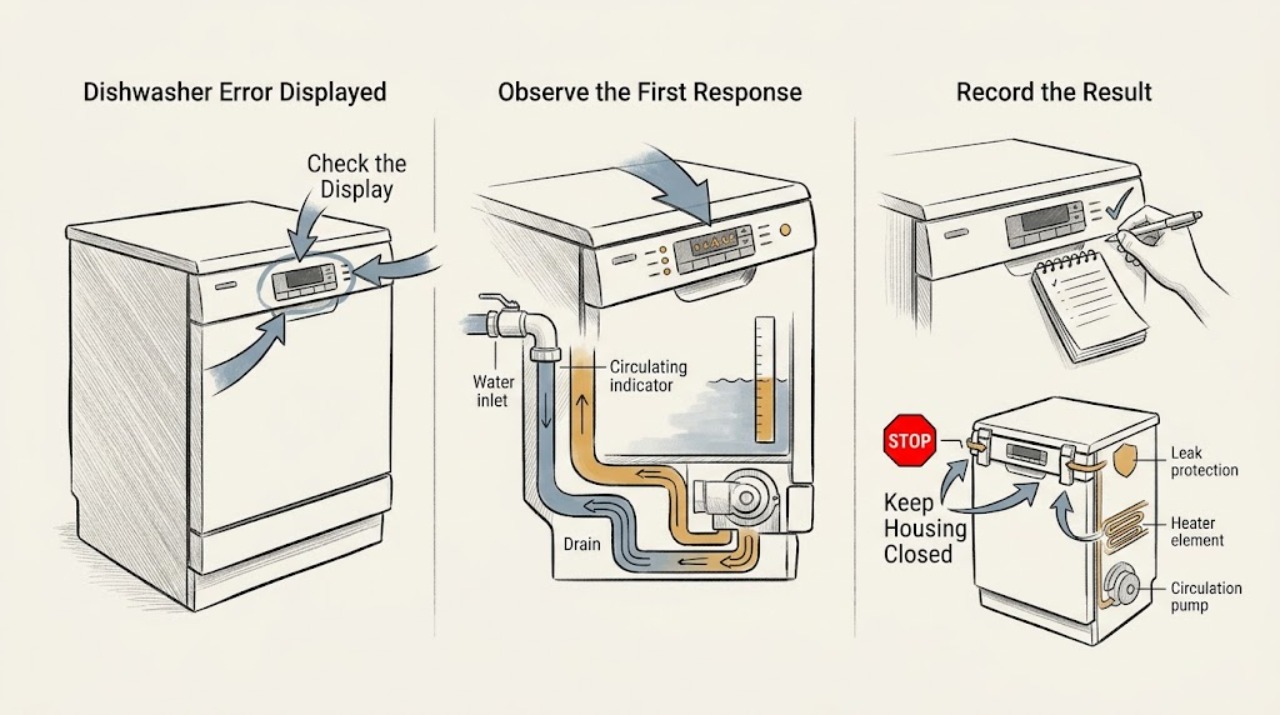
Work through in order
Diagnostic checks
Use only checks that match the exact appliance or system and its official guide.
-
Check 1
With the dishwasher stopped and the door opened only as far as is safe, photograph or write down the exact display characters, flashing-light or beep sequence, cycle stage, and the full model/product information. Record the country or market in which the dishwasher was sold. Look for the model label along the inside of the door or the right side of the tub, as Electrolux describes for dishwashers.
Expected result: The display is a clear code, a repeated LED/beep pattern, a status or prompt rather than a code, or unreadable; the model, product number, or region is known or missing.
Next step: Search the exact model and code in the matching Electrolux regional support site or owner manual. If the code is unreadable or the model is missing, arrange support using the label information rather than guessing from a universal chart.
Stop if: Do not remove panels or reach under the tub to find a label. Stop if the appliance is leaking, electrically damaged, hot in an abnormal way, smoking, or repeatedly trips protection.
Why this matters
Why: A code or indicator cannot be interpreted reliably without its exact characters, timing, model, and market. A status prompt or door/lock indication may need a user-state correction rather than a component diagnosis, while an unknown identity is a reason to pause before applying any procedure.
-
Check 2
Use the recorded model/product number, region, and exact display or indicator pattern to open the corresponding Electrolux support article or manual. Check whether the display is an error, a door or lock prompt, a delay/status message, or a normal cycle indication. Do not copy a code meaning or reset sequence from another model, brand site, or country page.
Expected result: The exact article confirms the displayed condition, the code is not listed, the page applies to a different model or region, or the display is a status/door prompt rather than an error.
Next step: Follow only the matching article's user checks. If no exact article exists, keep the code and model record intact and contact Electrolux support instead of building a code table from near matches.
Stop if: Do not enter diagnostic mode, alter configuration values, or use a service manual intended for technicians.
Why this matters
Why: Only the matching support path establishes applicability. An unlisted or mismatched code remains unidentified; a status or door prompt may be cleared by the documented user control or closure check and should not be promoted to a pump, heater, or board failure.
-
Check 3
If the exact article points to a start or door condition, remove only a loose loading obstruction, close the door fully until the latch engages, and check the accessible control panel for a documented control lock or delay-start state. Use only the model's stated cancel or unlock control; do not force the door or latch.
Expected result: The door closes and latches normally, a loose item or rack prevents closure, a lock/delay state is shown, the door will not latch, or the same display returns immediately.
Next step: Run one short normal start only when the exact article permits it and the door is safely latched. If the code returns or the latch requires force, stop and arrange service with the recorded model and code.
Stop if: Do not bypass or hold the door interlock, remove the door panel, adjust hinges, or place hands inside while the machine may start.
Why this matters
Why: A door prompt or delayed cycle can prevent starting without proving an internal failure. A door that will not latch, a damaged seal/latch area, or an immediately returning display keeps the door interlock or control system in view and needs service if the external correction does not resolve it.
-
Check 4
Only after the exact model instructions say it is safe, check accessible external conditions: the water supply valve is on, the inlet and drain hoses are not visibly kinked or crushed, the drain connection is installed as the manual requires, and the removable filter or glass trap is clear of loose food soil. Do not remove a pump cover or reach into standing water with power connected.
Expected result: The water supply is off, a visible hose restriction is present, the filter or glass trap is visibly soiled, the tub is not draining, water is standing in the base, or these external conditions are normal.
Next step: Correct only a clear external supply, hose, or removable-filter condition described by the exact article, then make one documented retest if permitted. If water remains, a leak is suspected, or the code returns, keep the dishwasher off and call service.
Stop if: Do not pull out a built-in dishwasher alone, disconnect hoses, remove the sump or pump, or operate the unit with water near electrical parts.
Why this matters
Why: Electrolux links some displayed conditions with water intake, drainage, or accessible filter/sump restrictions, but these checks do not prove which internal valve, pump, sensor, or control is involved. Water in the base or a leak is a safety and service signal, not a reason to keep running cycles.
-
Check 5
If the exact Electrolux article or manual gives a reset or cancel procedure, follow that procedure once, using the specified control or power-isolation method and time. Before resetting, record the code and any water, drain, fill, or cycle behavior. Do not repeatedly reset an active leak, a protection trip, or an unknown code just to make the display disappear.
Expected result: The display clears and a normal cycle completes, the same code returns after the reset, a different code appears, or the dishwasher immediately drains/stops or shows a leak condition.
Next step: Keep a written record of the before-and-after display and arrange service for a recurring, immediate, multiple, or safety-related code. Do not escalate a reset into diagnostic-mode testing.
Stop if: Do not cycle the breaker repeatedly, use an undocumented service reset, or restart when water is leaking, the base is wet, or electrical protection has tripped.
Why this matters
Why: A one-time clear can reflect a temporary interruption or a completed cancellation, but recurrence is evidence that the underlying condition remains. A changed or immediate code needs the new exact code's article; a leak or protection response overrides a reset attempt.
-
Check 6
After one allowed external correction or one exact documented reset, record whether the dishwasher fills, circulates, heats, drains, and completes the selected program. Preserve the exact code, model/product number, region, cycle stage, door result, water observations, and reset result for service. Do not use the code alone to order a component.
Expected result: The code does not return and the cycle completes, the code returns at the same stage, multiple codes appear, the appliance cannot fill/drain/wash/heat, or water/electrical symptoms are present.
Next step: Stop using the dishwasher for recurring or safety-related conditions and arrange qualified Electrolux service. Give the technician the complete display and symptom log rather than a guessed code interpretation.
Stop if: Stop immediately for active leaking, water near electrical parts, smoke, burning odor, damaged wiring, repeated breaker/GFCI trips, or an unexplained hot surface. Do not restart to see whether the code clears.
Why this matters
Why: A resolved display after a clear external condition may represent a temporary or user-state issue. Recurrence, multiple displays, incomplete cycles, or a functional failure narrows the affected system but does not identify a safe replacement part; internal pump, valve, heater, sensor, leak-protection, wiring, or control work may be required.
Use your observations
Decision map
Find the observation that best matches what you see, then follow the next safe action.
-
PATH 01Safety boundary
What you see
The exact model article identifies the display as a door, control-lock, delay, start prompt, or other user-state message, and there is no leak or electrical hazard.
Do this next
Close and latch the door, cancel the documented delay, or unlock the controls exactly as the model instructions say, then make one normal start. Arrange service if the door will not latch or the prompt returns immediately.
Why this path and its safety boundary
Why it matters: The display may be reporting an incomplete user condition rather than an internal component failure.
Safety stop: Do not bypass the interlock, force the latch, or remove the door/control panel.
-
PATH 02Safety boundary
What you see
The exact article points to filling, draining, or an accessible filter/sump condition, and the user finds a clear external water-supply, visible hose, or removable-filter issue without standing water near electrics.
Do this next
Correct only the condition named by the exact model article and perform one permitted retest. Keep the code log; call service if the code or functional symptom returns.
Why this path and its safety boundary
Why it matters: An external restriction or user-correctable condition is plausible, but the displayed code does not prove that the inlet valve, drain pump, pressure sensor, or control is defective.
Safety stop: Do not disconnect plumbing, remove pump/sump covers, or run the machine with a suspected leak or wet electrical area.
-
PATH 03Safety boundary
What you see
The exact manual provides a reset or cancellation procedure, the appliance has no active leak or electrical hazard, and the display clears after one documented attempt with a complete normal cycle.
Do this next
Keep the before-and-after record and monitor the next normal use. Arrange service if any code returns, the cycle stops again, or filling, washing, heating, or draining is abnormal.
Why this path and its safety boundary
Why it matters: A temporary interruption or canceled cycle is possible, but the reset does not establish that the underlying system is healthy in all conditions.
Safety stop: Do not repeat resets as a substitute for diagnosis or use an undocumented diagnostic sequence.
-
PATH 04Safety boundary
What you see
The exact display is unreadable, unlisted, or found only on a different Electrolux model or regional support site, or the model/product number is missing.
Do this next
Do not infer a cause from a universal chart. Obtain the label information and contact Electrolux support or use the exact model manual with the code and cycle-stage record.
Why this path and its safety boundary
Why it matters: Applicability is not established. A similar-looking code may have a different meaning or reset behavior in another market or appliance family.
Safety stop: Do not enter service mode, change configuration, replace a part, or keep running cycles with an unresolved display if the appliance is not operating normally.
-
PATH 05Safety boundary
What you see
The same code returns, multiple codes appear, the dishwasher repeatedly stops, cannot fill/drain/wash/heat, leaks, or triggers an electrical protection device after the permitted external checks.
Do this next
Stop using the appliance, isolate water or power only when it is safe to do so, and arrange qualified Electrolux service. Provide the exact code, model/product number, region, stage of failure, external checks, and reset history.
Why this path and its safety boundary
Why it matters: A persistent fault in the water, drain, leak-protection, circulation, heating, sensing, wiring, or control system is more likely; the display still cannot identify a replacement part safely.
Safety stop: Do not remove internal panels, test live wiring, bypass leak protection or a door interlock, or continue resetting the machine.
Helpful context
Understand the symptom
Record the identity before interpreting the display
An Electrolux dishwasher may show characters, flashing indicators, or beeps, and the same-looking symptom can lead to a different support path in another market or product family. Write the display exactly as shown, including a leading letter, a lower-case-looking character, a decimal, or a repeated pattern. Record when it appears and whether the tub is full, empty, filling, draining, or washing. Find the model and product information on the appliance before searching support; Electrolux says the dishwasher model label is commonly along the inside of the door or on the right side of the tub.
Use the exact regional article, not a universal code table
The official UK support article groups one family of i-style codes and tells the user to open the article for the exact displayed code. Official North American pages separately describe conditions such as a door that is not latched, a blocked filter or sump, or a drain problem. Those pages are useful examples of why the full code, model, market, and symptom matter; they are not permission to apply one region's meaning to another Electrolux dishwasher. If your exact code is not listed, use the model-number support search or owner manual and preserve the unresolved code for service.
Keep checks external and stop when the symptom points inside
After the exact article is identified, check only what it assigns to the user: door closure, control state, water supply, accessible filter or sump, and a visible drain hose. A reset may clear a temporary interruption, but a code that returns is useful evidence rather than a reason to keep resetting. Water in the base, an active leak, repeated protection trips, or an error that stops filling, washing, draining, or heating moves the job to qualified service. Do not remove the tub, pump, valve, heater, sensor, wiring, or control panel to test the cause.
Safety boundary
Stop conditions
- Stop immediately for active water leakage, water near electrical parts, smoke, burning odor, damaged cord or wiring, repeated breaker/GFCI trips, abnormal heat, or a protection response.
- Do not bypass the door interlock, leak-protection system, sensor, heater control, or other safety device.
- Do not remove the dishwasher tub, pump, inlet valve, heater, pressure sensor, wiring, or control/display panel, and do not perform energized electrical tests.
- Do not apply a code meaning, reset, or component recommendation from another model, brand, or country; use the exact Electrolux model, product number, and regional manual or support article.
- Stop repeated cycles or resets when the same code returns, multiple codes appear, or the appliance cannot fill, wash, heat, or drain normally.
Only after diagnosis
Potential parts
- inlet or drain valve
Consider only after the exact model's code and a qualified diagnosis confirm a valve fault rather than an external supply, hose, filter, or drain-installation condition.
Confirm the exact model/product number, region, and manufacturer fit information; an error display does not establish valve compatibility. - circulation or drain pump
Consider only when qualified testing identifies a pump or motor fault after the model-specific water and filter checks, not from a code family alone.
Verify model-specific fit and electrical specification with Electrolux or an authorized source; do not open the sump or test the pump live. - heating element or temperature sensor
Consider only if the exact model's diagnostic path and qualified testing confirm a heating or temperature-sensing fault after fill and circulation are normal.
Confirm the exact model/product number and safety specification; a displayed code cannot select a heater or sensor by itself. - control or display board
Consider only when qualified diagnosis confirms an electronic control or display fault after the code, wiring, door state, and monitored function have been verified.
Configured boards are model and product-number dependent; obtain manufacturer fit confirmation and never substitute a board from a similar-looking model.
When checks do not resolve it
Need a professional?
Safety scope: The user may record the display and label, consult the exact regional manual, close the door, check accessible controls, verify an external water tap or visible hose condition, clean a removable filter when the exact article permits it, and perform one documented reset. Qualified personnel must handle internal pumps, valves, heaters, sensors, leak protection, wiring, control boards, panel removal, plumbing disconnection, and live tests.
Common questions
FAQ
What should I do when my Electrolux dishwasher displays an error?
Record the exact characters or LED/beep pattern, cycle stage, model/product number, and region first. Use the matching Electrolux support article or owner manual, then perform only its accessible door, control, water-supply, drain, or filter checks. Do not apply a generic code chart; a recurring or unlisted code needs service with the complete record.
Why can't I use an Electrolux dishwasher error-code list from another country?
Electrolux publishes regional and model-specific code paths. The UK support page uses one set of i-style categories, while North American support pages document other display conditions and procedures. A similar-looking code may not have the same meaning or reset method on your dishwasher, so match the model, product number, market, and exact display before acting.
Where is the Electrolux dishwasher model number?
Electrolux says it is commonly along the interior side of the door or on the right side of the tub, visible when the door is open. Locations can vary, so use the complete label information rather than a partial model name when searching the support site.
Can a displayed Electrolux code be caused by something simple?
Sometimes. Official Electrolux checks include a door that is not fully latched, delayed start, water supply, a visible drain-hose restriction, or an accessible filter or sump condition, depending on the exact article. Correct only the named external condition and retest once if permitted; a returning code does not identify a part but does justify service.
Should I reset an Electrolux dishwasher after an error appears?
Only when the exact model or code-specific Electrolux article provides a reset procedure. Record the original display first and use the procedure once. If the code returns, changes, appears immediately, or is associated with leaking, standing water, or an electrical protection trip, stop resetting and arrange service.
When does an Electrolux dishwasher error require a technician?
Arrange qualified service when the exact code is unlisted or recurring, multiple codes appear, the dishwasher cannot fill, wash, heat, or drain, the door will not latch, or there is a leak or electrical hazard. A display can narrow the affected function but cannot safely select a pump, valve, heater, sensor, wiring, or control board for replacement.
Read the exact guide
Official sources
- Dishwasher Error Code i20 - Unit did not drain properlyElectrolux · Official article for the named Electrolux i20 code family; its listed drain checks and reset are not a universal procedure for all models or countries.
- Dishwasher displays an error code, how to fix it?Electrolux UK · Official Electrolux UK support overview; its listed code families and linked procedures are regional and model-dependent.
- Dishwasher Not StartingElectrolux · Official Electrolux support article for dishwashers; exact controls and installation details remain model-dependent.
- Dishwasher Error Code i40 - Clogged filter or sumpElectrolux · Official article for the named Electrolux i40 code family; its filter/sump instruction must not be generalized to another code or region.
- Dishwasher Error Code CL or Cd - Door is openElectrolux · Official article for the named Electrolux code family and region; it is an example of a door-state message, not a universal code meaning.
- Where can I find my model and serial number?Electrolux · Official Electrolux support article; it gives common label locations but says the model-number location may vary.
Community feedback
Share a repair observation
Share a plain-text repair observation. Accepted observations are published automatically; this page may take a moment to update.