
On this page
Start here
Quick answer
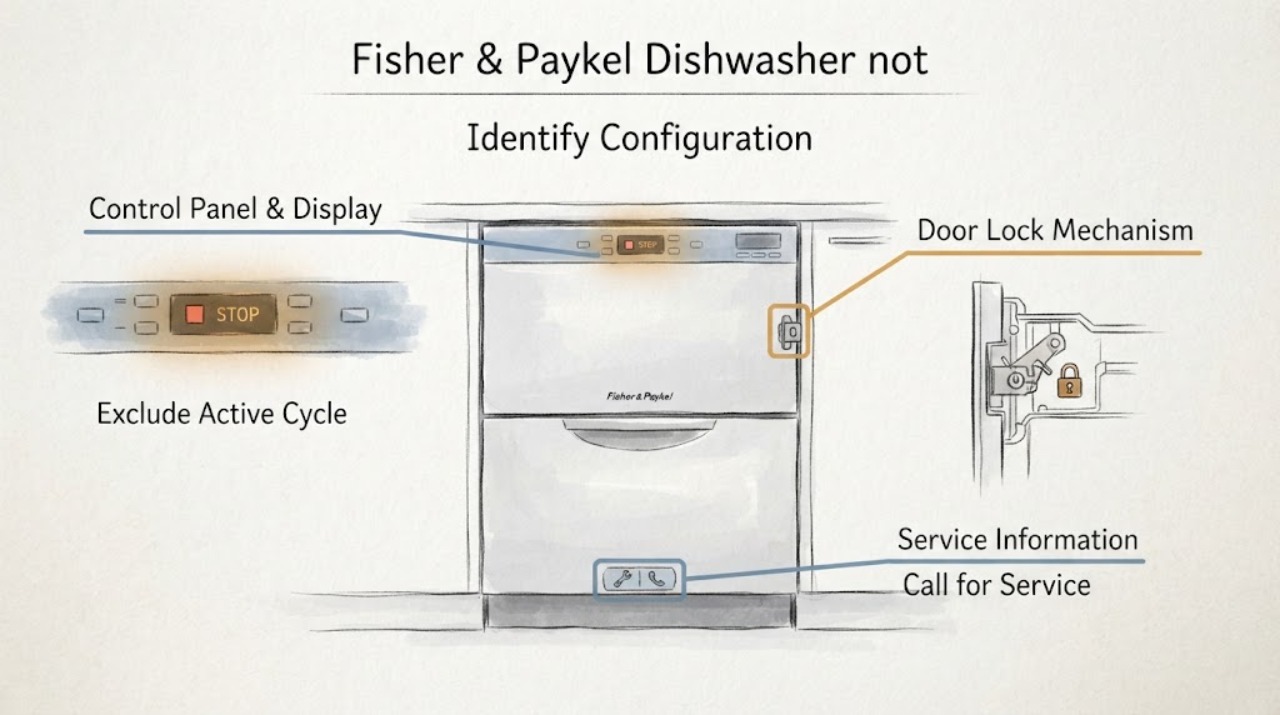
First identify whether this is a Fisher & Paykel DishDrawer or a drop-door dishwasher and whether a wash is still running. Fisher & Paykel says a DishDrawer can remain locked by AUTO LOCK during a wash or quiet phase, and a fault should be checked on the display. Its dishwasher guide warns that opening during a programme can release hot water or steam, so do not pull or pry the door. Check the model-specific guide for the documented pause/unlock procedure, then stop the water and power and arrange authorised service if there is a fault, leak, damaged latch or a door that stays locked after the cycle is safely stopped.
Work through in order
Diagnostic checks
Use only checks that match the exact appliance or system and its official guide.
-
Check 1
Record whether the appliance is a single or double DishDrawer or a conventional drop-door dishwasher, which drawer/door is affected, the complete model code and every visible indicator.
Expected result: The configuration and model are clear, or the identity remains incomplete or the two drawers behave differently.
Next step: Open the exact model guide in Fisher & Paykel Product Help before pressing controls. If the model cannot be confirmed, use service rather than a guessed sequence.
Why this matters
Why: Fisher & Paykel has multiple dishwasher families with different locks and controls; one family’s sequence cannot establish the other family’s release path.
-
Check 2
Observe whether the dishwasher is washing, drying, beeping, showing a remaining time, or in a quiet phase; do not pull hard on the handle or drawer front.
Expected result: The cycle is active or the DishDrawer guide identifies a quiet phase, or the appliance is clearly idle.
Next step: Follow the exact guide’s documented pause or cancel procedure and open cautiously only after the spray arm has stopped and heat/steam has dissipated. If the cycle is idle but the latch remains locked, continue to the fault branch.
Why this matters
Why: Fisher & Paykel says a DishDrawer may remain locked during a wash/quiet phase, and an active programme can contain hot water or steam.
-
Check 3
Read the display and indicators for AUTO LOCK, LOCK, a continuous/intermittent tone, or a fault message; use only the model-matched manual’s unlock or pause instruction.
Expected result: A documented lock or active fault is present, or no lock/fault state explains the closed door.
Next step: Complete only the documented model procedure. If a fault remains, the door is damaged, or the controls stay unresponsive, stop and arrange authorised service.
Why this matters
Why: A control lock or active fault can prevent the user controls from releasing the door; the symptom alone does not prove a broken latch.
-
Check 4
From outside the appliance, look for water on the floor or in the tub, a continuous fault condition, a tripped supply or visible cord/plug damage; do not remove panels or reach into the latch.
Expected result: There is a leak, standing water, damaged electrical supply, or no external hazard is visible.
Next step: If water or electrical damage is present, stop using the dishwasher and isolate water/power only when safe, then contact authorised service. If no hazard is visible, use the model-specific manual/service path.
Why this matters
Why: Fisher & Paykel directs users to turn off water and power for other leaks and to disconnect a malfunctioning appliance before service; internal lock and wiring faults are not user-level latch adjustments.
-
Check 5
After the model-authorized external checks, document whether the door opens normally, remains mechanically stuck, or opens only after a reset or cycle change; do not pry, bypass the lock, or order a generic part.
Expected result: The door remains locked, the handle/latch is visibly damaged, or the issue recurs after a temporary release.
Next step: Keep the dishwasher out of use if it is unsafe or leaking and book Fisher & Paykel authorised service with the model code and observed state.
Why this matters
Why: The available no-model evidence cannot separate latch, hook, alignment, control or active-cycle causes.
Use your observations
Decision map
Find the observation that best matches what you see, then follow the next safe action.
-
PATH 01Next step
What you see
The matching guide identifies an active wash or quiet phase and the dishwasher has no leak or electrical hazard.
Do this next
Use the guide’s pause/cancel process, wait for spray and steam to stop, and open cautiously.
Why this path and its safety boundary
Why it matters: The closed door is consistent with an active programme or automatic lock, not proof of a broken latch.
-
PATH 02Next step
What you see
The display shows AUTO LOCK, LOCK or another documented control-lock state.
Do this next
Follow only the exact model guide’s unlock procedure; do not pry the door or use a sequence from another Fisher & Paykel family.
Why this path and its safety boundary
Why it matters: The controls are intentionally restricted by the model’s lock state.
-
PATH 03Next step
What you see
A fault message, continuous beeping, leak, standing water, damaged cord or broken handle is present.
Do this next
Stop use, turn off water and disconnect power only when safe, then arrange authorised Fisher & Paykel service.
Why this path and its safety boundary
Why it matters: This is a fault or safety boundary rather than a normal locked-cycle condition.
-
PATH 04Next step
What you see
The model-matched safe procedure is complete but the door or drawer still will not open, or the symptom recurs.
Do this next
Keep the appliance out of use and provide the full model code and observed indicators to authorised service; do not open the door by force.
Why this path and its safety boundary
Why it matters: The no-model evidence cannot identify the internal latch, hook, alignment or control cause.
-
PATH 05Next step
What you see
The appliance is idle, undamaged and opens normally after the documented procedure.
Do this next
Record the model-specific steps and use the dishwasher only as the guide permits.
Why this path and its safety boundary
Why it matters: The cause was likely an active lock or programme state, but this does not validate a universal procedure for other models.
Helpful context
Understand the symptom
Identify the dishwasher configuration first
Fisher & Paykel uses both DishDrawer configurations and conventional drop-door dishwashers. Record whether one drawer or both drawers are affected, whether the door is hinged or a drawer front, the complete model code and every visible indicator. A keylock or pause procedure from one family must not be transferred to another.
Do not force a door during a wash
If the dishwasher is washing, drying, or in a quiet phase, leave the latch and handle alone until the matching user guide explains how to pause or cancel. Fisher & Paykel warns that opening during a programme can release hot water or steam and says the spray arm should stop before the door is opened.
Check the lock and display state
For DishDrawer models, Fisher & Paykel documents AUTO LOCK during the wash and says a fault should be checked on the display. Its guides also describe a control-panel lock that can make controls unresponsive. Use the exact model guide for the permitted unlock or pause control; do not guess a button combination or bypass the latch.
Treat water, power and damage as stop conditions
If there is standing water, a leak, a continuous fault tone, a damaged power cord, a broken handle or a door that will not release after the documented safe stop, turn off the water supply and disconnect power only when it is safe to do so. Fisher & Paykel directs malfunctioning appliances to authorised service and does not support unapproved servicing.
Use model-matched support before any parts decision
Find the full model code and use Fisher & Paykel Product Help or the matching manual. A door lock, hook, handle, drawer alignment or control fault cannot be distinguished from the phrase “not opening” alone. Do not order a latch or pry behind the panel until an authorised technician has matched the diagnosis to the model.
When checks do not resolve it
Need a professional?
Arrange Fisher & Paykel authorised service when the door or drawer remains locked after the model-matched safe procedure, a fault or continuous tone returns, the latch/handle is damaged, there is a leak or standing water, or internal lock/alignment/wiring diagnosis is needed.
Common questions
FAQ
Why will my Fisher & Paykel DishDrawer not open?
The care guide lists a wash or quiet phase, AUTO LOCK, or a fault as possible explanations. Check the display and use the matching model guide rather than forcing the drawer.
Can I open a Fisher & Paykel dishwasher while it is running?
The user guide warns against opening during a programme because hot water or steam may rush out. Follow the model’s pause or cancel procedure and wait until the spray arm has stopped before opening cautiously.
Does every Fisher & Paykel dishwasher use the same unlock steps?
No. Fisher & Paykel offers DishDrawer and drop-door configurations, and the controls differ by model. Find the complete model code and use the matching Product Help or manual.
What if the dishwasher is leaking and will not open?
Stop using it, turn off the water and disconnect power only when safe. Fisher & Paykel directs other leaks and malfunctioning appliances to authorised service; do not pry the door or reach into the latch.
Read the exact guide
Official sources
- Help & Support | Book A Service | Repair | Technician | Fisher & Paykel USAFisher & Paykel · Official Fisher & Paykel US support page; used for model-specific manual lookup and authorised-service escalation.
- DishDrawer Dishwasher Care and Maintenance / TroubleshootingFisher & Paykel · Official Fisher & Paykel care guide for the listed DD60 DishDrawer models; used for conditional AUTO LOCK, quiet-phase, fault, leak and safe service guidance, not as a universal sequence for every model.
- Explore Our Range Of Dishwashers | Fisher & Paykel USAFisher & Paykel · Official Fisher & Paykel US product-family page; used only to establish that DishDrawer and drop-door configurations exist and that the no-model article must branch by configuration.
- DW60DOX Dishwasher User GuideFisher & Paykel · Official Fisher & Paykel user guide for the named DW60DOX model; used conditionally for drop-door wash/steam, keylock and safety behavior, not generalized as a universal key sequence.
Community feedback
Share a repair observation
Share a plain-text repair observation. Accepted observations are published automatically; this page may take a moment to update.