
On this page
Start here
Quick answer
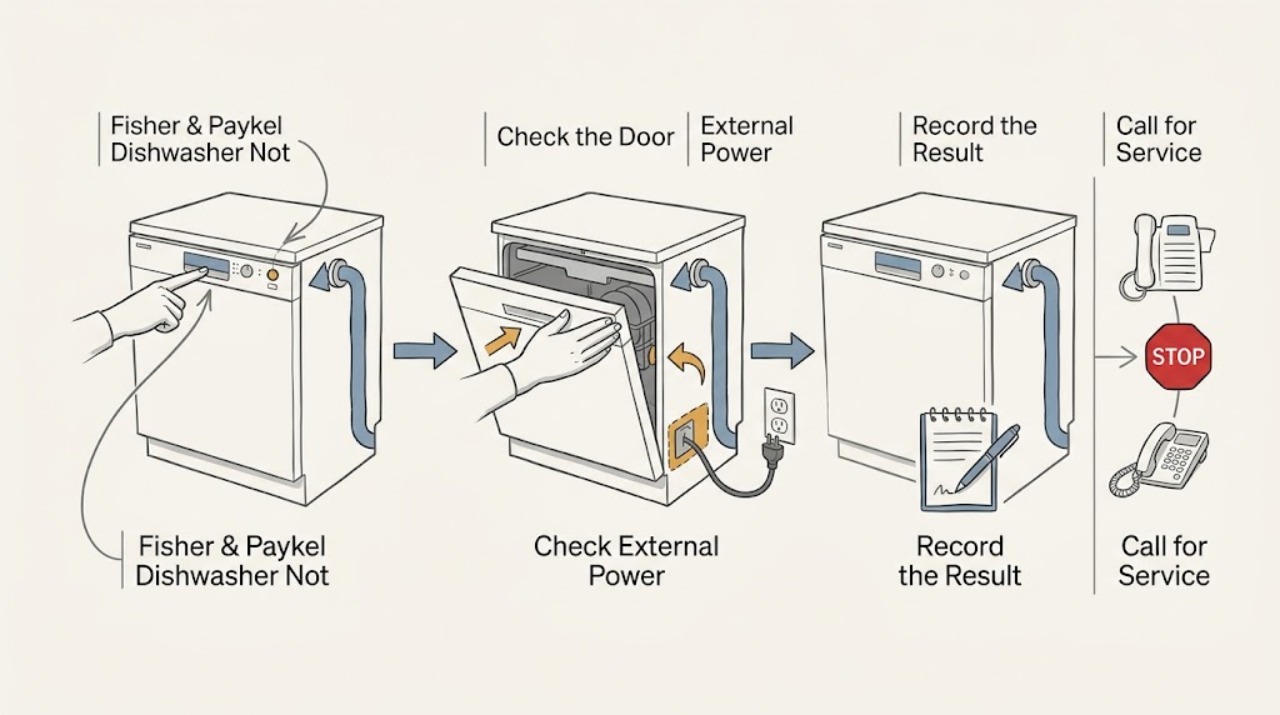
First identify the Fisher & Paykel architecture: a conventional DW60 door dishwasher uses a door latch and a Start/Pause control, while a DishDrawer runs each drawer independently and adds drawer-specific Keylock or Childlock, delayed-start timing, and (on some models) Demo mode. With the appliance dry and cool, check external power, close the correct door or drawer normally, clear only the lock or delay state described by the exact model guide, and record any fault display. The DW60 guides also list a closed door, Start/Pause not pressed, a closed water tap, and a blocked inlet strainer among no-start causes; DishDrawer guides additionally list an unclosed drawer, lock state, a missed start window, Demo mode, and persistent A/F faults. If power is absent, a breaker trips again, an interlock will not latch, a fault persists, or a pump, valve, wiring, or control would need access, stop and arrange qualified service.
Before you begin
Safety first
- The user may identify the model, observe indicators, check accessible power from a dry position, close the door or drawer normally, follow the exact manual for a lock or delay state, and inspect visible tap/hose conditions. Electrical diagnosis, interlock bypass, hose disconnection, pump/valve/control access, live measurements, and repairs are for qualified professionals.
Work through in order
Diagnostic checks
Use only checks that match the exact appliance or system and its official guide.
-
Check 1
Read the rating-label model and decide whether the appliance is a conventional DW60 door dishwasher or a DishDrawer. On a double DishDrawer, identify which drawer was selected. Without opening panels, note whether the indicators are dark, a cycle is selected, a lock symbol or delay countdown is visible, the door or drawer is ajar, or a fault code/beep pattern is present.
Expected result: The appliance is a door model, a single or double DishDrawer, or the architecture/model is still unknown; the panel is dark, locked, delayed, paused, in Demo mode, or showing a fault.
Next step: Use the exact model guide for the identified architecture. Continue to the external power check if the panel is dark; otherwise continue to normal closure and control-state checks for the affected door or drawer.
Stop if: Do not guess a key combination, bypass a latch, or keep pressing controls when there is smoke, a burning odor, a hot plug, a leak, exposed wiring, or an unexplained persistent fault.
Why this matters
Why: The architecture changes the interlock and control sequence. A dark panel points first to power, while a lit panel with a lock, delay, or fault points to a control-state or model-specific branch. One DishDrawer can fail to start while another drawer remains usable.
-
Check 2
From a dry position, check whether the dishwasher's accessible plug is fully seated if it is a plug-in installation, and check the relevant breaker or isolator once. Look only at the accessible plug, cord, outlet face, and surrounding floor; do not move a built-in unit or remove a cover. If the outlet is safely accessible and dry, a simple known-good appliance check may distinguish an outlet issue, but do not use an extension or adapter as a workaround.
Expected result: The breaker is tripped, the outlet is dead, the plug or cord is hot/discolored/damaged, water is near the outlet, or the dishwasher remains dark despite a normal external supply.
Next step: If the supply is safely restored once and the panel returns, proceed to door/drawer closure. If the breaker trips again, the outlet remains dead, or any damage or water is present, isolate power from a safe dry position and arrange qualified service.
Stop if: Do not touch wet or hot electrical parts, unplug through standing water, repeatedly reset the breaker, use an extension cable or multi-plug, change a fuse/breaker rating, or perform live voltage tests.
Why this matters
Why: A dead supply can explain a dark panel without proving an appliance failure. Heat, water, arcing, repeated trips, or a dead appliance with a confirmed supply requires professional electrical or appliance diagnosis; it is not a reason to keep resetting power.
-
Check 3
Remove only an obvious rack, utensil, or dish that prevents normal closure. Check that the conventional door or selected DishDrawer closes evenly and latches without force; check that no seal or drawer edge is visibly displaced. Do not hold the latch closed by hand or attempt to defeat the interlock.
Expected result: The door or drawer closes and latches normally, or it springs back, stays ajar, rubs, is obstructed, or will not latch even when visibly clear.
Next step: After normal closure, follow the model's Start/Pause sequence. If the latch still will not engage or the dishwasher only starts when the latch is manipulated, leave it off and request service for the interlock or alignment.
Stop if: Do not bend the door, adjust hinges, remove the latch, bypass the interlock, or access wiring behind the door or drawer front.
Why this matters
Why: A normal latch provides the start interlock condition. A door/drawer that cannot close or latch makes alignment, an obstruction, seal interference, or the interlock assembly more likely; it does not justify forcing the mechanism.
-
Check 4
Using the exact manual for the model, clear a visible Keylock or Childlock only with its documented control sequence, cancel a delayed start only as documented, and select a cycle then press Start/Pause within the model's stated start window. For a DishDrawer, close the affected drawer after selecting the cycle; if it was opened during a delayed or paused state, use only the documented resume/cancel command. Do not assume a conventional DW60 has DishDrawer controls or Demo mode.
Expected result: The lock symbol clears, the delay countdown cancels or resumes, the cycle starts, or the display remains locked/delayed/Demo/paused and the cycle does not begin.
Next step: If the cycle starts, observe the first fill and stop if a leak, unusual noise, or fault appears. If the state cannot be cleared with the exact manual, record the display and model and move to service rather than trying undocumented combinations.
Stop if: Do not guess reset sequences, repeatedly start and cancel a full or water-filled drawer, or continue if a fault code, leak, burning smell, or abnormal heat appears.
Why this matters
Why: A lock, delayed start, missed start window, or Demo mode can make a powered dishwasher appear not to start. Fisher & Paykel's button sequences and lock names differ across DW60 and DishDrawer models, so an unchanged state after the exact documented sequence points away from a simple user setting.
-
Check 5
If the panel and latch are normal, confirm that the visible water tap supplying the dishwasher is open and that the accessible inlet hose is not visibly kinked or crushed. On a conventional DW60 model, consult the exact manual before cleaning any owner-accessible inlet strainer; do not disconnect the hose or reach into a valve. DishDrawer installation and inlet arrangements differ, so do not transplant DW60 strainer instructions to a DishDrawer.
Expected result: The tap is closed, the hose is visibly kinked, the model guide identifies a blocked inlet strainer, or water supply appears normal but the cycle still does not start or immediately faults.
Next step: Open a closed tap and correct only an obvious external kink without moving the appliance. If the exact guide permits an owner-level strainer check, follow that guide; otherwise stop and arrange service when supply is normal but the fault remains.
Stop if: Do not pull out a built-in dishwasher, disconnect pressurized hoses, open the water valve, clean inaccessible parts, or continue if there is a leak or water near electrical parts.
Why this matters
Why: A closed tap, restricted inlet path, or inlet fault can prevent a conventional dishwasher from progressing after Start. Normal external supply does not rule out an internal inlet valve, control, or water-level fault, which is not a user repair.
-
Check 6
Record the model, affected door or drawer, indicator pattern, displayed code, beeps, water level, and exactly when the dishwasher stops. If the manual gives one safe power-cycle procedure, perform it only once after the appliance is empty of obvious standing water and there is no hazard; then test one normal cycle. Do not keep resetting a recurring fault.
Expected result: The dishwasher starts normally after the documented one-time reset, or the same drawer/door remains dead, shows an A/F or other fault, leaves water, hums without filling, or trips power.
Next step: Keep the dishwasher off and provide the recorded details to Fisher & Paykel support or an authorized service partner when the fault persists. Arrange prompt service for a leak, standing water, repeated trip, or a fault that prevents safe closure or drainage.
Stop if: Do not remove panels, access pumps or wiring, bypass a door/drawer interlock, run live tests, or repeatedly power-cycle a machine with water, heat, odor, noise, or a recurring fault.
Why this matters
Why: A one-time recovery after a transient interruption is different from a persistent drawer-specific, interlock, pump, inlet, control, or electrical fault. A fault code identifies a service path only in the exact model context; it does not authorize opening the machine.
Use your observations
Decision map
Find the observation that best matches what you see, then follow the next safe action.
-
PATH 01Safety boundary
What you see
The display and indicators are dark, and the external outlet or breaker cannot safely provide power or trips again.
Do this next
Leave the dishwasher isolated and have the circuit and appliance checked by qualified professionals. Provide the model and whether the trip occurred at plug-in or during a cycle.
Why this path and its safety boundary
Why it matters: Supply, installation, or an appliance electrical fault is more likely than a door or delayed-start setting; a dark panel alone cannot identify which.
Safety stop: Do not repeatedly reset the breaker, use an extension or adapter, or open the appliance.
-
PATH 02Safety boundary
What you see
Power and controls are visible, but the conventional door or the affected DishDrawer cannot close and latch normally.
Do this next
Remove only an obvious external loading obstruction and retry normal closure once. If it still will not latch, keep it off and arrange service for alignment or the interlock.
Why this path and its safety boundary
Why it matters: An obstruction, seal or alignment issue, or door/drawer interlock fault is more likely than a water-supply problem. Do not interpret a momentary start when the latch is pressed as a safe fix.
Safety stop: Do not force, wedge, tape, or bypass the latch or access its wiring.
-
PATH 03Safety boundary
What you see
The panel is lit and the door/drawer latches, but a lock symbol, delay countdown, missed start window, paused state, or Demo indication remains and no cycle begins.
Do this next
Use the exact model manual to clear the displayed state once. If it remains or returns without a valid setting, record it and request service rather than trying generic reset combinations.
Why this path and its safety boundary
Why it matters: The dishwasher may be waiting for a model-specific unlock, resume, cancel, or Start/Pause command rather than suffering an immediate mechanical failure. DishDrawer and DW60 controls are not interchangeable.
Safety stop: Do not repeatedly start/cancel a water-filled drawer or continue if the display also shows a persistent fault or leak.
-
PATH 04Safety boundary
What you see
The cycle command is accepted and the door/drawer is closed, but a conventional DW60 does not fill, reports an inlet-related condition, or remains unable to progress while the visible tap is closed or the hose is kinked.
Do this next
Open the tap or correct an obvious external kink only. Follow an owner-accessible strainer instruction only when the exact DW60 manual says it applies; otherwise stop and arrange service.
Why this path and its safety boundary
Why it matters: A closed tap or external restriction is plausible; if the visible supply is normal, an internal inlet valve, strainer, control, or water-level issue becomes more likely and requires model-specific service diagnosis.
Safety stop: Do not disconnect hoses, pull out a built-in unit, open a valve, or continue with a leak or water near electricity.
-
PATH 05Safety boundary
What you see
One DishDrawer remains dead or shows a recurring A/F or other model-specific fault, standing water, abnormal pump noise, or repeated power trips after safe external checks.
Do this next
Leave the affected drawer or dishwasher off, preserve the code and timing, and book Fisher & Paykel or authorized service. Do not use the working drawer as evidence that the failed drawer can be repaired by swapping parts.
Why this path and its safety boundary
Why it matters: A drawer-specific interlock, pump, inlet, control, wiring, or drainage fault is more likely than a shared Start button mistake. The code must be interpreted against the exact model guide.
Safety stop: Do not open panels, access the pump or wiring, bypass an interlock, or repeatedly run a faulting drawer.
Helpful context
Understand the symptom
Identify the dishwasher architecture before pressing buttons
Fisher & Paykel sells conventional DW60 door dishwashers and DishDrawer models, including double-drawer units. A DishDrawer has separate controls and can run one drawer while the other remains idle, so diagnose the affected drawer and do not assume that both drawers share the same start state. Record the full model from the rating label, whether the display or indicators are dark, which drawer or door is affected, and any lock, delay, Demo, or fault indication. The exact manual controls the button sequence and fault-code meaning.
A closed door is not the same as a completed start command
On conventional DW60 documentation, no-start causes include no power, a door that is not properly closed, Start/Pause not pressed, a closed water tap, and a blocked inlet strainer; some models also list Keylock. DishDrawer documentation separates the drawer closure from the start window: a selected drawer must be closed, and some models require Start within a short window after selecting a cycle. Delayed Start can leave the dishwasher apparently idle while a countdown runs. A lock or delay explanation is therefore model-specific; do not apply a DishDrawer key sequence to a conventional door model or vice versa.
Keep the boundary at dry, external checks
User-level checks are limited to the accessible controls, normal door or drawer closure, the external outlet and breaker, and a visible water tap or supply hose. Do not force a latch, bypass an interlock, pull out a built-in unit, disconnect a hose, remove a pump or filter housing beyond the exact owner procedure, or perform live electrical tests. If water remains, a drawer will not close, the unit is leaking, or an A/F fault continues, leave it off and use Fisher & Paykel support to locate the exact manual or an authorized service partner.
Safety boundary
Stop conditions
- Stop immediately for smoke, burning odor, sparks, a hot or damaged plug/cord/outlet, a breaker that trips again, or water near electrical parts; isolate power only from a safe dry location.
- Do not force or bypass a door/drawer interlock, wedge a latch, or hold the latch closed by hand to make the dishwasher run.
- Do not pull out a built-in unit, disconnect water hoses, open valves, remove panels, access pumps or wiring, or perform live electrical tests.
- Do not use an extension cable, multi-plug adapter, undocumented key sequence, or repeated power cycles as a workaround.
- If a fault, leak, standing water, abnormal heat/noise, or one-drawer failure persists, keep the affected appliance off and arrange qualified service.
When checks do not resolve it
Need a professional?
Arrange Fisher & Paykel or authorized appliance service when the dishwasher has no safe external power, the breaker trips again, a door or drawer will not latch, a lock or fault state cannot be cleared using the exact model guide, water supply is normal but the cycle will not progress, one drawer remains faulted, or the unit leaks, leaves standing water, hums abnormally, or shows an A/F or recurring code. Give the technician the full model, affected door or drawer, code/beep pattern, panel state, closure result, water observations, and when the failure occurs.
Safety scope: The user may identify the model, observe indicators, check accessible power from a dry position, close the door or drawer normally, follow the exact manual for a lock or delay state, and inspect visible tap/hose conditions. Electrical diagnosis, interlock bypass, hose disconnection, pump/valve/control access, live measurements, and repairs are for qualified professionals.
Common questions
FAQ
Why is my Fisher & Paykel dishwasher not starting even though the display is on?
First check whether the door or selected DishDrawer latches normally, then look for Keylock/Childlock, a delayed-start countdown, a missed Start/Pause command, or Demo mode on models that provide it. The exact sequence differs between a conventional DW60 and a DishDrawer, so use the model manual rather than a generic reset.
Can a Fisher & Paykel DishDrawer be set to run only one drawer?
Yes, the DishDrawer documentation describes each drawer as independently operated. Diagnose the selected drawer and its own closure, controls, lock state, and fault indication; do not assume that a working drawer proves the other drawer's interlock, pump, or control is sound.
Why does my Fisher & Paykel dishwasher look idle after I press Start?
A DishDrawer may be in Delayed Start, paused because the drawer was opened, or waiting for the documented Start command within its selection window. A conventional DW60 may simply have a door that is not fully closed or Start/Pause not pressed. Check the exact model's display and guide before assuming a failed pump or control.
What should I check if a Fisher & Paykel dishwasher will not fill?
For a conventional DW60, confirm the visible water tap is open and the accessible inlet hose is not kinked. The DW60 guides mention a blocked inlet strainer, but only the exact model manual determines whether an owner-level strainer procedure applies. Do not disconnect hoses or access the inlet valve; a normal visible supply with a persistent no-fill fault needs service.
When should I stop trying to start my Fisher & Paykel dishwasher?
Stop for smoke, burning odor, sparks, a hot plug, a repeated breaker trip, water near electricity, a leak, a door or drawer that will not latch, standing water with a recurring fault, or an A/F or other code that remains after the exact model procedure. Keep it off and contact Fisher & Paykel or an authorized service partner.
Read the exact guide
Official sources
- Help & Support | Fisher & Paykel EuropeFisher & Paykel · Support navigation; region, model, and authorized-service availability can vary.
- Fisher & Paykel DW60 Dishwasher User GuideFisher & Paykel · Use for the DW60 family represented by this manual; exact model controls and Keylock cancellation vary.
- DishDrawer Dishwasher TroubleshootingFisher & Paykel · Use for the DD60/DD24 guide represented by this document; exact current model features may differ.
- The DishDrawer Dishwasher can be lockedFisher & Paykel · Applies to the listed DD24 models; button sequences and fault displays are model-specific.
- DishDrawer Dishwasher User GuideFisher & Paykel · Applies to the DD605 guide; DishDrawer generations and control labels differ.
- DISHWASHER INTEGRATED DW60U4HI2 model USER GUIDEFisher & Paykel · Use for the integrated DW60U4HI2 guide and as a conventional door-dishwasher reference; other models can differ.
Community feedback
Share a repair observation
Share a plain-text repair observation. Accepted observations are published automatically; this page may take a moment to update.