
On this page
Start here
Quick answer
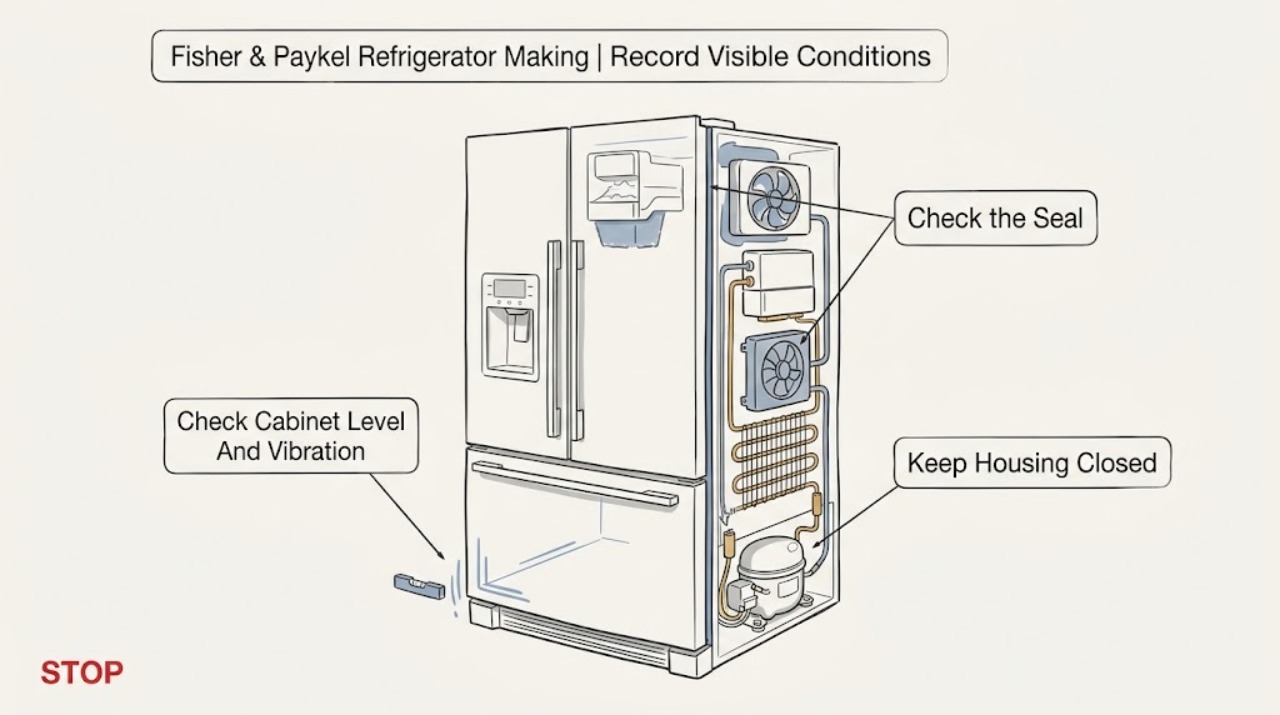
First record where the Fisher & Paykel refrigerator noise comes from, when it occurs, and whether cooling, the display, or an alarm is also affected. In the official ActiveSmart RF605QDU/RF605QN/RF605QZ/RF605QD guide, fan airflow during cooling, a compressor hum, refrigerant boiling or gurgling, hissing after closing the freezer door, defrost cracking or popping, and ice-maker or dispenser sounds are listed as normal operating sounds; an unlevel cabinet, uneven floor, or rattling bottles can also transmit noise. Those examples are model-family guidance, not proof that every Fisher & Paykel refrigerator has the same sound profile. A new persistent scrape, grind, repeated knock, electrical buzz, noise with a fault-light/beep pattern, loss of cooling, water leak, or noise that changes when a door or fan operates needs the exact model guide and likely service. Check only accessible items such as cabinet stability, shelf/container contact, door seal, and visible ice or packaging; do not remove evaporator covers, fan guards, rear panels, or sealed-system parts. Stop for smoke, burning odor, sparking, a damaged cord, abnormal heat, refrigerant odor or suspected circuit damage, and arrange Fisher & Paykel service.
Before you begin
Safety first
- This article covers sound observation and accessible external checks only. Fisher & Paykel trained service or a qualified technician must handle internal fans, compressor mounts, controls, wiring, ice/water assemblies, refrigerant circuits, and live testing.
Work through in order
Diagnostic checks
Use only checks that match the exact appliance or system and its official guide.
-
Check 1
Without moving panels or reaching into the appliance, note whether the sound is inside the fresh-food compartment, inside the freezer, at the door gasket, underneath/behind the cabinet, or from the ice maker/water dispenser. Record whether it occurs during cooling, immediately after a door closes, during defrost, while ice or water is being made, or continuously. Also note any loss of cooling, water, alarm, or display-light change.
Expected result: The sound is a brief airflow, hum, gurgle, hiss, crack/pop, or ice-maker sound at a documented time; a shelf/container or cabinet is vibrating; or the noise is a new persistent scrape, grind, knock, electrical buzz, or alarm-linked sound.
Next step: Use the exact model's User Warnings and Sounds or troubleshooting table. Keep a short audio/time log and photograph any visible ice, leak, damaged seal, or alarm pattern; do not remove covers to locate the source.
Stop if: Stop immediately for smoke, burning/electrical odor, sparking, abnormal heat, a damaged cord, or suspected refrigerant-circuit damage.
Why this matters
Why: The checked Fisher & Paykel guides tie several short sounds to normal fans, compressor, refrigerant, defrost, door-pressure equalization, and ice/water operation. A sound that is persistent, mechanical, electrical, or paired with a performance change is not cleared by a generic normal-sounds list.
-
Check 2
From outside, verify that the refrigerator is stable and not touching a wall, cabinet, pipe, or nearby object. Look for bottles, jars, shelves, bins, or packaging that can rattle. Do not pull a built-in unit or reach behind it just to test vibration.
Expected result: The cabinet rocks or touches surrounding objects, the floor is uneven, a shelf/bin/container vibrates with the sound, or no external vibration source is visible.
Next step: Remove or reposition only the accessible rattling item and follow the exact installation guide for any leveling adjustment. If the sound remains or requires moving an integrated unit, arrange service.
Stop if: Do not remove rear covers, loosen compressor mounts, place hands near a running fan, or move a heavy refrigerator alone.
Why this matters
Why: Fisher & Paykel lists an unlevel cabinet, uneven/weak floor, and bottles or jars rattling as reasons for other sounds in the checked guides. If the noise remains with the cabinet stable and containers isolated, an internal fan, compressor, defrost, or ice/water source becomes more plausible.
-
Check 3
Observe one normal freezer-door close from outside. Check that no package holds the door open and that the visible gasket sits flat and clean. Note whether the sound is a brief hiss immediately after closing, a gasket squeak/stick, or a repeated scrape or knock that continues after the door is fully sealed.
Expected result: The brief hiss occurs only after closing, the gasket is dirty/sticky or not seated, the door is misaligned, or the noise continues independently of door movement.
Next step: Clean the visible gasket with the exact model's approved method and remove an obvious obstruction. If the gasket will not seal, the door is misaligned, or the noise continues, stop at the service boundary.
Stop if: Do not pry the gasket out, adjust hinges without the exact installation guide, or insert tools through the door seal.
Why this matters
Why: The RF605 sound guide attributes a brief post-close hiss to pressure difference, and it identifies gasket noises as possible over-time dirt/grime. A continuing scrape/knock or poor seal can allow airflow and cooling changes, but it does not identify an internal part.
-
Check 4
If the refrigerator has an ice maker or water dispenser, observe whether the noise occurs only during a fill, valve operation, ice release, or ice drop. If it occurs during a defrost period, note a brief crack/pop or water sound. Keep fingers away from the ice-maker ejector and do not remove an ice-maker cover.
Expected result: The sound is a low motor hum, running water, a hiss as a water valve opens/closes, a crack as ice releases, a clunk as ice drops, a brief defrost crack/pop, or a repeated grinding/knocking sound unrelated to those events.
Next step: Use the exact model guide for ice-maker or defrost checks and record the timing. Stop the ice function only by the documented user control if needed; arrange service for persistent mechanical noise, water leakage, or an inaccessible component.
Stop if: Do not touch moving ice-maker parts, chip ice with tools, remove covers, or work around water and energized parts.
Why this matters
Why: The RF605 and RF203 guides list ice/water and defrost sounds that can be normal for the specified families. A repeated grind or knock, an ice maker that jams, or a sound with a leak or temperature problem requires model-specific service rather than a guessed icemaker or fan replacement.
-
Check 5
Open the fresh-food door only to check for an official fault alarm/light pattern and observe whether the noise coincides with loss of cooling, a fan stopping, or a display change. Record the number/sequence of beeps and the lights before pressing buttons. If the only symptom is a persistent abnormal noise, leave the refrigerator operating only while food remains safely cold and service can be arranged; do not keep testing a hot or damaged appliance.
Expected result: There is no alarm and cooling is normal, a model-specific fault pattern is present, cooling is failing, the noise is electrical/overheating, or the source cannot be localized safely.
Next step: For a fault pattern, persistent abnormal noise, or cooling change, contact Fisher & Paykel or an authorized technician with the model, sound log, alarm pattern, and temperature observations. Protect perishable food if cooling is compromised.
Stop if: Stop and isolate power only from a safe, dry position for smoke, sparks, burning odor, abnormal heat, damaged cord, or water near electrical components; do not open the cabinet.
Why this matters
Why: A normal-sound branch is more likely when the sound matches the exact guide and no performance change occurs. Fisher & Paykel says a fault pattern helps service identify an electronic failure; cooling loss, electrical symptoms, or an inaccessible source cannot be resolved by sound identification alone.
Use your observations
Decision map
Find the observation that best matches what you see, then follow the next safe action.
-
PATH 01Safety boundary
What you see
The sound is brief or demand-related and matches the exact model's documented fan airflow, compressor hum, refrigerant gurgle/boil, post-door-close hiss, defrost crack/pop, gasket, or ice/water sound, with normal cooling and no fault alarm.
Do this next
Monitor the sound and keep a record if it changes. Use only the exact model's installation and care guidance for leveling, gasket cleaning, or ice-maker controls.
Why this path and its safety boundary
Why it matters: Normal operation is more likely than a failed part for that model family. An unfamiliar sound can still be normal when its timing and source match the guide.
Safety stop: Escalate if the sound becomes continuous, grows harsher, or is joined by temperature, leak, alarm, smoke, heat, or electrical symptoms.
-
PATH 02Safety boundary
What you see
The noise changes when an accessible bottle, shelf, bin, door gasket, or surrounding object is moved, or the cabinet rocks/touches something.
Do this next
Remove the accessible obstruction, isolate the rattling container, or follow the exact installation guide for leveling. Arrange service if the door will not seal or the appliance must be moved.
Why this path and its safety boundary
Why it matters: A transmitted vibration, dirty/sticky gasket, door obstruction, or leveling/installation issue is more likely than a sealed-system fault.
Safety stop: Do not remove panels, force the door, pry the gasket, or attempt internal mount or hinge repairs without model-specific instructions.
-
PATH 03Safety boundary
What you see
The noise occurs only during a documented ice-maker/water event or a brief defrost period, with no leak, jam, alarm, or cooling loss.
Do this next
Observe without touching moving parts and use the exact model guide for the ice/water function. Call service if the sound becomes grinding, repeated, or accompanied by leaking or temperature change.
Why this path and its safety boundary
Why it matters: The listed RF605/RF203 model-family guides treat those short motor, water, valve, ice-release, ice-drop, and defrost sounds as potentially normal.
Safety stop: Do not chip ice, reach into the ejector, remove the ice-maker cover, or work around water and electrics.
-
PATH 04Safety boundary
What you see
The noise is a new scrape, grind, repeated knock, electrical buzz, or alarm-linked sound; it persists after accessible vibration checks; or cooling, display, alarm, water, or cord symptoms are also present.
Do this next
Leave the refrigerator or affected function off when unsafe and arrange Fisher & Paykel trained service with the model, sound location/timing, fault pattern, and temperature observations.
Why this path and its safety boundary
Why it matters: An internal fan, compressor, defrost, water/ice, control, electrical, or installation fault is possible, but a sound alone cannot identify a safe part or repair.
Safety stop: Stop immediately for smoke, burning odor, sparking, abnormal heat, damaged cord, refrigerant-circuit damage, or water near electrical components.
Helpful context
Understand the symptom
A refrigerator can sound active while working normally
ActiveSmart refrigerators change fan speed with cooling demand. The checked RF605 guide describes airflow, compressor hum, refrigerant gurgling or boiling, hissing after a freezer door closes, defrost cracking or popping, and ice-maker or dispenser sounds as normal for that model family. The sound's location and timing matter more than whether it is unfamiliar to the owner.
Noise location narrows the safe next check
A rattle that changes when bottles are moved is different from a sound behind an evaporator cover or a knock that coincides with a fault alarm. Fisher & Paykel's RF203 troubleshooting table specifically calls out cabinet stability/level and freezer defrosting for unfamiliar noises, while its sound guide separately describes ice-maker, water-valve, fan, compressor, and refrigerant sounds. These are decision points, not a reason to open the refrigeration system.
Fault alarms are a different symptom
On the checked E373/E450 ActiveSmart family, an electronic fault produces an alarm and a specific red/green light pattern when the fresh-food door is opened; the guide says the pattern helps service identify the failure. Record that pattern instead of silencing it and continuing to diagnose by sound alone.
Safety boundary
Stop conditions
- Do not open evaporator covers, fan guards, rear panels, compressor compartments, control boards, or the sealed refrigerant circuit to locate a noise.
- Do not use knives, screwdrivers, heat, or force to remove ice, free a fan, or adjust a gasket, hinge, compressor mount, or water/ice assembly.
- Stop for smoke, burning/electrical odor, sparks, abnormal heat, a damaged cord, water near electrical parts, suspected refrigerant-circuit damage, or a persistent grinding/knocking noise.
- If a model-specific fault alarm/light pattern appears or cooling is failing, record it and contact Fisher & Paykel trained service; do not silence and repeatedly restart the appliance.
When checks do not resolve it
Need a professional?
Safety scope: This article covers sound observation and accessible external checks only. Fisher & Paykel trained service or a qualified technician must handle internal fans, compressor mounts, controls, wiring, ice/water assemblies, refrigerant circuits, and live testing.
Common questions
FAQ
Is humming from a Fisher & Paykel refrigerator normal?
It can be normal for the documented models: the RF605 guide identifies humming as the compressor running. Judge it by timing, location, and whether cooling or alarms are normal; a new harsh or persistent hum needs the exact model checked.
Why does my refrigerator make a hissing sound after I close the freezer door?
The RF605 ActiveSmart guide attributes an audible post-close hiss to the pressure difference between warm air entering the cabinet, the suddenly cooled air inside, and outside air pressure. A continuous hiss, leak, or cooling loss is a different branch and needs service.
Can cracking or popping be a defrost sound?
For the RF605 and E373/E450 guides, brief cracking or popping may occur while automatic defrost operates. If the sound becomes grinding, repeated knocking, or is paired with a fault pattern or temperature change, stop treating it as normal.
What should I do if the noise comes with beeps or flashing lights?
Record the beep count and light pattern before pressing buttons. The E373/E450 guide says a specific fault pattern helps service identify the failure; use the exact model guide and contact Fisher & Paykel trained service rather than guessing from the noise.
Read the exact guide
Official sources
- RF605QDU/RF605QN/RF605QZ/RF605QD Fridge Freezer User GuideFisher & Paykel · Normal sounds, warnings, and safety for the listed RF605Q models only.
- ActiveSmart E373/E450 Fridge Freezer User GuideFisher & Paykel · Fault-alarm/light-pattern and normal-sound guidance for the named E373/E450 family only.
- RF203QDUVX1 Quad Door Fridge Freezer User GuideFisher & Paykel · Troubleshooting and unfamiliar-noise rows for the named RF203QDUVX1 model.
- Help & Support | Fisher & PaykelFisher & Paykel · General Fisher & Paykel support and trained/authorized service routing.
Community feedback
Share a repair observation
Share a plain-text repair observation. Accepted observations are published automatically; this page may take a moment to update.