
On this page
Start here
Quick answer
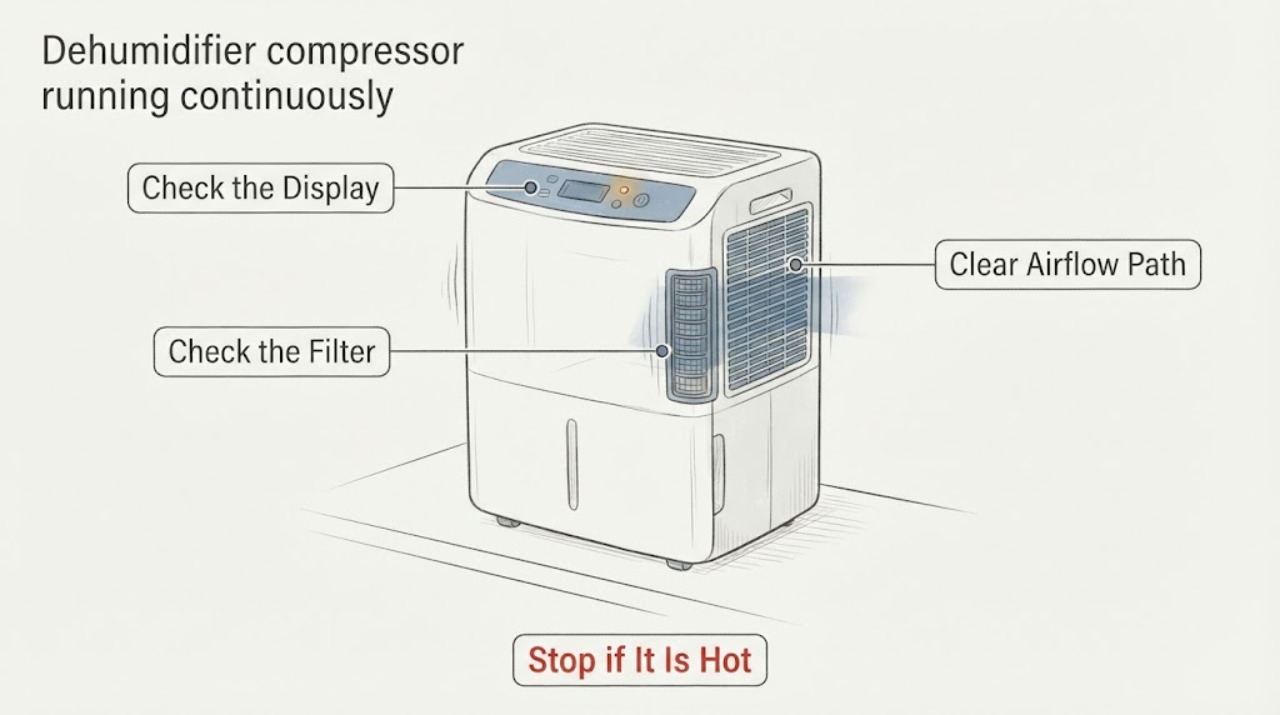
For the Frigidaire FAD704DWD13 task, first determine whether the unit is intentionally in CONTINUOUS mode or is still removing a large amount of moisture. The opened Frigidaire owner guide says this dehumidifier can run continuously in CONTINUOUS mode, can run for a long time after a restart when room moisture is high, and can run too much when airflow is blocked, outside openings are open, the space is too large, or the room is too cold. Check the humidity mode, filter and grille airflow, room conditions, and bucket seating without opening the cabinet. The guide also says the dehumidifier has no user-serviceable parts; if the fan stops while the compressor continues, the unit cannot stop with its control, or there is unusual heat, smoke, or a burning smell, stop using it and arrange authorized service rather than diagnosing the sealed system.
Work through in order
Diagnostic checks
Use only checks that match the exact appliance or system and its official guide.
-
Check 1
Read the display and controls without opening the cabinet. Check whether the unit is in CONTINUOUS mode, shown as CO on this guide's control description, or whether it is set to a humidity target.
Expected result: The display is CO/CONTINUOUS, or the unit is set to a target humidity and the room reading is still above that target.
Next step: If continuous drying is not intended, select the desired humidity setting using the normal controls and observe whether the unit cycles after the room dries. If it remains on after the target is reached, continue with the airflow and environment checks.
Why this matters
Why: The owner guide says CONTINUOUS mode keeps the unit running, and a high moisture load can require extended operation. A target that has not been reached can also explain continued dehumidification without proving a compressor defect.
-
Check 2
Turn the unit off with its control, leave it disconnected while cleaning, and inspect the filter, front grille, top discharge, and the space around the cabinet. Clean the filter as the guide describes and vacuum the grille with a brush attachment; keep the required clearance around the unit.
Expected result: The filter or grille is dirty, an intake or discharge is blocked, or the unit has little clearance; or the airflow path is visibly clear.
Next step: Restore only the external airflow conditions described by the guide, then run the unit in the intended humidity mode. If the fan still stops while the compressor continues, stop troubleshooting at the cabinet and arrange authorized service.
Why this matters
Why: The owner guide lists blocked air movement and a dirty grille as reasons the dehumidifier runs too much. A clear external airflow path removes that environmental explanation but does not identify a sealed-system or compressor component fault.
-
Check 3
Note the room temperature, whether windows or doors to outdoors are open, whether the space is unusually damp, and whether the room is larger than this dehumidifier can reasonably dry. Keep the appliance on a level surface and do not direct airflow at a heat source.
Expected result: The room is below the guide's stated operating range, outside openings are adding moisture, the space is unusually damp or oversized, or none of those conditions is present.
Next step: Correct only safe room and placement conditions, close outside openings, and allow the unit time to reduce the moisture load. If the room conditions are reasonable but the compressor still runs continuously after the humidity target is reached, preserve the observations for service.
Why this matters
Why: The guide says low temperature, outside air, high moisture after a recent restart, and an area that is too large can all make the appliance run longer. These observations describe load and operating conditions, not a confirmed compressor or refrigerant failure.
-
Check 4
With the unit switched off, verify that the bucket is seated correctly and that the bucket-full indicator is not active. Restore the empty bucket as shown in the guide, then observe whether normal control operation returns; do not remove covers or reach into the grille.
Expected result: The bucket is full or mis-seated, the bucket-full light remains on, or the bucket is seated and the control behaves normally except that the compressor/fan relationship remains abnormal.
Next step: Correct only the bucket position or water level described in the guide. If the mismatch persists, stop using the appliance and arrange authorized service; do not test the compressor, bypass the float, or open the sealed system.
Why this matters
Why: The guide says a full bucket should shut the unit down and that a correctly seated empty bucket allows it to restart. If the compressor continues while the fan has stopped or the unit will not stop using its controls, that is outside the expected bucket behavior described in the guide.
-
Check 5
Record the full rating-label model and suffix, selected mode, displayed humidity, room conditions, whether the fan is moving air, whether the compressor sound continues, and whether there is frost, unusual heat, smoke, a burning smell, or a damaged cord.
Expected result: A hazard is present, the compressor/fan mismatch persists, or the unit simply runs long while the guide's normal conditions still apply.
Next step: If there is smoke, burning smell, damaged wiring, or unusual heat, stop operation and disconnect power only if it is safe to do so, then arrange service. Otherwise provide the recorded behavior to an authorized Electrolux/Frigidaire servicer without opening the unit.
Why this matters
Why: The owner guide separates normal long operation from faults and says that sparks or a burning smell require immediate shutdown and authorized service. It also states that the appliance has no user-serviceable parts, so these observations cannot safely be converted into a home compressor, refrigerant, board, or sensor diagnosis.
Use your observations
Decision map
Find the observation that best matches what you see, then follow the next safe action.
-
PATH 01Next step
What you see
The display is CO/CONTINUOUS, the humidity target has not been reached, or the unit was recently restarted in a damp room.
Do this next
Use the intended humidity setting and allow the room to dry while keeping doors and windows to outdoors closed. Reassess whether the unit cycles after the target is reached.
Why this path and its safety boundary
Why it matters: The guide treats continuous mode and a high moisture load as expected reasons for extended operation.
-
PATH 02Next step
What you see
The filter or grille is dirty, airflow is blocked, the room is below the guide's operating range, outside openings are adding moisture, or the area is too large.
Do this next
Restore the external airflow and room conditions described in the guide, then observe the unit in the selected humidity mode. Escalate if the compressor/fan mismatch remains.
Why this path and its safety boundary
Why it matters: These are the guide's listed explanations for a dehumidifier that runs too much and do not by themselves show that the compressor or sealed system has failed.
-
PATH 03Next step
What you see
The bucket-full indicator is active or the bucket is not seated, yet the compressor appears to continue after the fan stops or the unit will not stop through its normal control.
Do this next
Correct only the bucket position or water level. If the mismatch persists, stop using the appliance and arrange authorized service without bypassing the float or opening the cabinet.
Why this path and its safety boundary
Why it matters: The guide says a full bucket should shut the unit down and a correctly reseated empty bucket should permit normal operation. Continued compressor operation with no fan is outside that described behavior.
-
PATH 04Next step
What you see
The compressor continues while the fan is stopped after the external checks, or there is smoke, a burning smell, abnormal heat, or a damaged cord.
Do this next
Stop operation; disconnect power only if safe, keep the cabinet closed, and arrange authorized Electrolux/Frigidaire service with the recorded model and observations.
Why this path and its safety boundary
Why it matters: The owner guide identifies sparks and burning smell as stop conditions and states that the appliance has no user-serviceable parts. The observed behavior does not justify naming a compressor, refrigerant, control, or sensor failure.
Helpful context
Understand the symptom
Separate expected long operation from a fan/compressor mismatch
The Frigidaire owner guide describes this dehumidifier as a moisture-removal appliance whose fan pulls air across the coils. It also lists CONTINUOUS mode, recent restart, high room moisture, restricted airflow, open outside openings, an oversized area, and low room temperature as reasons operation may last a long time. Those checks do not prove a compressor or refrigerant fault. A compressor that continues while the fan has stopped is a different observation and should be treated as abnormal operation requiring service if it persists after the safe control and airflow checks.
Stay within the owner-guide boundary
The opened guide says this dehumidifier has no user-serviceable parts. Keep the cabinet closed, do not work on the refrigerant circuit, and do not use a part or sealed-system diagnosis based only on continuous running. Record the operating mode, humidity display, bucket state, airflow condition, room temperature, and whether the fan actually stops for the authorized servicer.
When checks do not resolve it
Need a professional?
Arrange authorized service when the compressor remains on while the fan has stopped after the documented mode, airflow, room-condition, and bucket checks; when the unit cannot stop with its normal control; or whenever there is smoke, burning smell, abnormal heat, or a damaged power cord.
Common questions
FAQ
Does continuous compressor operation prove the compressor is bad?
No. The official owner guide lists CONTINUOUS mode, high moisture after a restart, blocked airflow, open outside doors or windows, an oversized area, and low temperature as reasons the dehumidifier may run too much. It does not authorize a sealed-system diagnosis from sound or run time alone.
What if the fan stops but the compressor keeps running?
That is different from simply running a long time. Check the selected mode, external airflow, room conditions, and bucket seating using the owner guide. If the mismatch persists, stop using the unit and arrange authorized service rather than opening the cabinet or bypassing the float.
Can I replace a compressor or recharge refrigerant myself?
No. The opened owner guide states that this dehumidifier has no user-serviceable parts and directs repairs to an authorized Electrolux servicer. Do not open the sealed system or order a part from the symptom alone.
What should I check before calling service?
Record the exact model suffix, mode, displayed humidity, bucket and bucket-full indicator state, filter and grille condition, room temperature, outside openings, and whether the fan is moving air while the compressor runs. This gives the servicer the observations the guide uses to distinguish normal moisture load from a service condition.
Read the exact guide
Official sources
- Complete Owner's Guide — Use & Care of your DehumidifierElectrolux Home Products / Frigidaire · Opened from the official FAD704DWD support page. The guide is the family owner document linked by Frigidaire; apply it to FAD704DWD13 only when the product label matches this family, and do not infer suffix-specific internal parts or sealed-system behavior.
- Product Support - Frigidaire 70 Pint Capacity DehumidifierFrigidaire / Electrolux · The opened official page identifies FAD704DWD as a 70-pint dehumidifier, marks it discontinued, links the Complete Owner's Guide, and provides service support. It does not print the FAD704DWD13 suffix, so suffix-specific differences must not be inferred.
Community feedback
Share a repair observation
Share a plain-text repair observation. Accepted observations are published automatically; this page may take a moment to update.