
On this page
Start here
Quick answer
Start with the split that matters: a dark panel suggests power or supply, while a lit panel with no wash action points to the door latch, Start command, Control Lock or Delay Start, water supply, drain condition, or an exact display/indicator code. Frigidaire says the door must be securely closed and latched, water must be available, and a selected cycle must receive the model's Start/Cancel command. Its official support also identifies model-dependent displays such as CL or Cd for a door that is not latched, LOC for a locked-door state, and PF for loss of power. Do not generalize a reset or button sequence: use the exact owner's manual for the model and display. If the latch will not hold, the panel stays dead, the breaker trips, water leaks, or the dishwasher needs internal electrical, latch, valve, pump, keypad, or control access, leave it off and arrange Frigidaire or qualified appliance service.
Before you begin
Safety first
- The user may observe the display, close the door normally, check an accessible plug and breaker from a safe position, verify an external water valve and visible supply line, and clean an owner-accessible filter or glass trap only as the exact manual permits. Latch bypass, internal valves/pumps/heaters/sensors/controls, electrical covers, live tests, and plumbing repairs are for qualified professionals.
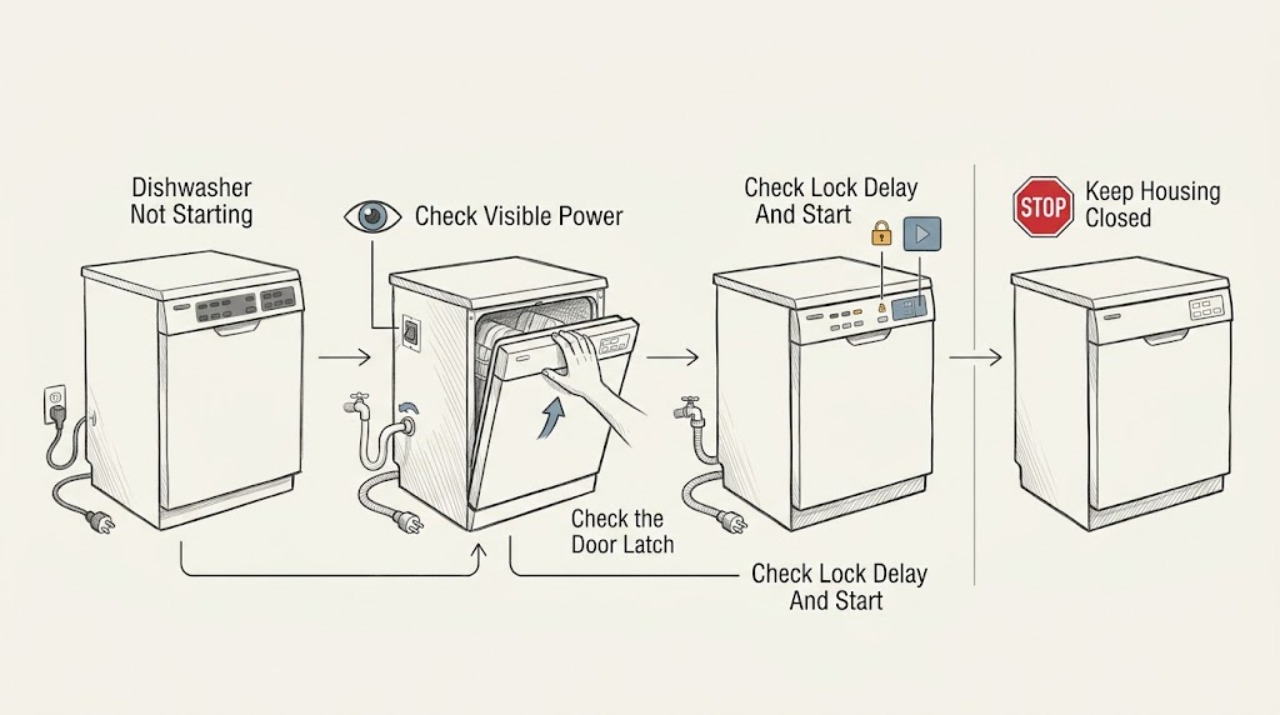
Work through in order
Diagnostic checks
Use only checks that match the exact appliance or system and its official guide.
-
Check 1
Press no cycle controls yet and observe whether the display or indicator lights illuminate. From a dry, safe position, check that an accessible plug is seated and inspect the breaker or fuse after a recent outage. Do not remove a junction-box cover or perform live electrical measurements.
Expected result: The panel is dark; the panel lights normally; the breaker has tripped; or power drops again when the dishwasher is connected.
Next step: If power remains absent or trips again, leave the dishwasher off and arrange qualified appliance/electrical service. If the panel is lit, continue with the door and control checks.
Stop if: Stop for a hot plug, burning smell, smoke, sparking, damaged cord, water near electrical parts, or a repeated breaker trip.
Why this matters
Why: A dark panel points first to supply, plug, breaker, wiring, or internal power service rather than a door or water setting. A repeat trip is not a reason to keep resetting it.
-
Check 2
Close the dishwasher door normally and check that racks, dishes, or a gasket are not preventing full closure. If the display shows CL, Cd, or Close the door, use the exact model guidance to close and latch it; do not press or hold the door while trying to start.
Expected result: The door latches and the indication clears; the door does not latch; the door appears closed but the code remains; or the dishwasher starts only when the door is manipulated.
Next step: Remove only an obvious loading obstruction and close the door normally once. If it still will not latch or the indication persists, arrange service rather than bypassing the interlock.
Stop if: Do not tape, wedge, bypass, or defeat the latch or door switch.
Why this matters
Why: Frigidaire identifies CL or Cd on applicable models as a door-not-successfully-closed-and-latched condition. A latch that will not hold or responds only to pressure suggests a latch, alignment, or control-sensing problem.
-
Check 3
With the door normally latched, read the controls for Control Lock/LOC, Delay Start, a countdown, or a Start/PRESS START instruction. Select a cycle and press the exact model's Start or Start/Cancel control as the owner's manual describes, then close the door promptly if that model requires it.
Expected result: LOC or a lock indicator is present; a delay countdown is active; Start responds and the cycle begins; the panel accepts touches but no cycle starts; or the keypad does not respond.
Next step: Use only the exact model manual to clear a lock or delay and to start the selected cycle. If the control remains unresponsive or the fault returns, stop and arrange service.
Stop if: Do not guess a lock-release combination, repeatedly press Cancel, or open the control panel.
Why this matters
Why: A lock, delay, missing Start acknowledgement, or a keypad/control fault can look like a dead wash cycle. Frigidaire's message guidance lists LOC and delay-hour displays, but the way to clear them varies by model.
-
Check 4
If the controls respond but the wash does not begin filling, check from outside that the household water valve is open and the accessible supply line is not pinched or restricted. Note whether any water enters after a valid Start command; do not disconnect the inlet hose or remove the water valve.
Expected result: No water enters; the valve is closed; the line is visibly pinched/restricted; water enters and the cycle advances; or the external supply appears normal but the dishwasher still will not start.
Next step: Correct only an obvious external valve or line condition allowed by the exact installation guidance, then make one normal start attempt. If no fill or repeat failure remains, arrange service.
Stop if: Stop for a leak, wet electrical area, damaged hose, or any need to pull out the appliance or open plumbing.
Why this matters
Why: Frigidaire identifies open water valves, an unobstructed valve path, and an unpinched supply line as fill checks. A normal external supply with no fill points toward an internal valve, sensor, control, or wiring diagnosis rather than a user-adjustable setting.
-
Check 5
If water remains in the tub or the machine stopped after a prior interrupted cycle, inspect only the owner-accessible drain area described by the exact manual: look for a kinked or moved drain hose, verify the disposer knockout requirement on a new installation, and clean the glass trap/filter as instructed with power isolated where required.
Expected result: Water is standing in the tub; the hose is kinked or newly moved; food soil is present in the glass trap/filter; a new disposer connection is involved; or the accessible drain path is clear.
Next step: Use the exact model's documented cancel or drain procedure only. If water remains, the unit will not start, or the indication returns, arrange service.
Stop if: Do not reach into standing water near electrical parts, remove the pump or sump, or keep restarting a leaking dishwasher.
Why this matters
Why: Frigidaire links hose routing, filter/trap debris, and disposer setup to drain problems, and notes that some mid-cycle drain failures show flashing lights. A clear visible path does not prove the internal pump or control is good.
-
Check 6
If the dishwasher still does not start, record the exact code, display text, light pattern, selected cycle/options, door result, power state, water result, and any recent outage or installation work. Compare the display only with the exact owner's manual and do not reset merely to erase the evidence.
Expected result: The display shows PF, CL/Cd, LOC, a documented flashing pattern, another code, or no code despite a lit panel.
Next step: Follow one model-specific user instruction only when there is no hazard. If the unit remains unable to start or the same fault returns, leave it off and arrange Frigidaire or qualified appliance service.
Stop if: Do not bypass safety controls, change wiring, perform live tests, or order a latch, pump, valve, keypad, heater, or control board from the symptom alone.
Why this matters
Why: PF is documented as loss of power on applicable models; CL/Cd and LOC are documented door/lock examples; other patterns may indicate a model-specific keypad, drain, fill, or control condition. A no-code failure after the external checks still does not identify a replaceable part.
Use your observations
Decision map
Find the observation that best matches what you see, then follow the next safe action.
-
PATH 01Safety boundary
What you see
The display and indicators are dark, or the breaker/fuse trips again when the dishwasher is connected.
Do this next
Leave the dishwasher off and arrange qualified appliance/electrical diagnosis. Give the technician the outage and breaker timing.
Why this path and its safety boundary
Why it matters: An external supply, plug, breaker, wiring, or internal power fault is more likely than a door, water, or Start-command issue.
Safety stop: Do not repeatedly reset the breaker, change its rating, open the junction box, or perform live measurements.
-
PATH 02Safety boundary
What you see
The panel is lit, but the door does not latch or the display shows CL, Cd, LOC, Close the door, or a lock state.
Do this next
Close the door normally and use only the exact manual's lock or start instruction. Arrange service if the latch or indication remains faulty.
Why this path and its safety boundary
Why it matters: A door-latch, alignment, or Control Lock condition is more likely than a failed wash motor. Frigidaire defines CL/Cd on applicable models as the door not successfully closed and latched and identifies LOC as a locked-door indication.
Safety stop: Do not wedge the door, hold it closed, or defeat the latch/interlock.
-
PATH 03Safety boundary
What you see
The panel and keypad respond, but a delay countdown, PRESS START state, missing Start acknowledgement, or unresponsive cycle selection prevents the wash from beginning.
Do this next
Use the exact owner's manual to clear the delay or lock and issue Start once. Escalate if the control does not accept the command or the state returns.
Why this path and its safety boundary
Why it matters: A documented delay or start state is more likely than a water-valve failure when the machine has not been commanded to run. A responsive keypad with no start after the exact procedure raises a control or sensing issue.
Safety stop: Do not guess button combinations or repeatedly cancel and restart.
-
PATH 04Safety boundary
What you see
The door and Start command are accepted, but no water enters and the external water valve is closed or the supply line is pinched/restricted.
Do this next
Correct only an obvious external supply condition permitted by the exact installation guidance and make one normal start attempt. Arrange service for persistent no-fill.
Why this path and its safety boundary
Why it matters: A supply or fill-path condition is more likely. If the external supply is normal but no water enters, an internal valve, sensor, control, or wiring fault may require service.
Safety stop: Do not open plumbing, remove the inlet valve, or continue testing with a leak.
-
PATH 05Safety boundary
What you see
The unit has water remaining, shows a drain-related flashing pattern, displays PF after an outage, or presents another exact code after the external checks.
Do this next
Use only the model-specific drain, power-recovery, or code guidance. If the condition persists, leave the dishwasher off and arrange service.
Why this path and its safety boundary
Why it matters: A drain, power-recovery, keypad, or model-specific error state is more likely than a simple failure to press Start. The code must be interpreted against the exact manual.
Safety stop: Do not apply a generic reset, access internal parts, or handle standing water near electrical components.
Helpful context
Understand the symptom
‘Not starting’ is not one fault
A Frigidaire dishwasher may be completely without power, powered but waiting for a closed door or Start command, held by Control Lock or Delay Start, unable to fill, or stopped by a code or flashing-light condition. Check the visible state first so a normal control condition is not mistaken for a failed pump or control board.
A lit panel still does not prove the door or cycle is ready
Frigidaire states that the door must be securely closed and latched and that an interrupted cycle may require Start again after the door is closed. A display can therefore be active while the dishwasher refuses to run. Do not hold or bypass the latch to force a start.
Water and drain conditions can block starting
The official support guidance asks owners to verify an open water supply and an unrestricted supply line, and it links incorrect drain routing or a clogged drain path to starting and mid-cycle problems. These checks are different from an electrical or keypad diagnosis and remain model-dependent.
Use model-specific codes and controls
Frigidaire documents examples such as CL or Cd, LOC, PF, and flashing indicator patterns, but not every dishwasher uses the same display. Record the exact text or lights and consult the matching owner's manual; do not copy a cancel, reset, or lock-release sequence from another model.
When checks do not resolve it
Need a professional?
Arrange Frigidaire or qualified appliance service when the panel remains dark, the door will not latch, the keypad does not respond, the unit will not fill or drain after safe external checks, a display code or flashing pattern persists, or a reset would require a model-specific procedure you cannot verify. Stop using the dishwasher for a leak, burning smell, smoke, repeated breaker trip, damaged cord, water near electrical parts, or any need to open a panel.
Safety scope: The user may observe the display, close the door normally, check an accessible plug and breaker from a safe position, verify an external water valve and visible supply line, and clean an owner-accessible filter or glass trap only as the exact manual permits. Latch bypass, internal valves/pumps/heaters/sensors/controls, electrical covers, live tests, and plumbing repairs are for qualified professionals.
Common questions
FAQ
Why is my Frigidaire dishwasher not starting even though the panel is lit?
Check the door latch, Start command, Control Lock or Delay Start, exact display message, water supply, and any residual water from a prior cycle. A lit panel does not prove that the door is sensed closed or that a valid cycle command has been accepted.
What does CL, Cd, or LOC mean?
On applicable models, CL or Cd indicates that the door was not successfully closed and latched, while LOC indicates a locked-door state. Use the exact model owner's manual for the relevant control action; do not bypass the latch or guess a lock-release sequence.
Can a closed door still stop a Frigidaire dishwasher from starting?
Yes. The door may appear closed without being securely latched, or the latch may not be sensed correctly. If CL/Cd persists, the door will not hold, or the unit starts only when the door is manipulated, stop and arrange service rather than holding or bypassing the door.
Could no water supply prevent the dishwasher from starting?
Yes. Frigidaire directs owners to verify that the water valve is open and the supply line is not pinched or restricted. If the external supply is normal but the unit still will not fill or start, an internal fill or control diagnosis is needed.
What does PF mean on a Frigidaire dishwasher?
On models that use this code, PF indicates loss of power. Frigidaire also documents a power-outage resume state on applicable models. Follow only the exact model instruction and arrange service if power is absent, drops again, or the code returns.
Should I reset a Frigidaire dishwasher that will not start?
Only use a cancel, resume, or reset procedure stated for the exact model and current display. Frigidaire publishes different behavior for door, drain, power, and keypad states; a generic reset can erase useful evidence and is unsafe with a leak or electrical warning.
Read the exact guide
Official sources
- Dishwasher Not StartingFrigidaire · Frigidaire dishwashers covered by the support article; model-specific owner's manuals remain controlling.
- What should I do if my dishwasher is not starting?Frigidaire · Frigidaire dishwashers covered by the support article; exact model owner's manuals govern controls and reset behavior.
- Dishwashers - Not DrainingFrigidaire · Frigidaire dishwashers covered by the support article; drain layout and any cancel procedure remain model-dependent.
- Dishwasher - Not FillingFrigidaire · Frigidaire dishwashers covered by the support article; plumbing and internal valve work are not user repairs.
- What do I do if my dishwasher is showing a message code?Frigidaire · Frigidaire dishwasher display messages covered by the support article; unlisted messages require the exact owner's manual.
- Dishwasher Error Code PF - Loss of PowerFrigidaire · Only models that use PF to indicate a loss of power; exact manual governs acknowledgement or restart.
- Dishwashers Flashing LightsFrigidaire · Applicable Frigidaire dishwasher indicator patterns; exact model controls and codes may differ.
- Dishwashers - Resume the wash after power outageFrigidaire · Frigidaire dishwasher models that show the described power-alert and resume controls; exact manual governs.
- Dishwasher Error Code CL or Cd - Door is openFrigidaire · Only models that use CL or Cd for a door-not-latched state.
Community feedback
Share a repair observation
Share a plain-text repair observation. Accepted observations are published automatically; this page may take a moment to update.