
On this page
Start here
Quick answer
A Frigidaire dryer that runs but does not dry is most often affected by the selected cycle or temperature, a coated or blocked lint screen, an overloaded or poorly tumbling load, a dirty moisture sensor, restricted exhaust, or inadequate room ventilation. Start with the cycle and load, then clean and reseat the lint screen, inspect the sensor bars, and check that the exhaust hood opens and the duct is clear. Never run a gas dryer without an exhaust duct vented outdoors. If airflow remains poor, heat is absent, the dryer overheats, or lint is accumulating inside the cabinet, stop and arrange qualified service.
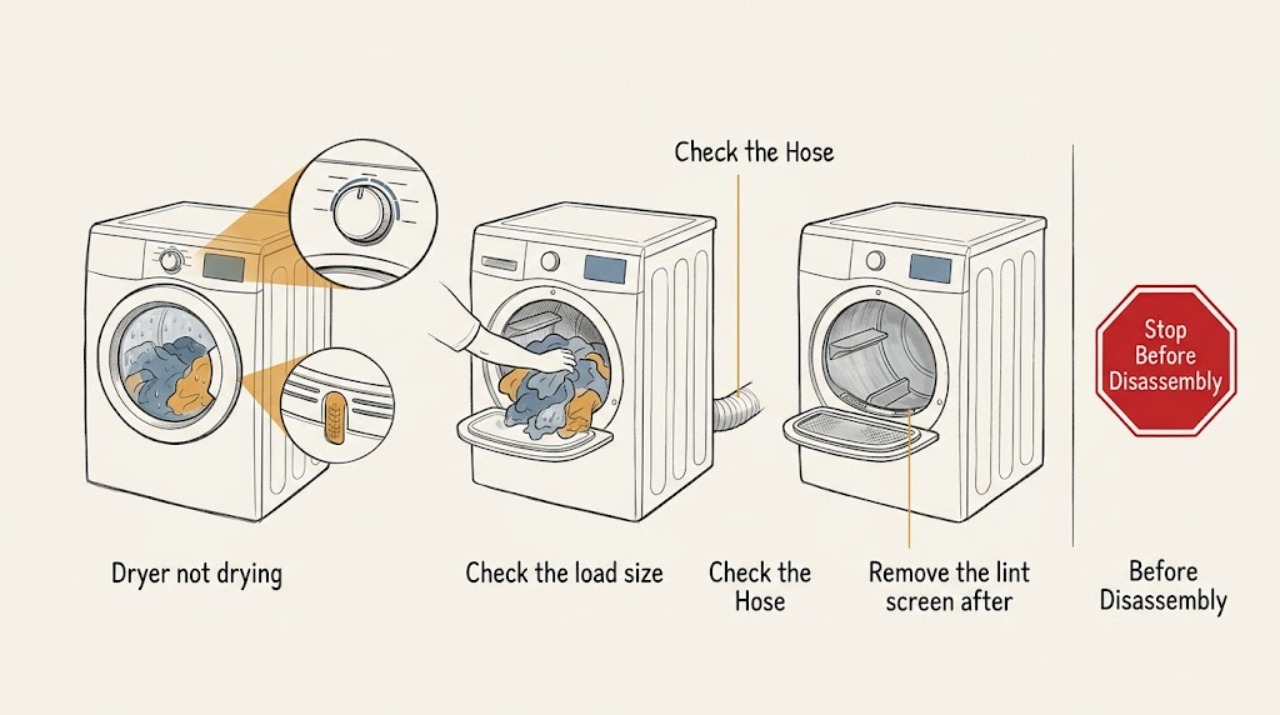
Work through in order
Diagnostic checks
Use only checks that match the exact appliance or system and its official guide.
-
Check 1
Check the selected cycle and temperature against the fabric labels and the complete owner's guide; confirm that Air Fluff or another no-heat option is not selected and that the chosen dry level matches the load.
Expected result: The drum tumbles with little or no heat on Air Fluff or a no-heat setting; a normal heat cycle with damp clothes points to airflow, load, sensor, or heating diagnosis.
Next step: Run a correctly selected cycle with a modest, fabric-compatible load. If the selected heated cycle still produces no heat or the dryer overheats, stop and arrange service.
Why this matters
Why: Frigidaire notes that Air Fluff or a no-heat temperature tumbles without heat, so a setting can look like a dryer fault.
-
Check 2
Remove the lint screen after the dryer is cool, clear visible lint, and wash the screen periodically with warm soapy water if fabric-softener residue has coated it; dry it fully and reinstall it before the next cycle.
Expected result: A visibly packed or waxy screen, or water that does not pass easily through a clean screen, indicates restricted screen airflow; a clean, dry, installed screen shifts attention to the duct and load.
Next step: Use the dryer only with the clean, dry screen installed, then compare drying performance on a correctly sized load. If lint quickly returns or the screen will not clear, stop and request service.
Why this matters
Why: Frigidaire recommends cleaning the lint screen after every use and periodic washing to remove residue, and warns not to operate without the screen in place.
-
Check 3
Check the load size and tumble pattern: separate heavy fabrics from light fabrics, avoid packing the drum tightly, and avoid running a nearly empty load that cannot tumble evenly.
Expected result: Items remain bunched, a bulky item stays damp inside, or the drum is overloaded or nearly empty; a loose, balanced load tumbles freely and exposes more fabric to moving air.
Next step: Divide or rebalance the load, select the matching dry level, and turn a bulky item as directed by the owner's guide if it remains damp. If normal loads still stay wet, continue with airflow and sensor checks.
Why this matters
Why: Frigidaire says loads that are too large or too small take longer and that items need room to tumble freely.
-
Check 4
Locate the moisture sensor bars using the owner's guide and inspect them for a visible film from dryer sheets; wipe the bars with the manufacturer's recommended method before running another sensor-controlled cycle.
Expected result: A residue-covered sensor can stop the cycle early or misread dampness; clean bars with a cycle that still leaves clothes damp point toward load or airflow rather than surface residue.
Next step: Re-test with a normal, mixed-fabric load. If the sensor behavior remains abnormal or the bars are inaccessible, use the model manual and arrange service rather than opening the cabinet.
Why this matters
Why: Frigidaire explains that fabric-softener-sheet residue can inhibit the moisture sensor's ability to sense wet clothes accurately.
-
Check 5
Inspect the room and visible exhaust route: confirm the dryer is not enclosed without the ventilation the model requires, the exhaust duct is not crushed or clogged, and the outside hood opens while the dryer operates; do not place a screen over the hood.
Expected result: Weak airflow at the outside hood, a hood that does not open, a visibly restricted duct, or a poorly ventilated closet indicates an exhaust or installation restriction; strong outdoor airflow points to the load or dryer itself.
Next step: Stop using the dryer until a safe, unobstructed outdoor exhaust path is restored. For a gas dryer, never operate without a duct vented outdoors. Arrange qualified duct or appliance service if the route cannot be safely cleared.
Why this matters
Why: Frigidaire links inadequate ventilation and a blocked exhaust duct or hood to extended drying, and recommends qualified cleaning when the issue persists.
-
Check 6
After the lint, load, sensor, and exhaust checks, compare a correctly selected cycle with a normal load and note whether the drum becomes warm, air exits outdoors, and clothes gradually dry rather than stopping early.
Expected result: The drum tumbles with heat and good exhaust airflow but clothes remain wet, or the dryer has no heat, shuts down, overheats, or produces a burning smell.
Next step: Stop the dryer and arrange qualified service for no heat, overheating, burning odor, smoke, repeated shutdown, unusual noise, or internal lint. Provide the model identifier and the checks already completed.
Why this matters
Why: A persistent fault after airflow and usage checks may involve the heater, thermal protection, motor, controls, or internal lint accumulation and is not an ordinary user adjustment.
Use your observations
Decision map
Find the observation that best matches what you see, then follow the next safe action.
-
PATH 01Safety boundary
What you see
Air Fluff or another no-heat cycle is selected.
Do this next
Select the heat and dry-level setting appropriate for the fabric and model, then test a correctly sized load.
Why this path and its safety boundary
Safety stop: Continue with lint, load, sensor, and exhaust checks.
-
PATH 02Safety boundary
What you see
The lint screen is coated, blocked, missing, or not fully seated.
Do this next
Clean and dry the screen, reinstall it, and do not operate the dryer without it. If it cannot be restored, arrange service.
Why this path and its safety boundary
Safety stop: Continue with the load and exhaust checks.
-
PATH 03Safety boundary
What you see
Airflow at the outside hood is weak or the duct, hood, or room ventilation is restricted.
Do this next
Stop drying until the outdoor exhaust path is safely cleared or professionally cleaned; a gas dryer must have outdoor exhaust.
Why this path and its safety boundary
Safety stop: Continue with the moisture sensor and dryer-operation checks.
-
PATH 04Safety boundary
What you see
A correctly selected cycle still has no heat, overheats, smells of burning, creates smoke, or leaves lint inside the cabinet.
Do this next
Stop using the dryer and arrange qualified appliance service; do not remove cabinet panels as a first troubleshooting step.
Why this path and its safety boundary
Safety stop: Monitor the next normal load and arrange service if drying remains poor after the safe checks.
Helpful context
Understand the symptom
A dryer can tumble normally while still failing to move enough warm, moist air through the load. First separate a no-heat symptom from a slow-drying symptom: Air Fluff and some low-temperature choices tumble without heat, while a blocked exhaust can leave the drum warm but the clothes damp. The model's complete owner's guide controls the exact cycles and access points.
Lint and restricted exhaust are both performance and fire-safety concerns. Keep the lint screen installed, keep the exhaust path outdoors and unobstructed, and stop if the dryer smells hot, overheats, shows smoke, or has lint collecting around the cabinet or vent connection.
Only after diagnosis
Potential parts
- lint screen
Consider this only if the screen is damaged, does not seat correctly, or cannot be cleaned to restore the intended airflow.
Confirm the complete Frigidaire model identifier and the manufacturer's fit information before ordering any part. - moisture sensor bars
Consider this only when the sensor remains inaccurate after residue is removed and a technician confirms a sensor fault.
Sensor parts and placement are model-specific; confirm fitment using the exact model and service diagnosis. - dryer heating or thermal-control component
Consider this only after the cycle, lint, load, and exhaust path are correct and a qualified technician identifies a heating or thermal-control fault.
Do not infer compatibility from the brand alone; use the exact model identifier and technician diagnosis.
When checks do not resolve it
Need a professional?
Stop using the dryer and arrange qualified service for no heat on a correctly selected heated cycle, overheating, burning odor, smoke, repeated shutdown, weak exhaust after safe duct checks, lint inside the cabinet, a damaged cord or gas connection, or drying that remains poor after the lint, load, sensor, and ventilation checks. Never run a gas dryer without an exhaust duct vented outdoors.
Common questions
FAQ
Why is my Frigidaire dryer running but not drying?
Check for a no-heat cycle, a coated lint screen, an overloaded or poorly tumbling load, sensor residue, and restricted exhaust. If a correctly selected cycle still has no heat or poor airflow, arrange service.
Can a dirty lint screen make a Frigidaire dryer take too long?
Yes. Lint or fabric-softener residue can restrict airflow. Clean the screen after every load, wash residue off periodically, dry it fully, and always reinstall it before running the dryer.
How do I know whether my Frigidaire dryer vent is blocked?
Weak airflow at the outside hood, a hood damper that does not open, a crushed or clogged duct, or excessive lint around the connection suggests restriction. Stop using the dryer until the outdoor exhaust path is safely cleared.
When should I stop troubleshooting a dryer that is not drying?
Stop for no heat, overheating, a burning smell, smoke, repeated shutdown, lint inside the cabinet, a damaged gas or electrical connection, or a gas dryer without outdoor exhaust. Arrange qualified service.
Read the exact guide
Official sources
- Laundry Centers - How can I improve the drying performance of my Frigidaire Laundry Center?Frigidaire Owner Center · Frigidaire laundry-center load size, free tumbling, and bulky-item drying guidance
- Laundry Centers - How do I care for and clean my Frigidaire Laundry Center?Frigidaire Owner Center · Frigidaire dryer lint-screen, cabinet, and exhaust-duct care and fire-safety guidance
- Dryer - Not Drying and Extended Drying TimeFrigidaire Owner Center · Frigidaire dryer cycle, lint, load, sensor, ventilation, exhaust, and drying-time guidance
Community feedback
Share a repair observation
Share a plain-text repair observation. Accepted observations are published automatically; this page may take a moment to update.