
On this page
Start here
Quick answer
Do not diagnose a Frigidaire oven error from the beep or from a code remembered from another model. Photograph the complete display, record what the oven was doing, and match the exact code to the Frigidaire error guide and the model's Owner's Manual. Frigidaire lists examples such as F1 keypad, F10 thermal runaway, F30 open probe, F31 shorted probe, communication codes, and F90-F94 door-lock issues; F10 requires turning the oven off and allowing it to cool. A model-permitted reset may clear a transient indication, but a returning code, uncontrolled heat, smoke, burning odor, or a door that will not unlock is a stop condition requiring qualified appliance service.
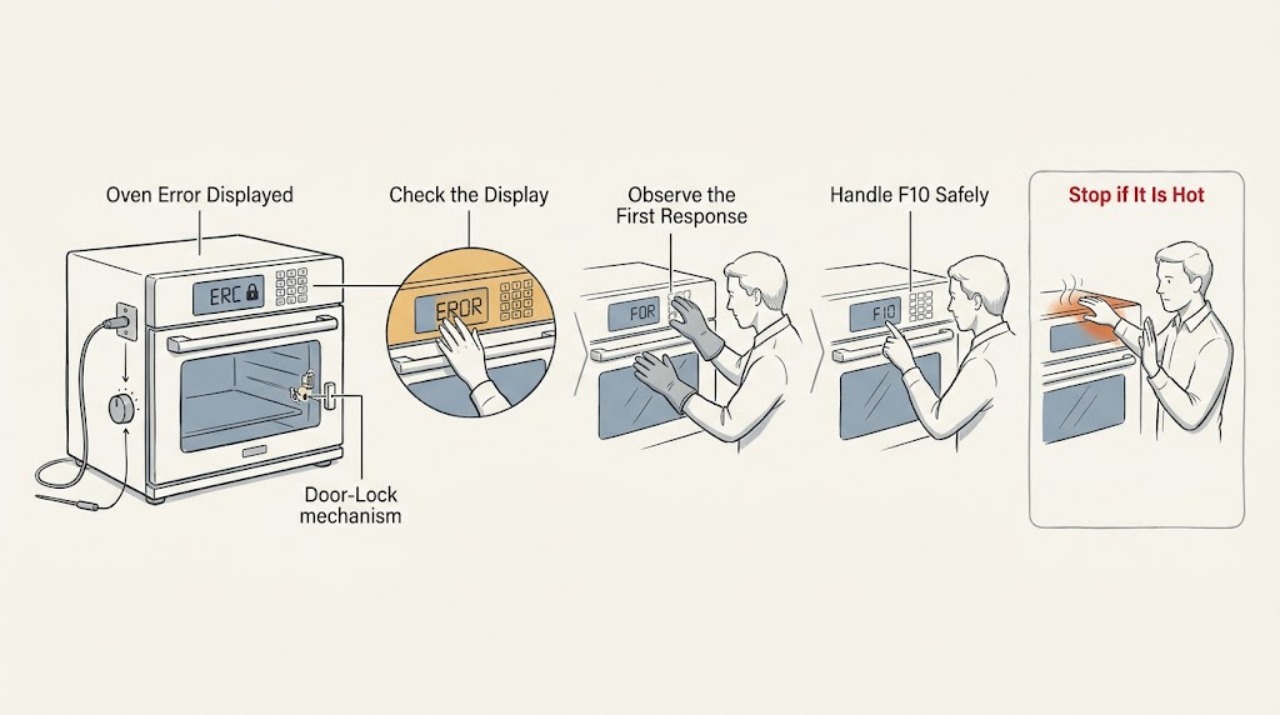
Work through in order
Diagnostic checks
Use only checks that match the exact appliance or system and its official guide.
-
Check 1
From a safe position, photograph the complete display and write down the exact code or symbol, the selected cooking mode, whether the door is open or locked, and what happened immediately before the error appeared.
Expected result: Classify the indication as a letter-number code, dash or lock symbol, demo indication, blank or flashing display, or an unrecognized message; record whether buttons accept input and whether the oven is heating.
Next step: Compare the exact indication with the Frigidaire guide and the model-specific Owner's Manual before clearing the display.
Stop if: Stop using the oven for smoke, burning odor, uncontrolled heat, visible electrical damage, or a door that cannot be safely closed or unlocked.
Why this matters
Why: The display class changes the next check. A code can identify a keypad, temperature-probe, communication, lock, or high-temperature family, while a dash or lock symbol may indicate an intentional control state.
-
Check 2
Look up the recorded code in the Frigidaire oven or range error guide, then confirm that the appliance type and model match the guide before applying its instruction.
Expected result: Record whether the code matches F1, F10, F12, F13, a listed communication code, F30, F31, F40/F41, F90-F94, a dash or lock indication, or an unlisted model-specific code.
Next step: Follow only the matching entry and manual for the exact model; preserve the photo and code for service if no entry matches.
Stop if: Do not substitute a code definition from another brand, appliance type, or model family, and do not continue cooking under an unresolved safety code.
Why this matters
Why: Frigidaire groups these indications differently: keypad, identification or prompt, communication, probe, lockout, and door-lock codes lead to different service questions. An unlisted code cannot be safely interpreted by guessing a similar-looking code.
-
Check 3
If the display shows F10 or the oven is clearly hotter than the selected setting, cancel the function if the controls respond, turn the oven off, and allow it to cool without touching hot elements or opening the cabinet.
Expected result: After the oven is cool, record whether F10 clears, returns immediately, or is accompanied by continued heating with no selected cycle; do not restart it merely to reproduce an unsafe condition.
Next step: Leave the appliance off and arrange qualified service when F10 returns, the oven heats while off, or safe cooling cannot be confirmed.
Stop if: Stop immediately for smoke, flames, a burning odor, or any need to reach into a hot or energized oven.
Why this matters
Why: Frigidaire describes F10 on standard range and wall ovens as detection of higher-than-normal temperature and a built-in safety alert. A returning code or continued heating is not a nuisance display and may require internal diagnosis.
-
Check 4
If the display shows a dash, lock symbol, F40/F41, or F90-F94, compare the door and control state with the exact manual and use only the documented unlock or lockout procedure from the front panel.
Expected result: Record whether the controls respond, the lock indicator clears, the door unlocks as documented, or the display continues to show a lock-related indication.
Next step: Keep the oven off and request service when the door remains locked, the code returns, or the documented procedure cannot be completed.
Stop if: Never pry the door, bypass the lock, remove the panel, or reach into the door-lock mechanism.
Why this matters
Why: Frigidaire identifies a dash as a locked control state and lists F40/F41 and F90-F94 as lock-related families. A persistent door-lock fault can restrict cooking functions and should not be bypassed.
-
Check 5
If the code is F30, F31, F1, F12, F13, or a communication code, note whether it appeared during preheat, cooking, cleaning, or an idle display, and check only the visible condition and the model manual's user-accessible instructions.
Expected result: Record whether the code clears, returns at the same stage, prevents temperature selection, causes erratic keys or display behavior, or leaves the oven unable to start.
Next step: Stop further testing and provide the code, stage, model, and display photo to qualified service when the indication returns or the oven cannot operate normally.
Stop if: Do not test resistance, open the control area, disconnect a probe, or work on wiring unless a qualified professional has made the appliance safe.
Why this matters
Why: The Frigidaire guide associates these families with an open or shorted probe, keypad, identification or prompt failure, or communication error. The timing and repeatability help service, but they do not identify a safe part replacement from the code alone.
-
Check 6
Only when the oven is cool, free of smoke or odor, and the applicable Frigidaire guide or manual permits it, perform the documented power reset from a safe position; do not disconnect internal wiring.
Expected result: After power is restored, record whether the display returns normally, the same code returns immediately, the oven remains locked, or it begins heating without a selected cycle.
Next step: Keep the oven off and arrange qualified service when the code returns or any abnormal behavior remains; include the reset result in the service description.
Stop if: Do not reset a hot, smoking, burning-smelling, or actively overheating oven, and do not repeatedly cycle power to suppress a recurring alert.
Why this matters
Why: A clear display after one permitted reset may indicate a transient control event, but it does not prove the cause is repaired. An immediate repeat or unexpected heating indicates a persistent fault.
-
Check 7
Only after the error clears and the oven is cool and otherwise normal, run one short supervised bake or preheat test using the model manual's ordinary procedure, keeping the oven empty during preheat and the door closed.
Expected result: Record whether the oven reaches the selected temperature, displays no code, responds to controls, and avoids unexpected heat, smoke, or odor.
Next step: Stop testing and arrange qualified appliance service if the error reappears, the oven heats incorrectly, or any safety symptom develops.
Stop if: Do not leave the test unattended and do not continue a cycle with an error, uncontrolled heating, smoke, burning odor, or lock problem.
Why this matters
Why: A normal supervised cycle supports a transient display event, but a returning code or abnormal temperature means the appliance is not reliably repaired.
Use your observations
Decision map
Find the observation that best matches what you see, then follow the next safe action.
-
PATH 01Safety boundary
What you see
The display shows F10 or the oven is hotter than the selected setting.
Do this next
Turn the oven off, allow it to cool, and arrange qualified service if F10 or abnormal heating returns.
Why this path and its safety boundary
Why it matters: This is a high-temperature safety alert, not a harmless display reminder.
Safety stop: Do not restart or open the appliance while heat, smoke, odor, or uncontrolled heating is present.
-
PATH 02Safety boundary
What you see
A dash, lock indication, F40/F41, or F90-F94 accompanies the error.
Do this next
Use the exact model's documented unlock or reset procedure once; request service if the door or controls remain locked.
Why this path and its safety boundary
Why it matters: The control or door-lock system is limiting operation, and the lock must not be bypassed.
Safety stop: Stop if the door will not unlock as documented or if opening the appliance would be required.
-
PATH 03Safety boundary
What you see
The display shows F1, F12, F13, a communication code, F30, or F31.
Do this next
Record when it returns, perform only a permitted model-specific reset, and arrange qualified service if it recurs.
Why this path and its safety boundary
Why it matters: The listed family points toward a keypad, identification or prompt, communication, or temperature-probe issue, but the code alone does not prove which component has failed.
Safety stop: Do not open the control area, disconnect wiring, or install a part based only on the code.
-
PATH 04Safety boundary
What you see
The code is not in the applicable Frigidaire guide, the model is uncertain, or the display cannot be read reliably.
Do this next
Keep the oven off if operation is abnormal and contact qualified service with a clear display photo and model information.
Why this path and its safety boundary
Why it matters: The available evidence is insufficient to assign a safe meaning to the indication.
Safety stop: Do not guess from a similar model or continue cooking to see what happens.
-
PATH 05Safety boundary
What you see
The display clears after one permitted reset and a supervised normal test completes without an error or abnormal heat.
Do this next
Keep the error photo and reset result; stop using the oven and arrange service if the same indication returns.
Why this path and its safety boundary
Why it matters: The indication may have been transient, but recurrence remains meaningful.
Safety stop: Do not treat a cleared display as permission to ignore smoke, odor, uncontrolled heating, or a door-lock problem.
Helpful context
Understand the symptom
The exact display is more useful than the symptom
An oven may show a letter-number code, a dash, a lock message, a demo indication, or a flashing control state. The same beep can accompany a normal key or timer event, a locked control, or a genuine fault. Write down the code exactly as shown, including whether a character could be a letter or a number, and note the selected function, door state, temperature behavior, and whether the controls respond.
Codes are model-dependent
Frigidaire's ranges guide lists code families including F1 keypad, F10 thermal runaway, F12 micro identification, F13 E prompt failure, F3/F20/F26 communication error, F30 open probe, F31 shorted probe, F40/F41 cooktop lockout, and F90-F94 door-lock issue. The list is a starting point, not permission to replace a component: use the exact model manual for the meaning and the permitted recovery sequence.
A reset cannot make an unsafe fault safe
Frigidaire provides a reset procedure for some oven error indications, but a reset only tests whether the display fault was transient. If the code returns, the oven heats unexpectedly, the door remains locked, or there is smoke or a burning odor, leave the appliance off. Do not remove panels, probe wiring, bypass a lock, or repeatedly cycle power to hide the indication.
Safety boundary
Stop conditions
- Stop using the oven for F10 with abnormal heat, smoke, flames, burning odor, visible damage, or heating with no selected cycle.
- Do not force or bypass a locked door, remove panels, test live wiring, disconnect a probe, or replace a component based only on an error code.
- Arrange qualified appliance service when a code returns after the documented reset, the code is unlisted, controls remain erratic, or the oven cannot complete a safe supervised test.
When checks do not resolve it
Need a professional?
Request qualified appliance service for a recurring or unlisted code, F10 or any uncontrolled heating, F90-F94 or a door that will not unlock as documented, erratic controls, smoke, burning odor, or a fault that cannot be cleared safely.
Have this ready
- Give the technician the exact model, a display photo, the code, selected function, door state, temperature behavior, when the code appeared, and the result of any permitted reset.
Common questions
FAQ
What should I do first when my Frigidaire oven displays an error?
Photograph the complete display, record the selected function and door state, and match the exact code to the Frigidaire guide and your model's Owner's Manual. Do not guess from another model.
What does F10 mean on a Frigidaire oven?
Frigidaire describes F10 on standard range and wall ovens as detection of higher-than-normal temperature. Turn the oven off and let it cool; arrange qualified service if the alert or abnormal heating returns.
Can I clear a Frigidaire oven error by resetting power?
Frigidaire documents a reset for some error indications, but a reset is only a diagnostic step. If the code returns, the oven heats unexpectedly, the controls remain erratic, or the door stays locked, leave it off and request service.
Read the exact guide
Official sources
- How do I use my display or controls?Frigidaire · Frigidaire model-dependent display and control functions
- Oven Error Codes and Alarms GuideFrigidaire · Frigidaire oven error-code and alarm guidance
- What does it mean if my display shows a – (dash)?Frigidaire · Frigidaire locked-control display indication
- Ranges - Error Code GuideFrigidaire · Frigidaire range display-code families and unresolved-error service guidance
Community feedback
Share a repair observation
Share a plain-text repair observation. Accepted observations are published automatically; this page may take a moment to update.