
On this page
Start here
Quick answer
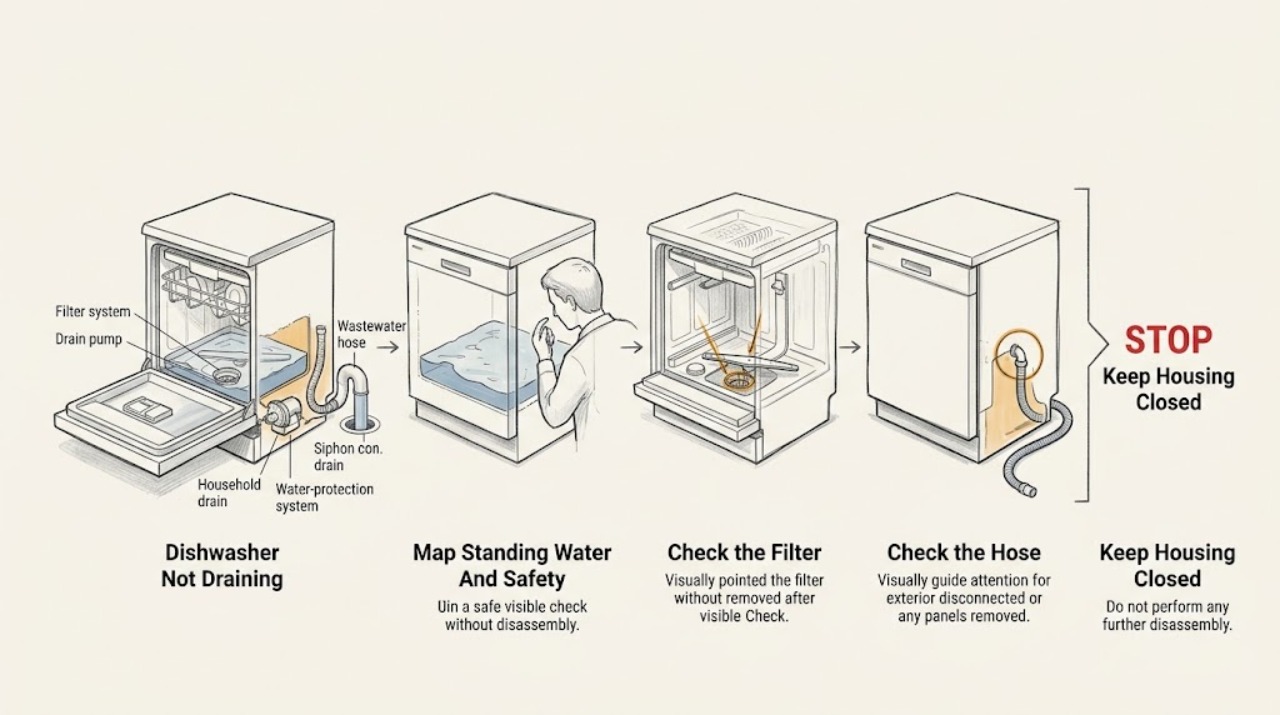
A Gaggenau dishwasher that leaves water in the tub should be separated into an accessible drain-path problem and an internal pump or water-protection problem. First stop the cycle, keep hands out of the water until sharp debris is considered, and identify the exact E-Nr because Gaggenau says the correct manual is model-specific. With the appliance de-energized only as the model instructions permit, remove standing water with a sponge, inspect and clean the accessible filter system, and ensure it is correctly reinstalled. Then inspect the visible wastewater hose under the sink for a kink, confirm the siphon connection is open, and—if the dishwasher drains into a garbage disposal—verify that the disposal inlet plug was removed at installation. Gaggenau manuals also identify a missing high loop or debris returning into the drain hose as causes of poor draining. If the display shows a model-specific drain condition such as E:6102 or E:6103, use that exact manual rather than applying another model's steps. Continuous filling, a water-protection indication, leaking, damaged wiring, or standing water that reaches electrical parts is a stop condition: close the water supply and arrange qualified service. If filters and the external drain path are clear but water still remains, the drain pump, pump cover, wiring, control, or household plumbing needs professional diagnosis. Do not run drain cleaner through the dishwasher, probe the pump, remove the base, pull out a built-in unit, or perform live electrical tests.
Before you begin
Safety first
- The user may identify the water pattern, retrieve the exact E-Nr manual, clean and reinstall an accessible filter system when the manual permits, and inspect visible hose and sink-side routing. Pump covers, impellers, internal hoses, controls, wiring, base removal, live testing, sharp debris in an inaccessible sump, water-protection faults, and any work requiring movement of a built-in dishwasher belong to qualified service.
Work through in order
Diagnostic checks
Use only checks that match the exact appliance or system and its official guide.
-
Check 1
Stop the wash cycle and identify the water level, whether the water is hot or contaminated, whether the pump makes a draining sound, whether the sink or disposal also backs up, and whether a display code, leak, or water-protection indication is present. Record the appliance E-Nr before selecting a manual.
Expected result: The tub has a small residual amount, a large amount of dirty water, water returns from the sink, the pump is silent or humming, or a leak/water-protection state is visible.
Next step: For a routine standing-water symptom, continue to the safe filter check. For a leak, continuous filling, water-protection indication, smoke, or water near electrical parts, close the water supply from a safe position and arrange service.
Stop if: Do not reach into hot or contaminated water, handle possible glass, run another cycle to reproduce a leak, or remove panels.
Why this matters
Why: A small model-normal residual amount is different from a full tub. Sink backup suggests the household drain or siphon path; a silent or humming pump with clear external routing makes an internal pump or control branch more likely. A leak or water-protection state overrides routine checks.
-
Check 2
After the appliance is made safe as specified by the exact E-Nr manual, remove only the accessible racks and filter system, inspect the coarse, fine, and micro-filter areas, rinse the filter elements, remove visible residue, and reinstall the filter system with the locking catches and alignment marks correctly engaged.
Expected result: Food soil or foreign material blocks a filter, a filter is damaged or not seated, the sump is visible but clear, or the filter system cannot be removed without force.
Next step: Clean and reinstall only as the model manual shows, then use the documented drain or cancel function once. If the filter is damaged, cannot seat, or the tub remains full, stop and continue with the external drain-path check or service.
Stop if: Do not force the filter, let debris fall into the sump, reach into the pump blindly, use drain chemicals, or clean around energized parts.
Why this matters
Why: Gaggenau says debris can block the filters and that a dirty filter can cause drainage trouble. A clear, correctly seated filter makes the external hose, siphon, pump-cover, or internal pump branch more likely. A filter that resists removal or a sump containing sharp debris is not a force-fit repair.
-
Check 3
From the accessible under-sink area, inspect the wastewater hose for a kink, compression, sagging route, or visible residue at the connection. Check that the siphon inlet is open and that the hose has the high loop required by the model installation instructions; do not pull the dishwasher out.
Expected result: The hose is kinked or low, the siphon connection is sealed or blocked, debris is visible at an accessible connection, the high loop is absent, or the external route looks correct.
Next step: Correct only an obvious accessible hose route or connection issue as documented, then run the model's brief drain test. Arrange service for a hidden blockage, a route requiring appliance removal, or persistent standing water.
Stop if: Do not detach a pressurized or wet connection, pull out the built-in dishwasher, cut the hose, or pour chemicals into the drain path.
Why this matters
Why: Gaggenau identifies a kinked or blocked wastewater hose, sealed siphon connection, missing high loop, and back-flushed debris as causes of water not draining. A correct visible route shifts suspicion toward the pump, pump cover, appliance control, or hidden household plumbing.
-
Check 4
If the dishwasher drains through a sink siphon or garbage disposal, check whether the sink drain and disposal accept water normally and whether the dishwasher inlet plug was removed when the disposal connection was installed. Inspect only the accessible connection and do not dismantle the disposal.
Expected result: The sink or disposal also drains slowly, the dishwasher connection remains sealed, the plug was not removed at installation, or the household drain accepts water normally.
Next step: Have the household drain or disposal connection corrected by the appropriate qualified installer if needed, then retest. If the connection is correct and the dishwasher still will not drain, continue to the code and service branch.
Stop if: Do not remove a disposal, open plumbing under a full tub, use drain opener, or run repeated cycles against a blocked drain.
Why this matters
Why: A shared slow drain or a retained disposal inlet plug can block dishwasher discharge without an appliance pump failure. A normal household drain and an open connection make an appliance-side hose, pump cover, pump, or control issue more likely.
-
Check 5
Read the displayed code or indicator against the exact Gaggenau E-Nr manual. For models whose manual lists them, compare E:6102 with a blocked pump or loose pump cover, E:6103 with water not draining, and E:9240 with soiled or blocked filters; do not transfer those meanings to another model without confirmation.
Expected result: The manual identifies a filter, pump, hose, siphon, high-loop, disposal, or water-protection cause; the code is absent; or the same code returns after the documented accessible correction.
Next step: Follow only the model-manual user step for a filter or visible drain route. For recurring codes, water protection, continuous filling, or a code requiring pump, wiring, or base access, close the water supply and arrange service.
Stop if: Do not reset repeatedly, bypass a water-protection device, open the base, or perform live electrical testing.
Why this matters
Why: A matching model-manual entry narrows the next safe check, while a repeated code after the accessible check indicates that the condition is unresolved. A code alone does not identify a replaceable part or make internal access safe.
-
Check 6
If the filter system is clean and seated, the visible hose and siphon/disposal connection are correct, the high loop is present where required, and a documented drain attempt still leaves water, record the E-Nr, code, water level, pump sound, filter condition, hose route, and sink-drain behavior for service.
Expected result: Drainage resumes after an accessible correction, the pump remains silent or only hums, water returns from the sink, the code returns, or no accessible cause explains the standing water.
Next step: Arrange qualified Gaggenau or appliance service for internal diagnosis. Keep the appliance out of service and close the water supply for leaks, water-protection indications, continuous filling, burning odor, damaged wiring, or water near electrical parts.
Stop if: Do not remove the base, open the pump housing, handle sharp debris blindly, disconnect internal hoses, or make live electrical measurements.
Why this matters
Why: Recovery after a filter or external drain correction supports that branch. Persistent water with a clear path can involve the pump, pump cover, impeller, control, wiring, or hidden plumbing; the symptom cannot select one part. A silent or humming pump is not a safe invitation to probe it.
Use your observations
Decision map
Find the observation that best matches what you see, then follow the next safe action.
-
PATH 01Safety boundary
What you see
The filter system contains food soil or foreign material, is not seated, or the model reports a blocked-filter condition.
Do this next
Make the appliance safe, clean and correctly reinstall the filter system using the exact manual, then run one documented drain attempt. Escalate if the filter cannot seat or water remains.
Why this path and its safety boundary
Why it matters: A filter obstruction is more likely than a failed pump at the first check.
Safety stop: Do not force the filter or reach blindly into a sump that may contain glass.
-
PATH 02Safety boundary
What you see
The wastewater hose is kinked or low, the siphon connection is sealed, the high loop is missing, or the manual identifies debris in the drain hose.
Do this next
Correct only an accessible routing or connection issue documented for the installation, then retest. Service or a qualified installer is needed if the hose is hidden or the dishwasher must be moved.
Why this path and its safety boundary
Why it matters: A discharge-path restriction or backflow condition is more likely than an internal appliance failure.
Safety stop: Do not detach wet plumbing, pull out the built-in unit, or use drain chemicals.
-
PATH 03Safety boundary
What you see
The dishwasher is connected to a garbage disposal whose inlet plug was not removed, or the sink/disposal also drains slowly.
Do this next
Have the disposal or plumbing connection corrected by the appropriate qualified installer, then run the dishwasher's documented drain check.
Why this path and its safety boundary
Why it matters: The shared household drain connection can prevent dishwasher discharge without proving an appliance pump fault.
Safety stop: Do not dismantle the disposal, open a full drain connection, or pour drain opener into the system.
-
PATH 04Safety boundary
What you see
The dishwasher continuously fills, leaks, displays a water-protection indication, or leaves water near electrical components.
Do this next
Close the water supply from a safe accessible position, stop using the appliance, and arrange qualified service. Keep people away from standing water near electrical parts.
Why this path and its safety boundary
Why it matters: This is a water-damage and electrical-safety branch, not routine filter troubleshooting.
Safety stop: Do not run another cycle, remove panels, or restore operation to see whether the condition clears.
-
PATH 05Safety boundary
What you see
The filters are clean and seated, the visible hose, siphon, high loop, and disposal connection are correct, but the tub still does not drain or the code returns.
Do this next
Arrange model-specific Gaggenau service and provide the E-Nr, code, water level, pump sound, filter and hose observations, and whether the sink drains normally.
Why this path and its safety boundary
Why it matters: An internal drain pump, pump cover, impeller, control, wiring, or hidden plumbing fault is more likely; the symptom cannot identify a replacement part.
Safety stop: Do not open the base, probe the pump, disconnect internal hoses, handle sharp debris blindly, or live-test wiring.
Helpful context
Understand the symptom
Identify the water pattern before touching the filter
A shallow amount of clean water after a cycle, a tub full of dirty water, slow draining, and water that returns from the sink are not the same symptom. Note whether the pump runs, whether the water level changes at all, whether the sink or garbage disposal also drains poorly, and whether a display code is present. Record the Gaggenau E-Nr before using a manual: Gaggenau's support page directs owners to enter the appliance number to retrieve the correct documents, and the 200- and 400-series manuals do not share every instruction.
Clean only the accessible filter system
Food debris in the wash water can block Gaggenau's multi-part filter system. After making the appliance safe according to the exact manual, remove the racks as directed, take out the filter assembly, rinse the filter elements, remove visible residue from the filter rim, and reinstall the assembly with its locking catches and alignment marks engaged. Do not let debris fall into the sump. If the water is hot, cloudy with chemicals, or contains glass, let it cool and use caution; the filter area is not a reason to reach blindly into the pump.
Check the external drain route under the sink
Gaggenau's drain troubleshooting points to the wastewater hose, the siphon connection, the household drain, and the high loop. From an accessible position, look for a sharply bent hose, a hose that has slipped low, a blocked sink or air gap where fitted, or a connection that is still sealed. On installations connected to a garbage disposal, the disposal inlet plug must have been removed. Correct only an obvious accessible routing or connection issue that the installation manual permits; do not pull a built-in dishwasher out or detach a hose to prove a blockage.
Interpret codes and water behavior by model
Some Gaggenau manuals use E:6102 for a blocked wastewater pump or loose pump cover and E:6103 for water not draining, with hose, siphon, pump-cover, high-loop, and disposal-installation causes listed beneath it. Other models can display different codes or describe the same condition in different language. A code is a branch selector, not permission to open the base or perform an electrical test. Use the exact E-Nr manual and stop if the code returns after the documented accessible checks.
Treat pump, wiring, leaks, and water protection as service work
If the filter and visible drain route are clear but the tub still does not empty, the drain pump, pump cover, impeller area, control, wiring, or household plumbing may be involved. Gaggenau manuals warn that sharp debris such as glass can be present near the pump. A water-protection indication, continuous filling, a leak, burning odor, damaged cord, or water near electrical parts requires closing the water supply and arranging qualified service. Do not remove the base, probe the impeller, disconnect internal hoses, or make live measurements.
Only after diagnosis
Potential parts
- dishwasher filter system
Consider a replacement only if the exact E-Nr manual or service diagnosis shows that a filter element is damaged or cannot seat after cleaning.
Filter assemblies differ by Gaggenau dishwasher model and series; confirm the E-Nr and the manufacturer's parts information. - dishwasher wastewater hose
Consider this only when a qualified installer or technician confirms a collapsed, damaged, or model-incompatible hose after accessible routing and siphon checks.
Hose length, fittings, and routing are installation- and model-specific; do not select by appearance alone. - dishwasher drain pump or pump cover
Consider this only when filters and the external drain path are clear and qualified service identifies a blocked, damaged, or failed pump assembly or cover.
Pump and cover designs vary by E-Nr; standing water or a code does not prove that either component needs replacement. - dishwasher control or wiring component
Consider this only after a qualified technician rules out filters, hose, siphon, household drain, pump cover, and pump causes and confirms an internal electrical fault.
Electrical components require model-specific diagnosis and safe isolation; do not perform live tests or bypass protection devices.
When checks do not resolve it
Need a professional?
Arrange qualified Gaggenau or appliance service when the filter system and visible drain path are clear but water remains, the same drain code returns, the pump is silent or only hums, the appliance must be pulled out, or diagnosis would require pump, pump-cover, impeller, internal hose, control, wiring, or base access. Close the water supply and stop using the dishwasher for continuous filling, a water-protection indication, a leak, smoke, burning odor, damaged cord, or water near electrical parts.
Safety scope: The user may identify the water pattern, retrieve the exact E-Nr manual, clean and reinstall an accessible filter system when the manual permits, and inspect visible hose and sink-side routing. Pump covers, impellers, internal hoses, controls, wiring, base removal, live testing, sharp debris in an inaccessible sump, water-protection faults, and any work requiring movement of a built-in dishwasher belong to qualified service.
Common questions
FAQ
Why is my Gaggenau dishwasher leaving water in the bottom?
The first user-level causes are a blocked or mis-seated filter, a kinked wastewater hose, a sealed siphon connection, a missing high loop, a retained garbage-disposal inlet plug, or a shared household drain restriction. If those checks are clear, the drain pump or internal control needs model-specific service.
Can a dirty Gaggenau dishwasher filter cause a draining problem?
Yes. Gaggenau manuals say debris can block the multi-part filter system. Make the appliance safe, clean and correctly reinstall the accessible filters using the exact E-Nr manual, and stop if the filter cannot seat or sharp debris is present.
What does E:6103 mean on a Gaggenau dishwasher?
On the Gaggenau manuals that use this code, E:6103 is associated with water not draining and can lead to checks of the disposal inlet plug, wastewater hose, siphon connection, pump cover, high loop, and back-flushed debris. Verify the exact E-Nr manual because code details and access differ by model.
Should I remove the Gaggenau dishwasher drain pump cover myself?
Only follow that step if the exact model manual explicitly authorizes it and you can safely isolate the appliance and handle possible sharp debris. With no model supplied, treat pump-cover, impeller, base, and internal hose access as a professional boundary.
What should I do if my Gaggenau dishwasher keeps filling or shows a water-protection indication?
Close the water supply from a safe accessible position, stop using the dishwasher, and arrange qualified service. Gaggenau manuals treat continuous filling and activated water protection as service conditions rather than routine drain-filter checks.
Read the exact guide
Official sources
- Use and Care Manual DF210701 | GaggenauGaggenau · Gaggenau DF210701 dishwasher; filter procedure is an example requiring exact-model confirmation
- Downloads | GaggenauGaggenau · Gaggenau appliances, including dishwashers
- Use and Care Manual DF211700 | GaggenauGaggenau · Gaggenau DF211700 dishwasher; codes and remedies are model-specific
- Use and Care Manual DF210700 | GaggenauGaggenau · Gaggenau DF210700 dishwasher; drain-pump access is model-specific
- Use and Care Manual DF481701 | GaggenauGaggenau · Gaggenau DF481701 dishwasher; code and access details are model-specific
- DF481700F_9001630072Gaggenau · Gaggenau DF481700F dishwasher; drainage and protection steps require exact-model confirmation
Community feedback
Share a repair observation
Share a plain-text repair observation. Accepted observations are published automatically; this page may take a moment to update.