
On this page
Start here
Quick answer
First record the exact Gaggenau E-Nr/model, which compartment is warm, and whether the display and interior lights work. If the display is lit but the refrigerator does not cool, check the exact manual for showroom/demo mode; the opened RC 282 and RVB497790 manuals both identify showroom mode as a cause of a powered refrigerator that does not cool. Then check accessible external ventilation, interior vents, door closure and gasket, temperature setting, and recent outage, installation, frequent opening, or warm-food events. On some Gaggenau models a light rear-wall frost layer is automatically defrosted and can be normal, but thick or recurring frost, blocked airflow, or failure to recover is not cleared by that observation. If the cabinet remains warm after the model-authorized recovery period, a fault message returns, or there is water near electrical parts, smoke, burning odor, abnormal heat, a damaged cord, or repeated trips, stop and arrange trained Gaggenau service. Do not remove panels, touch fans or heaters, add refrigerant, or live-test the cooling system.
Before you begin
Safety first
- This article covers model identification, safe power observation, normal controls, accessible ventilation and door/load checks, and model-authorized recovery. Trained Gaggenau service must handle wiring, controls, fans, defrost, compressor/start devices, refrigerant circuits, and live testing.
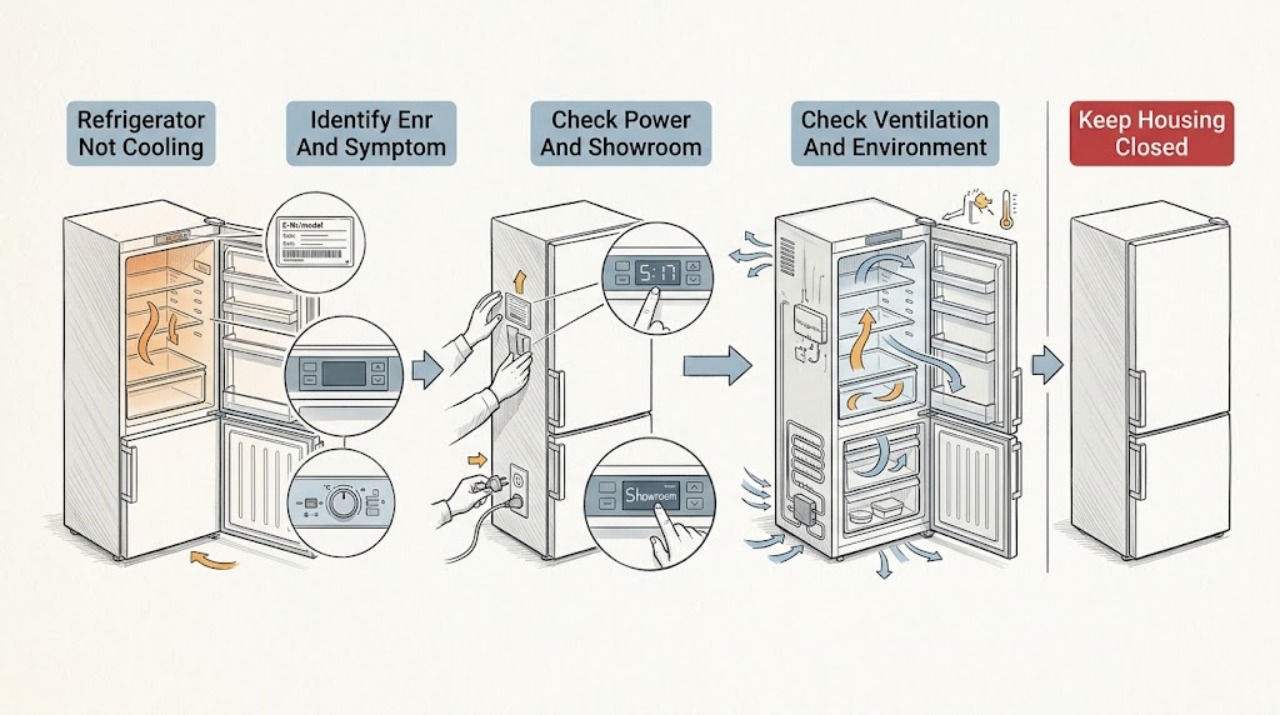
Work through in order
Diagnostic checks
Use only checks that match the exact appliance or system and its official guide.
-
Check 1
Record the exact Gaggenau E-Nr/model and serial if available, appliance configuration, warm compartment, display/light state, temperature reading or food-temperature symptom, recent outage or installation, and whether the unit was moved or heavily loaded.
Expected result: Everything is dark; displays/lights work but one or both compartments are warm; a fault message or showroom indication appears; or the model/compartment is unknown.
Next step: Use Gaggenau's E-Nr documentation portal to obtain the exact manual and follow the matching branch. If the model cannot be identified, do not guess a setting or reset.
Stop if: Do not remove trim or panels to find the rating plate or inspect an internal component.
Why this matters
Why: An all-dark appliance belongs to the power branch. A powered but warm appliance can be in showroom mode or have a cooling/airflow problem. A single warm zone and any display state need the matching manual; sound alone does not prove a compressor or fan fault.
-
Check 2
If the cabinet is dark, check the accessible mains connection and household fuse/breaker from a safe dry position. If the display and lighting are on but there is no cooling, check the exact manual for showroom/demo mode and use only its normal-control exit or self-test if explicitly provided.
Expected result: The appliance has no power; the display/lights are on and showroom mode is active; the display is on with no showroom indication; the breaker trips again; or power and mode appear normal.
Next step: Restore only a loose, dry, undamaged connection or the exact model's documented mode. Use qualified electrical service for an abnormal supply; if mode and power are normal, continue with airflow and door checks.
Stop if: Do not repeatedly reset a tripping breaker, open an electrical enclosure, use an extension cord, or run an undocumented service test.
Why this matters
Why: A power interruption or showroom mode can make the appliance appear not to cool. The RC 282 and RVB manuals specifically identify showroom mode in the powered-but-not-cooling symptom. A verified supply with normal mode leaves a cooling or control fault possible.
-
Check 3
Inspect only accessible external ventilation openings and clearance around the appliance. Remove permitted obstructions without moving a built-in appliance unsafely, and note nearby cookers, heaters, direct sun, or a blocked cabinet grille. Do not remove a grille or reach behind it.
Expected result: An external grille is blocked; the appliance is pressed against a wall or heat source; the room is unusually hot; or ventilation and surroundings appear normal.
Next step: Clear only accessible obstructions and follow installation clearance in the exact manual. Allow normal operation and recheck temperature; arrange service if cooling does not recover.
Stop if: Do not pull out a built-in appliance, clean energized electrical parts, remove covers, or touch a hot compressor or condenser.
Why this matters
Why: Gaggenau manuals say covered ventilation openings and nearby heat can reduce cooling efficiency or cause longer operation. Normal external ventilation makes an internal airflow or refrigeration issue more likely if the cabinet remains warm.
-
Check 4
Close refrigerator and freezer doors normally and inspect the visible gasket for dirt, gaps, or an item holding a door open. Reposition accessible food that touches the back wall or blocks an interior vent. Read the temperature setting and compare it with the exact manual; do not copy another family's setting.
Expected result: A door does not seal; a drawer/container blocks closure; food is against a back wall or vent; the setting is wrong for the model; or doors, loading, and settings appear normal.
Next step: Correct the accessible obstruction, close doors, use the model-authorized setting, and allow recovery after a door or loading event. Service the appliance if it remains warm.
Stop if: Do not force a gasket, remove a door, dismantle a drawer, or probe a vent or fan.
Why this matters
Why: Gaggenau manuals link frequent opening, blocked openings, food against the back wall, and setting choices to temperature problems. A clear door and airflow path remove owner-correctable causes but do not prove the cooling system is healthy.
-
Check 5
Observe the temperature trend without opening interior panels. Record whether the model manual describes a light rear-wall frost layer and automatic defrost, whether thick frost blocks a vent, whether the temperature rise followed loading or frequent opening, and whether the cabinet recovers. Do not scrape frost or use a heat source.
Expected result: The exact manual documents automatic rear-wall defrost; frost is thick, recurring, or blocking airflow; temperature is temporarily high after loading/opening; or temperature stays far from the setting.
Next step: Follow the exact manual's normal setting and recovery guidance, minimize door openings, and monitor. If frost returns heavily or temperature remains abnormal, arrange service without opening the evaporator area.
Stop if: Do not chip frost, pour hot water, use a hair dryer/heat gun, remove an evaporator cover, or test a heater or sensor.
Why this matters
Why: The RVB manual says a rear-wall frost layer can be normal when the wall defrosts automatically, while thick frost, blocked airflow, or persistent temperature deviation is not narrowed to a normal cycle. A temporary rise differs from a cabinet that never recovers.
-
Check 6
If power, mode, ventilation, doors, loading, settings, and the model-authorized recovery period do not restore cooling, prepare a service record with E-Nr/model, warm compartment, display state, temperature readings/trend, recent events, door/airflow observations, frost pattern, unusual sounds, water, and safety symptoms.
Expected result: The cabinet remains warm; a temperature or electronics message returns; cooling is intermittent; frost repeatedly blocks airflow; or water, smoke, odor, abnormal heat, cord, outlet, or breaker symptoms are present.
Next step: Stop at external checks and arrange trained Gaggenau service. Use qualified electrical service for a household circuit issue, and protect food if temperatures are unsafe.
Stop if: Do not remove panels, live-test wiring, bypass a control or door switch, add refrigerant, or order a part from the symptom alone.
Why this matters
Why: Remaining causes may include controls, sensors, fans, defrost, compressor/start components, or sealed refrigeration. Gaggenau manuals route persistent display faults and unresolved cooling symptoms to customer service; the symptom does not select a compatible part.
Use your observations
Decision map
Find the observation that best matches what you see, then follow the next safe action.
-
PATH 01Safety boundary
What you see
Displays and lighting are on, but the cabinet does not cool and the exact manual identifies showroom/demo mode.
Do this next
Use the exact model's documented mode-exit or self-test once. If cooling does not resume, arrange service.
Why this path and its safety boundary
Why it matters: Showroom mode can leave the interface active while refrigeration is not operating; this is model-specific.
Safety stop: Do not enter hidden service menus or replace a board based on showroom behavior.
-
PATH 02Safety boundary
What you see
Interior lighting and display are absent, or power was lost after an outage or breaker event.
Do this next
Check the accessible plug and household supply safely. If a breaker trips again or a verified supply leaves the appliance dark, use qualified service.
Why this path and its safety boundary
Why it matters: Power connection, fuse/breaker, or appliance-side power is the first branch.
Safety stop: No repeated resets, extension cord, opened plug, or live testing.
-
PATH 03Safety boundary
What you see
The appliance runs longer, an external grille is blocked, food touches a vent/back wall, or a door/gasket does not seal.
Do this next
Clear accessible obstructions, correct closure, use the exact setting, and allow recovery. Arrange service if the cabinet remains warm.
Why this path and its safety boundary
Why it matters: Visible ventilation, door-seal, and loading problems are more likely than an immediately proven compressor fault.
Safety stop: Do not remove ventilation covers, door hardware, fan guards, or internal panels.
-
PATH 04Safety boundary
What you see
A light rear-wall frost layer appears on a model whose manual documents automatic defrost, or temperature rises briefly after loading/opening and then recovers.
Do this next
Minimize door openings, leave airflow space, and monitor. Escalate persistent warmth or heavy frost.
Why this path and its safety boundary
Why it matters: The documented model behavior can be normal, but it does not prove adequate cooling; heavy recurring frost or failure to recover changes the branch.
Safety stop: Do not scrape, heat, or dismantle the frost-covered area.
-
PATH 05Safety boundary
What you see
Cooling remains absent after external checks, an electronics fault remains/returns, temperature stays far from the setting, or smoke, odor, water near electrical parts, abnormal heat, or repeated trips occur.
Do this next
Stop using the appliance when a hazard or severe warming is present and arrange trained Gaggenau service. Provide the model, message, temperature trend, photos, and event history.
Why this path and its safety boundary
Why it matters: An internal control, sensor, fan, defrost, compressor, or sealed-system fault is possible; a hazard makes continued testing inappropriate.
Safety stop: No panel removal, live test, refrigerant work, bypass, repeated reset, or part replacement based on the symptom alone.
Helpful context
Understand the symptom
A warm cabinet does not identify one part
A Gaggenau refrigerator can be warm because it is in showroom mode, has lost power, has blocked ventilation, has a door-seal or loading problem, has not recovered after a recent event, or has an internal cooling fault. The correct order is display and power, visible airflow and doors, settings and temperature trend, then service. Gaggenau manuals differ by family, so use the E-Nr manual before changing a mode or resetting the appliance.
Keep the cooling system closed
Owner checks stop at the plug, breaker, normal controls, accessible ventilation, doors/gaskets, visible food placement, and model-authorized settings or reset. Do not remove an evaporator cover, fan guard, rear panel, heater, sensor, board, or compressor cover; do not perform live electrical tests or add refrigerant. If the cord is damaged, the outlet is hot, water is near electrical parts, smoke or burning odor is present, the cabinet is abnormally hot, or a breaker repeatedly trips, stop using the appliance and isolate power only from a safe dry position before arranging qualified service.
When checks do not resolve it
Need a professional?
Safety scope: This article covers model identification, safe power observation, normal controls, accessible ventilation and door/load checks, and model-authorized recovery. Trained Gaggenau service must handle wiring, controls, fans, defrost, compressor/start devices, refrigerant circuits, and live testing.
Common questions
FAQ
Why is my Gaggenau refrigerator warm while the display is on?
Check the exact model for showroom/demo mode first; opened RC 282 and RVB497790 manuals identify it as a powered-but-not-cooling cause. Then check external ventilation, doors, airflow, settings, and recovery after an outage or loading event. Persistent warmth needs service.
Is frost on the back wall of a Gaggenau refrigerator normal?
For the RVB497790 family, the opened manual says a rear-wall frost layer can be normal because the wall defrosts automatically at regular intervals. Thick or recurring frost, blocked airflow, a door-seal problem, or failure to maintain temperature needs the exact manual or service.
What should I check when only one Gaggenau refrigerator compartment is warm?
Record which compartment is warm, then check the model's settings, visible door seal, and food placement around vents. Do not assume a shared fan, damper, sensor, or defrost part across models; if the compartment remains warm after recovery, arrange service.
When should I stop troubleshooting a Gaggenau refrigerator that is not cooling?
Stop when power and external checks are normal but cooling remains absent, a fault message returns, temperature stays far from the setting, or there is smoke, burning odor, abnormal heat, water near electrical parts, a damaged cord/outlet, or repeated trips. Do not open panels or work on refrigeration components.
Read the exact guide
Official sources
- Before You CallGaggenau · Gaggenau refrigerator before-service checks for power, settings, airflow, doors, frost, and sounds
- Use and Care Manual RVB497790Gaggenau · Gaggenau RVB497790 refrigerator/freezer cooling, airflow, frost, temperature, display, and sound troubleshooting
- Downloads - Download appliance documentationGaggenau · Gaggenau E-Nr-based owner manuals and appliance documentation
- GAGGENAU HAUSGERÄTEGaggenau Hausgeräte · Gaggenau refrigerator no-cooling-capacity power troubleshooting
- Gaggenau User manual RC 282 RefrigeratorGaggenau · Gaggenau RC 282 refrigerator cooling troubleshooting, showroom mode, display faults, and repair safety
Community feedback
Share a repair observation
Share a plain-text repair observation. Accepted observations are published automatically; this page may take a moment to update.