
On this page
Start here
Quick answer
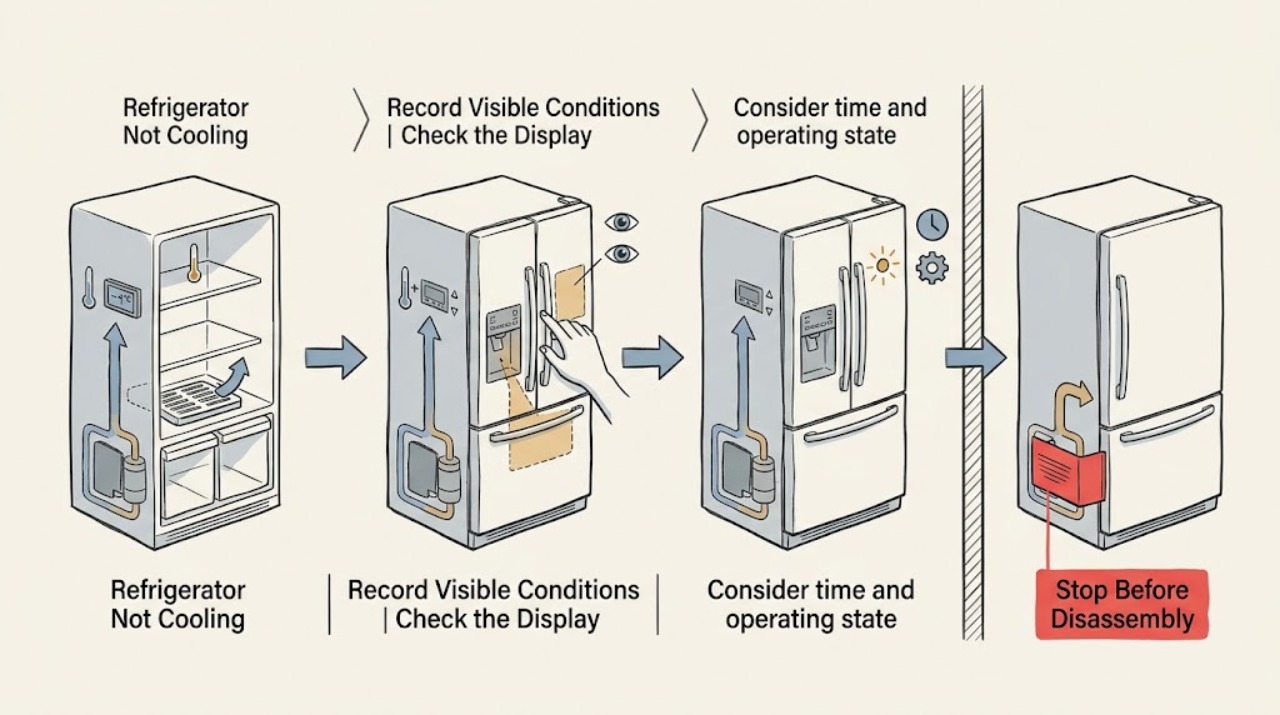
If a GE Café refrigerator is warm, first check the exact model's temperature controls, power indications, and any OFF, demo, or diagnostic state. Then allow a newly installed or recently interrupted unit time to stabilize, check that doors and gaskets seal, clear food from air outlets, and verify the installation has the manual's required clearance. Only clean a condenser if the exact Café manual says it is user-accessible and cleanable. A freezer that is cold while the fresh-food section is warm needs a different airflow, frost, or door-sealing decision from a cabinet with no light or display. If both sections remain warm after external checks, or the unit clicks, stays silent, trips power, or needs fan, compressor, control, or sealed-system diagnosis, stop and arrange qualified GE service.
Work through in order
Diagnostic checks
Use only checks that match the exact appliance or system and its official guide.
-
Check 1
Open the fresh-food door briefly and record the interior light, display, and any status indicators. Confirm the plug is seated and check the wall outlet externally with a known-good load. Do not infer that a working light proves the compressor or fans are operating.
Expected result: Note whether there is no light or display, a light but no display, or normal indicators with no cooling. Record any breaker or ground-fault device that has tripped.
Next step: Restore only a loose plug or a safely tripped household breaker after removing other loads. If the outlet works but the Café refrigerator remains unresponsive, stop and arrange service with the exact model; do not open panels.
Why this matters
Why: No light and no display make supply power or refrigerator control-power loss more likely. Working lights with a warm cabinet shift the check toward controls, defrost timing, airflow, doors, or the refrigeration system.
-
Check 2
Read the exact Café owner guide and check the refrigerator and freezer controls for OFF, zero, lock, demo/showroom, vacation, or diagnostic state. Follow only the documented model sequence; do not copy a button combination from another Café or GE refrigerator.
Expected result: Record the displayed temperatures, whether controls accept a normal setting, and whether a model-specific mode or message remains after the permitted control action.
Next step: Return the unit to normal operation exactly as the manual specifies and allow its response time. If the mode will not clear or the refrigerator remains warm, preserve the message and arrange model-specific service.
Why this matters
Why: An OFF or demo state can leave lights and controls functional while cooling is disabled. A control panel that will not respond, returns to a non-cooling state, or shows a persistent model message points toward service rather than repeated setting changes.
-
Check 3
Consider time and operating state: check whether the refrigerator was just installed, recently unplugged, affected by a brief outage, or loaded with a large amount of warm food. Listen from outside the cabinet without touching covers and allow the model's recovery interval.
Expected result: Note whether the compressor and fans are temporarily quiet, whether operation resumes on its own, and whether the refrigerator has had about 24 hours to stabilize after installation or a major change.
Next step: Keep the refrigerator connected and doors closed while it recovers. Do not repeatedly cycle power or remove the compressor cover; if the waiting interval passes without sustained operation, continue to the external temperature and airflow checks.
Why this matters
Why: GE explains that fans and compressor can pause during defrost and that compressor-overload protection can delay restart after an interruption. A normal return to operation supports a temporary pause; persistent silence or repeated clicks does not.
-
Check 4
Inspect external installation and loading: move tall containers away from air outlets, remove items that hold a door open, check gasket contact, and look for a light that stays on as a door closes. Confirm the room and cabinet have the clearance and ambient conditions specified by the exact Café manual.
Expected result: Record whether the freezer is cold while the fresh-food section is warm, whether one or both doors seal, whether heavy frost is visible, and whether food blocks a rear air path or the ice bin prevents closure.
Next step: Correct only accessible loading or sealing issues allowed by the manual. Do not remove doors, hinges, evaporator covers, or wiring; escalate persistent frost, alignment, or temperature problems.
Why this matters
Why: A blocked air path, warm-air entry, a door gasket gap, frost, or an interior light that stays on can explain uneven or poor cooling. A clear, sealed cabinet with both sections warm makes a hidden system fault more likely.
-
Check 5
If the exact manual identifies user-cleanable condenser fins or coils, disconnect power and perform only that documented external cleaning; otherwise leave hidden coils and panels alone. Then record one controlled operating pattern after stabilization: normal hum, no sustained sound, repeated clicking, fan symptom, or continued warming.
Expected result: Note whether temperatures improve after an authorized cleaning and recovery period, whether the fan moves air, and whether any burning odor, water near electrical parts, or breaker trip occurs.
Next step: Reassemble only what the manual instructs and restore power safely. If the issue persists, keep the symptom intact, record model and temperatures, and arrange qualified GE Café service; do not perform live tests or sealed-system work.
Why this matters
Why: A model-authorized dirty condenser can reduce efficiency, but GE notes that coil location and cleaning requirements vary. Persistent warmth with correct settings, clear airflow, good seals, and permitted cleaning makes a control, fan, compressor, defrost, or sealed-system diagnosis more likely.
Use your observations
Decision map
Find the observation that best matches what you see, then follow the next safe action.
-
PATH 01Next step
What you see
The Café refrigerator has no light or display.
Do this next
If the outlet works, stop user diagnosis and arrange service with the exact Café model.
Why this path and its safety boundary
Why it matters: Supply power, a breaker, or control-power fault is more likely than a cooling-only problem.
-
PATH 02Next step
What you see
Lights or display work, but the controls show OFF, demo, diagnostic, or another non-cooling state.
Do this next
Apply only the documented control change and wait for the model's response; escalate if the state remains or returns.
Why this path and its safety boundary
Why it matters: A model-selectable operating state is more likely than an immediate compressor failure.
-
PATH 03Next step
What you see
The freezer is cold but the fresh-food section is warm, or frost and door symptoms are present.
Do this next
Correct only accessible loading and sealing issues allowed by the manual. Persistent frost, failed alignment, or uneven cooling needs service.
Why this path and its safety boundary
Why it matters: Warm-air entry, airflow restriction, or a defrost/circulation issue is more likely than a simple setpoint error.
-
PATH 04Next step
What you see
Both sections remain warm after external checks and stabilization.
Do this next
Stop troubleshooting, preserve the symptom, and arrange qualified GE Café service with the model and observations.
Why this path and its safety boundary
Why it matters: A model-specific fan, control, compressor, defrost, or sealed-system diagnosis is more likely; the generic topic does not justify naming a part or code.
Helpful context
Understand the symptom
Use the exact Café model guide
GE's owner centers show that Café refrigerators include different French-door models and feature sets. Controls, ice and water hardware, built-in clearances, and service procedures are not interchangeable. Find the model and serial label, then use the matching owner manual before changing settings, adjusting a gasket, cleaning a condenser, or interpreting a display message.
Separate no cooling from slow recovery
A refrigerator can seem warm after installation, a power interruption, a large warm load, or prolonged door opening. GE's general guidance allows about 24 hours for a new installation to cool and stabilize. A blank cabinet, working lights with no cooling, a cold freezer with a warm fresh-food section, and a unit that is simply recovering are different symptom patterns and should not receive the same part guess.
Keep service work outside the home diagnosis
Safe user checks are limited to external settings, power indications, loading, doors, gaskets, accessible airflow, ambient conditions, and maintenance explicitly authorized by the exact manual. Unplug before any model-authorized cleaning. Do not remove evaporator covers, test live wiring, open the sealed system, add refrigerant, or name a component from a sound alone.
When checks do not resolve it
Need a professional?
Arrange qualified GE Café service if the outlet works but the refrigerator has no operating response, a control state will not clear, temperatures remain high after the model's stabilization interval and external checks, heavy frost or a door-sealing issue persists, or the unit clicks repeatedly or stays silent. Stop immediately for smoke, burning or electrical odor, water near electrical parts, a hot/damaged cord, or repeated breaker trips. Unplug before model-authorized cleaning; do not open panels, test live circuits, add refrigerant, or work on the sealed system.
Common questions
FAQ
Why is my GE Café refrigerator warm but the lights work?
A working light shows that some power reaches the cabinet, not that the compressor and fans are running. Check the exact model's controls for OFF or demo state, allow for defrost or post-outage recovery, and inspect doors, gaskets, airflow, frost, and installation conditions. Persistent warmth after stabilization needs service.
How long should a GE Café refrigerator take to cool after installation?
GE's general refrigerator guidance allows about 24 hours for a newly installed refrigerator to cool and stabilize. The exact Café model guide controls the settings and special features. Keep the doors closed and avoid repeatedly changing settings during that interval.
Can I clean the condenser coils on a GE Café refrigerator?
Only if the exact Café owner manual identifies the condenser as user-cleanable and gives the procedure. GE notes that coil location and cleaning requirements vary by model. Disconnect power before permitted cleaning and do not remove hidden panels based on another refrigerator's instructions.
Read the exact guide
Official sources
- 49-60103-1 Refrigerator Use and Care GuideGE Appliances · Older GE refrigerator owner safety and troubleshooting context
- Refrigerator - Error, Fault or Function CodesGE Appliances · GE refrigerator model-dependent error and function-code context
- Refrigerator - Not Cooling EnoughGE Appliances · GE refrigerator settings, stabilization, doors, airflow, condenser, installation, lights, and service troubleshooting
- Refrigerator - Does Not Run or CoolGE Appliances · GE refrigerator no-run power, controls, defrost, overload, and demo-mode troubleshooting
- Refrigerator and Freezer Troubleshooting and SupportGE Appliances · GE refrigerator model-specific support and troubleshooting scope
- Troubleshooting for CFCP1NIZSSGE Appliances · GE Café Series CFCP1NIZSS refrigerator owner center and model troubleshooting
- Troubleshooting for CYE22USHSSGE Appliances · GE Café Series CYE22USHSS refrigerator owner center and model troubleshooting
Community feedback
Share a repair observation
Share a plain-text repair observation. Accepted observations are published automatically; this page may take a moment to update.