
On this page
Start here
Quick answer
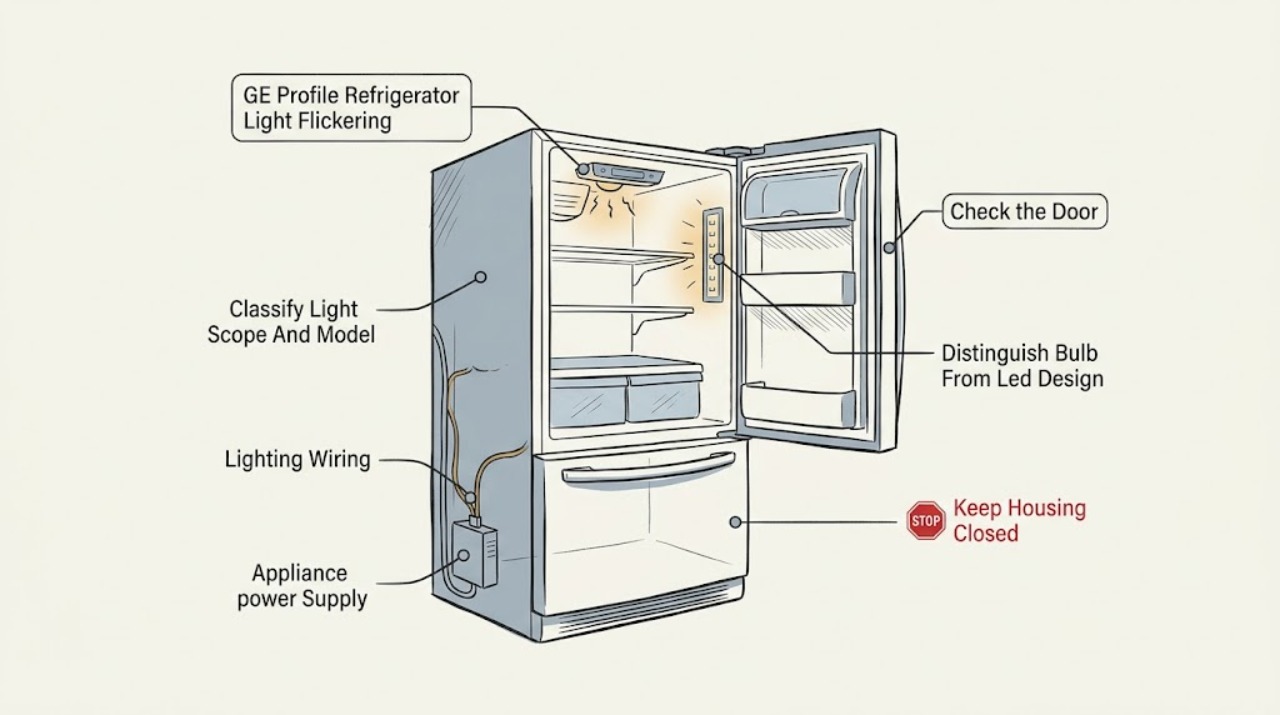
First identify where the flicker occurs and whether it affects one interior light, several interior lights, a dispenser light, or the refrigerator display as well. GE says refrigerator LED lights vary in number and location; some models use a slim LED panel and others use individual LED assemblies, while older designs may use a replaceable bulb. If only one light flickers while cooling and the display remain normal, a model-specific light assembly or its connection is more likely than a whole-appliance power problem. If all lights, the display, or other appliance functions pulse together, or the plug or outlet is hot, damaged, sparking, or smells burnt, stop using the refrigerator and arrange qualified appliance or electrical service. Use the exact GE Profile model support page or manual before buying a bulb. Disconnect power before replacing a user-replaceable bulb, and do not remove an LED panel, probe wiring, bypass a door switch, or perform live tests; GE states that LED assembly replacement requires an authorized service technician.
Before you begin
Safety first
- Do not remove LED panels or interior covers, pull connectors, bypass door switches, test live voltage, or continue operating with smoke, burning odor, sparks, abnormal heat, damaged power parts, repeated breaker trips, or water near electrical components. GE identifies LED assembly replacement as an authorized-service task.
Work through in order
Diagnostic checks
Use only checks that match the exact appliance or system and its official guide.
-
Check 1
Without opening the refrigerator or moving it, record the exact GE Profile model and serial information from the rating label or existing paperwork. Identify the affected location: one interior light, several interior lights, a dispenser light, or the exterior display. Note whether cooling, fans, and controls remain normal, and whether the flicker is continuous or linked to door movement.
Expected result: Only one light flickers; multiple interior lights flicker; the dispenser light flickers; the display or other functions pulse too; or the model is not yet known.
Next step: Continue with the branch matching the observed scope and use the exact model support page or manual before selecting any replacement procedure. If the model cannot be identified without removing a panel, stop and arrange model-specific support.
Stop if: Do not infer the lighting design from the GE Profile name, remove trim to find a label, or enter a service mode to make the flicker occur.
Why this matters
Why: A localized light symptom is a different branch from a whole-appliance power symptom. An unknown model makes bulb, panel, switch, and reset instructions unreliable because GE lighting layouts vary.
-
Check 2
With the refrigerator operating normally, observe the light from a safe position while opening the door normally and then holding the door fully open without touching the light or door switch. Check only for visible door, gasket, shelf, or stored-item interference that could keep the door from reaching its normal position. Do not press, tape, or bypass a switch or sensor.
Expected result: The flicker occurs only as the door moves or nears closure; it continues with the door fully open and still; the door does not close or align normally; or the door pattern makes no difference.
Next step: Record the exact position and timing for the model-specific service report. Correct only an obvious visible obstruction or loading issue; if the door, gasket, hinge area, switch, or wiring needs adjustment or access, stop for service.
Stop if: Do not hold the switch closed, remove the door trim, adjust hinges, or insert tools into the switch opening.
Why this matters
Why: A change tied to door position makes the door-activated lighting state or its model-specific sensing path more relevant, but it does not prove a failed switch. Flicker with the door still points more toward the light assembly, wiring, or control. A door that cannot close normally is a separate condition that can keep lighting behavior abnormal.
-
Check 3
Use the exact model manual or GE model support information to determine whether the affected light is a bulb-shaped lamp, an individual LED assembly, or an LED panel or light wall. Inspect only the visible shape and the manual; do not remove a cover to identify it and do not order a generic bulb from the symptom alone.
Expected result: The manual identifies a user-replaceable bulb; it identifies an LED board, panel, column, or assembly; the visible light does not match the manual; or no model-specific lighting information is available.
Next step: For a documented replaceable bulb only, follow the model instructions, disconnect power first, and use the specified bulb. For an LED design, a mismatch, or uncertain access, leave the light assembly closed and arrange authorized service.
Stop if: Do not remove an LED panel, pry a lens, substitute a bulb by wattage guess, or work on the light while energized.
Why this matters
Why: GE says bulb type, size, and wattage vary by model. A bulb-shaped lamp may be owner-replaceable only when the model instructions permit it, while LED boards and assemblies require service. A mismatch or missing manual means compatibility and safe access are not established.
-
Check 4
From a dry, safe position, observe whether the refrigerator display, interior lights, dispenser controls, or other functions pulse at the same time. Inspect the accessible plug, cord, and receptacle only for visible damage, looseness, scorching, or heat; do not open the receptacle or pull out a built-in refrigerator to reach a rear connection.
Expected result: Only the one light flickers; several lights and the display pulse together; the plug or outlet is hot or damaged; the breaker trips; or the accessible supply looks normal.
Next step: Stop using the refrigerator and arrange qualified electrical service for an abnormal receptacle or circuit, and appliance service for a synchronized appliance symptom. Do not repeatedly reset a breaker or continue testing to reproduce the flicker.
Stop if: Stop immediately for smoke, burning smell, sparking, abnormal heat, a damaged cord or outlet, repeated breaker trips, or water near electrical parts.
Why this matters
Why: A single light with otherwise stable operation keeps the issue localized. Synchronized pulsing or an abnormal supply raises a power or control concern, while heat, damage, sparks, or repeated trips are immediate stop conditions. A normal-looking external supply does not clear internal wiring or control components.
-
Check 5
Only if the exact model manual explicitly identifies a replaceable bulb and there is no hazard, disconnect refrigerator power before accessing that bulb. Follow the manual's removal and installation directions, use the specified type, size, and wattage, and keep the light area dry. Do not perform this step for an LED board, panel, column, or assembly.
Expected result: The correct bulb is replaced and the light is stable; the flicker remains; the manual identifies an LED assembly; or the bulb socket, wiring, cover, or surrounding area is damaged or wet.
Next step: Restore power once and observe normally only after the manual-authorized bulb procedure. If the flicker returns or the design is LED, leave the refrigerator off when a hazard is present and arrange authorized GE Profile service.
Stop if: Do not work energized, touch exposed wiring, bend contacts, install a higher-wattage bulb, or open an LED assembly.
Why this matters
Why: A stable result after a documented bulb replacement supports a bulb or contact issue, but it does not prove the whole lighting circuit is healthy. A persistent flicker, an LED design, or damaged or wet access requires service rather than a different guessed lamp.
-
Check 6
After the applicable external observation or one model-authorized bulb replacement, make one normal-use observation and record whether the light remains stable, which locations flicker, whether the display changes with it, the door position, and any odor, heat, noise, or error indication. Keep the exact model and the timing record for service.
Expected result: The light is stable; one LED or area continues to flicker; all lights or the display continue to pulse; the flicker is accompanied by a hazard; or the symptom returns after warming or door movement.
Next step: Arrange qualified GE Profile appliance service for persistent or recurring flicker, especially when the model uses an LED panel or assembly. Use electrical service when the outlet or circuit is implicated, and provide the symptom scope and timing rather than ordering a part from the symptom alone.
Stop if: Stop immediately for smoke, burning odor, sparks, abnormal heat, damaged insulation, water near electrical parts, or repeated breaker trips; do not restart to reproduce the failure.
Why this matters
Why: Stable recovery supports a documented bulb, contact, or temporary door-state issue but does not establish a universal part. Persistent localized flicker is consistent with a model-specific LED assembly, light connection, or control path; synchronized flicker or a hazard needs urgent safety handling.
Use your observations
Decision map
Find the observation that best matches what you see, then follow the next safe action.
-
PATH 01Safety boundary
What you see
One interior light flickers while cooling, the display, and other refrigerator functions remain stable, and the exact model indicates an LED panel, column, or individual LED assembly.
Do this next
Leave the assembly closed and arrange authorized GE Profile service with the exact model, light location, and timing pattern.
Why this path and its safety boundary
Why it matters: A localized model-specific LED assembly or lighting connection is more likely than a whole-house supply failure, but the observation cannot select a compatible assembly.
Safety stop: Do not pry off the panel, pull a connector, or make a live measurement.
-
PATH 02Safety boundary
What you see
The exact manual identifies a bulb-shaped, owner-replaceable lamp, and the flicker is limited to that lamp without heat, odor, damage, or synchronized display pulsing.
Do this next
Disconnect power and follow the exact manual once using the specified bulb. If flicker persists, stop replacing lamps and arrange service.
Why this path and its safety boundary
Why it matters: A bulb or its model-specific contact is a reasonable first user-level possibility, but GE says size, type, and wattage vary.
Safety stop: Do not guess wattage, work energized, or substitute this branch for an LED-board procedure.
-
PATH 03Safety boundary
What you see
The light changes only while the door moves or is nearly closed, while the light is stable with the door fully open and the door does not close or align normally.
Do this next
Clear only visible loading interference and document the exact door position. Arrange service if the door, gasket, hinge area, switch, or wiring needs adjustment or access.
Why this path and its safety boundary
Why it matters: Door-activated lighting state, door alignment, or the model-specific sensing path becomes more relevant; this does not prove that the door switch itself failed.
Safety stop: Do not defeat the switch, force the door, remove trim, or adjust hinges without model-specific service instructions.
-
PATH 04Safety boundary
What you see
Several refrigerator lights, the display, or other appliance functions pulse together, or the accessible plug or receptacle is hot, damaged, sparking, or associated with a breaker trip.
Do this next
Leave the refrigerator off and arrange qualified electrical service for the circuit or receptacle and appliance service for the refrigerator. Protect the area from water and do not repeatedly reset protection.
Why this path and its safety boundary
Why it matters: The symptom is no longer a localized light diagnosis; an electrical supply, power-input, or control problem is possible, and hazard signs make continued operation unsafe.
Safety stop: Do not open the receptacle, probe live wiring, use an extension cord, or restart the appliance to reproduce the pulse.
-
PATH 05Safety boundary
What you see
The light continues to flicker after a documented bulb procedure, the exact model identifies an LED assembly, or the model and lighting design cannot be verified without opening the appliance.
Do this next
Arrange qualified GE Profile appliance service and provide the exact model, light location, door-position pattern, display behavior, and any safety symptoms.
Why this path and its safety boundary
Why it matters: An internal light assembly, connection, control, or model-specific component may be involved, but the symptom does not justify a universal replacement part.
Safety stop: Do not remove an LED panel, expose wiring, bypass a door switch, or order a part without model-specific fit and diagnosis.
Helpful context
Understand the symptom
A flickering light is a symptom, not a universal part diagnosis
Record the exact model and serial information before interpreting the light. GE Profile includes more than one refrigerator design, and GE's own examples include a full LED light wall as well as the broader family of individual LED assemblies. A single blinking spot, a whole interior that pulses, a dispenser lamp, and a refrigerator display that dims with the light are different observations. The time pattern matters too: note whether the flicker follows door movement, begins after the door has been open, or continues while the door is held still.
Keep lighting checks external and de-energized
Do not remove an LED lens or panel, pull apart a connector, bypass the door switch, or test live voltage. If the light is a bulb-shaped lamp and the exact manual permits replacement, disconnect power first and use only the specified type, size, and wattage. Stop immediately for a burning odor, smoke, sparks, abnormal heat, a damaged cord or outlet, repeated breaker trips, or water near electrical parts; leave the refrigerator off and seek qualified service.
Use the scope of the flicker to choose the next safe branch
If one interior LED flickers while the rest of the refrigerator operates normally, the light assembly or its model-specific circuit is a service question. If every light and the display pulse together, treat the symptom as a possible power or control problem and do not keep cycling the appliance. If the flicker is tied only to a door being almost closed or moved, first document the visible door-closure pattern and check the matching manual; do not hold or defeat a door switch to reproduce it. The pattern narrows the service report but does not identify a compatible replacement part by itself.
When checks do not resolve it
Need a professional?
Arrange qualified GE Profile appliance service for a persistent or recurring flicker, any LED panel or assembly, a door-related light fault that needs adjustment, or a synchronized display-and-light symptom. Use qualified electrical service when the outlet, cord, or household circuit is hot, damaged, sparking, or tripping. Stop immediately for smoke, burning odor, abnormal heat, water near electrical parts, or repeated breaker trips.
Safety scope: Do not remove LED panels or interior covers, pull connectors, bypass door switches, test live voltage, or continue operating with smoke, burning odor, sparks, abnormal heat, damaged power parts, repeated breaker trips, or water near electrical components. GE identifies LED assembly replacement as an authorized-service task.
Have this ready
- Exact GE Profile model and serial information, affected light location, bulb versus LED design from the model manual, whether the display or other functions pulse, door-position timing, whether a safe bulb procedure was performed, and any heat, odor, smoke, spark, water, or breaker observation.
Common questions
FAQ
Can I replace a flickering GE Profile refrigerator LED myself?
Do not assume so. GE says some refrigerators use individual LED assemblies or a slim LED panel and that LED assembly replacement requires an authorized service technician. Confirm the exact model before opening anything.
Could a flickering refrigerator light just need a new bulb?
Only if the exact model manual identifies a bulb-shaped, owner-replaceable lamp. GE says bulb type, size, and wattage vary; if replacement is permitted, disconnect refrigerator power first and use the specified lamp.
What if the refrigerator display flickers along with the light?
Treat synchronized display and light pulsing as a possible power or control symptom rather than a single bulb problem. Stop for heat, damage, sparks, burning odor, or repeated breaker trips, and arrange qualified electrical or appliance service.
Read the exact guide
Official sources
- Refrigerator and Freezer Troubleshooting and Support | GE AppliancesGE Appliances · GE refrigerator model identification and issue-specific support
- Refrigerator - Interior LED LightingGE Appliances · GE refrigerators with interior LED panels or assemblies
- GE Profile Smart RefrigeratorsGE Appliances · GE Profile refrigerator designs shown on the official product-line page
- Refrigerator - Selecting Appropriate Light BulbsGE Appliances · GE refrigerator lighting, model-specific bulb selection, and LED-board distinction
Community feedback
Share a repair observation
Share a plain-text repair observation. Accepted observations are published automatically; this page may take a moment to update.