
On this page
Start here
Quick answer
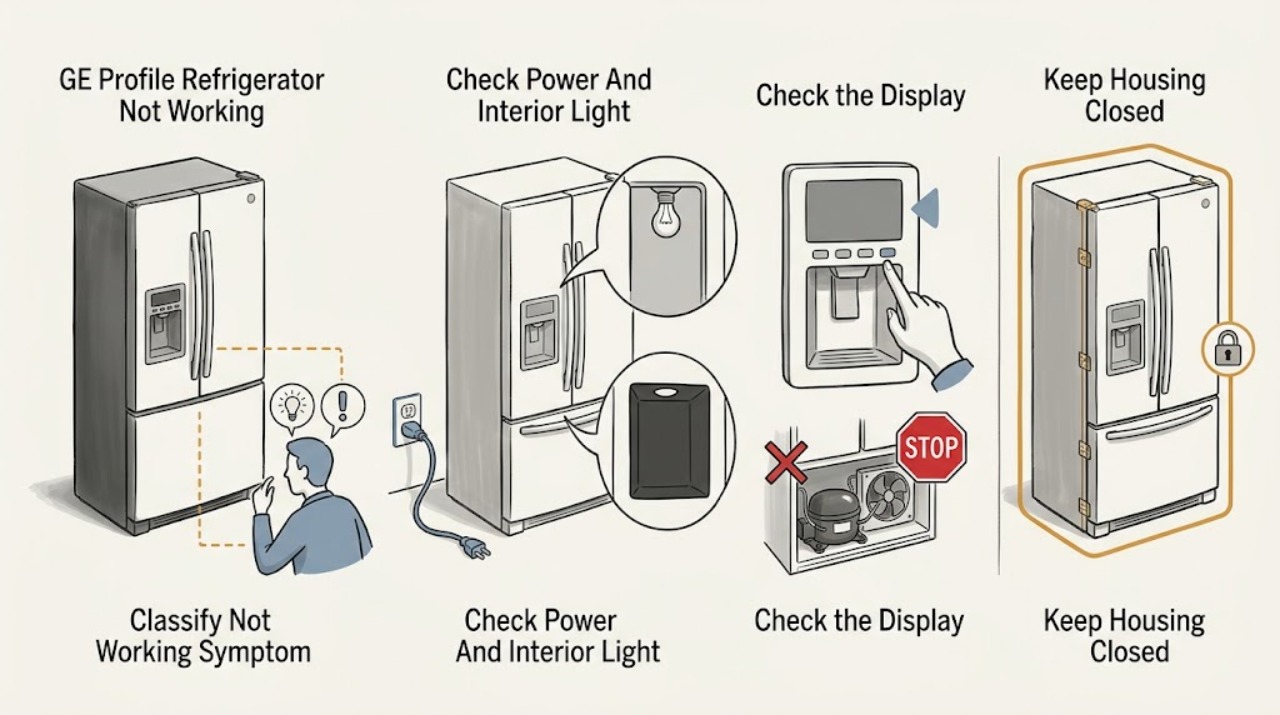
First separate a completely dead GE Profile refrigerator from one that has lights or a display but is not cooling, and record the complete model number. If there is no interior light or display, check that the plug is fully seated and that the wall outlet has power; do not open the cabinet or test live wiring. If lights are on, confirm the temperature controls are on and check the exact Owner's Manual for any model-specific Demo or Showroom Mode. A refrigerator can also appear to stop during automatic defrost: GE says the compressor and fans may be off for roughly 25–45 minutes, depending on model. After a short power outage or an immediate unplug/replug, the compressor may delay while the system equalizes; GE says this protection is automatic. If the unit remains warm after the model-specific settings, door/airflow checks, and the applicable stabilization period, or if an internal control, fan, compressor, sealed system, or wiring fault is suspected, arrange qualified GE service. Do not remove panels or bypass safety devices.
Before you begin
Safety first
- This article covers model identification, accessible plug/outlet checks, control/mode observation, normal-cycle timing, safe external cooling checks, and a model-appropriate dispenser power reset. Internal panels, door harnesses, live electrical tests, controls, fans, compressor circuits, defrost parts, and sealed-system work require qualified service.
Work through in order
Diagnostic checks
Use only checks that match the exact appliance or system and its official guide.
-
Check 1
Record the complete GE Profile model and classify the symptom: no interior light or display, lights/display on but no cooling, lights on with an occasional quiet period, a Demo/Showroom indication, or only the dispenser/control panel not working. Note whether the freezer is cold and whether any alarm or message is shown.
Expected result: The whole appliance appears dead; the display works but both compartments are warm; the refrigerator is quiet for a limited period; a model-specific mode indication is visible; or only one feature has failed.
Next step: Follow the matching branch below, and use the exact model Owner's Manual for controls, messages, and configuration-specific instructions.
Stop if: Do not remove panels, enter an unverified diagnostic sequence, or probe wiring to identify the state.
Why this matters
Why: No light points first to power. Light/display with no cooling points to controls, normal cycle timing, airflow, or an internal cooling fault. A single feature failure may be a panel, lock, or model-specific harness issue rather than a dead refrigerator.
-
Check 2
Open the fresh-food door and check the interior light or display. If both are off, verify that the refrigerator plug is fully seated and check the wall outlet with a known-good appliance or the home's normal breaker procedure. Do not remove the refrigerator cover or make electrical measurements.
Expected result: The light/display returns; the outlet has no power; the plug or breaker was the issue; or the outlet and plug are powered but the refrigerator remains completely dark.
Next step: Restore only an accessible outlet or plug connection. If the outlet is dead, follow the home's safe breaker/GFCI procedure or contact an electrician. If the outlet is powered but the refrigerator stays dark, arrange appliance service.
Stop if: Stop immediately for a hot plug, burning smell, arcing, damaged cord, water near the outlet, repeated breaker trips, or any need to open the cabinet.
Why this matters
Why: GE uses the fresh-food light as an initial indication of refrigerator power. A dead outlet or loose plug is an external supply problem; power at the outlet with no refrigerator response points to an appliance-side power or control fault.
-
Check 3
If the light or display is on, check that the refrigerator and freezer controls are not set to Off, and look for a Demo, Showroom, or model-specific mode indication. Use only the exact GE Profile Owner's Manual to clear a mode; do not try button combinations copied from another model.
Expected result: The controls were off; a Demo/Showroom indication is present; the controls appear normal; or the display is locked/partly responsive.
Next step: Use the model manual to return the controls to normal operation, then allow the manual's stabilization period. If the display remains abnormal or the refrigerator does not start, escalate to service.
Stop if: Do not enter service diagnostics, bypass a control lock, or hold random buttons while the appliance is energized.
Why this matters
Why: GE identifies an off control or Demo Mode as a reason a refrigerator can appear not to run while lights or controls still work. GE also documents different mode indicators and button sequences by model, so a generic sequence is unsafe and unreliable.
-
Check 4
If the refrigerator has lights and controls but the compressor and fans are quiet, note when the pause began and whether there was a recent power outage or immediate unplug/replug. Leave the unit connected and observe for the model-appropriate period rather than repeatedly cycling power.
Expected result: The pause ends within the normal defrost interval; cooling resumes after a short post-outage delay; or the refrigerator stays quiet and warm beyond that period.
Next step: If operation resumes, continue monitoring temperatures. If the unit remains quiet or warm after the documented interval, move to external cooling checks and arrange service if they do not help.
Stop if: Do not force a restart, bypass overload protection, or touch compressor terminals or wiring.
Why this matters
Why: GE says compressor and fans do not run during automatic defrost, which can make the appliance seem stopped. GE also says an overload protection response after a power interruption can delay compressor restart while the refrigerant system equalizes.
-
Check 5
If the refrigerator runs or makes normal operating sounds but is warm, compare the control settings with the exact Owner's Manual, check that doors close and gaskets seal, move large containers away from visible air paths, and note whether the unit was newly installed. Check only accessible clearances and model-approved maintenance locations.
Expected result: The setting is wrong or recently changed; the appliance is newly installed; a door, gasket, container, installation clearance, or ambient-temperature issue is visible; or all external conditions appear normal.
Next step: Correct one accessible condition at a time using the model manual, then allow the applicable stabilization period. If the unit remains warm, arrange service rather than adjusting internal components.
Stop if: If condenser cleaning is authorized for this exact model, unplug before cleaning; otherwise do not remove covers or assume the coils are user-serviceable.
Why this matters
Why: GE lists controls, a roughly 24-hour stabilization period for new installations, door closure, airflow obstruction, installation environment, and model-specific air clearance as possible cooling influences. A normal external check does not prove an internal part failure, but it narrows the next step.
-
Check 6
If cooling and interior lights work but the dispenser panel or one control feature does not, record whether the refrigerator was recently installed or its doors were removed. For a dark dispenser panel, disconnect power only as described by GE and restore it after 30 seconds; then use the model manual to check any control lock.
Expected result: The panel returns after the short power reset; the problem began after installation or door work; a lock/message is shown; or the feature remains dead while the refrigerator cools.
Next step: If the reset does not restore the feature, stop at the user-accessible boundary and provide the model and installation history to a qualified technician. Do not open the door trim or reconnect a harness yourself.
Stop if: Do not remove doors, open dispenser/control housings, or work on a wiring harness with power connected.
Why this matters
Why: GE says a dispenser panel can temporarily lock up after installation-related static electricity and recommends a 30-second power disconnect; it also says a door wiring harness may need model-specific attention after door removal. Continued failure needs service.
-
Check 7
If the outlet and plug are powered, controls are on, no applicable normal defrost/outage pause explains the symptom, and the refrigerator still does not cool or respond, stop owner diagnosis. Give GE or a qualified technician the complete model/serial information, symptom classification, display messages, recent outage or installation history, settings, and the timing of any sounds or pauses.
Expected result: The refrigerator stays completely dark; it has lights but no cooling; it repeatedly stops outside normal cycling; frost or water affects an internal path; or an internal control, fan, compressor, sealed system, or wiring fault is suspected.
Next step: Arrange qualified GE Profile refrigerator service and keep the unit connected if safe so the technician can observe the symptom, consistent with GE's service guidance.
Stop if: Do not open panels, test live circuits, bypass interlocks or overload protection, or order internal parts based only on “not working.”
Why this matters
Why: These patterns require model-specific electrical and refrigeration diagnosis. The GE Profile name covers multiple configurations, so the symptom alone cannot identify a compatible board, fan, compressor component, sensor, or sealed-system repair.
Use your observations
Decision map
Find the observation that best matches what you see, then follow the next safe action.
-
PATH 01Safety boundary
What you see
The fresh-food light and display are both off.
Do this next
Check the accessible plug and outlet. If the outlet is powered but the refrigerator remains dark, arrange service.
Why this path and its safety boundary
Why it matters: External power, plug, outlet, or an appliance-side power/control fault is more likely than a cooling-only fault.
Safety stop: Stop for heat, arcing, damaged wiring, water near electricity, or repeated breaker trips.
-
PATH 02Safety boundary
What you see
Lights or display work, but both compartments are warm or the compressor/fans never resume after the normal cycle window.
Do this next
Check the exact model controls and external cooling conditions once, then arrange service if cooling does not return.
Why this path and its safety boundary
Why it matters: Controls, Demo Mode, airflow, defrost, or an internal cooling system fault are more likely; the GE Profile label alone cannot distinguish them.
Safety stop: Do not remove panels or test the compressor, fan, control, or sealed system.
-
PATH 03Safety boundary
What you see
The refrigerator is quiet for a limited period and then resumes, especially during an expected defrost or soon after a power interruption.
Do this next
Leave the unit connected and monitor; escalate if the pause exceeds the model-appropriate period or temperatures remain unsafe.
Why this path and its safety boundary
Why it matters: Normal defrost or compressor overload equalization is more likely than a permanent no-run fault.
Safety stop: Do not repeatedly unplug/replug or bypass overload protection.
-
PATH 04Safety boundary
What you see
Lights/display work and a Demo, Showroom, lock, or other mode indication appears, particularly after installation or service.
Do this next
Use the exact Owner's Manual to clear the mode or lock and allow stabilization. Call service if the indication persists or the control is unresponsive.
Why this path and its safety boundary
Why it matters: The control state may be preventing normal cooling or accepting input; the exact clearing method is model-specific.
Safety stop: Do not copy button combinations from another GE or GE Profile model.
-
PATH 05Safety boundary
What you see
The refrigerator cools and lights work, but the dispenser panel or one feature remains unresponsive.
Do this next
Try GE's model-appropriate 30-second power reset for a dark dispenser panel, then arrange service if the feature remains unavailable.
Why this path and its safety boundary
Why it matters: A panel lock, temporary control state, installation-related harness issue, or feature-specific fault is more likely than total refrigerator power loss.
Safety stop: Do not remove door trim or reconnect a harness without qualified service.
-
PATH 06Safety boundary
What you see
Power and external settings are correct, but the unit remains dark, warm, or repeatedly stops outside a normal cycle.
Do this next
Arrange qualified GE Profile service with the model and observation record.
Why this path and its safety boundary
Why it matters: An internal control, fan, compressor circuit, defrost system, sealed system, or wiring issue is more likely, and no universal GE Profile part can be selected from this symptom.
Safety stop: Do not open panels, perform live tests, bypass safeguards, or use heat to clear internal ice.
Helpful context
Understand the symptom
“Not working” can describe different refrigerator states
Before changing anything, note whether the interior light and control display work, whether the freezer is cold, whether the compressor or fans are audible, and whether only the dispenser or another feature has stopped. A GE Profile model may be a side-by-side, French-door, or another configuration; the label does not establish one control layout or one fault. Keep the complete model number with your notes.
Use the lowest-risk checks first
The accessible checks are power at the outlet, a secure plug, the model's temperature controls, a possible Demo/Showroom indication, a normal defrost or post-outage pause, door closure, visible airflow obstructions, and the model's stabilization time. Do not copy a button sequence, diagnostic mode, sensor location, or part diagnosis from another GE Profile refrigerator.
A persistent no-cool or no-response symptom needs service
If power is present but the refrigerator remains warm, if the display stays dead after the outlet check, or if cooling does not return after the applicable normal cycle, stop at the external boundary. Internal controls, fans, compressor circuits, sealed-system work, door harnesses, and live electrical tests require qualified service.
Safety boundary
Stop conditions
- Stop and disconnect power only when safe for a hot plug, burning smell, arcing, damaged cord, water near electricity, or repeated breaker trips; obtain qualified electrical or appliance help.
- Do not remove panels, test live wiring, open the dispenser or door harness, bypass controls/interlocks/overload protection, or select internal parts from the symptom alone.
- Do not repeatedly unplug and replug the refrigerator to force a compressor restart; allow the documented defrost or post-outage recovery period.
- If external power, model controls, normal-cycle timing, and accessible cooling checks do not restore operation, protect perishable food and arrange qualified GE Profile service.
When checks do not resolve it
Need a professional?
Arrange qualified GE Profile refrigerator service when the outlet is powered but the appliance remains dark, when the refrigerator has lights or a display but does not cool after the exact model settings and applicable cycle/stabilization period, when a Demo/Showroom or control state will not clear using the model manual, when a dispenser/control feature remains dead after the safe reset, or when diagnosis would require internal panels, wiring, controls, fans, compressor, defrost, or sealed-system work.
Safety scope: This article covers model identification, accessible plug/outlet checks, control/mode observation, normal-cycle timing, safe external cooling checks, and a model-appropriate dispenser power reset. Internal panels, door harnesses, live electrical tests, controls, fans, compressor circuits, defrost parts, and sealed-system work require qualified service.
Common questions
FAQ
Why is my GE Profile refrigerator not working but the light is on?
A light indicates that at least some power reaches the refrigerator, but it does not prove that cooling is operating. Check that the controls are on, rule out Demo/Showroom Mode and a normal defrost or post-outage pause, then check external door and airflow conditions using the exact model manual. Persistent warmth needs service.
Why is my GE Profile refrigerator completely dead?
Start with the fresh-food light, plug, and wall outlet. GE says a missing interior light can indicate that the refrigerator has no power. If the outlet is powered and the plug is secure but the refrigerator remains dark, the appliance-side power or control system needs qualified service.
Can a GE Profile refrigerator stop temporarily during defrost?
Yes. GE says the compressor and fans do not run during automatic defrost, so the refrigerator can seem to stop. The duration varies by model; GE support describes roughly 25–45 minutes for automatic defrost. If it does not resume or the food temperature rises, arrange service.
What should I do after a power outage or unplugging my GE Profile refrigerator?
Leave it connected and allow the refrigeration system to equalize. GE says an overload-protection response after a short outage or immediate unplug/replug can delay compressor restart automatically. Repeated power cycling is not a repair step; persistent failure needs service.
How do I turn off Demo Mode on a GE Profile refrigerator?
Use the complete model's Owner's Manual. GE documents different Demo/Showroom indicators and clearing sequences for different refrigerators, so do not copy a button combination from another Profile model. After clearing a mode, allow the manual's stabilization period.
When should I call service for a GE Profile refrigerator that is not working?
Call service when the outlet is powered but the appliance stays dark, when controls and lights work but cooling does not return after a normal cycle or the model's stabilization period, when a dispenser/control panel stays dead after the safe model-appropriate reset, or when diagnosis would require a panel, harness, control, fan, compressor, sealed-system, or live electrical test.
Read the exact guide
Official sources
- Refrigerator - Not RunningGE Appliances · Official GE guidance that includes multiple model-specific Demo Mode examples; do not transfer any displayed code or button sequence to a different model.
- Refrigerator - Not Cooling EnoughGE Appliances · Official GE refrigerator guidance; exact controls, clearances, coil access, and diagnostic behavior are model-dependent.
- Troubleshooting for PSS26MSRSSGE Appliances · Official GE Appliances Owner Center page for the named PSS26MSRSS GE Profile side-by-side model; its architecture and control layout must not be generalized to other Profile models.
- Refrigerator - Automatic Defrost SystemGE Appliances · Official GE explanation for full-sized frost-free refrigerators; defrost timing and system type vary by model.
- Refrigerator - No Power to the DispenserGE Appliances · Official GE dispenser guidance; reset and any harness location must be applied to the exact model.
- Refrigerator - Normal Cycle TimesGE Appliances · Official GE explanation of normal refrigerator cycle behavior; exact timing varies by model and conditions.
- Refrigerator - Does Not Run or CoolGE Appliances · Official GE refrigerator support guidance; control labels and model-specific mode instructions still require the exact Owner's Manual.
Community feedback
Share a repair observation
Share a plain-text repair observation. Accepted observations are published automatically; this page may take a moment to update.