
On this page
Start here
Quick answer
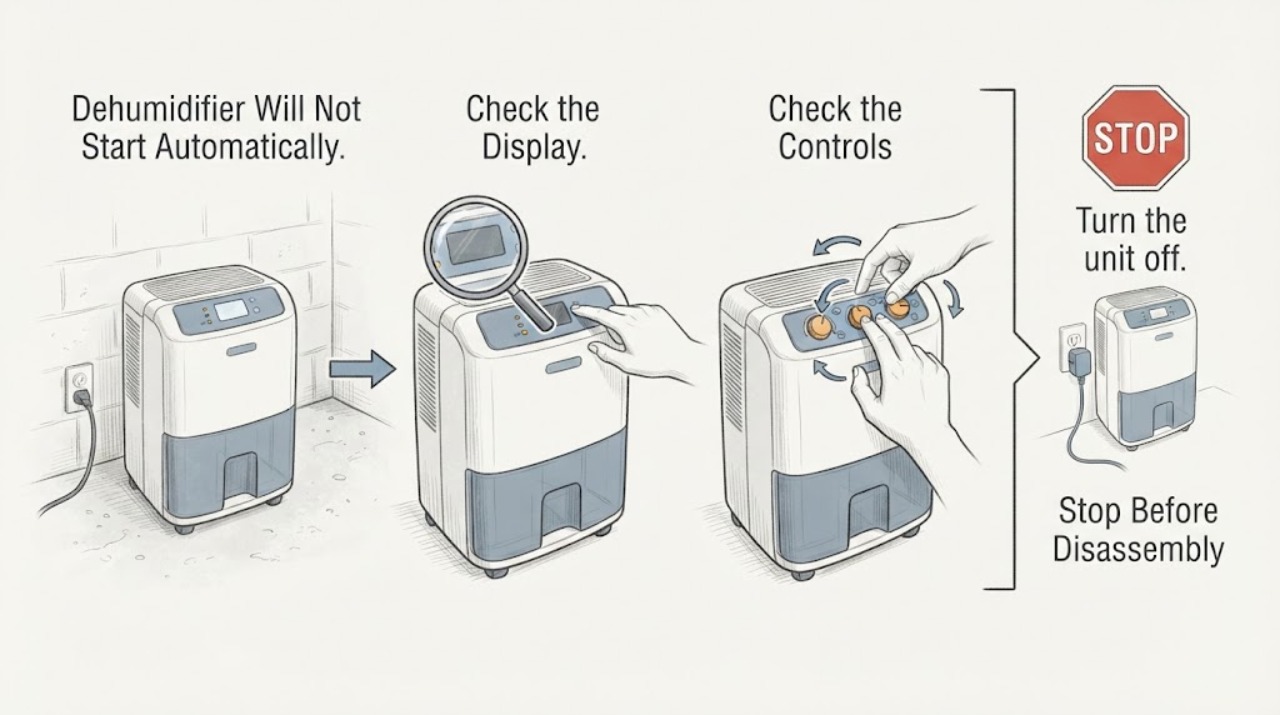
For the GE APEL50LZQ1 in a basement, first separate normal humidity control from a no-power failure. The opened GE model page identifies this exact unit as a 50-pint portable dehumidifier with a built-in pump, and its linked owner manual says the unit stops when the selected humidity has been reached, when the bucket is full or missing, and for up to three minutes after a power failure. Read the displayed room humidity, lower the setpoint only when the room is still too damp, seat the bucket, keep the unit above the manual's minimum room temperature and allow time for the room to respond. If the display and fan remain dead with a grounded outlet and a properly seated bucket, stop trying to diagnose a sensor or compressor yourself and arrange GE service.
Work through in order
Diagnostic checks
Use only checks that match the exact appliance or system and its official guide.
-
Check 1
Press the Power pad once and read the display with the room doors and windows in their normal closed condition. Note whether the display shows a room humidity value, the Power indicator, or nothing at all.
Expected result: The display is active and shows a humidity reading, or the display and indicators remain completely dark.
Next step: If the display is active, continue with the setpoint and bucket checks. If it is dark, unplug the unit by gripping the plug, confirm the receptacle is suitable without opening the appliance, and arrange service if the problem persists.
Why this matters
Why: An active display means the unit has control power and may simply be waiting for the humidity target or a safety condition; a completely dark display is a supply, control-power or appliance fault that the user should not localize to a sensor.
-
Check 2
Compare the displayed room humidity with the selected humidity setting. For a first setup, use the manual's 45% or 50% starting guidance and allow at least 24 hours; if the basement is still damp, lower the target or select Nonstop as the manual describes.
Expected result: The displayed humidity is at or below the selected target, or it remains above the target after the allowed observation period.
Next step: Keep the target within the model's 35%-80% range, close outside openings and allow air to circulate. If the display remains implausible or the unit never responds while the room is above the target, stop at the external checks and request GE service.
Why this matters
Why: At or below the target, automatic non-operation is expected. A persistent reading above the target points to an environmental or operating issue, but not by itself to a failed humidity sensor.
-
Check 3
Turn the unit off and unplug it before checking the front water bucket. Empty it if full, then slide it back fully and squarely into position; do not remove the bucket while the unit is operating or immediately after it stops.
Expected result: The Empty light is on, the bucket is missing or not fully seated, or the unit starts after the bucket is correctly replaced.
Next step: Keep the bucket securely seated. If using the built-in pump, confirm the pump hose is connected as directed and not kinked; do not open the housing or bypass the water-level control.
Why this matters
Why: The APEL50 family manual states that a full, removed or improperly positioned bucket stops operation and prevents normal control operation; a start after reseating supports a bucket-safety condition rather than a compressor diagnosis.
-
Check 4
Observe the basement temperature and the space around the unit without moving the cabinet into a hazard. Keep the unit on a smooth, level floor with the manual's clearance, and make sure curtains, furniture or stored items do not block the grilles.
Expected result: The room is below 41°F, the airflow is blocked, or the unit is operating in a small enclosed area that does not exchange air with the damp basement.
Next step: Restore the documented location and airflow conditions, then allow the unit time to respond. Do not add a heater, cover the grilles or move the dehumidifier while it is powered.
Why this matters
Why: The manual identifies low temperature and restricted airflow as conditions that reduce moisture removal; in a basement, a closed adjacent closet can remain damp even while the unit operates elsewhere.
-
Check 5
If the unit has just been unplugged or the basement experienced a power interruption, wait through the manual's protective restart period before judging it. Check only that the three-prong plug is fully seated in its own correctly grounded outlet; do not use an extension cord, surge protector or multi-outlet adapter.
Expected result: The unit begins normal operation after the delay, or the display remains dead and the outlet or cord is damaged, wet or unsafe.
Next step: Keep the unit disconnected if the cord or outlet is damaged or wet, and have a qualified electrician address the supply. If the supply is safe but the unit still will not start, arrange GE service rather than opening or servicing it yourself.
Why this matters
Why: A delay of up to three minutes after power failure is documented behavior. A damaged supply, unsafe outlet or continued no-start condition is outside a control-setting fix and may create shock or fire risk.
Use your observations
Decision map
Find the observation that best matches what you see, then follow the next safe action.
-
PATH 01Next step
What you see
The display is active, the bucket is seated, and room humidity is at or below the selected target.
Do this next
Leave the target and airflow conditions stable; if the basement is still damp, lower the documented setpoint or use Nonstop and allow the room time to respond.
Why this path and its safety boundary
Why it matters: The unit is likely waiting for a humidity demand rather than failing to power on.
-
PATH 02Next step
What you see
The display is active but the Empty light is on, the bucket is full, or the bucket is not fully seated.
Do this next
Turn the unit off, unplug it, empty and securely reseat the bucket, and keep the pump hose arranged as described if the pump is being used. Do not defeat the bucket control.
Why this path and its safety boundary
Why it matters: The documented water-level safety condition is preventing operation.
-
PATH 03Next step
What you see
The display is active, humidity remains above the target, and the bucket and airflow are correct, but the unit never starts after the documented restart delay.
Do this next
Stop at the external checks and arrange GE service with the exact model, setpoint, displayed humidity and bucket status. Do not open the housing or order an internal part from the symptom alone.
Why this path and its safety boundary
Why it matters: The remaining cause is not safely distinguishable from outside; the manual does not authorize a user diagnosis of the sensor, compressor or control board.
-
PATH 04Next step
What you see
The display is dead, the plug or cord is damaged, water is near the electrical connection, the outlet is not grounded, or the unit requires opening to continue.
Do this next
Disconnect power from a dry, safe position, keep the unit out of service, and use a qualified electrician for the receptacle or a GE-authorized service route for the appliance. Do not use an adapter, extension cord or bypass.
Why this path and its safety boundary
Why it matters: The situation presents an electrical or water hazard beyond safe user troubleshooting.
Helpful context
Understand the symptom
A quiet compressor is different from a dead unit
The APEL50LZQ1 can stop dehumidifying because its measured room humidity is at or below the selected target, because the bucket safety switch is open, because the compressor is in its protective restart delay, or because the room is too cold for effective moisture removal. A dark display, absent fan and no response to the Power pad are a different pattern. The checks below stay at the control, bucket, environment and supply level described by the GE manual; they do not identify an internal sensor, compressor or board.
Basement conditions can make automatic operation appear to fail
A basement may remain humid because the selected target is too high, outside air is entering, air circulation is blocked, or the temperature is too low. The manual says the display reports the actual room humidity with stated accuracy and recommends allowing at least 24 hours to reach the desired level after initial setup. That is a reason to observe the cycle before calling a normal humidity-controlled pause a component failure.
When checks do not resolve it
Need a professional?
Call a qualified electrician for a damaged or ungrounded receptacle, damaged cord, water near the electrical connection or repeated breaker problems. Use GE service when the APEL50LZQ1 has a dead display or still will not start after the setpoint, bucket, temperature, airflow and documented delay checks.
Common questions
FAQ
Why does the GE APEL50LZQ1 appear not to start when the basement is humid?
Check the displayed humidity against the selected target first. The unit can be idle when the target has been reached, when the bucket is full or not seated, or during its documented protective restart delay. A display that is completely dark is a different problem and needs supply or GE service assessment.
Should I set the dehumidifier to a lower humidity immediately?
Only after confirming the display and bucket are normal. GE's manual recommends a 45% or 50% starting setting and at least 24 hours to reach the desired level; if the basement remains damp, lower the setting or select Nonstop as documented for this model family.
Can I use an extension cord or open the unit to test the sensor?
No. The GE manual prohibits extension cords, surge protectors and multi-outlet adapters, and says GE does not support user servicing. Use a properly grounded individual outlet and arrange qualified service for a persistent no-start condition.
Read the exact guide
Official sources
- Model Search | APEL50LZQ1GE Appliance Parts · The opened GE parts model page names APEL50LZQ1 and describes it as a GE ENERGY STAR 50 Pint Portable Dehumidifier with Built-in Pump for Wet Spaces; it links the owner manual used below.
- OWNER'S MANUAL DEHUMIDIFIERGE Appliances · The opened 24-page GE manual is Rev. 1 01-20 and lists APEL50, APEW50 and APER50. The exact GE APEL50LZQ1 model page links this manual. It supports the external operating and safety checks here, not an internal sensor or compressor diagnosis.
- User Manual & Care for APEL50LZGE Appliances · The opened GE Owner Center page identifies the APEL50LZ family, provides the owner manual link and provides GE service routing. The exact Q1 suffix is independently identified by the GE Appliance Parts page.
Community feedback
Share a repair observation
Share a plain-text repair observation. Accepted observations are published automatically; this page may take a moment to update.