
On this page
Start here
Quick answer
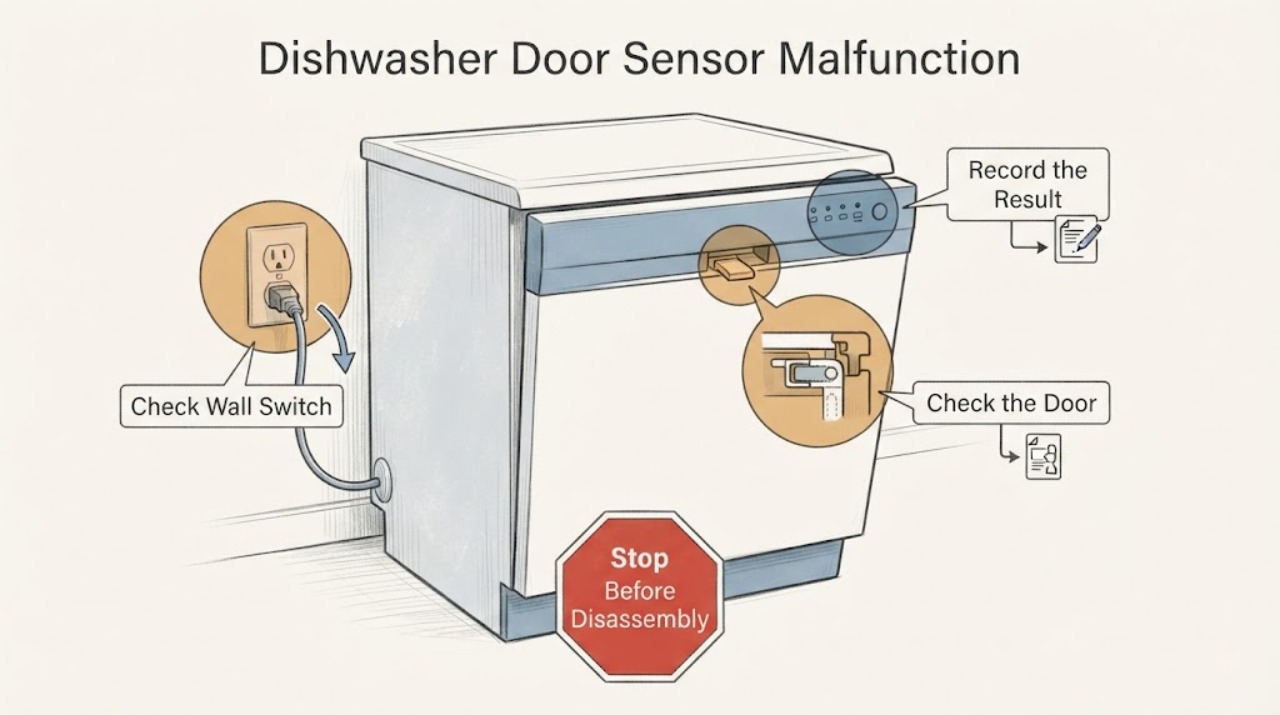
GE's support guidance does not establish a universal user test for a dishwasher door sensor. It does establish the observable chain: the door must close securely, the latch must fully engage, and the latch switch must signal that the door is closed before the dishwasher can operate. With power off for any cleaning or maintenance, clear racks, dishes, trim, insulation, or countertop interference and check whether the door closes and latches normally. If the controls have lights or sounds, check the exact model's Control Lock, Delay Start, Demo, Sleep/Sabbath, and leak-protection instructions; if the display is dead, check the external power path. If the door latches but the machine still reports an open door or will not start, do not bypass the latch or probe wiring: the sensor or latch may be involved, but GE's general pages do not prove which component failed, so use the model manual and arrange qualified service.
Work through in order
Diagnostic checks
Use only checks that match the exact appliance or system and its official guide.
-
Check 1
Stop the dishwasher before cleaning or inspecting the closing path; switch off its control and, before any maintenance or cleaning, disconnect power at the plug or house breaker as GE directs.
Expected result: There is water near electrical areas, a damaged cord, burning smell, sparking, a breaker that will not stay on, or no such warning sign.
Next step: Keep the dishwasher out of service and arrange qualified appliance or electrical help for a warning sign. Otherwise continue with the accessible door and rack inspection; do not bypass or electrically test the latch signal.
Why this matters
Why: A safety warning is outside a door-closure check and makes repeated test cycles or opening the control area unsafe. Without a warning sign, only external, model-appropriate checks remain reasonable.
-
Check 2
With the door open, push the racks fully in and remove any dish, pan handle, utensil, trim, insulation, or other item that projects into the door path; then close the door normally without slamming or forcing it.
Expected result: The door now closes flush and the latch catches, or the door still hits something, remains crooked, or will not latch.
Next step: If it still cannot latch, stop and review installation/alignment or arrange installer/service help. Do not hold the latch closed, tape the door, or bypass the switch to make the machine run.
Why this matters
Why: A closure change after clearing the path points to a physical obstruction or fit issue rather than proving an electronic sensor fault. A door that still cannot latch has not reached a valid closed-door state.
-
Check 3
Once the door physically latches, note whether the display and buttons are dark or whether lights and button sounds remain present; if the display is dark, check only the external breaker, GFCI, cord where fitted, and wall switch.
Expected result: The display remains dead, or the controls illuminate and respond while the cycle still will not start or an open-door indication remains.
Next step: Restore external power only if the home circuit is safe and the breaker/GFCI resets normally. If controls respond, continue with the exact manual's settings and latch guidance; do not conclude that the door sensor itself is failed from this symptom alone.
Why this matters
Why: A dead display directs attention first to power. Responding controls make a simple loss of supply less likely and leave model-specific lock, delay, demo, leak-protection, latch, or closed-door-signal conditions to distinguish.
-
Check 4
Use the complete model number in GE's owner-manual lookup, then compare the observed lights, beeps, delay/lock state, Demo or Sleep/Sabbath state, and any leak-protection message with that manual; do not open the console or test the latch wiring.
Expected result: The manual identifies a model-specific setting or protection feature, or the door latches and settings are correct but the dishwasher still reports open or will not start.
Next step: Follow only the model-specific correction stated in the manual. If the condition persists, stop using the dishwasher and give service the model, exact indication, latch behavior, and checks already completed; do not bypass the interlock.
Why this matters
Why: A documented setting or protection feature can prevent operation without proving a sensor failure. Persistent failure after a valid latch and model-specific checks leaves the latch/switch/control path unresolved at the user level.
Use your observations
Decision map
Find the observation that best matches what you see, then follow the next safe action.
-
PATH 01Next step
What you see
The door strikes the cabinet, rack, dishware, or countertop, or it never catches the latch.
Do this next
Clear the obstruction and check loading or installation alignment. If the door remains misaligned or will not latch, keep the dishwasher off and use installer or qualified service help.
Why this path and its safety boundary
Why it matters: The dishwasher is not reaching the physical closed-and-latched state that GE says is required; this does not establish a failed door sensor.
-
PATH 02Next step
What you see
The door closes and latches, the controls have lights or sounds, and the dishwasher still will not start or behaves as if the door is open.
Do this next
Use the exact model manual for settings and indications. If the condition survives those checks, stop forcing the door and arrange qualified service; do not bypass or probe the interlock.
Why this path and its safety boundary
Why it matters: Control Lock, Delay Start, Demo, Sleep/Sabbath, leak protection, or a model-specific latch/closed-door signal issue remains possible. GE's general guidance does not identify which component has failed.
-
PATH 03Next step
What you see
The door latches normally but the display and controls are dark, or the breaker/GFCI will not restore power safely.
Do this next
Leave the dishwasher off and have the supply or appliance checked by a qualified professional, especially after a trip, smell, heat, or visible electrical damage.
Why this path and its safety boundary
Why it matters: The symptom is not enough to call a door-sensor malfunction; GE's first path for a nonresponsive dishwasher is external power and installation checks.
Helpful context
Understand the symptom
A dishwasher that acts as if its door is open does not automatically prove that a separate sensor has failed. GE's public troubleshooting describes a door-latch chain: the door must close securely, the latch must engage, and a switch must signal the closed condition. The same symptom can come from an obstruction, alignment, a control setting, a power problem, or a model-specific protection feature.
Start with the door's physical closure
Inspect the accessible closing path without removing panels. GE lists racks that are not fully pushed in, dishes or silverware projecting into the opening, cabinet or countertop interference, a stiff new gasket, an unlevel installation, and an incorrectly positioned adjustable rack as reasons a door may not close or latch. A door that cannot physically latch has not yet isolated an electrical sensor problem.
Use the control symptoms to choose the next check
If the display and buttons are completely dark, GE directs owners toward the external power path, including the breaker, GFCI, cord where fitted, and wall switch. If lights or button sounds are present, power is less likely to be the primary issue; the model-specific Control Lock, Delay Start, Demo Mode, Sleep/Sabbath Mode, leak protection, and door-latch instructions become relevant. Do not infer a door-sensor failure from a blinking light or beep alone because GE says those indications vary by model.
Confirm the model before treating it as a sensor fault
Record the complete model number from the dishwasher label and use GE's manual lookup for the exact appliance. GE's general pages do not identify a universal door-sensor location, resistance value, replacement part, or bypass procedure. If the door closes and latches, the controls respond, and the appliance still behaves as though the door is open, document the exact display, beeps, and whether the problem began after installation or an adjustment, then use qualified service rather than opening the console or repeatedly forcing the latch.
Common questions
FAQ
Does a GE dishwasher that thinks the door is open prove the door sensor is bad?
No. GE says the latch must fully engage for its switch to signal a closed door, and its general troubleshooting also lists obstructions, alignment, control settings, leak protection, and power conditions. A component diagnosis requires the exact model and service-level checks.
What should I check if the door will not latch?
Check for racks, dishes, silverware, trim, insulation, cabinet or countertop interference, an unlevel installation, and the position of an adjustable rack. Do not force the latch or bypass it; unresolved alignment or latch problems need installer or qualified service help.
Why does the dishwasher have lights but still not start?
GE lists Control Lock, Delay Start, Demo Mode, Sleep/Sabbath Mode, leak protection, a door that is not fully latched, and model-specific conditions among the possibilities. Check the exact owner's manual and the door closure before assuming a sensor failure.
Read the exact guide
Official sources
- Support for GE DishwashersGE Appliances · GE's official dishwasher support page routes owners to model-specific support and qualified service when user-level checks do not resolve the issue.
- Dishwasher - Blinking Lights or Beeping SoundsGE Appliances · GE says indications vary by model; this source supports checking the exact manual and distinguishes an unlatched-door beep from other indications, without assigning an unspecified sensor failure.
- Dishwasher - Will Not Start or Run but Has Lights or SoundGE Appliances · GE's general dishwasher support page; it covers door-latch engagement and model-dependent Control Lock, Delay Start, Demo, flood-float, leak-protection and Sleep/Sabbath conditions without diagnosing an unspecified sensor.
- Dishwasher - Door Will Not LatchGE Appliances · GE's general door-latch guidance supports safe external checks for an unspecified GE dishwasher; it does not authorize bypassing the interlock or identify a universal replacement part.
- Dishwasher - Will Not Run or Has No PowerGE Appliances · GE's general no-power troubleshooting applies to an unspecified GE dishwasher only for external closure and supply checks; it does not establish a sensor test or component diagnosis.
- Dishwasher - Door Not Closing ProperlyGE Appliances · GE's general closing guidance applies to observable installation and alignment conditions across its dishwasher support scope, without proving an electronic door-sensor fault.
- Owner's Manual & Installation InstructionsGE Appliances · GE's official manual lookup requires the appliance model number; it is the appropriate route for model-specific door, control and indication instructions.
Community feedback
Share a repair observation
Share a plain-text repair observation. Accepted observations are published automatically; this page may take a moment to update.