
On this page
Start here
Quick answer
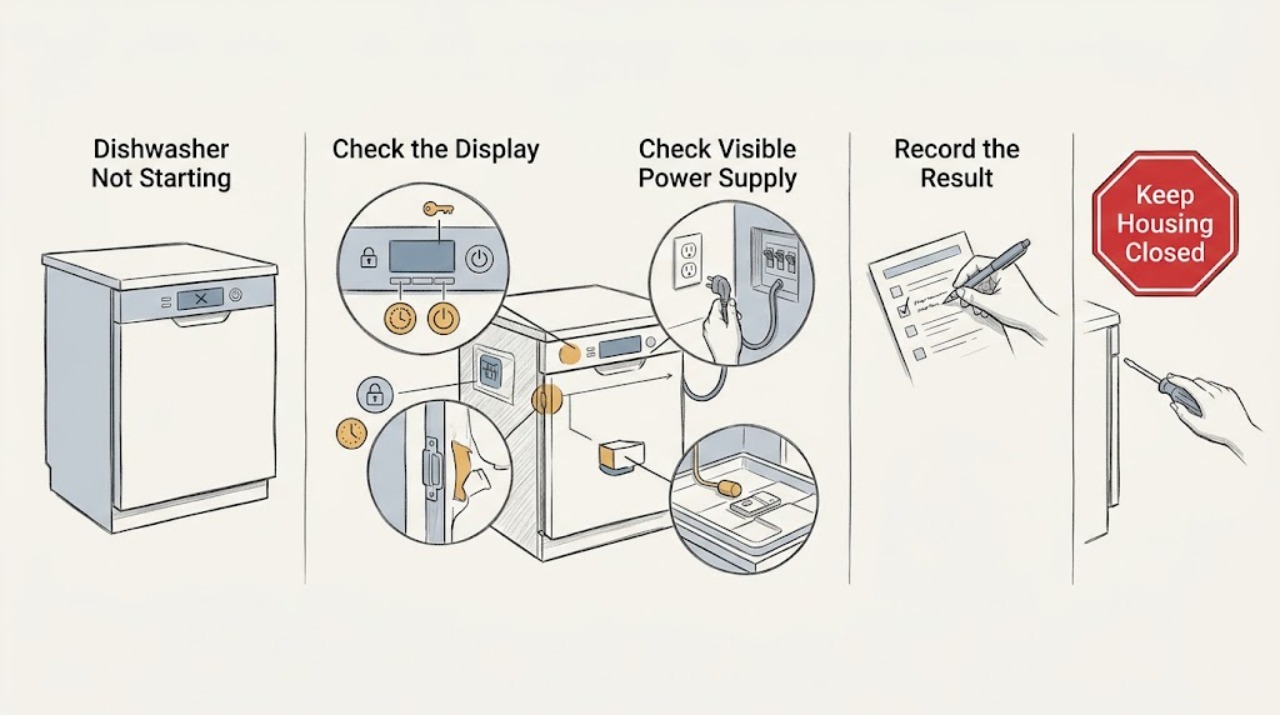
First separate a dead dishwasher from one that has lights or sounds but will not run. If there are no lights or button responses, check the visible supply: a cord in the adjacent cabinet, a GFCI reset, a wall switch, or the dishwasher breaker, without opening the appliance. Reset the breaker once only when there is no heat, odor, water, or other electrical hazard; a repeat trip needs service. If the controls light up, turn Control Lock off according to the model manual, remove any rack, dish, cabinet, or countertop interference, and confirm the door fully latches. Check that Delay Start, Demo Mode, Sleep/Sabbath Mode, or a reset state is not holding the cycle. Read any code before resetting: GE says codes vary by model and can indicate drain, fill, detergent-cup, temperature, pressure, power-failure, or leak conditions. A dishwasher with LEAK DETECTED or water underneath should be disconnected from power from a dry, safe position and serviced. If a model-appropriate Start/Reset and one documented 30-second power reset do not restore operation, stop troubleshooting at user level. Do not bypass the latch, reach under the unit, remove panels, or perform live tests.
Before you begin
Safety first
- Do not defeat the latch or Control Lock, reach under the dishwasher, remove panels, touch wet electrical parts, probe the float or wiring, bypass protection, or repeatedly reset a breaker or leak alert. Stop for LEAK DETECTED, water near electrical parts, smoke, burning odor, sparks, abnormal heat, a hot or damaged cord or outlet, or repeated breaker trips.
Work through in order
Diagnostic checks
Use only checks that match the exact appliance or system and its official guide.
-
Check 1
From outside the dishwasher, record the exact model and observe whether the display, cycle lights, keypad tones, or interior controls show any response. Do not remove panels or pull the appliance. Note whether the issue began after an outage, installation, cleaning, or a door opening.
Expected result: There are no lights or sounds; lights or sounds are present but Start does nothing; the display shows a delay, lock, demo, or code; or the dishwasher starts then stops.
Next step: Continue with the matching branch and exact model manual. If the model label or power connection cannot be reached safely, stop and arrange service.
Stop if: Stop for water underneath, LEAK DETECTED, smoke, burning odor, sparks, abnormal heat, a damaged cord or outlet, or repeated breaker trips.
Why this matters
Why: No response selects a power path. A responsive control selects lock, door, mode, leak, drain, fill, sensor, or control paths. A display message is more diagnostic than the no-start symptom alone, but GE says the meanings are model-dependent.
-
Check 2
If the dishwasher is completely dark, check from a dry position whether its visible cord is firmly plugged into the adjacent cabinet outlet, whether a GFCI outlet needs a reset, and whether a nearby wall switch controls the dishwasher. If no hazard is present, reset the dishwasher breaker once; do not open the junction box or hardwired connection.
Expected result: The outlet or GFCI is off; the wall switch was off; the breaker restores power; the breaker trips again; or power is present but the dishwasher remains completely dead.
Next step: Restore only a clearly switched-off supply and try one normal start. Leave the appliance disconnected and arrange appliance or electrical service for a repeat trip, damaged power path, or persistent no-power condition.
Stop if: Do not repeatedly reset protection, touch a wet outlet, inspect hardwired terminals, use a damaged cord, or pull the dishwasher forward.
Why this matters
Why: GE lists a loose cord, GFCI, wall switch, or breaker as possible reasons a dishwasher appears dead. A repeat trip or persistent dead appliance after an active supply needs qualified diagnosis rather than repeated resets.
-
Check 3
If lights or button sounds are present, check the exact model manual for Control Lock, Sleep or Sabbath Mode, Demo Mode, and any reset or cancel state. Use only the documented user control to unlock or exit a mode once; do not guess a key combination from another GE model.
Expected result: A lock indicator is active; the display is dark but buttons or sounds suggest Sleep/Sabbath; the dishwasher is in Demo Mode; a reset light is blinking; or controls respond normally but Start still does nothing.
Next step: Exit only the documented mode and wait for its normal completion. If the controls remain unresponsive or the mode returns, arrange model-specific service.
Stop if: Do not bypass Control Lock, enter service diagnostics, open the console, or repeatedly press controls with water or heat present.
Why this matters
Why: GE says these protection or demonstration states can leave a powered dishwasher non-responsive or make it appear not to run. A blinking Start or Start/Reset light may also represent a reset sequence rather than a failed motor.
-
Check 4
Open the door and inspect only the visible racks, dishes, utensils, cabinet edge, gasket, and latch area. Push each rack fully in, remove anything projecting past the rack, and close the door firmly without slamming. Do not remove the latch or adjust hinges; on an adjustable rack, use the exact manual for the correct position.
Expected result: The door now latches and Start works; a dish, rack, trim, gasket, or countertop blocks closure; the door is crooked or contacts the cabinet; or it still will not latch.
Next step: Run one normal start after a visible obstruction is corrected. Arrange service or installer correction for persistent misalignment, a latch that will not engage, or a new installation that is not level.
Stop if: Do not force the latch, hold the door closed, adjust a hinge under load, or continue if water leaks around the door.
Why this matters
Why: GE says the latch must signal a closed door before the dishwasher can start, and identifies loading, rack position, cabinet interference, leveling, and alignment as closure causes. A door that still will not latch points to installation, latch, hinge, or switch service.
-
Check 5
Read every display message or light pattern before resetting. Check whether Delay Start or Delay Hours is active, then follow the exact manual to cancel it if an immediate cycle is wanted. Record codes, standing water, a blocked detergent cup, low-water indication, or a leak message; inspect only visible loading and door-area obstructions.
Expected result: A delay indicator such as a number and H is shown; a power-failure or reset indication appears; a drain, fill, detergent-cup, temperature, pressure, or leak code appears; or there is no code but Start still will not run.
Next step: Cancel the documented delay or remove only a visible detergent-cup obstruction once. For a leak alert, persistent code, standing water, or no-start after the correction, stop and arrange service.
Stop if: Do not reach into the sump or float, remove hoses, reset a leak message repeatedly, or run a cycle with water under the unit.
Why this matters
Why: GE says Delay Start intentionally postpones the cycle and that fault codes differ by model. Some visible obstructions can be corrected, but drain, pressure, temperature, leak, and recurring control conditions often require service.
-
Check 6
If there is no leak, electrical hazard, or hot water concern, press Start/Reset once as the model requires and wait for the documented reset state to finish. If GE's guidance applies to the symptom, turn the dishwasher breaker off for about 30 seconds and back on once. Record whether the display, latch, pump, or cycle responds; do not repeat the reset to chase an intermittent fault.
Expected result: The dishwasher starts normally; a reset light completes and clears; the same code or no-start condition returns; the breaker trips; or water, smoke, odor, or heat appears.
Next step: Run one cycle only if the reset clears the issue and there is no hazard. Otherwise leave the dishwasher off and arrange qualified appliance or electrical service with the model and symptom record.
Stop if: Do not reset a leak alert, repeatedly reset a breaker, bypass protection, or restart when water is near electrical parts.
Why this matters
Why: A single reset can clear a transient control or power-surge state, but it does not prove a failed latch, drain, sensor, leak detector, or control is repaired. A returning symptom or hazard needs professional diagnosis.
Use your observations
Decision map
Find the observation that best matches what you see, then follow the next safe action.
-
PATH 01Safety boundary
What you see
The dishwasher has no lights, sounds, or control response, and a visible cord, GFCI, wall switch, and breaker are the possible supply points.
Do this next
Restore only a clearly inactive supply and try once. Arrange service for a persistent dead unit, damaged power path, or breaker that trips again.
Why this path and its safety boundary
Why it matters: GE lists a disconnected cord, GFCI, wall switch, or tripped breaker as possible causes of a dead dishwasher. If the supply is active but the unit remains dead, an appliance input or control fault is more likely.
Safety stop: Do not open hardwired connections, touch wet power parts, or repeatedly reset a breaker.
-
PATH 02Safety boundary
What you see
Lights or keypad sounds are present, but Control Lock, Delay Start, Demo Mode, Sleep/Sabbath Mode, or a reset state is indicated.
Do this next
Use the exact manual to unlock, cancel the delay, or exit the mode once. Arrange service if the state cannot be cleared or returns immediately.
Why this path and its safety boundary
Why it matters: The dishwasher has power but a documented control state is preventing an immediate cycle. GE says delay indicators show that the cycle is intentionally postponed, while lock and demo features vary by model.
Safety stop: Do not use another model's key sequence, enter diagnostics, or open the console.
-
PATH 03Safety boundary
What you see
A rack, dish, utensil, cabinet, gasket, leveling, or alignment issue prevents the door from closing and latching, or the dishwasher beeps as though the door is open.
Do this next
Correct only the visible obstruction and try one start. Use installer or qualified service for a crooked door, latch, hinge, switch, or leveling issue.
Why this path and its safety boundary
Why it matters: GE says the dishwasher cannot start until the door latch signals closure. A visible loading or installation obstruction is more likely than a pump fault when the door never latches.
Safety stop: Do not force, tape, or bypass the latch, and stop for a door leak.
-
PATH 04Safety boundary
What you see
The display shows a code or message, the cycle leaves water, the dishwasher will not fill or drain, the detergent cup is blocked, or LEAK DETECTED is shown.
Do this next
Follow only the exact model's visible correction. For LEAK DETECTED, water underneath, a returning code, or persistent no-start, disconnect power from a dry position and arrange qualified service.
Why this path and its safety boundary
Why it matters: GE's code table includes model-dependent drain, water, detergent-cup, temperature, pressure, power-failure, and leak conditions. A leak alert or water under the appliance is a safety branch, not a reset or part-shopping problem.
Safety stop: Do not reach under the unit, remove the float or hoses, run another cycle after a leak alert, or repeatedly reset the code.
-
PATH 05Safety boundary
What you see
The dishwasher still will not start after the matching power, mode, door, code, and one-safe-reset checks, or it has smoke, burning odor, sparks, abnormal heat, damaged power parts, or a repeat breaker trip.
Do this next
Leave the dishwasher disconnected and arrange qualified appliance or electrical service. Provide the model, lights and sounds, door state, code, water state, and reset result.
Why this path and its safety boundary
Why it matters: An internal latch, sensor, float, drain, valve, control, wiring, or power fault may be present. Repeated operation does not identify a compatible part and can increase risk.
Safety stop: Do not bypass protection, remove panels, perform live tests, or reconnect to reproduce the symptom.
Helpful context
Understand the symptom
Start with the control state, not a replacement part
A GE dishwasher can fail to start because it has no supply power, because the door-latch signal is not being received, because a lock or delay mode is active, or because a code or leak-protection feature has stopped operation. GE's no-run guidance specifically separates no lights or sounds from a powered but unresponsive control. Record the model, whether controls illuminate or beep, whether the door latches, and any display code before resetting.
Lights and sounds narrow the branch
No lights or sounds sends the diagnosis to the supply, GFCI, wall switch, cord, or appliance input. Lights or button sounds with no run make Control Lock, door closure, Delay Start, Demo or Sleep mode, leak protection, a stuck float, and model-specific faults more relevant. GE says a delay display such as a number followed by H can postpone the cycle, while an unlatched door or a leak alert can prevent operation even when the display is lit.
Do not defeat the start interlocks
Do not hold the door shut with a tool, bypass Control Lock, reach below the tub, remove the toe-kick or console, or probe the latch, float, wiring, or heater. If a leak alert, water under the unit, smoke, burning odor, sparks, abnormal heat, a hot or damaged cord or outlet, or a repeated breaker trip appears, stop using the dishwasher and isolate power only from a dry, safe position.
When checks do not resolve it
Need a professional?
Call qualified GE dishwasher service for a no-start that remains after safe supply, mode, door, code, and one-reset checks; a door that will not latch; a returning fault; incomplete fill or drain; LEAK DETECTED; water under the unit; or any internal-access diagnosis. Stop immediately for smoke, burning odor, sparks, abnormal heat, damaged power parts, water near electrical parts, or repeated breaker trips.
Safety scope: Do not defeat the latch or Control Lock, reach under the dishwasher, remove panels, touch wet electrical parts, probe the float or wiring, bypass protection, or repeatedly reset a breaker or leak alert. Stop for LEAK DETECTED, water near electrical parts, smoke, burning odor, sparks, abnormal heat, a hot or damaged cord or outlet, or repeated breaker trips.
Have this ready
- Exact model and serial information, whether lights or sounds are present, outlet/GFCI/wall-switch and breaker results, Control Lock or delay state, door and rack condition, every displayed code, water in the tub or underneath, reset steps, and any smoke, odor, heat, spark, or repeat-trip symptom.
Common questions
FAQ
Why does my GE dishwasher have lights but not start?
Check Control Lock, Delay Start, Demo or Sleep/Sabbath Mode, then make sure the door fully latches with no rack, dish, cabinet, or countertop obstruction. Read any code before using one model-documented reset. If the door and controls are correct but it still will not start, arrange service.
What should I check when my GE dishwasher is completely dead?
From a dry position, check the visible cord or adjacent outlet, GFCI reset, and any wall switch, then reset the dishwasher breaker once only if there is no hazard. If the breaker trips again or power is present but the dishwasher remains dead, leave it off and arrange qualified appliance or electrical service.
Can I keep resetting a GE dishwasher that will not start?
No. A model-appropriate Start/Reset or one documented short power reset may clear a transient state, but a returning no-start, code, leak alert, or breaker trip needs diagnosis. Never reset through smoke, heat, odor, sparks, water underneath, or LEAK DETECTED.
Read the exact guide
Official sources
- Dishwasher - Blinking Lights or Beeping SoundsGE Appliances · GE electronic-control dishwasher models; exact sound and reset behavior varies by model
- Dishwasher - Door Will Not LatchGE Appliances · GE dishwasher doors that will not latch; exact rack, gasket, and installation details vary by model
- GE Appliance - Resetting Your Circuit BreakerGE Appliances · General GE appliance power guidance; reset only when no electrical hazard is present
- Dishwasher - Error, Fault or Function CodesGE Appliances · Electronic-control GE dishwasher models; not every code is present on every model
- Dishwasher - Door Does Not Close ProperlyGE Appliances · GE dishwasher closure guidance; exact installation instructions govern any adjustment
- Dishwasher - Won't Run and Has No PowerGE Appliances · GE dishwasher models with no display or button response; exact installation and model manual remain controlling
- User Manual & Care for GDT695SSJSS | GE AppliancesGE Appliances · Opened GE dishwasher model example; exact user model controls applicable options and sequences
- Dishwasher - Will Not Start or Run but Has Lights or SoundGE Appliances · GE dishwasher models with lights or control sounds but no cycle; model-specific options and features vary
- Dishwasher - Delay Start OptionGE Appliances · Only GE dishwasher models equipped with Delay Start or Delay Hours; control labels and time range vary
- Dishwasher - Floor Protect / Leak Protection FeatureGE Appliances · Only models equipped with Floor Protect or Floor Protect with Alert
Community feedback
Share a repair observation
Share a plain-text repair observation. Accepted observations are published automatically; this page may take a moment to update.