
On this page
Start here
Quick answer
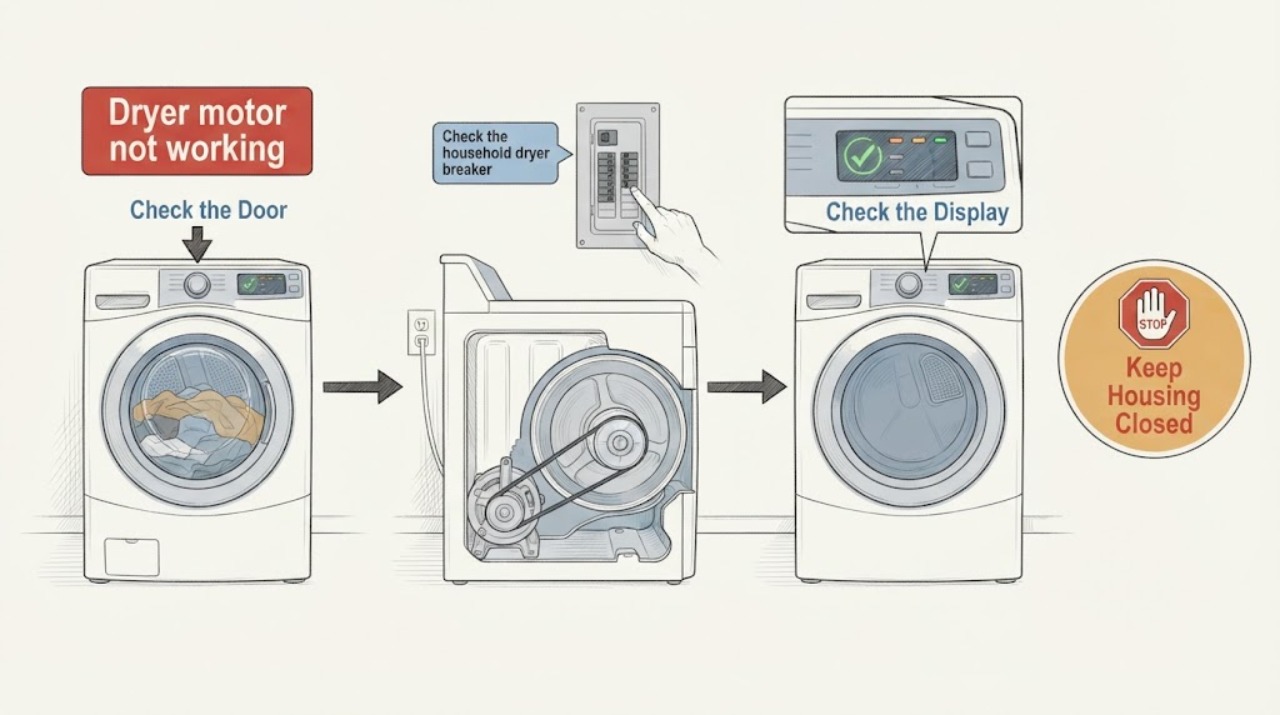
A GE dryer that will not start or whose drum will not turn needs a few safe external checks before service. Confirm the plug, closed door, selected cycle and fully pressed START button, then check the dedicated breaker or fuse. If the display shows 1 or 2 on a 2019-or-newer model, GE says that personality selection can prevent starting or tumbling until the correct electric or gas setting is selected. If the dryer hums without turning, the drum turns unusually freely, a cord or terminal looks burned/frayed, or the checks do not restore operation, stop using it and arrange qualified service. Do not open the cabinet, test live wiring, bypass the door switch, or declare the motor failed from the symptom alone.
Work through in order
Diagnostic checks
Use only checks that match the exact appliance or system and its official guide.
-
Check 1
Confirm the basic start sequence without opening the dryer: plug fully seated, door closed tightly, cycle and time or temperature selected, and START pressed completely.
Expected result: The dryer remains completely unresponsive, or it responds and attempts to start.
Next step: If it remains unresponsive after the safe sequence, move to the circuit and model-specific service branch.
Stop if: If it attempts to start, describe whether the drum turns, hums, stops, or shows a display message.
Why this matters
Why: GE lists these controls and door conditions before a motor diagnosis; a failure here does not prove the motor is bad.
-
Check 2
Check the household dryer breaker or fuses from the panel, without removing dryer panels or resetting a protection device repeatedly.
Expected result: The dedicated circuit is tripped/blown, or it is on and the symptom remains.
Next step: If the protection will not remain on or trips again, leave the dryer off and arrange qualified electrical/appliance service.
Stop if: If the circuit is on and stable, continue with the display and drum observations rather than opening the cabinet.
Why this matters
Why: GE says the dryer should use a separate/dedicated circuit; a circuit issue can prevent starting without establishing a motor fault.
-
Check 3
If the display shows 1 or 2 on a GE model made in 2019 or later, use the START control only as GE describes to select the correct personality: 1 for electric or 2 for gas.
Expected result: The display shows 1 or 2, or there is no such display.
Next step: Select only the value matching the confirmed electric or gas dryer type, then stop if the dryer still does not operate.
Stop if: Do not apply this setting to a model without that display; proceed with the other checks.
Why this matters
Why: On some newer models, GE says an unset personality can prevent the dryer from turning on or tumbling; this setting is model and dryer-type dependent.
-
Check 4
With power disconnected and no access to internal parts, observe whether the drum stays still, hums without turning, or turns unusually freely; do not reach behind panels or try to free a jam with power connected.
Expected result: The drum does not move, a hum is present, or the drum turns freely by the external check.
Next step: Remove only an obvious external overload if safe; if the symptom persists, leave the dryer off and arrange service.
Stop if: If the drum turns normally but heat or timing is the real complaint, use the model-specific support path instead of the motor article.
Why this matters
Why: GE says an overloaded heavy wet load can make the belt slip and a drum that turns freely may indicate a loose or broken belt requiring service; a persistent hum is listed as abnormal noise. None of these alone proves motor failure.
-
Check 5
From outside the appliance, inspect only the visible power cord and connection area for a broken, burned, loose or frayed condition; do not loosen terminals, remove covers or touch exposed conductors.
Expected result: The cord or terminal area looks damaged, or no external damage is visible.
Next step: Keep the dryer disconnected and arrange qualified appliance/electrical service.
Stop if: Continue only with identity and symptom documentation; do not use a guessed motor or wiring repair.
Why this matters
Why: GE identifies these conditions on electric dryers as requiring model-specific service information; a clean exterior does not clear an internal fault.
-
Check 6
Record the exact model and serial from the dryer tag, whether it is electric or gas, display behavior, sound, drum movement, breaker history and any burning smell or visible damage for service.
Expected result: The model/serial tag is available, or it cannot be safely located.
Next step: Give the complete information to qualified service and keep the dryer off if it cannot start normally or makes an abnormal sound.
Stop if: Request service by appliance type without inventing a model-specific motor, belt or control diagnosis.
Why this matters
Why: GE routes support through the specific model/serial or QR code, and installation and component details vary across dryer families.
Use your observations
Decision map
Find the observation that best matches what you see, then follow the next safe action.
-
PATH 01Next step
What you see
The dryer has no response after the plug, closed door, cycle, START and stable dedicated circuit are confirmed.
Do this next
Stop user diagnosis, record the model and arrange qualified service.
Why this path and its safety boundary
Why it matters: The official checks have not isolated a motor failure; the problem may be in the control, door, supply or another internal circuit.
-
PATH 02Next step
What you see
The dryer hums or makes a persistent abnormal sound but the drum does not turn.
Do this next
Disconnect power, do not open or bypass anything, and arrange service with the sound and drum behavior documented.
Why this path and its safety boundary
Why it matters: GE lists humming as abnormal and says service is recommended when abnormal noise continues; a motor, belt or another drive component cannot be identified from sound alone.
-
PATH 03Next step
What you see
The drum turns unusually freely or a heavy wet load preceded the no-tumble symptom.
Do this next
Do not order a guessed belt or motor; keep the unit off if the symptom remains and use model-specific service.
Why this path and its safety boundary
Why it matters: GE says an overload can make the drive belt slip and a freely turning drum may indicate a loose or broken belt requiring service.
-
PATH 04Next step
What you see
The cord or terminal connection is burned, loose, broken or frayed, or the circuit trips again.
Do this next
Leave the dryer disconnected and arrange qualified appliance/electrical service; do not touch terminals or reset repeatedly.
Why this path and its safety boundary
Why it matters: GE treats those electrical observations as service conditions, and repeated protection trips are not a safe motor test.
-
PATH 05Next step
What you see
A gas dryer is being considered for a vent-disconnected test.
Do this next
Do not perform that test; keep the vent installed and follow the exact model installation instructions or qualified service.
Why this path and its safety boundary
Why it matters: GE warns that operating a gas dryer without its vent can allow carbon monoxide fumes into the room.
Helpful context
Understand the symptom
First separate no-start from no-tumble
“Motor not working” can describe a dryer with no display or response, a dryer that starts but only hums, or a dryer whose drum does not turn. Those observations lead to different safe next steps. GE’s general no-start checks do not prove a motor failure, and its drum guidance does not authorize cabinet access or internal testing.
Use the GE start sequence before diagnosing a motor
With the dryer in its normal installed position, make sure the plug is fully seated, the door closes tightly, the cycle and time or temperature are selected, and START is pressed completely. Check the household breaker or fuses and the dryer’s separate circuit. Stop if the cord, plug or terminal area is burned, loose, broken or frayed.
A hum or freely turning drum is not a motor diagnosis
GE identifies humming as an abnormal dryer noise and says a drum that turns freely may point to a loose or broken belt requiring service. A heavy wet load can also make a belt slip. These observations can narrow the service report, but they do not establish which internal part failed.
Confirm model and dryer type before any model-specific work
GE dryer model numbers and serial tags are used to route the owner to exact support; the tag is commonly inside the front face of the dryer compartment. Record the model, serial, electric or gas type, display behavior, sound, and whether the drum moves. Do not use a different GE manual or guessed motor part.
Keep vent and gas limitations separate
A vent restriction is a performance and heat issue, not proof that the motor failed. If a qualified model-specific check concerns venting, follow the installation instructions. GE specifically warns against operating a gas dryer without its vent because carbon monoxide could enter the room; no vent-disconnected test belongs on an unidentified gas dryer.
When checks do not resolve it
Need a professional?
Arrange qualified appliance or electrical service when the dryer remains unresponsive after the basic checks, hums without turning, the drum turns freely, the cord or terminal area is damaged, the circuit trips again, or the model-specific external checks do not resolve the symptom. Keep the dryer off for burning, electrical or gas-safety signs.
Have this ready
- exact model and serial
- electric or gas type
- whether the display responds
- whether the drum hums, stops or turns freely
- breaker/fuse history
- visible cord/terminal damage and any abnormal smell
Common questions
FAQ
Does a dryer that will not start prove the motor is bad?
No. GE first lists the plug, door, cycle, START control and household circuit, and on some newer models a 1/2 personality setting can prevent starting or tumbling. If those checks do not resolve it, use the exact model for service rather than naming the motor from the symptom.
What does a humming GE dryer mean?
GE lists humming as an abnormal dryer noise. A hum with no drum movement can involve the drive system or another internal condition, but the sound alone does not identify the failed part. Disconnect power and arrange service if it persists.
What if the drum turns freely?
GE says a drum that turns freely may indicate a loose or broken belt requiring service, while an overloaded heavy wet load can also make a belt slip. Do not treat this as proof of a failed motor or install a guessed part.
Can I test a gas dryer with the vent disconnected?
No. GE warns that a gas dryer operated without its vent can allow carbon monoxide fumes into the room. Keep the vent installed and use the model installation instructions or qualified service.
Read the exact guide
Official sources
- Support for GE Washers and DryersGE Appliances · Official GE support page; used for QR/model support and the unresolved-service boundary, not as a parts or internal repair manual.
- Dryer - Will Not Run or StartGE Appliances Support · Official GE dryer support guidance for common no-start symptoms; model-specific settings and electrical details remain conditional.
- Dryer - Drum Does Not TurnGE Appliances Support · Official GE guidance for a drum that does not turn; it supports overload and freely-turning-drum observations without establishing a motor diagnosis.
- Dryer - Things To Check For A Venting IssueGE Appliances Support · Official GE dryer vent guidance; used to keep vent observations separate from motor diagnosis and to prohibit vent-disconnected tests on gas dryers.
- Dryer - NoisesGE Appliances Support · Official GE dryer noise guidance; used to separate a persistent hum or other abnormal sound from a motor diagnosis.
- Find Your GE Dryer Model & Serial NumbersGE Appliances · Official GE dryer identity page; used to require exact model/serial before model-specific settings, wiring or parts claims.
Community feedback
Share a repair observation
Share a plain-text repair observation. Accepted observations are published automatically; this page may take a moment to update.