
On this page
Start here
Quick answer
A constant high-frequency sound from a newly installed GE microwave is not enough to identify a failed capacitor, transformer, magnetron, or control board. First determine whether it is present while the microwave is idle, only while cooking, or only when a vent fan is running. GE says some humming, clicking, magnetron cycling, and fan sounds are normal, but it also recommends service for electrical or mechanical sounds and says a microwave should never be operated empty. If the sound is present from the first installation, remains when the unit is idle, comes with sparking, popping, smoke, a burning smell, or abnormal heating, stop using it, unplug it at the accessible supply, and use GE service or the seller's installation/warranty route. Do not remove the cabinet or inspect the high-voltage section.
Before you begin
Safety first
- Do not operate the microwave empty, remove the cabinet or grille, probe wiring, bypass door interlocks, or inspect the high-voltage section. Unplug only at the accessible supply when the article directs a stop-use response.
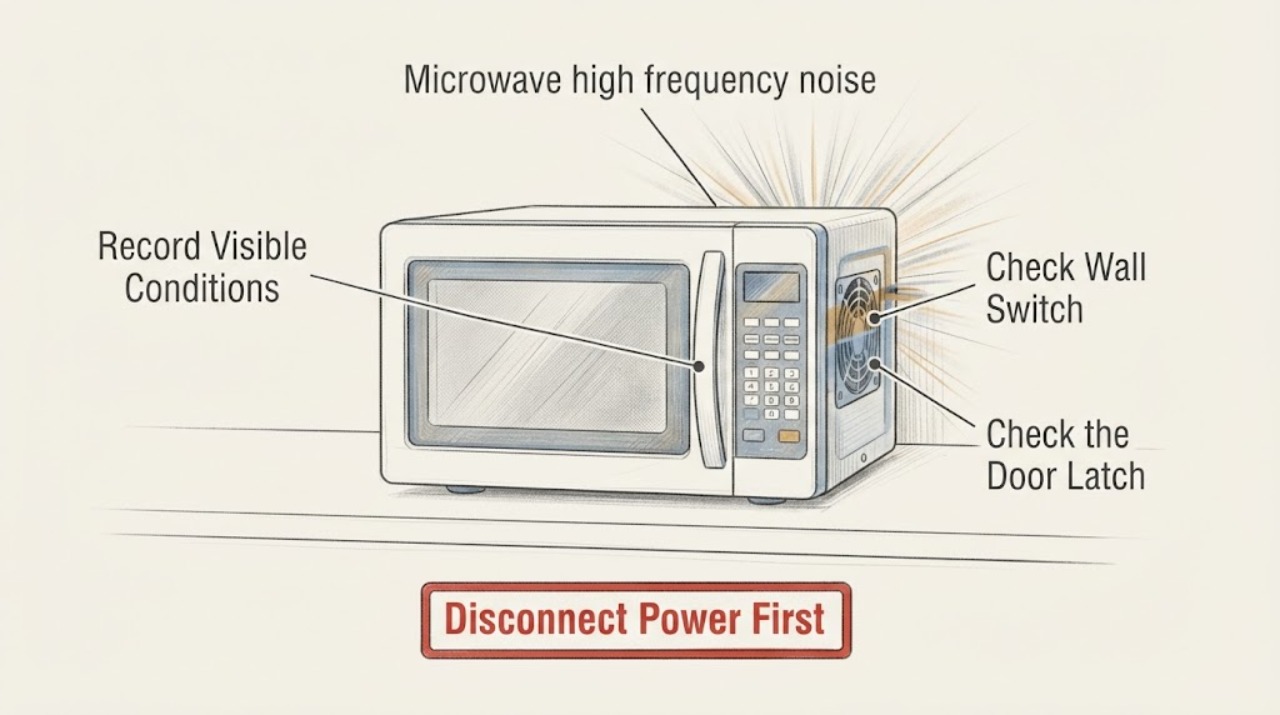
Work through in order
Diagnostic checks
Use only checks that match the exact appliance or system and its official guide.
-
Check 1
Without removing the microwave from its mounting or opening any cover, note whether the sound is present while the unit is idle, only after Start, only when the vent fan runs, or only while the door is open. Record whether the display, keypad, cavity light, fan, and heating function behave normally.
Expected result: The sound is constant at idle, begins only during cooking, tracks the vent fan, or is accompanied by sparking, popping, smoke, a burning smell, or failure to heat.
Next step: If any safety sign appears, stop immediately, unplug at the accessible supply, and arrange GE or qualified service. If the sound is idle-only without other symptoms, continue only with the external checks below; do not open the cabinet.
Why this matters
Why: GE lists several model-dependent hums, clicks, and fan sounds as normal, but timing alone cannot identify an internal part. Safety signs or a new mechanical/electrical sound make this a service issue rather than a sound-level adjustment.
-
Check 2
With the microwave empty and switched off, listen from a normal standing position for the idle sound, then disconnect power at the accessible plug or switch without removing the appliance from its installation. Do not reach behind the unit or remove panels.
Expected result: The sound stops when power is removed, or it continues because the sound came from another appliance, fan, or room source.
Next step: For a persistent energized high-frequency sound on a new appliance, leave it disconnected and use the model-specific GE service or installation/warranty route. Do not use the power cycle as a repair or repeatedly reconnect the unit to test it.
Why this matters
Why: A sound that stops with power is associated with the microwave's energized standby or operating state, but GE's public pages do not map a high-frequency idle sound to a particular component. A sound that remains points away from an energized microwave and should be traced externally.
-
Check 3
If the microwave is over the range and the sound is fan-like after first installation, close the door firmly two or three times, never more than four, as GE describes for a vent fan that starts when the unit is first plugged in. Do not force the latch or change the mounting.
Expected result: The fan-like sound stops after the limited door-close check, or it continues with the unit plugged in.
Next step: If the fan continues, or if the sound is not clearly fan-like, unplug the microwave and contact service. Do not remove the door, grille, cabinet, or vent assembly.
Why this matters
Why: GE attributes this particular first-installation symptom to a possible shipping-related door misalignment and gives a limited external check. That guidance does not prove that a high-frequency display-area whine is a vent-fan issue.
-
Check 4
If you have already used the microwave, record the cooking power level, whether food heated, and whether the sound was accompanied by arcing, sparking, popping, or a burning smell. Never run the microwave empty to reproduce the noise; use only the exact owner's manual instructions for any normal-use test.
Expected result: The sound occurs only at lower power without arcing and the food heats, or it is electrical/mechanical, occurs with arcing or popping, or the food does not heat.
Next step: For arcing, repeated popping, smoke, burning smell, or no heating, stop use and arrange service. A high-frequency sound without those signs still needs model-specific assessment if it is new and persistent; do not diagnose a high-voltage part yourself.
Why this matters
Why: GE says lower-power magnetron cycling can create dull thumping, clicking, or humming, while an electrical or mechanical popping sound warrants service. GE also warns that empty operation can cause popping and damage the interior.
-
Check 5
Photograph the model and serial label, keep the installation paperwork, and describe the sound as idle or cooking, its apparent location near the display/keypad or fan, and any change after installation. Leave the microwave assembled for the service visit.
Expected result: The complete model is available and the sound is reproducible, or the model is missing and the sound cannot be reproduced.
Next step: Give the model, installation date, sound timing, and safety observations to GE service or the seller/installer. If the model cannot be identified, do not substitute another GE manual or part and do not continue using a persistent unexplained noise simply because the unit heats.
Why this matters
Why: GE's normal-sound descriptions vary by model and installation, so the exact model and a reproducible symptom are needed to distinguish a normal sound from a defect.
Use your observations
Decision map
Find the observation that best matches what you see, then follow the next safe action.
-
PATH 01Next step
What you see
The high-frequency noise is present continuously while the new microwave is idle, is loudest near the display/keypad, and stops when power is removed.
Do this next
Keep the microwave disconnected and request model-specific GE service or installation/warranty evaluation. Do not open the cabinet or attempt a component diagnosis.
Why this path and its safety boundary
Why it matters: The symptom is associated with the energized appliance, but the opened GE material does not identify a specific internal component or establish that the sound is safe.
-
PATH 02Next step
What you see
The sound occurs only during cooking at a lower power setting, with no sparking, popping, smoke, burning smell, or heating failure.
Do this next
Compare the exact model's owner's guide and contact GE if the new sound is persistent, unusually sharp, or different from the documented operation. Never test by running the oven empty.
Why this path and its safety boundary
Why it matters: GE says magnetron cycling at lower power can create dull thumping, clicking, or humming; a user-described high-frequency tone is still not confirmed as normal for an unidentified model.
-
PATH 03Next step
What you see
The microwave is over the range and the sound is clearly the vent fan starting after installation or after the door is closed.
Do this next
Perform only the limited two-to-three door-close check, no more than four attempts. If the fan continues or the sound is not clearly fan-related, unplug and contact service.
Why this path and its safety boundary
Why it matters: GE documents an over-the-range first-installation case in which the vent fan can start after plugging in, possibly after shipping-related door misalignment.
-
PATH 04Next step
What you see
The noise is accompanied by arcing, sparks, repeated popping, smoke, burning smell, a damaged cavity or door, or failure to heat.
Do this next
Stop use immediately, unplug at the accessible supply, keep the cabinet closed, and arrange qualified service or a warranty evaluation.
Why this path and its safety boundary
Why it matters: GE treats electrical or mechanical popping as a reason to contact service and warns that empty operation can damage the interior.
Helpful context
Understand the symptom
Separate a normal operating sound from a new fault signal
GE notes that a microwave can sound different depending on its model and whether it is installed over a range or on a counter. Its normal-sounds guidance covers a slight hum while idle, low-power magnetron cycling, clicks or relays, and internal or vent-fan noise. It does not identify a constant high-frequency whine near the display as a specific component fault. Treat the sound as an unresolved symptom and use the timing and safety signs below to decide whether the new appliance should go directly to service.
Do not turn an unidentified noise into a high-voltage DIY repair
A newly installed microwave should stay assembled. GE's public guidance distinguishes normal operating sounds from electrical or mechanical popping and directs those abnormal cases to service. The user-safe checks are limited to the sound pattern, accessible controls, door and vent behavior, and obvious cavity conditions; they do not include removing the cover, probing wiring, or testing the high-voltage circuit.
Installation can change what an over-the-range model sounds like
If this is an over-the-range GE microwave, GE says the vent fan can start when the unit is first plugged in, possibly because the door shifted during shipping. GE gives a limited external door-close check for that specific symptom. A high-frequency sound that remains near the display or continues after the documented check is not established as a fan problem and should be sent to service.
When checks do not resolve it
Need a professional?
Contact GE service or the seller/installer for a new persistent high-frequency noise, especially when it is present at idle, comes from the display/keypad area, continues after the documented over-the-range fan check, or is accompanied by arcing, popping, smoke, burning smell, door damage, or failure to heat.
Safety scope: Do not operate the microwave empty, remove the cabinet or grille, probe wiring, bypass door interlocks, or inspect the high-voltage section. Unplug only at the accessible supply when the article directs a stop-use response.
Common questions
FAQ
Is a high-frequency sound from a new GE microwave normal?
GE lists several normal sounds, including a slight idle hum, low-power cycling hum or clicks, and fan noise, but its public guidance does not identify a constant high-frequency tone near the keypad as a specific normal condition. Treat a persistent new tone as unresolved and use GE service rather than opening the microwave.
Can I run the microwave empty to find the noise?
No. GE warns that operating a microwave empty can cause popping and damage the interior. Record when the sound occurs during ordinary safe use, and stop if there is arcing, smoke, burning smell, abnormal popping, or failure to heat.
What should I check if the noise started immediately after installing an over-the-range model?
If the sound is clearly the vent fan, GE documents that the fan can start after first plugging in and suggests closing the door firmly two or three times, no more than four. If the sound continues, is not fan-like, or is near the display/keypad, unplug the unit and contact service without removing the mounting or cabinet.
Read the exact guide
Official sources
- Over-the Range Microwaves - Vent Fan Coming On When Plugged InGE Appliances · Official GE support article restricted to over-the-range models and the symptom of a vent fan starting after first plug-in. It is not evidence that a display-area high-frequency tone is a fan issue.
- Microwave - Normal Operational CharacteristicsGE Appliances · Official GE support article used for model-dependent normal sound categories and the boundary that an unidentified high-frequency sound is not mapped to a component. No model-specific diagnosis is inferred.
- Microwave - Arcing or Making SoundsGE Appliances · Official GE support article used for stop-use and no-empty-operation boundaries. It does not diagnose the assigned high-frequency noise or identify a component.
Community feedback
Share a repair observation
Share a plain-text repair observation. Accepted observations are published automatically; this page may take a moment to update.