
On this page
Start here
Quick answer
For the GE JES821WB 002 microwave showing F3 or behaving as though a keypad is stuck, first confirm the exact model string and the complete display from the rating label or manual. GE's official general microwave code page defines F3 as a shorted touch pad panel, but GE also directs owners to model-specific literature and says a trained service technician should diagnose displayed fault codes. Keep the interpretation at that general level: an exterior key held down, liquid or cleaner on the panel, or an internal touch-panel/control fault can look similar, and F3 alone does not identify a replaceable part. With the microwave idle and no hazard, inspect and dry only the exterior panel as the model manual permits and use at most one documented clear or power-reset step. If F3 returns, the keypad is unresponsive or acts by itself, the door does not latch, or there is smoke, odor, arcing, abnormal heat, liquid near electrical parts, a hot or damaged cord, or a repeated breaker trip, stop using the microwave and arrange qualified service. Never open the cabinet, probe the high-voltage circuit, bypass the door interlock, or continue cooking to test it.
Before you begin
Safety first
- Keep the microwave out of service for a returning or undocumented F3, abnormal keypad behavior, failed latch, or any thermal, electrical, liquid, fire, or display hazard. Do not open the cabinet, perform live tests, handle high-voltage parts, or bypass the door interlock.
Work through in order
Diagnostic checks
Use only checks that match the exact appliance or system and its official guide.
-
Check 1
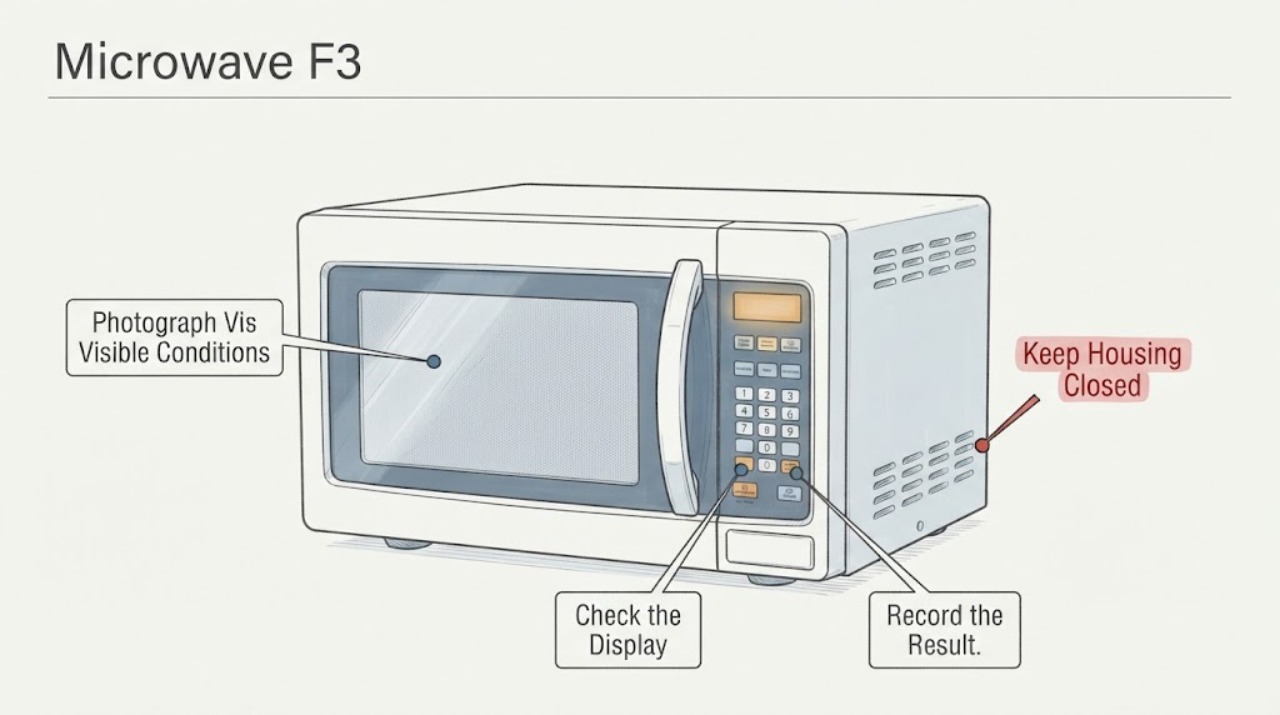
From outside the appliance, photograph the entire display and read the rating label or owner paperwork for the exact model. Record whether the display says F3, -F3-, F3 with extra characters, or something else, when it appears, and whether the microwave is a standard oven rather than a drawer. Do not move a built-in unit or open a panel to find the label.
Expected result: The label matches JES821WB 002 and the complete display is repeatable F3, or the label has a different suffix/format, the display is partial, or the product form is uncertain.
Next step: Keep the photograph and continue only if the appliance identity and display are clear. If they do not match, obtain the correct GE manual before applying an F3 instruction; do not borrow a code table from a drawer or another model.
Stop if: Stop for smoke, burning or electrical odor, sparks, arcing, abnormal heat, liquid near electrical parts, a hot or damaged cord or outlet, or a repeat breaker trip.
Why this matters
Why: GE's support pages route owners to model-specific literature, while the general F3 definition is not proof that every revision or product form uses the same keypad and control procedure. The supplied model includes a space and a numeric suffix, so the printed label must control rather than an inferred normalized model.
-
Check 2
Compare the complete F3 display with the exact JES821WB 002 literature once the model is confirmed. Check only user-facing distinctions such as a control lock, demo or display setting, a power-failure message, or a documented clear/cancel instruction; do not press random key combinations or use a drawer-specific F3 sequence.
Expected result: The exact manual documents F3 and a user-level clear, the message is a different normal mode, or no matching F3 entry is available for the confirmed model.
Next step: Use only one clear or cancel step explicitly documented for this model. If the manual cannot be matched or F3 returns, stop user troubleshooting and arrange qualified GE-compatible microwave service.
Stop if: Do not enter service mode, defeat a control or door lock, remove the keypad, or open the microwave cabinet.
Why this matters
Why: GE's general page defines F3 as a shorted touch pad panel, but the exact manual controls the permitted clear and the product-specific meaning. An undocumented or differently formatted message remains unresolved and cannot select a keypad or control part.
-
Check 3
With the microwave idle and from a safe, dry position, inspect the exterior keypad for a visibly held key, spilled liquid, cleaner residue, a cracked or lifted membrane, or a panel that is wet to the touch. Wipe the exterior only as the exact manual permits, using a dry or appropriately damp cloth without spraying into controls; do not press hard or insert anything between keys.
Expected result: A key is visibly held or the panel is damp/soiled, the panel is cracked or lifting, or the exterior is clean, dry, and intact but F3 remains.
Next step: After the exterior is fully dry, use one model-documented clear step if available. If the code remains, the keypad does not respond normally, or the panel is damaged, keep the microwave out of service and call qualified service.
Stop if: Do not spray cleaner, pour liquid on the panel, use a heat gun or hair dryer, remove the control panel, or continue if the panel is hot, sparking, or electrically odorous.
Why this matters
Why: A surface condition can explain a held-key indication, but a clean dry panel with persistent F3 leaves an internal keypad/control possibility that cannot be separated safely by exterior inspection. F3 does not prove which internal assembly is responsible.
-
Check 4
Only when there is no smoke, odor, arcing, abnormal heat, liquid near electrical parts, damaged cord or outlet, failed latch, or breaker problem, and only if the plug or circuit control is safely accessible without moving the appliance, perform no more than one model-permitted power interruption. GE's general page says a 30-second supply interruption can clear some microwave fault or function codes; treat that as a limited reset, not a repair test.
Expected result: F3 clears and the panel behaves normally, F3 returns immediately, the display remains abnormal, the keypad is dead or acts by itself, or the breaker trips again.
Next step: For a returning code, dead or self-activating keypad, abnormal display, or repeat trip, leave the microwave disconnected only when that can be done safely and arrange qualified service. Do not repeat the reset or try to reproduce F3 with cooking.
Stop if: Do not touch a wet plug or breaker, repeatedly cycle a tripping circuit, open the fuse area, make a live measurement, or operate the microwave with the cabinet open.
Why this matters
Why: A one-time clear can distinguish a transient control state from a returning fault, but GE warns that some cases still require service. A returning code or abnormal controls leaves the touch panel/control diagnosis unresolved and raises the risk of unsafe operation.
-
Check 5
Before any further use, test only the normal user interface response without starting a heating cycle: note whether Cancel/Off, number keys, Start, and the display respond as expected, and whether any key activates without being pressed. Confirm that the door closes and latches normally from outside; do not force it or insert a tool into the latch.
Expected result: All keys respond normally after the permitted clear, one or more keys remain dead, a key activates by itself, the door will not latch, or the display and controls disagree.
Next step: If any key is dead or self-activates, the latch fails, or the display remains abnormal, stop using the microwave and arrange qualified service. Do not run a heating cycle as a functional test.
Stop if: Do not bypass the door interlock, hold a key down to test it, operate with a cracked panel, or continue after smoke, sparks, odor, abnormal heat, or liquid ingress.
Why this matters
Why: A normal interface after one cleared F3 is different from a keypad that remains unresponsive or self-activates. A failed latch is a safety-interlock concern, and the visible F3 cannot establish a safe repair for either condition.
-
Check 6
Prepare a service record with the exact model as printed, the full F3 display photo, when it appears, recent spill or cleaning, whether the panel was wet or visibly held, the result of one documented clear or reset, keypad response, door-latch behavior, and any power or hazard symptoms. Keep the appliance out of service while the code or unsafe behavior persists.
Expected result: The record shows a one-time clear with normal controls and no hazard, or it shows recurring F3, an abnormal keypad/display, failed latch, no-start/no-heat behavior, or an electrical, thermal, liquid, or fire warning.
Next step: Give the record to GE-compatible qualified microwave service. Keep the unit disconnected when safe for a returning fault or any hazard, and use emergency help for an active fire or immediate danger.
Stop if: Do not order a keypad or control board from F3 alone and do not open the cabinet, probe high-voltage parts, replace an internal fuse, or bypass a door safety device.
Why this matters
Why: This evidence helps a trained technician distinguish a user-facing panel condition from a returning touch-panel/control or safety problem without exposing the owner to microwave high voltage. GE's code page specifically places fault diagnosis with trained service.
Use your observations
Decision map
Find the observation that best matches what you see, then follow the next safe action.
-
PATH 01Next step
What you see
The rating label matches JES821WB 002, the display is a repeatable F3, the exterior panel is dry and intact, and the exact literature provides a documented clear.
Do this next
Use the one documented clear step, then check normal user-interface response without heating. Stop and arrange service if F3 returns or any key behaves abnormally.
Why this path and its safety boundary
Why it matters: GE's general code meaning points toward the touch pad panel, but the model-specific procedure still controls; a clear result does not identify a replacement part.
-
PATH 02Next step
What you see
F3 clears once after a permitted exterior dry/clear or one safe power interruption and the keypad, display, and door latch behave normally.
Do this next
Do not repeat the reset or run a heating test to reproduce the code. Monitor only normal use within the exact manual's limits and call service if F3 recurs.
Why this path and its safety boundary
Why it matters: A transient panel condition or control state is possible, but the reset does not prove that the touch panel or control is repaired.
-
PATH 03Next step
What you see
F3 returns after the documented clear, the panel remains unresponsive or self-activates, or the display is abnormal with a clean dry exterior.
Do this next
Stop using the microwave and arrange qualified, model-specific service. Do not open the cabinet, disconnect the keypad ribbon, make live measurements, or order a part from the code alone.
Why this path and its safety boundary
Why it matters: The general GE F3 definition remains consistent with a touch-pad-panel fault, but the responsible internal assembly and safe repair are unresolved.
-
PATH 04Next step
What you see
The model label or product form does not match JES821WB 002, the display is not clearly F3, or no exact manual entry can be found.
Do this next
Photograph the label and display and obtain the correct GE literature before using a code sequence. Keep the appliance off if the message or control behavior is abnormal.
Why this path and its safety boundary
Why it matters: The opened GE sources support model-number lookup and a general microwave F3 definition, not a safe cross-model or drawer-specific interpretation.
-
PATH 05Next step
What you see
Smoke, burning or electrical odor, sparks, arcing, abnormal heat, liquid near electrical parts, a hot or damaged cord or outlet, repeated breaker trips, a failed door latch, or the microwave starts by itself is present.
Do this next
Stop immediately, keep people away, and isolate power only from a safe dry position; arrange qualified microwave service. Use emergency help for an active fire or immediate danger.
Why this path and its safety boundary
Why it matters: The condition has crossed the ordinary user-check boundary and may involve fire, shock, microwave-energy, or door-interlock risk.
Helpful context
Understand the symptom
F3 gives a useful direction but not a safe part verdict. GE's general microwave page labels F3 as a shorted touch pad panel and notes that fault codes are intended to help technicians diagnose the appliance. A key held down, liquid or cleaner on the exterior membrane, or a fault inside the control assembly can produce similar symptoms. Do not treat the wording as permission to open the cabinet or to decide between a keypad and a control board from the code alone.
The supplied identity is written as JES821WB 002, including a space. GE's literature and model-support pages require the complete model number for the correct manual; do not silently rewrite the label, borrow instructions from a drawer or another GE microwave, or assume that a suffix variation has the same keypad and safety procedure. If the rating label does not match the supplied string, pause the F3 diagnosis until the exact model is confirmed.
When checks do not resolve it
Need a professional?
Call qualified GE-compatible microwave service for a returning F3, a dead or self-activating keypad, abnormal display, unknown model/manual match, failed latch, or any no-start/no-heat condition after the documented user checks.
Safety scope: Keep the microwave out of service for a returning or undocumented F3, abnormal keypad behavior, failed latch, or any thermal, electrical, liquid, fire, or display hazard. Do not open the cabinet, perform live tests, handle high-voltage parts, or bypass the door interlock.
Have this ready
- Provide the exact model as printed on the rating label, the complete F3 display photo, timing, recent cleaning or spill, exterior panel observations, one documented clear/reset result, keypad response, door-latch behavior, and any power or hazard symptoms.
Common questions
FAQ
What does F3 mean on a GE JES821WB 002 microwave?
GE's general microwave support page lists F3 as a shorted touch pad panel. That is a diagnostic direction, not proof that the keypad itself is the replaceable part; confirm the exact model literature and arrange trained service if F3 returns or the controls behave abnormally.
Can moisture cause the GE microwave F3 code?
Liquid or cleaner on a membrane keypad can hold or affect a key, but F3 alone cannot prove the cause. Inspect and dry only the exterior as the exact manual permits; never spray into controls, open the cabinet, or use heat to dry it. A clean, dry panel with recurring F3 needs qualified service.
Should I replace the keypad when F3 appears?
Not from F3 alone. GE's public code summary identifies a shorted touch pad panel but directs fault diagnosis to a trained service technician. Do not disconnect keypad wiring or choose a keypad/control part until the exact JES821WB 002 identity and the technician's diagnosis are confirmed.
Is it safe to keep using the microwave with F3?
Do not use it while F3 persists, the keypad is unresponsive or activates by itself, the door will not latch, or any smoke, odor, sparks, abnormal heat, liquid near electrical parts, damaged power parts, or repeated breaker trip is present. A one-time clear with normal controls does not prove the fault is repaired; stop and call service if F3 returns.
Read the exact guide
Official sources
- Owner's Manual & Installation InstructionsGE Appliances · Opened official GE literature page. It directs owners to enter the appliance model number to retrieve the applicable owner's manual, installation instructions, and related literature; it does not itself prove a JES821WB 002 F3 procedure.
- Find Your GE Model & Serial NumbersGE Appliances · Opened official GE model-locator page. It provides model-label guidance and identifies microwaves as a cooking-product category; use the physical label to confirm the supplied model string rather than silently changing its spacing or suffix.
- Microwave - Error, Fault or Function CodesGE Appliances · Opened official GE Appliances microwave support page. It lists F3 as a shorted touch pad panel, says displayed fault codes should be diagnosed by a trained service technician, and notes that a 30-second power interruption may clear some codes; it is a general summary, not proof of every JES821WB 002 revision's procedure.
Community feedback
Share a repair observation
Share a plain-text repair observation. Accepted observations are published automatically; this page may take a moment to update.