
On this page
Start here
Quick answer
Start with the visible state of the GE microwave. If the display is lit, check whether the control lock is shown, clear a stored or incomplete programme with the model's CLEAR/OFF or RESET control, confirm the clock and enter a complete cook time followed by START. GE says the keypad can appear unresponsive when a programme was not completed or when the control lock is active; some models show L, LOC or LOCKED. If the display is dead, check the grounded three-prong connection and the household fuse or breaker, and use GE's documented 30-second power reset only from outside the appliance. If the keypad remains unresponsive, the display is dim or partial, the breaker trips again, there is arcing, smoke, burning odor or door damage, stop using the microwave and arrange GE service. Never open the cabinet or attempt high-voltage, interlock or control-panel repair yourself.
Before you begin
Safety first
- Limit owner checks to the display, model-documented keypad controls, grounded outlet/cord observation and a single external power reset. Do not remove the microwave cabinet, touch high-voltage components, test capacitors or magnetron, bypass the door interlock, change wiring or replace a control panel from the symptom alone.
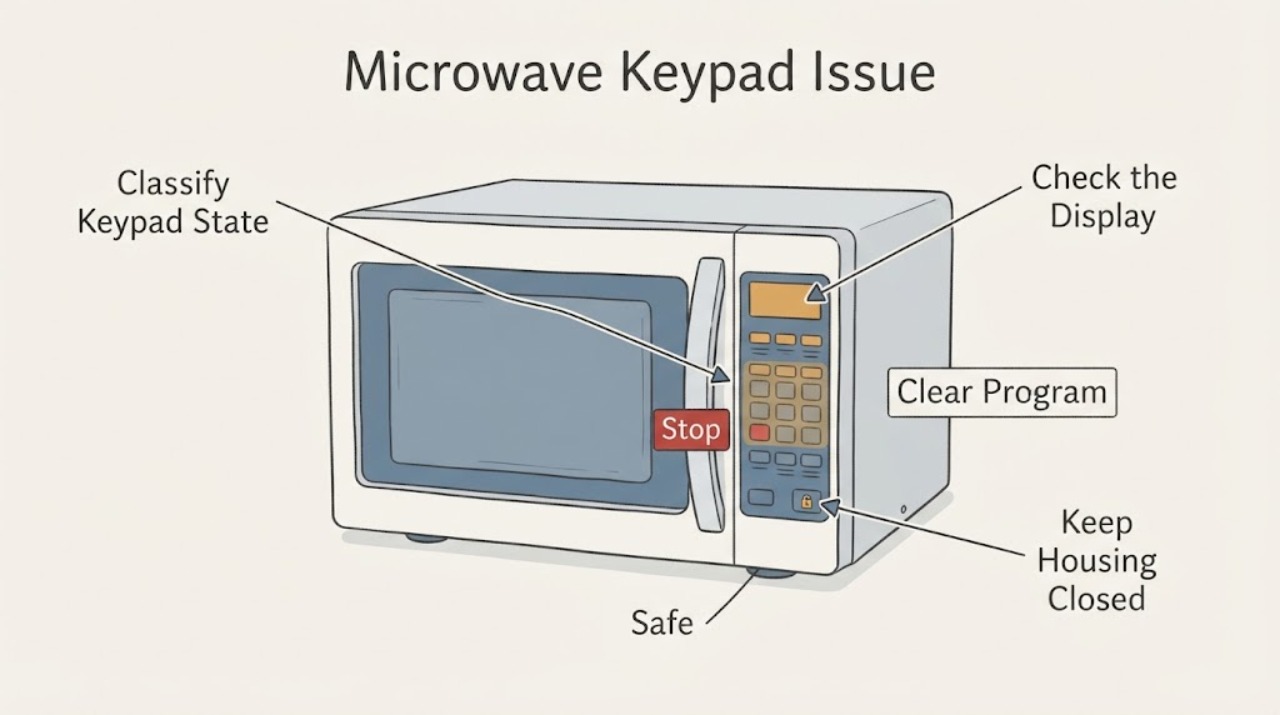
Work through in order
Diagnostic checks
Use only checks that match the exact appliance or system and its official guide.
-
Check 1
Record whether the display is blank, lit but unchanged, showing L/LOC/LOCKED, responding only to some pads or changing while the microwave will not start.
Expected result: The display state and pad pattern fit a power, programme, lock or limited-number-pad condition.
Next step: Use the matching branch and stop for smoke, arcing, burning odor, door damage or repeated breaker trips.
Why this matters
Why: GE gives separate external checks for a dead display, incomplete programme, control lock and number-pad expectations.
-
Check 2
With the display lit, use the exact model's CLEAR/OFF or RESET control, verify the clock, enter a complete cook time and press START once.
Expected result: The display returns to the clock and accepts a complete programme, or it remains unchanged.
Next step: Use the microwave normally if the model accepts the programme; otherwise check the lock and external power branches, then arrange service.
Why this matters
Why: GE says an incomplete or delayed programme can leave the touch panel apparently unresponsive; persistence after clearing is not explained by programme state alone.
-
Check 3
Look for L, LOC or LOCKED and follow only the owner's manual instruction for clearing the control lock, such as the model-documented CLEAR/OFF hold.
Expected result: A lock indicator is present and clears, or no lock indicator appears and the keypad remains unresponsive.
Next step: Use the documented unlock action if present; otherwise continue to the power/service branch without removing the panel or bypassing the lock.
Why this matters
Why: GE identifies the lock feature as a possible reason a lit keypad will not respond; no indicator means a lock explanation is unconfirmed.
-
Check 4
For a blank display, verify the cord is fully inserted in a grounded three-prong outlet and check the household fuse or breaker; if safe, perform GE's external 30-second power reset.
Expected result: The display returns after power is restored, or the breaker trips, the outlet is damaged, or the display stays dead.
Next step: Reprogram only after stable power returns; stop resetting a tripping breaker and arrange qualified service without opening the microwave.
Why this matters
Why: GE identifies a loose/ungrounded connection, blown fuse or tripped breaker as possible external causes; a recurring trip or dead display needs service diagnosis.
-
Check 5
If only number pads 7, 8 or 9 seem ineffective, use the model manual to identify their assigned functions instead of expecting Express Cook from a single press.
Expected result: Other controls respond and the microwave accepts time, power-level or clock input, or every keypad control is unresponsive.
Next step: Use the documented function for those pads; arrange service for broad keypad failure or a display that does not respond after external checks.
Why this matters
Why: GE says 7, 8 and 9 do not have Express Cook on its microwaves; universal keypad failure is a separate service condition.
-
Check 6
Give GE support or a qualified servicer the model, display state, pad pattern, lock indicator, power-reset result and any arcing, odor, breaker or door symptom.
Expected result: The keypad remains unresponsive, the display is dim or partial, a safety symptom appears or repair would require panel removal.
Next step: Keep the microwave unplugged and arrange qualified service; never open the cabinet, test high-voltage parts or bypass a door interlock.
Why this matters
Why: GE's public guidance ends at external controls and recommends service; it does not establish a failed membrane, board, fuse or interlock from the symptom alone.
Use your observations
Decision map
Find the observation that best matches what you see, then follow the next safe action.
-
PATH 01Next step
What you see
The display is lit, shows L/LOC/LOCKED, and the keypad works after the model-documented unlock action.
Do this next
Use the microwave normally and keep the model's lock instructions; do not remove the panel or bypass the lock.
Why this path and its safety boundary
Why it matters: GE identifies the control lock as a likely explanation for a lit but nonresponsive keypad.
-
PATH 02Next step
What you see
The display is lit without a lock indicator, and a stored or incomplete programme clears when CLEAR/OFF or RESET is used.
Do this next
Set the clock if needed, enter a complete cooking time and press START; arrange service if the keypad stops responding again.
Why this path and its safety boundary
Why it matters: GE says an incomplete or delayed programme can make the touch panel appear nonresponsive.
-
PATH 03Next step
What you see
Only 7, 8 or 9 appears not to work, while other controls respond and the manual assigns those pads to time, power or clock functions.
Do this next
Use the documented function or sequence for the pad and monitor normal operation.
Why this path and its safety boundary
Why it matters: GE says those number pads do not provide Express Cook, so a single press not starting heat is not by itself a keypad failure.
-
PATH 04Next step
What you see
The display is blank and returns after a stable grounded connection or GE's external 30-second reset.
Do this next
Reprogram the microwave normally and arrange service if the display fails again or the breaker trips.
Why this path and its safety boundary
Why it matters: An external power or incomplete-control state may have cleared; this does not validate any internal repair.
-
PATH 05Next step
What you see
The keypad remains unresponsive, the display is dim or partial, a breaker trips again, arcing/smoke/odor appears, the door is damaged or panel removal would be required.
Do this next
Keep the microwave unplugged, do not retest or open the cabinet, and arrange GE or qualified service.
Why this path and its safety boundary
Why it matters: The symptom is outside safe owner checks and may involve hazardous microwave circuitry or door protection.
Helpful context
Understand the symptom
Separate a dead microwave from a lit locked keypad
Record whether the display is blank, lit but unchanged, showing L/LOC/LOCKED, or changing while the microwave will not start. Also note whether the interior light comes on when the door opens. GE uses these observations to distinguish power, programme and control-lock conditions; the word keypad alone does not identify a failed control panel.
Clear the visible programme state
If the display is lit, press the model's CLEAR/OFF or RESET control as documented in the owner's manual, set the clock if required, enter a complete cooking time and press START. GE says an incomplete or delayed programme can make the touch panel seem unresponsive. Do not keep pressing random combinations or copy a hidden service sequence from another model.
Check the control lock without bypassing it
Look for L, LOC or LOCKED on the display and use only the exact model's owner-manual unlock instruction. GE notes that many models use a press-and-hold CLEAR/OFF action, but the keypad layout varies. Never defeat the lock by removing the panel or changing wiring.
Check power from outside the appliance
For a blank display, verify that the cord is fully inserted in a grounded three-prong outlet and check the household fuse or breaker. GE's keypad article permits unplugging the microwave or turning off its supplying breaker for 30 seconds, then restoring power and reprogramming it. Do not remove the cover, probe the outlet with improvised equipment or repeatedly reset a breaker that trips.
Interpret number-pad behavior correctly
If only 7, 8 or 9 appears not to start a cook cycle, GE says those pads do not provide Express Cook on its microwaves and may be assigned to time, power-level or clock functions. Follow the model manual before treating that behavior as a fault; a display that ignores every pad is a different branch.
Stop for high-voltage or door hazards
Keep the microwave unplugged and arrange GE or qualified service for a keypad that remains unresponsive after the external checks, a fading or partial display, repeated breaker trips, arcing, smoke, burning odor, a damaged door or a control problem that requires panel removal. Microwave cabinets contain hazardous high-voltage components even when the appliance is unplugged; do not attempt internal testing or interlock bypass.
When checks do not resolve it
Need a professional?
Use GE support or qualified microwave service for persistent keypad failure, dead or fading display, repeated breaker trips, arcing, smoke, burning odor, door damage or any condition requiring panel removal.
Safety scope: Limit owner checks to the display, model-documented keypad controls, grounded outlet/cord observation and a single external power reset. Do not remove the microwave cabinet, touch high-voltage components, test capacitors or magnetron, bypass the door interlock, change wiring or replace a control panel from the symptom alone.
Common questions
FAQ
Why is my GE microwave keypad not responding even though the display is on?
GE says an incomplete programme or control lock can make a lit keypad appear unresponsive. Clear the programme, check for L/LOC/LOCKED and follow the exact model manual; persistent failure needs service.
Why do the 7, 8 and 9 buttons on my GE microwave seem not to work?
GE says its microwaves do not provide Express Cook for 7, 8 or 9. Those pads may be used for time, power-level or clock functions, so use the model manual before treating the behavior as a fault.
Can I open a GE microwave to repair the keypad?
No. GE's owner guidance stops at external power, programme and lock checks and directs unresolved keypad problems to service. A microwave cabinet can contain hazardous high-voltage components, so do not open it or bypass the door interlock.
When should I stop resetting a GE microwave?
Stop for a recurring breaker trip, arcing, smoke, burning odor, door damage, a dead or partial display or keypad failure that remains after one documented external reset. Keep it unplugged and arrange qualified service.
Read the exact guide
Official sources
- Microwave - 7, 8, or 9 Number Pads Do Not WorkGE Appliances Support · Direct GE clarification for number-pad expectations; used only to distinguish 7/8/9 Express Cook behavior from a whole-keypad failure.
- Microwave - Is Not Making SoundGE Appliances Support · Direct GE guidance for lit displays with nonresponsive buttons, incomplete programmes and model-dependent control lock.
- Microwave - Touch Control Panel Not Operating CorrectlyGE Appliances Support · Direct GE keypad troubleshooting; used for grounded power, clock/program state, 30-second external reset, breaker and service boundaries.
Community feedback
Share a repair observation
Share a plain-text repair observation. Accepted observations are published automatically; this page may take a moment to update.