
On this page
Start here
Quick answer
On a GE Monogram ZE2160SF-05 installed in a cabinet, first separate a lit panel that ignores keys from a microwave that is completely dark. GE's ZE2160SF Owner Center identifies the base ZE2160SF model and points to its owner manual; the exact -05 suffix and serial should be confirmed before any part or manual decision. If the display is lit, look for LOCK or L and clear only a program or control lock using the matching owner manual. The GE manual for this control family documents holding CLEAR/OFF for about three seconds to unlock and holding 0 for about three seconds to turn the clock display on or off; do not assume a different keypad uses the same sequence. If the panel remains unresponsive, if the appliance is dead, or if the breaker trips, stop and arrange service. Because this unit is built into cabinetry, do not pull it out, remove trim or the case, open the control panel, defeat the door interlock, or take live measurements. Stop immediately for smoke, burning odor, arcing, a hot or damaged cord/outlet, water, or a damaged door/seal.
Before you begin
Safety first
- Do not remove the built-in trim kit or pull the microwave from the cabinet, open the outer case or control panel, touch high-voltage components, defeat door interlocks, alter wiring, or measure energized circuits. Keep it off for smoke, odor, arcing, heat, water, damage, repeated trips, or an unreadable persistent display.
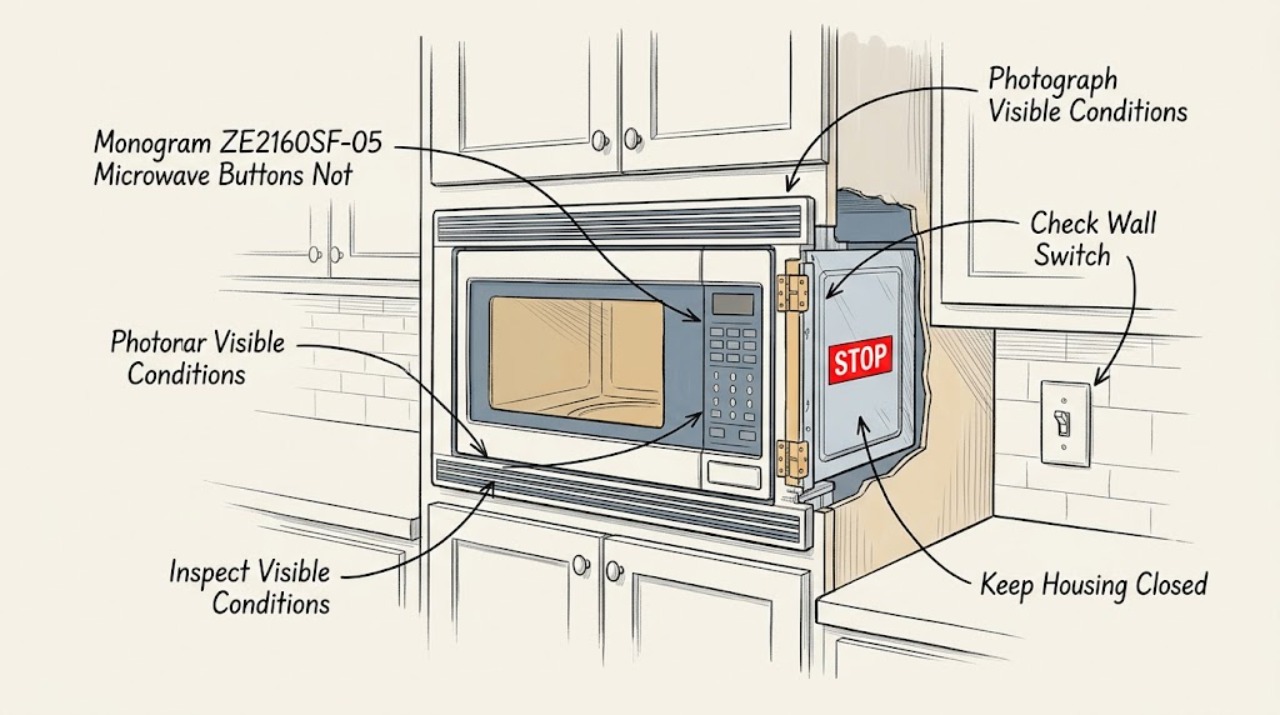
Work through in order
Diagnostic checks
Use only checks that match the exact appliance or system and its official guide.
-
Check 1
From outside the cabinet, photograph the keypad and display and record the full label as ZE2160SF-05 (including serial and market if present). Note whether the display is bright, blank, shows LOCK or L, shows a prior time/program, or is partially lit; also note whether the cavity light comes on when the door is opened normally.
Expected result: The panel is lit but ignores keys, the clock is blank while another sign of power exists, the entire microwave is dark, or the label lacks the -05 suffix.
Next step: Keep the photo and exact label for the matching manual or service request. Do not open trim or the cabinet to find another label; if the suffix cannot be confirmed, use symptom-level safety guidance only.
Why this matters
Why: GE's Owner Center lists the base ZE2160SF model and its manual, while its support guidance separates a non-responsive key panel from a completely dead microwave. The display state determines whether to check a documented control state or an external supply; an incomplete model identity makes part and key-sequence assumptions unsafe.
-
Check 2
If the display is lit, look for LOCK, L, a paused or unfinished program, Delay Start, or a clock that has not been set. Use only the exact ZE2160SF-series manual's Clear/Off, clock, or lock instructions once; do not guess a key combination because GE documents several lock designs for different models.
Expected result: A lock indication clears, the prior program clears, the clock returns after the documented display control, or the panel remains unresponsive with no state change.
Next step: If the manual-documented state clears, make only a normal external control selection. If no state clears or the panel still ignores keys, stop pressing repeatedly and arrange qualified microwave service.
Stop if: Do not pry keys, spray liquid into the panel, remove trim, bypass the lock, or enter an undocumented diagnostic mode.
Why this matters
Why: GE says a control lock can show LOCK or L and that lock-release methods vary by model. The opened GE manual for the ZE2160SF control family documents holding CLEAR/OFF about three seconds to unlock and holding 0 about three seconds for Display On/Off, but a successful unlock does not prove the keypad hardware is healthy.
-
Check 3
If the microwave is completely dark, inspect only the dry, accessible wall switch, plug face, outlet, and household breaker or fuse from a safe position. Restore one normal switch or breaker state only if there is no heat, water, scorch, odor, or damage; do not remove an outlet cover or pull the built-in microwave forward.
Expected result: The accessible supply is off or dead, power is normal but the microwave stays dark, or the protective device trips again.
Next step: Leave the microwave off for a dead, damaged, or repeatedly tripping supply and obtain qualified electrical or appliance help. Do not use an extension cord, change protection ratings, or keep resetting power.
Stop if: Do not touch a hot, wet, scorched, loose, or sparking plug/outlet, and do not move the cabinet-installed unit.
Why this matters
Why: GE's control-panel troubleshooting identifies a grounded three-prong supply, house fuse/breaker, and a dead display with no function as the first external distinctions. A stable supply with a dark installed appliance points to appliance service; a dead or repeatedly tripping circuit belongs with qualified electrical service.
-
Check 4
If the panel is lit and the controls respond after the documented state is cleared but cooking does not begin, close the door normally once and check from outside that nothing is touching the front frame or preventing a square, secure latch. Do not hold the door shut, insert anything into the latch, or run the microwave with a gap.
Expected result: The door closes and latches normally, the door is misaligned or damaged, or the panel still does not respond even though the display is lit.
Next step: Use the microwave only with an undamaged door that closes and latches normally and only after the exact manual permits operation. For a damaged/misaligned door or persistent no-start/no-response condition, leave it off and arrange qualified service.
Stop if: Do not bypass, tape, wedge, straighten, or otherwise manipulate an interlock or door assembly.
Why this matters
Why: A secure door is part of the microwave safety system; a door or interlock condition is not a keypad repair. GE's safety instructions prohibit defeating or tampering with interlocks and prohibit operation with a damaged door.
-
Check 5
From outside the cabinetry, check only that visible trim and ventilation openings are not blocked by stored items and that there is no water, smoke, scorch, or heat around the face, cabinet, cord, or outlet. Do not remove the trim kit or slide the microwave out to inspect vents, the plug, or internal components.
Expected result: Airflow is visibly obstructed, the trim/cabinet is damaged, the built-in unit would need to be moved to check power, or there is smoke, odor, arcing, heat, or water.
Next step: Remove only an obvious loose item outside the trim without moving the appliance. For blocked integrated airflow, damage, or any hazard sign, stop using it and arrange qualified service; leave active smoke or fire to emergency guidance.
Stop if: Do not pull, tilt, lift, unfasten, or dismantle a cabinet-installed microwave, and do not restore power to a wet or damaged unit.
Why this matters
Why: GE says a built-in trim kit provides necessary airflow and warns that blocked airflow can make a microwave operate improperly or cause damage. A cabinet installation also creates a movement and electrical-access hazard; smoke, odor, heat, arcing, or water crosses the user-check boundary.
-
Check 6
If the panel remains unresponsive after the exact lock/program check and one safe external power check, prepare the service handoff without opening anything. Provide the full model/suffix, serial, installation style, display state, lock/program indications, whether the cavity light worked, breaker events, door condition, and a short video of the failed key response from outside.
Expected result: The symptom is repeatable with a stable external supply, or it cannot be safely reproduced without moving the built-in microwave.
Next step: Keep the microwave out of service if the panel is still unresponsive, the display is unreadable, or any hazard exists. Have qualified microwave service assess the installed unit; do not order a control panel or fuse solely from the symptom.
Why this matters
Why: GE's support article recommends service when the touch panel suggestions do not resolve the issue. The exact model and symptom record lets a qualified provider distinguish keypad/control, supply, door-interlock, and installation concerns without a user component guess.
Use your observations
Decision map
Find the observation that best matches what you see, then follow the next safe action.
-
PATH 01Next step
What you see
The display is lit, shows LOCK or L, or contains an unfinished program, and the exact manual-documented Clear/Off or program-clear step restores normal key response.
Do this next
Use only normal operation with a secure undamaged door. If the panel locks again or becomes unresponsive, stop and arrange service; do not repeat undocumented sequences.
Why this path and its safety boundary
Why it matters: A control state is more likely than a failed keypad, but clearing it does not establish that the microwave is otherwise safe or that the control hardware will remain reliable.
-
PATH 02Next step
What you see
The panel is lit but ignores every key after the documented lock/program check, or the display remains blank while the outlet and other external power signs are normal.
Do this next
Leave the built-in microwave in place and arrange qualified appliance service with the full ZE2160SF-05 identity and video. Do not open the panel or replace a guessed part.
Why this path and its safety boundary
Why it matters: A keypad, display, control, or appliance power-path fault is more likely than a normal lock state, but the exact failed component cannot be identified safely from outside.
-
PATH 03Next step
What you see
The entire microwave is dark, the accessible outlet or breaker is dead, or the breaker trips again when power is restored.
Do this next
Stop using it and obtain qualified electrical or appliance help. Do not alter protection ratings, use an extension cord, pull the microwave from the cabinet, or keep restoring power.
Why this path and its safety boundary
Why it matters: A household supply/protection or appliance power-path issue is more likely than Control Lock. Repeated trips may indicate an electrical hazard.
-
PATH 04Next step
What you see
The display responds but the door will not latch squarely, the door/frame/seal is damaged, or Start still fails with a secure undamaged door.
Do this next
Do not operate the microwave. Arrange qualified service and provide door photos and the exact model; do not attempt to straighten, wedge, or defeat the latch.
Why this path and its safety boundary
Why it matters: The first pattern is a door/interlock safety condition; the second needs internal diagnosis. Neither justifies holding the door shut or bypassing the interlock.
-
PATH 05Next step
What you see
Smoke, burning odor, visible arc, hot or damaged cord/outlet, water near the appliance, melted/scorched trim, or other electrical damage is present.
Do this next
Stop use, stay clear, and isolate power only from a safe accessible point if that can be done without contact with damaged equipment. Obtain emergency or qualified electrical/appliance help as appropriate.
Why this path and its safety boundary
Why it matters: This is a fire, electrical, or microwave-safety stop condition, not a button troubleshooting branch. An installed unit must not be opened or moved by the user to investigate it.
Helpful context
Understand the symptom
The GE Monogram ZE2160SF-05 is a countertop-style microwave that may be installed with a built-in trim kit. The buttons-not-responding complaint can mean a locked or unfinished control state, a blank display setting, a power problem, or a failed keypad/control path. It is not safe to decide which internal part failed from key response alone, especially when the unit is enclosed in a cabinet.
Keep every check at the user-accessible boundary. GE's built-in guidance says trim kits provide the airflow needed by the microwave and that only the kit designed for the model should be used. Do not slide, tilt, lift, or dismantle the installed unit to reach a plug, fuse, control board, or high-voltage section; arrange qualified service when an accessible external check cannot resolve the symptom.
When checks do not resolve it
Need a professional?
Use the GE/Monogram support route or a qualified microwave service provider for persistent no-response, a dead unit with stable supply, a failed door latch/interlock, or any fault requiring access behind the cabinet. Use qualified electrical service for the household circuit, cord, or outlet when it is dead, damaged, hot, or tripping.
Safety scope: Do not remove the built-in trim kit or pull the microwave from the cabinet, open the outer case or control panel, touch high-voltage components, defeat door interlocks, alter wiring, or measure energized circuits. Keep it off for smoke, odor, arcing, heat, water, damage, repeated trips, or an unreadable persistent display.
Have this ready
- Provide the complete ZE2160SF-05 model and serial, market, installation/trim-kit style, display and lock/program state, exact keys that fail, cavity-light behavior, door/latch condition, breaker events, visible airflow or damage, and safe-distance photos/video. State that the unit was not pulled out or opened.
Common questions
FAQ
How do I unlock the GE Monogram ZE2160SF-05 microwave?
Use the exact owner's manual for the full -05 model. The opened GE manual for the ZE2160SF control family documents holding CLEAR/OFF for about three seconds to unlock when an L is displayed, but GE says lock methods vary by model, so do not force a different keypad sequence.
Could the clock being blank make the buttons seem dead?
Possibly. The opened GE manual documents a Display On/Off feature using the 0 pad for about three seconds, and GE notes that some programming states can affect panel response. Confirm the exact model instructions; a blank display with no other function or a panel that remains unresponsive needs service.
Can I pull the built-in microwave out to check the plug or fuse?
No. GE says built-in trim kits provide necessary airflow and are model-specific. Do not move the cabinet-installed microwave or open its case; have qualified service access it safely.
When should I stop using this microwave immediately?
Stop for smoke, burning odor, sparks/arcing, a hot or damaged cord or outlet, water, melted/scorched trim, a damaged door/seal, or repeated breaker trips. Do not bypass the door interlock or restore power repeatedly.
Read the exact guide
Official sources
- GE Microwave Owner's Manual and Troubleshooting GuideGE Appliances · Opened GE manual content documents the ZE2160SF-style controls; use it with the exact -05 manual and do not generalize to unrelated keypad designs.
- Microwave - Replacing a Built-In Monogram MicrowaveGE Appliances · General built-in Monogram guidance; it establishes model-specific trim-kit and airflow boundaries, not a user removal procedure.
- GE Appliance - Model and Serial Number LocationGE Appliances · General GE identification guidance used to preserve the full suffix and serial for service; it does not diagnose the keypad.
- Microwave - Touch Control Panel Not Operating CorrectlyGE Appliances · General GE microwave guidance; it does not identify a failed internal component on ZE2160SF-05.
- Microwave - Explanation of the Child Lock Out FeatureGE Appliances · GE gives examples for multiple keypad designs and explicitly says to consult the exact model manual; it is not proof of one universal unlock sequence.
- GE Built-In Trim Kit Installation Instructions JX2127/JX2130GE Appliances · Opened from the GE ZE2160SF installation page; used only to establish that built-in access and airflow are installation work, not to instruct a user to remove this unit.
- User Manual & Care for ZE2160SF | GE AppliancesGE Appliances · GE's base-model Owner Center page identifies the Monogram microwave and links its owner manual; confirm the -05 suffix against the rating label before using model-specific instructions.
- Microwave Design Standards and RadiationGE Appliances · General GE microwave safety guidance used for the no-bypass and qualified-service boundary.
Community feedback
Share a repair observation
Share a plain-text repair observation. Accepted observations are published automatically; this page may take a moment to update.