
On this page
Start here
Quick answer
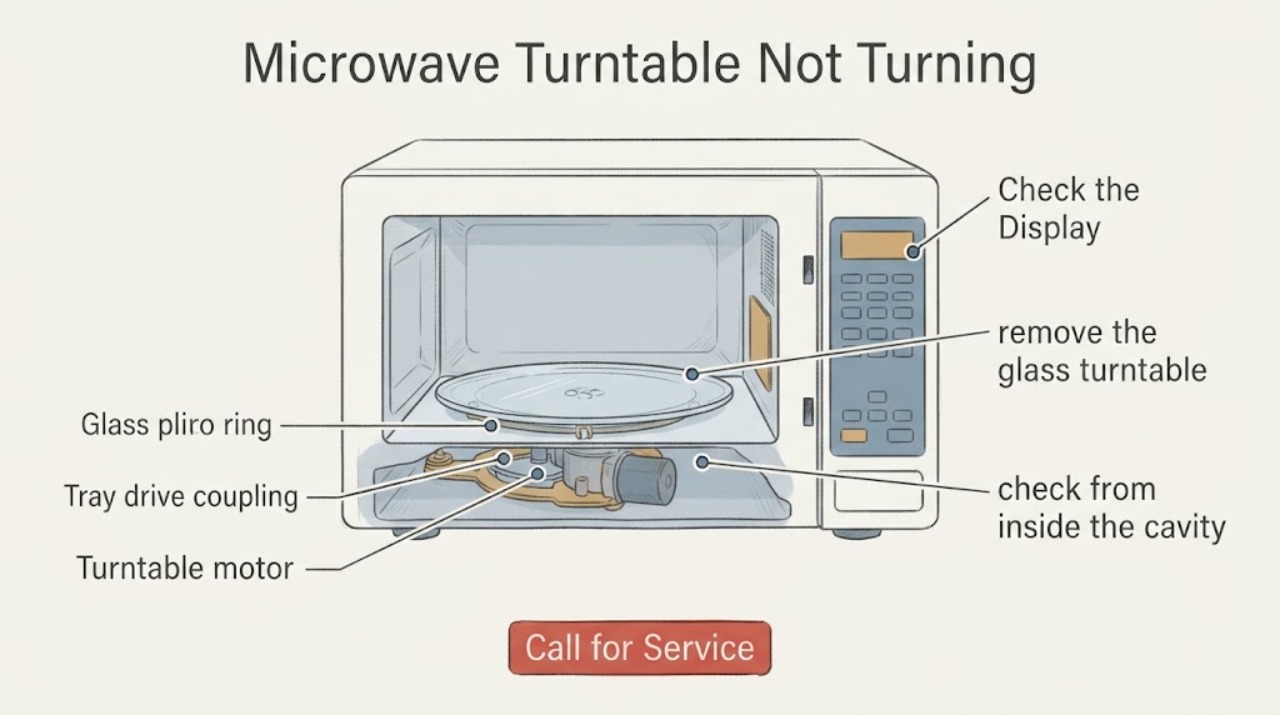
On the GE JVM1870SK04, first confirm that the turntable has not been switched off: the JVM1870SK owner manual says the TURNTABLE control can turn rotation off for large dishes. With cooking stopped and the tray cool, remove and reseat the glass turntable and support, clean the removable parts and cavity floor, and check that the center of the tray sits on its drive connection. Do not run the microwave empty, remove the cabinet, or measure live motor wiring. GE's exact JVM1870SK04 parts diagram lists a turntable motor and tray drive coupling, but it does not publish a user-facing motor power rating or prove that either part has failed. If the turntable remains stopped after the control and removable-part checks, arrange qualified GE microwave service.
Work through in order
Diagnostic checks
Use only checks that match the exact appliance or system and its official guide.
-
Check 1
Stop cooking and let the glass tray cool. Press the GE JVM1870SK manual's TURNTABLE control to confirm rotation is enabled, then note whether the display or control responds and whether the tray remains still during normal operation.
Expected result: The turntable control restores rotation, the control changes but the tray stays still, or the control has no visible response.
Next step: If the setting was off, use the oven normally with the tray and support installed. If rotation remains absent, continue with the cool removable-part inspection and do not measure motor power.
Why this matters
Why: A disabled turntable setting can mimic a motor fault. If the setting is enabled but the tray remains still, the problem moves to the removable assembly or service-level drive system; the control response alone does not identify which internal part has failed.
-
Check 2
With power off and the tray cool, remove the glass turntable and support. Wash the removable parts in warm, sudsy water, wipe visible food residue from the cavity floor with a soft cloth, and check for cracks, a bent support, or debris in the center seating area.
Expected result: Residue or debris is present, the support is not seated, the glass tray or support is damaged, or the parts are clean and intact.
Next step: Dry and reinstall only the intact removable parts exactly as the manual shows. Replace a damaged removable part only through GE's model-specific parts path; if the parts are intact and rotation is still absent, continue to the seating check and service boundary.
Why this matters
Why: GE identifies the turntable and support as removable for cleaning and requires both to be in place for operation. Debris or incorrect seating can prevent smooth engagement; a cracked or damaged part is not corrected by forcing it to turn.
-
Check 3
After reinstalling the support and glass tray, check from inside the cavity that the tray is centered and its underside engages the visible center drive connection without forcing, scraping, or inserting tools into the opening. Do not remove the cavity floor or reach below it.
Expected result: The tray is level and properly seated, the center connection is visibly damaged or missing, or the tray still binds or stays still despite correct seating.
Next step: If the visible seating is wrong, correct only the removable assembly. If the connection or internal drive is damaged or rotation remains absent, stop and arrange qualified service rather than ordering a generic motor or testing live wiring.
Why this matters
Why: A correct removable assembly rules out a simple tray-seating issue but does not distinguish the coupling, motor, wiring, control, or another internal fault. GE's exact parts diagram shows separate turntable drive components for this model.
-
Check 4
If a powered check is needed after the tray and support are correctly installed, use a normal supervised cooking cycle with food or a microwave-safe water load; never run the oven empty just to watch the turntable. Observe whether the oven heats normally, the tray turns, and any sparking, burning odor, unusual noise, or control fault occurs.
Expected result: The oven heats and the tray turns, the oven heats but the tray remains still, or the oven sparks, smells burnt, makes an abnormal noise, trips power, or does not heat.
Next step: Stop the test immediately for any unsafe symptom and disconnect power if it can be done safely. If the tray is still stopped after the normal setup checks, give GE service the exact model JVM1870SK04 and the observed symptoms; do not continue cycling the oven.
Why this matters
Why: Heating with no rotation leaves the drive system unresolved and does not provide a motor-power value. Smoke, arcing, a burning odor, power trips, or no-heat symptoms are broader safety or service issues, not permission to open the cabinet.
Use your observations
Decision map
Find the observation that best matches what you see, then follow the next safe action.
-
PATH 01Next step
What you see
The TURNTABLE control was off and the tray begins rotating after the setting is restored.
Do this next
Leave the turntable enabled for ordinary cooking and keep the glass tray and support installed.
Why this path and its safety boundary
Why it matters: The symptom was a documented operating setting rather than proof of a failed turntable motor.
-
PATH 02Next step
What you see
The control is enabled, but the glass tray or support was dirty, mis-seated, cracked, or unable to engage the center connection.
Do this next
Clean and reseat only intact removable parts. Use the exact GE model parts path for a damaged removable item, and request service if the drive connection remains damaged or rotation does not return.
Why this path and its safety boundary
Why it matters: The removable turntable assembly is the first remaining user-checkable cause; the internal motor has not been proven bad.
-
PATH 03Next step
What you see
The setting is on, the removable parts are intact and seated, and the tray still does not turn, especially if the oven heats normally.
Do this next
Stop user diagnosis and arrange qualified GE microwave service. Do not remove the cabinet, defeat interlocks, measure live motor wiring, or apply power to a replacement motor outside the oven.
Why this path and its safety boundary
Why it matters: A service-level turntable drive, motor, wiring, or control problem remains possible, but the symptom does not identify the failed component or its power rating.
Helpful context
Understand the symptom
Check the control before diagnosing a motor
The JVM1870SK family has a TURNTABLE control that can switch rotation off for large dishes. A stopped tray therefore does not, by itself, prove that the motor is unpowered or defective. Restore the turntable setting according to the GE manual, then use only the cool, removable tray and support checks below.
What the exact model parts diagram does and does not establish
GE's parts catalog for JVM1870SK04 identifies a turntable motor and a tray drive coupling in the microwave assembly. That confirms the model has serviceable drive components, but the catalog does not establish a motor voltage, wattage, current draw, or a safe in-place test for a homeowner. Do not substitute a motor based on a similar-looking GE microwave or apply power to a loose motor.
Keep the test inside the normal cooking setup
The GE manual requires the turntable and support to be installed for use and warns against running the oven empty for more than a short period. If a normal supervised heating check is needed after the removable assembly is correctly seated, use food or a microwave-safe water load as directed by the manual; do not watch the motor by removing the cavity floor or cabinet.
Stop before the microwave cabinet
GE's manual says the oven should be adjusted or repaired only by properly qualified service personnel and warns against defeating safety interlocks. The safe user boundary ends at the turntable control, the cool glass tray and support, visible residue, and correct seating. A motor-power measurement, wiring check, coupling replacement below the cavity, or cabinet removal belongs to qualified microwave service.
Only after diagnosis
Potential parts
- GE JVM1870SK04 turntable motor or tray drive coupling
Only consider a model-specific drive component after the TURNTABLE setting and removable tray/support checks pass and qualified service confirms the internal fault.
Use the exact JVM1870SK04 parts diagram and service diagnosis; do not infer compatibility, electrical rating, or replacement procedure from another GE microwave.
When checks do not resolve it
Need a professional?
Arrange qualified GE microwave service when the turntable remains stopped after the TURNTABLE setting and cool removable-part checks, or immediately for sparking, smoke, burning odor, power trips, damaged door or interlocks, no-heat symptoms, or any need to access the motor or wiring. Do not attempt a live motor-power test or cabinet repair.
Common questions
FAQ
What is the turntable motor power for the GE JVM1870SK04?
The opened GE owner manual and exact-model parts catalog identify the turntable function and motor assembly but do not publish a user-facing motor voltage, wattage, current, or safe live-test specification. Do not guess a rating or measure live wiring; give the exact model to qualified service.
Can the GE JVM1870SK04 turntable be switched off?
Yes. The GE JVM1870SK owner manual says the turntable can be turned off for large dishes with the TURNTABLE control. Check that setting before treating a stationary tray as a motor failure.
Can I run this microwave empty to see whether the tray motor works?
No. GE warns that operating the oven empty for more than a minute or two can damage the oven and start a fire. If a normal check is necessary, keep the tray and support installed and use food or a microwave-safe water load according to the manual.
Which GE part should I order if the tray will not turn?
Do not order a motor from the symptom alone. GE's JVM1870SK04 parts diagram lists both a turntable motor and a tray drive coupling, so the correct component still depends on diagnosis and exact fitment. Use GE's model-specific parts path or qualified service rather than a generic substitute.
Read the exact guide
Official sources
- 49-40537 Spacemaker Owner's ManualGE Appliances · Opened GE-hosted manual cover lists JVM1870 among the covered models; used for family-level operation and safety instructions that match the assigned JVM1870SK04, not for unprovided internal repair values.
- GE Profile Spacemaker XL1800 Microwave Oven - JVM1870SKGE Appliances · Official GE product page used to confirm the JVM1870SK family identity, recessed turntable, and Turntable On/Off feature; exact suffix parts are taken from the exact-model GE parts diagram.
- User Manual & Care for JVM1870SKGE Appliances · Official GE support page for the JVM1870SK family; used to anchor the assigned JVM1870SK04 to GE's family manual and service path.
- Assembly View for MICROWAVE | JVM1870SK04GE Appliances Parts · Official GE parts catalog for the exact assigned model; used only to confirm listed turntable drive component classes and model-specific fitment, not to infer electrical specifications or a homeowner repair procedure.
Community feedback
Share a repair observation
Share a plain-text repair observation. Accepted observations are published automatically; this page may take a moment to update.