
On this page
Start here
Quick answer
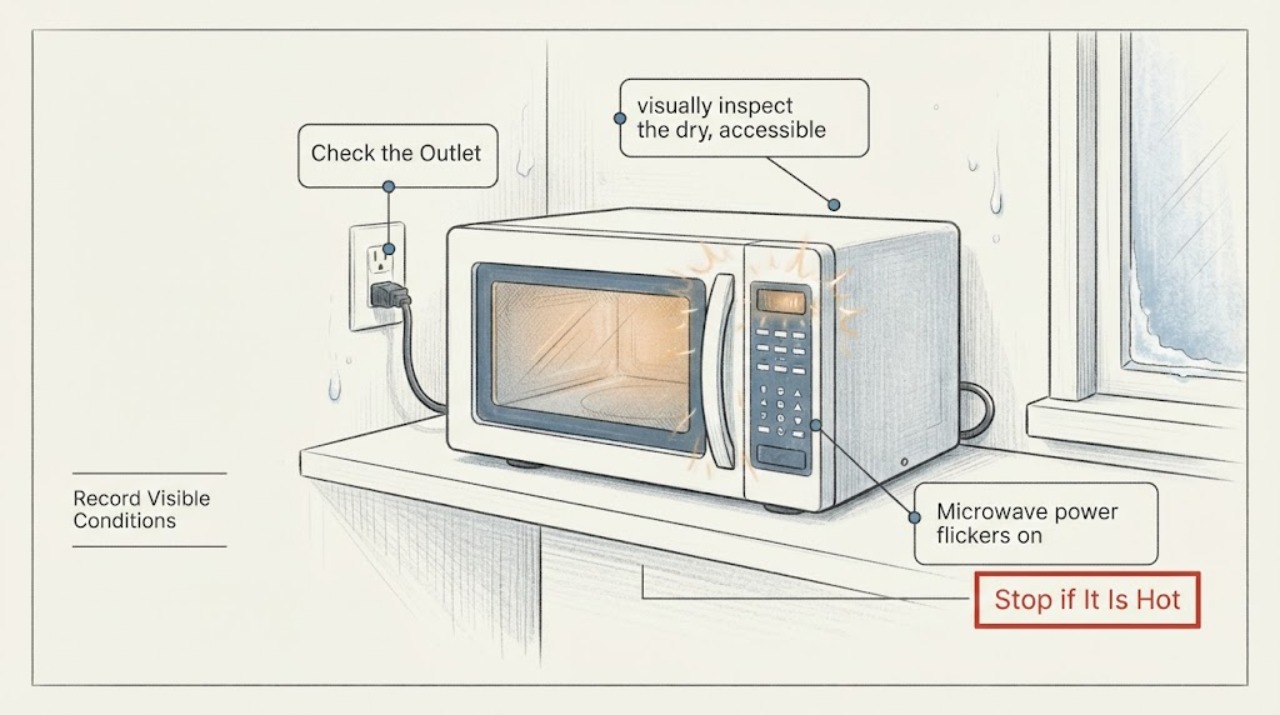
A cold outside wall is a clue to inspect for visible moisture, but GE does not identify cold-wall placement as a confirmed cause of power flicker. First record whether the display, interior light, and controls all blink, whether the event occurs only when cooking begins, and whether a breaker or other lights change. With the microwave off and without moving the mounted unit, look for condensation, a wet or damaged accessible plug or outlet area, corrosion, scorching, or a damaged cord. Stop and arrange qualified electrical or appliance service for any moisture or damage. If everything is dry, verify from a safe accessible position that the JVM6175SF1SS is on its own properly grounded branch circuit with no extension cord or adapter; GE's model installation instructions specify a 120-volt supply and a separate 15- to 20-amp outlet. A breaker that trips again, flicker while the unit is idle, repeated display resets, smoke, odor, arcing, or a hot connection is a stop-use condition. Do not remove the cabinet, open the receptacle, defeat a door interlock, or attempt microwave internal testing.
Work through in order
Diagnostic checks
Use only checks that match the exact appliance or system and its official guide.
-
Check 1
Without repeatedly starting the microwave, record exactly what flickers: the clock/display, interior light, control response, kitchen lights, or all of them. Note whether it happens when cooking starts, while the microwave is idle, after a long cook, or when another large appliance starts. Keep the full JVM6175SF1SS model available from the rating label or paperwork without moving the unit.
Expected result: Only the cavity light changes, the display resets or goes blank, the whole appliance drops out, nearby lights dim too, or the event occurs while the microwave is idle; the timing is load-related or unrelated to cooking.
Next step: Use the timing to choose the supply, moisture, or service branch below. Do not reproduce a hazardous event, run the unit empty, or keep restoring power just to collect more observations.
Why this matters
Why: A light-only change can be a normal operating effect, but a display reset or whole-appliance interruption is a power-loss symptom. Flicker at idle is not explained by microwave cooking load, and nearby-light changes point toward the household circuit rather than proving an internal microwave part.
-
Check 2
With the microwave not operating and without moving the mounted appliance, visually inspect the dry, accessible area around the outside wall, cabinet underside, visible cord, plug, and receptacle face for droplets, frost that has melted, dampness, corrosion, scorch marks, or a loose or damaged cord. Do not touch a wet, hot, or damaged connection.
Expected result: The visible area is dry and intact, condensation is only on the outside of the door after cooking, or moisture/damage is present near the cord, plug, outlet, cabinet, or wall.
Next step: If the connection area is wet, damaged, hot, or scorched, leave the microwave off and arrange qualified electrical or appliance service. If it is dry and undamaged, continue with the non-invasive circuit checks; do not open the outlet or cabinet.
Why this matters
Why: GE describes some door and cavity condensation during cooking as normal, but that does not establish that moisture at an electrical connection is safe. Moisture, corrosion, heat, or damage can make continued operation unsafe; a dry inspection leaves ordinary supply and appliance faults to separate.
-
Check 3
From a safe, accessible position, check whether the microwave is supplied by its own properly grounded three-prong outlet and dedicated branch circuit. Confirm there is no extension cord or improvised adapter and that the plug is fully seated only if it can be seen without pulling the unit or reaching into a wet area.
Expected result: The microwave shares the circuit, uses an extension or adapter, the plug is not fully seated, the outlet or breaker is visibly damaged or off, or the dedicated supply appears normal.
Next step: Do not rewire, change a protective-device rating, or open the receptacle. Have a qualified electrician correct a non-dedicated, damaged, or uncertain circuit; arrange GE appliance service when the circuit is correct but the microwave still flickers.
Why this matters
Why: GE specifies an individual grounded supply for microwaves and a dedicated circuit for over-the-range models; shared wiring or an extension can contribute to flicker, fuse operation, or breaker trips. A normal-looking accessible supply does not prove the microwave's internal power path is sound.
-
Check 4
If the microwave has stopped and the accessible outlet can be checked without disturbing the installation, make only one external supply check from a safe, dry position: confirm the household breaker or fuse is in its normal state, and use a small lamp at the outlet only after the microwave is disconnected safely. Do not remove the outlet cover or use the microwave itself as a repeated test load.
Expected result: The lamp is also unstable or the breaker/fuse is open, the breaker trips again, or the outlet remains stable while the microwave display stays dark or continues to flicker.
Next step: For a dead or repeatedly tripping circuit, leave the microwave off and call a qualified electrician. If the outlet is stable but the microwave is not, arrange qualified GE microwave service; do not keep resetting or open the appliance.
Why this matters
Why: An unstable outlet or recurring protective-device trip puts the household circuit or connection ahead of an appliance diagnosis. A stable outlet with a malfunctioning microwave shifts the likely fault inside the appliance or its cord, which is not a user repair on this model.
-
Check 5
If the flicker follows a long cooking period rather than occurring at idle, inspect only from outside that the microwave's visible airflow openings are not covered by cabinets, packaging, grease, or stored items. Do not move the over-the-range unit or remove a vent, case panel, or duct to reach a blockage.
Expected result: A visible airflow obstruction is present, the unit returns after one cooling period, the vents are clear but it still flickers, or the microwave repeatedly shuts down or trips.
Next step: Clear only an obvious external obstruction and allow one normal cooling period before a normal, attended use. If the symptom returns, does not recover, or the circuit trips, stop using the microwave and arrange service.
Why this matters
Why: GE says blocked airflow or extended cooking can overheat a microwave and that power may return after approximately 30 minutes. Recovery after a clear external blockage supports a temporary overheat branch, but it does not explain idle flicker or justify bypassing thermal protection.
-
Check 6
After an event, note whether the display shows PF, 888, 8888, a clock reset, or another fault indication, and preserve the time and cooking stage. Use Cancel/Off only to stop a normal cycle; do not repeatedly cycle the breaker or attempt a cabinet reset when moisture, odor, heat, arcing, or an unstable supply is present.
Expected result: The display shows a power-restored indication and then works normally, the display repeatedly resets, a documented fault remains, or the appliance stays dark after the accessible supply is stable.
Next step: Record the exact display and model for the service call. Arrange qualified service for a recurring reset, persistent fault, or dark unit; never open the microwave to chase the source.
Why this matters
Why: GE says PF or 888-type displays can appear after power is restored, while persistent or recurring symptoms may require service. A power-restored display records an interruption but does not identify whether the source was the house circuit, cord, control, or another internal path.
Use your observations
Decision map
Find the observation that best matches what you see, then follow the next safe action.
-
PATH 01Next step
What you see
Moisture, frost melt, corrosion, scorch marks, a hot connection, or a damaged cord or plug is visible near the outside-wall installation.
Do this next
Stop using the microwave. Isolate power only from a safe, dry, accessible control point and arrange qualified electrical or appliance service; do not touch the wet connection or move the mounted unit.
Why this path and its safety boundary
Why it matters: This is an electrical or moisture safety condition, not evidence that a particular microwave part has failed.
-
PATH 02Next step
What you see
The flicker begins when cooking starts, nearby lights change, the outlet is shared or unstable, or the breaker opens or trips again.
Do this next
Leave the microwave off and have a qualified electrician assess the circuit. Do not change breaker or fuse ratings, open the receptacle, or keep resetting it.
Why this path and its safety boundary
Why it matters: The household branch circuit, receptacle, connection, or protective device is more likely than a door setting; GE says a recurring trip requires unplugging the microwave and service.
-
PATH 03Next step
What you see
The outlet is stable and dry, but the microwave display flickers while idle, repeatedly resets, stays dark, or shows a fault after power is restored.
Do this next
Stop owner troubleshooting and arrange qualified GE microwave service with the exact model, display pattern, timing, and circuit observations. Do not open the cabinet or attempt internal testing.
Why this path and its safety boundary
Why it matters: A persistent appliance power or control problem remains possible, but the symptom does not identify a fuse, control, transformer, or other internal part.
-
PATH 04Next step
What you see
The event occurs only after extended cooking or blocked external airflow, the visible obstruction is removed, and the appliance returns once after cooling with no odor, heat, arcing, moisture, or breaker trip.
Do this next
Use only one attended normal cycle after the documented cooling period. If flicker returns or the unit does not recover, stop and arrange service.
Why this path and its safety boundary
Why it matters: A temporary overheat response is plausible under GE's guidance, but recurrence means the appliance should not be repeatedly restarted as a test.
-
PATH 05Next step
What you see
Smoke, burning odor, arcing, water near electrical parts, an unusually hot plug or outlet, a damaged door, or a repeated protective-device trip appears at any point.
Do this next
Stop operation, keep clear of the hazard, and obtain qualified appliance or electrical help. Do not restart the microwave, defeat its safety interlocks, or open the cabinet.
Why this path and its safety boundary
Why it matters: This is an immediate stop-use condition with fire, shock, or microwave-safety implications, not a routine flicker diagnosis.
Helpful context
Understand the symptom
What the cold outside wall does—and does not—tell you
The JVM6175SF1SS is an over-the-range model, and GE's exact-model parts page links a JVM6175 owner's manual and installation instructions. Those documents establish the appliance's grounding and dedicated-circuit requirements, but they do not say that a cold exterior wall by itself causes electrical flicker. Treat the location as a reason to inspect the visible wall, cabinet, cord, and receptacle area for dampness or damage—not as proof of a failed control, fuse, transformer, or other internal part. If the event happens only when the microwave begins a cook cycle, the supply under load deserves priority; if the display blinks while the microwave is idle, the problem is not explained by normal cooking load or condensation around the door.
Do not turn flicker into a high-risk microwave test
GE's owner's manual says not to use the microwave when it is not working properly or has a damaged cord or plug, and says servicing should be done by qualified personnel. Do not pull down or move an over-the-range unit to reach a connection, remove an outlet cover, open the cabinet, or try to identify an internal fuse or microwave-energy component. A visible water path, burning smell, arcing, hot connection, repeated breaker operation, or a door that is damaged or will not close correctly ends user checks immediately.
When checks do not resolve it
Need a professional?
Arrange qualified GE microwave service when the dedicated accessible supply is stable but the JVM6175SF1SS still flickers, repeatedly resets, stays dark, or shows a persistent fault. Arrange qualified electrical service for a shared, unstable, damaged, wet, hot, or repeatedly tripping circuit. Stop immediately for smoke, burning odor, arcing, water near electrical parts, a damaged cord or plug, or a damaged door.
Have this ready
- Provide the complete model JVM6175SF1SS, whether it is mounted over the range and vented outside, the exact display or light behavior, whether flicker occurs at idle or when cooking begins, breaker and nearby-light observations, any visible moisture or damage, and whether one cooling period changed the symptom.
Common questions
FAQ
Can a cold outside wall by itself make this GE microwave power flicker?
GE's published JVM6175 documents do not identify cold-wall placement as a direct cause. Treat the location as a clue to inspect for visible moisture or installation damage, then separate that observation from the dedicated-circuit and appliance-service checks.
What circuit does the JVM6175SF1SS require?
The GE installation instructions specify a 120-volt supply on a properly grounded 15- to 20-amp branch circuit and a separate outlet; GE's electrical guidance says over-the-range microwaves should be on a dedicated circuit. Have a qualified electrician correct wiring or receptacle issues.
Should I keep resetting the breaker when the microwave flickers?
No. GE allows one normal reset in its breaker guidance, but says to unplug the microwave and contact service if the breaker trips again. Do not repeatedly reset an unstable circuit or use a cabinet reset as a diagnosis.
Is condensation around a GE microwave always a failure?
GE says moisture inside the cavity or around the door can be normal during cooking and may dissipate after cooking. Moisture, corrosion, heat, or damage at the cord, plug, outlet, or other electrical area is a stop-use reason and is not covered by that normal-condensation guidance.
Read the exact guide
Official sources
- Microwave Oven JVM6175, JVM6177, LVM6177 Owner's ManualGE Appliances · The exact GE model page links this JVM6175 platform manual; it covers grounding, damaged cords/plugs, no self-service, and microwave safety boundaries.
- Model Search | JVM6175SF1SSGE Appliances · Official GE Appliance Parts model page identifies JVM6175SF1SS as a 1.7 cu. ft. over-the-range sensor microwave oven.
- Microwave - Electrical Requirements and Breaker SizeGE Appliances · GE consumer support guidance for countertop and over-the-range microwaves; model-specific installation instructions control where they differ.
- Installation Instructions: Over the Range Microwave OvenGE Appliances · The exact GE model page links these installation instructions; they cover the grounded receptacle, branch-circuit rating, mounting, and vent-clearance requirements for this platform.
- Microwave - Moisture or CondensationGE Appliances · GE consumer support guidance for normal cooking-related moisture inside the cavity and around the door; it does not make moisture at an electrical connection safe.
- Microwave - Error, Fault or Function CodesGE Appliances · GE consumer support guidance for microwave display codes; it directs trained service for electronic fault diagnosis.
- Microwave - Power is OffGE Appliances · GE consumer support guidance for a microwave that loses power during a cycle; it does not identify internal parts.
- Microwave - Tripping Circuit BreakerGE Appliances · GE consumer support guidance for a microwave that trips a household fuse or breaker.
Community feedback
Share a repair observation
Share a plain-text repair observation. Accepted observations are published automatically; this page may take a moment to update.