
On this page
Start here
Quick answer
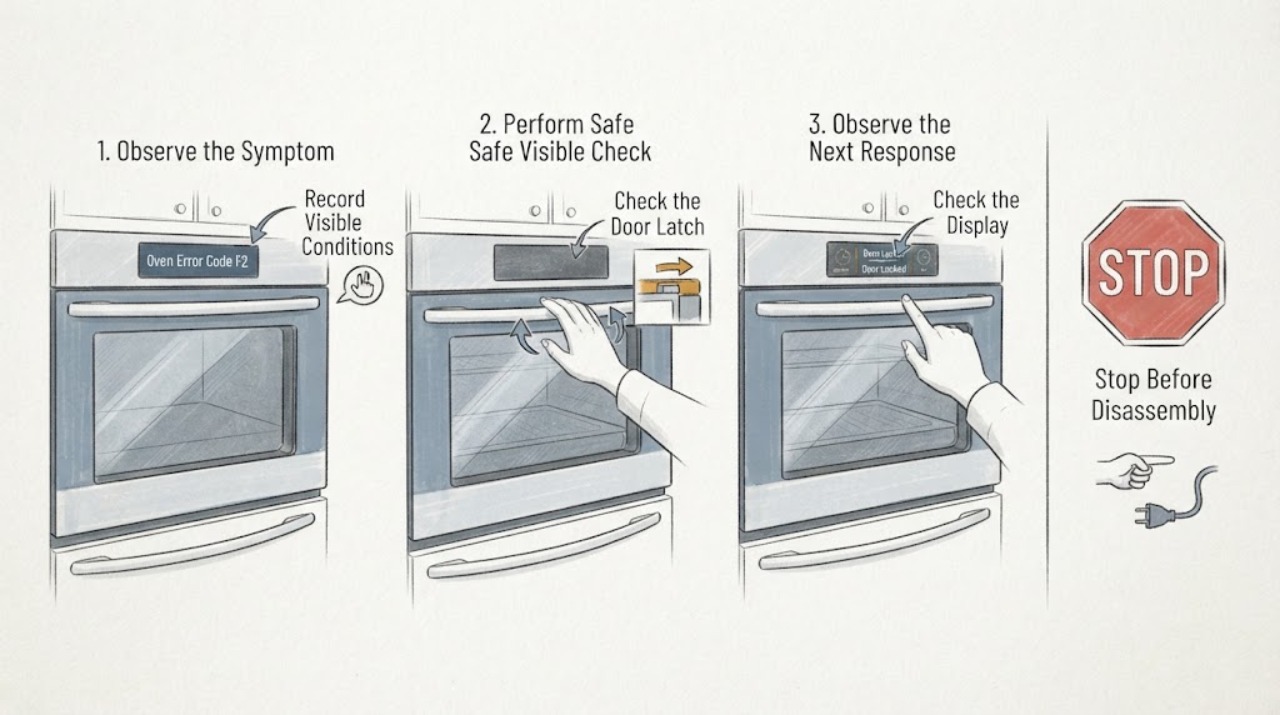
For GE ranges and wall ovens, GE's common-code guide says F2 or F20 means the oven temperature exceeded a preset threshold for an unknown reason. That guide also says it does not list every code for every past and present model, so F2 is not a universal GE diagnosis. Confirm that the appliance is a GE range or wall oven, record the complete model number and whether the display reads F2 or F20, turn the oven off and let it cool, and follow the matched manual. Do not replace a sensor or control, open the console, probe wiring, or keep resetting the code. GE's microwave and Advantium pages use F2 for a shorted thermal sensor, which shows why the appliance family must be verified before applying any code meaning. If F2 returns after cooling or a permitted single power reset, or if there is overheating, smoke, burning odor or visible damage, leave the appliance off and arrange GE service.
Work through in order
Diagnostic checks
Use only checks that match the exact appliance or system and its official guide.
-
Check 1
Read the display carefully and record whether it shows F2, F20, another code or a partial character. Confirm whether the appliance is a GE range/wall oven, microwave or Advantium, and record the complete model number from the appliance label.
Expected result: The appliance is a range or wall oven and displays F2/F20, or it is a microwave/Advantium or another product family.
Next step: Use only the official page or Owner's Manual matched to the product family and model. If the model or family is unknown, do not decode the code or order a sensor/control from a similar appliance.
Why this matters
Why: GE's range/wall-oven guide associates F2/F20 with an over-temperature threshold, while GE's microwave and Advantium guides associate F2 with a shorted thermal sensor. The family changes the meaning.
-
Check 2
Turn the oven off and allow it to cool completely before touching controls or inspecting anything visible. Note whether the cavity was unusually hot, the cooling fan behaved abnormally, smoke or a burning odor was present, or the code appeared during a high-heat or self-clean cycle.
Expected result: The appliance is cooling normally with no odor or visible damage, or it was overheating, smoking, sparking or heating unexpectedly.
Next step: For any hazard sign, leave the appliance off, disconnect power through a safe accessible breaker if appropriate and arrange service; use emergency help for active smoke or flame. Without a hazard, continue only with model-matched external checks after cooling.
Why this matters
Why: The range/wall-oven F2 entry indicates a temperature threshold was exceeded but does not identify the failed part. Smoke, sparking, odor or continued heating raises an immediate safety concern.
-
Check 3
With the appliance cool and no hazard present, verify only the user-visible control state: the intended Bake or Broil function and temperature were selected, a self-clean latch is not stuck, and the display is not showing a different mode. Do not open the control panel or measure a sensor.
Expected result: The control or latch state is incorrect, or the settings are correct and F2 remains or returns.
Next step: Correct only the obvious user-setting issue using the exact manual. If F2 remains or returns with correct settings, stop troubleshooting and arrange qualified service.
Why this matters
Why: GE's general oven guidance lists control selection and an unlocked self-clean latch as external checks, but those checks do not prove or disprove an F2 temperature-control fault.
-
Check 4
Only if the exact appliance manual or GE's matched range/wall-oven guidance permits it and there is no smoke, odor, heat damage or repeated breaker trip, record the code first and perform at most one controlled power reset at the household breaker. Do not cycle the breaker repeatedly.
Expected result: The code clears and does not return during a normal, model-permitted check, or F2 returns after the reset or the breaker trips again.
Next step: If F2 returns, the appliance behaves abnormally or the breaker trips again, leave it off and schedule service. Do not use a reset to continue high-heat or self-clean operation.
Why this matters
Why: GE says a short power interruption may clear a range/wall-oven code, but also says some cases require service. Clearing the display does not establish that the temperature-control fault is repaired.
-
Check 5
Give GE service the complete model and serial numbers, exact display text, product family, cycle and temperature when F2 appeared, cooling/overheating observations, self-clean history, power-reset result and any odor, smoke, sparking or breaker event. Do not order a sensor, control or heating part from the code alone.
Expected result: F2 is repeated, the model-specific meaning is unavailable, the oven is unsafe to run, or the code cannot be reconciled with the official family page.
Next step: Keep the appliance off as directed by the matched GE support page and arrange qualified service. Do not open the console, probe live wiring or replace a part based on a cross-family F2 meaning.
Why this matters
Why: GE's common-code page is not exhaustive and explicitly directs fault-code diagnosis to trained technicians. The available evidence does not identify a compatible part or internal cause for an unidentified model.
Use your observations
Decision map
Find the observation that best matches what you see, then follow the next safe action.
-
PATH 01Next step
What you see
The appliance is confirmed as a GE range or wall oven and the display is F2 or F20.
Do this next
Let the oven cool, record the exact model and event history, use the matched Owner's Manual, and arrange service if the code returns. Do not infer a sensor or control part.
Why this path and its safety boundary
Why it matters: GE's common Range & Wall Oven guide associates F2/F20 with the oven temperature exceeding a preset threshold for an unknown reason, but the page does not cover every historical or current model.
-
PATH 02Next step
What you see
The display is F2 but the appliance is a GE microwave, Advantium or another cooking product rather than a range/wall oven.
Do this next
Use the official page and manual matched to that appliance family and model. Do not use the range/wall-oven troubleshooting path or order a part from it.
Why this path and its safety boundary
Why it matters: GE's official microwave and Advantium pages define F2 as a shorted thermal sensor, demonstrating that the range/wall-oven F2 meaning cannot be transferred across product families.
-
PATH 03Next step
What you see
F2 is accompanied by smoke, burning odor, sparking, a repeated breaker trip, visible heat damage or an oven that continues heating unexpectedly.
Do this next
Stop using the appliance, disconnect power through a safe accessible breaker if appropriate, and obtain qualified service or emergency help for active smoke or flame. Do not open the control panel.
Why this path and its safety boundary
Why it matters: The code is accompanied by a potential fire or electrical hazard; a reset or repeated cooking test is not an appropriate diagnostic.
-
PATH 04Next step
What you see
F2 clears after the appliance cools or after one permitted power reset and does not recur during a normal, model-matched check.
Do this next
Do not run self-clean or another high-heat test to prove it. Monitor only according to the exact manual and schedule service if F2 returns or any abnormal heat/odor appears.
Why this path and its safety boundary
Why it matters: The display was cleared, but GE's code page does not say that a reset proves the underlying temperature condition is resolved.
Helpful context
Understand the symptom
F2 is family-specific, not a universal GE code
GE's Range & Wall Oven support page lists F2 or F20 as an oven temperature that exceeded a preset threshold for an unknown reason, but the same page says it cannot list every code for all past and present models. GE's microwave page and Advantium page instead list F2 as a shorted thermal sensor. Confirm the appliance category and complete model before treating the display as a diagnosis.
Cool the appliance and preserve the fault history
Turn the oven off and let it cool. Record whether the code appeared during baking, broiling, self-cleaning, preheating or after a power event, and whether the cavity was visibly too hot, smoking or producing a burning odor. Do not keep heating the oven to reproduce F2 and do not assume that a cleared display proves the underlying issue is gone.
Use only model-matched external checks
GE's general oven guidance covers control selection, household power, an unlocked self-clean latch and model-specific owner instructions. Those checks can identify a setting or supply issue, but they do not authorize opening the console, testing a temperature sensor live, or ordering a replacement control from another GE model. A recurring F2 needs service diagnosis.
Escalate overheating or an electrical warning
If F2 appears with smoke, a burning smell, a hot or damaged connection, sparking, a breaker trip or an oven that continues heating unexpectedly, stop using the appliance. Do not repeatedly reset the breaker or run another cycle. Disconnect power only through a safe accessible breaker or control as appropriate and arrange qualified GE appliance or electrical service; use emergency help for active smoke or flame.
When checks do not resolve it
Need a professional?
Arrange GE service if F2/F20 returns after cooling or one model-permitted reset, the model-specific meaning cannot be confirmed, the oven overheats or continues heating, or there is smoke, burning odor, sparking, visible damage or a repeated breaker trip. Do not open the control panel or replace a part from the code alone.
Have this ready
- Complete model and serial numbers, exact product family, exact displayed code, cycle and temperature, time of occurrence, cooling/overheating behavior, self-clean history, reset result, and any smoke, odor, sparking or breaker event.
Common questions
FAQ
What does F2 mean on a GE oven?
On GE's common Range & Wall Oven guide, F2 or F20 means the oven temperature exceeded a preset threshold for an unknown reason. GE says the summary does not include every code for every past and present model, so confirm the exact model before treating that as the final meaning.
Is GE F2 the same on a microwave or Advantium?
No. GE's official microwave and Advantium pages list F2 as a shorted thermal sensor. Confirm the product family before using any F2 guide.
Can I reset a GE oven F2 code?
GE says a short power interruption can sometimes clear a range/wall-oven code, but service may still be required. Record the code first, avoid a reset if there is smoke, odor, heat damage or repeated breaker operation, and do not keep cycling power when F2 returns.
Should I replace the oven sensor when F2 appears?
Do not order or replace a sensor from F2 alone. GE's range/wall-oven entry describes an over-temperature condition without identifying the failed part, and the same code means something different on other GE product families. Use the exact model manual and qualified service diagnosis.
Read the exact guide
Official sources
- Range & Wall Oven - Oven Will Not Come OnGE Appliances · Opened GE's official range/wall-oven support page. It covers control settings, household power, model-specific latch/manual guidance and service; it does not authorize internal code diagnosis.
- Range & Wall Oven - Oven Error, Fault or Function CodesGE Appliances · Opened GE's official range/wall-oven code page. It lists F2/F20 as an over-temperature threshold condition but explicitly says the summary does not cover all past and present models.
- Support for GE Cooking ProductsGE Appliances · Opened GE's official cooking-product support page. It directs owners to model/serial-tag support and separates range/oven, microwave and Advantium troubleshooting categories.
- Advantium 120 Volt - Error, Fault or Function CodesGE Appliances · Opened GE's official Advantium page. It lists F2 as a shorted thermal sensor and directs service if the code returns; this scope is not transferred to ordinary ranges/wall ovens.
- Microwave - Error, Fault or Function CodesGE Appliances · Opened GE's official microwave code page. It lists F2 as a shorted thermal sensor, demonstrating that code meaning is product-family-specific; it is not used to diagnose a range/wall oven.
Community feedback
Share a repair observation
Share a plain-text repair observation. Accepted observations are published automatically; this page may take a moment to update.