
On this page
Start here
Quick answer
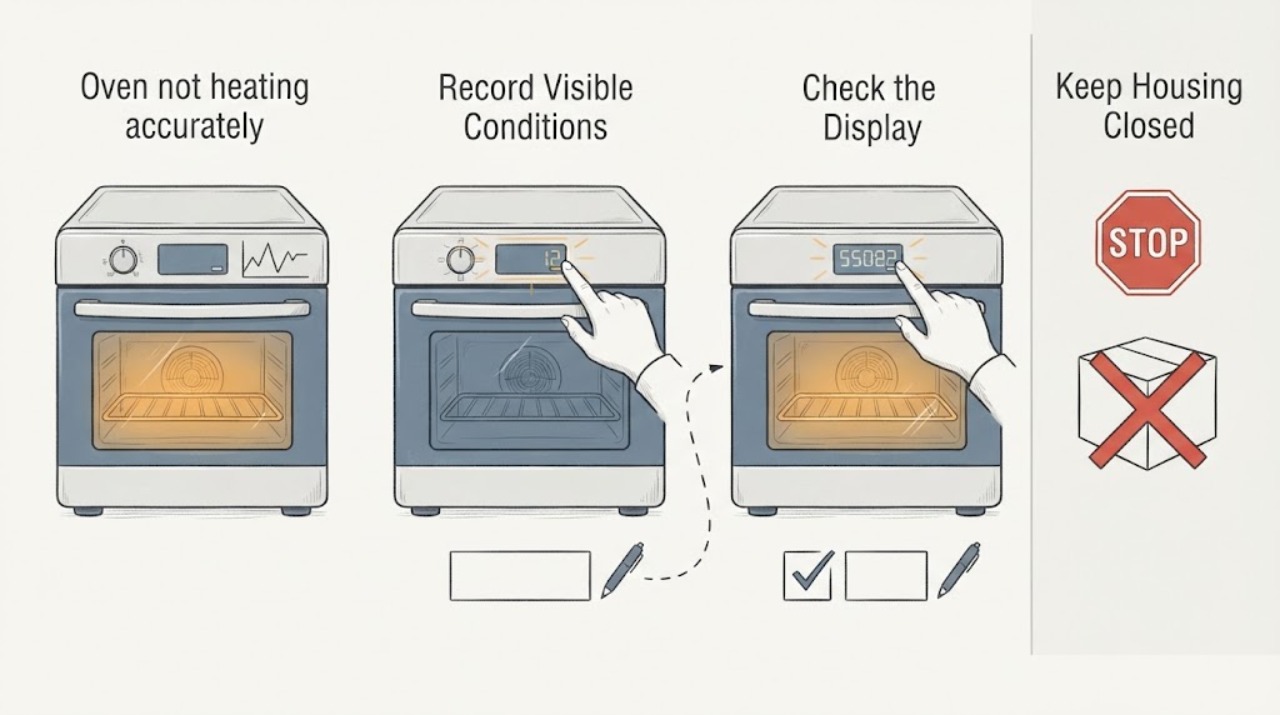
A temperature problem that begins after an update is a time relationship, not proof that the update changed the heating hardware or control logic. First verify the rating-label model: GE's public owner material identifies the PTD9000SNSS family, while the task label is PTD9000SNS5S. Record the cavity, mode, set temperature, full-preheat result, and whether the complaint is an app/control reading or the actual cavity temperature. On this electric double wall oven, repeat one controlled measurement in each cavity with a suitable oven thermometer, then check the documented Adjust Temperature setting separately for the upper and lower ovens. If the measured temperature remains wrong in one cavity or mode, or if there is a fault, smoke, burning odor, sparking, or a breaker trip, stop using the oven and arrange qualified GE appliance service. Do not name or replace a sensor, control, or element from the update timing alone.
Before you begin
Safety first
- This is a built-in 240-volt electric double wall oven. Do not open panels, probe live wiring, bypass temperature controls, alter software, or remove heating or sensing parts. GE's manual requires power to be disconnected at the household distribution panel before service and directs other servicing to a qualified technician. Keep the oven off for smoke, burning or electrical odor, sparking, abnormal heat, damaged wiring, a fault, or a repeated breaker trip.
Work through in order
Diagnostic checks
Use only checks that match the exact appliance or system and its official guide.
-
Check 1
With the oven cool, read the rating label and write down the complete model and serial information. Record the update date or completion notice if SmartHQ shows it, which cavity is affected, the cooking mode, the set temperature, and whether the number came from the oven control, SmartHQ, or an independent thermometer.
Expected result: The label confirms PTD9000SNS5S, confirms the closely related PTD9000SNSS family, or shows a different or incomplete model; the update is shown as complete, interrupted, or unknown.
Next step: Keep the complete identity and update record for GE support. If the label does not match the supplied task identity, stop model-specific troubleshooting and obtain the correct manual.
Stop if: Do not install another update, factory-reset the oven, or keep testing a suspected temperature fault while the model or update state is uncertain.
Why this matters
Why: GE's public support page and manual are for PTD9000SNSS and the task label has a different suffix. An uncertain identity or incomplete update is not enough to apply a setting or conclude that the heating system changed.
-
Check 2
Separate a display or app disagreement from a cavity-temperature disagreement. In one selected cavity, use the exact manual's normal Bake procedure, allow the preheat signal and a stable cycle, and place a suitable oven thermometer at the center without repeatedly opening the door. Compare the set value, any displayed value, and the independent reading over more than one heat cycle; do not use an inexpensive grocery-store dial as the only basis for calibration.
Expected result: Only SmartHQ or the control display disagrees while the independent reading is reasonable, the independent reading is consistently high or low, or the reading changes mainly with rack position, door openings, cookware, or mode.
Next step: Repeat the same controlled test once in the other cavity and document the complete readings. Do not compensate for an unverified measurement by making a large offset.
Stop if: Stop immediately for smoke, a burning or electrical odor, sparking, abnormal heat, a fault, or a breaker trip; keep the oven off and arrange service.
Why this matters
Why: A display/app mismatch is a connected-display problem rather than proof of bad heating. A cavity reading that moves with test setup may reflect normal cycling or measurement error; a repeatable cavity error is evidence that the temperature-control path needs further assessment.
-
Check 3
From the oven's Settings menu, review the current Adjust Temperature value for the selected cavity. The PTD9000 family manual says the upper and lower ovens are adjusted separately and permits an adjustment up to 35 degrees hotter or cooler; write down the existing value before changing anything. Use this documented control only after the repeat measurement, and keep the change modest and traceable.
Expected result: The offset is unchanged, one cavity has a different offset, the setting was changed during or after the update, or the control does not show the documented option for the confirmed model.
Next step: If the confirmed manual allows it, restore an unintended offset or make one documented adjustment and recheck the same cavity. If the option is absent, the identity is uncertain, or the error persists, give the recorded offset and readings to qualified service.
Stop if: Do not use a large offset to mask a suspected sensor, control, element, wiring, or supply fault, and do not open the control area.
Why this matters
Why: The oven may have a stored user preference or a cavity-specific setting; that is different from proving a firmware defect. The manual says this adjustment affects Traditional Bake and Convection Bake modes, not every cooking mode.
-
Check 4
Compare the upper and lower cavities and, only when safe, compare the same setpoint in the same documented Bake mode rather than mixing Bake, Convection Bake, Roast, Broil, Air Fry, or a precision cycle. Check that the rack is level, the cookware is appropriate, the door closes fully, and the vent is not obstructed; do not remove panels.
Expected result: Both cavities show the same repeatable shift, only one cavity or one mode is wrong, or the result follows the rack, cookware, door-seal, or airflow condition.
Next step: Use the pattern to request a model-specific diagnosis. Ask the provider to check the temperature-sensing and control path, heating elements, wiring and supply, and cavity airflow before authorizing a part.
Stop if: Do not run self-clean or high-temperature tests to force a comparison, and stop for any safety symptom.
Why this matters
Why: A two-cavity shift after the same event keeps a software or shared-control hypothesis possible but does not prove it. A single-cavity or single-mode error makes a local sensor, heating, airflow, or door-seal path more plausible; a test-setup effect points away from a firmware conclusion.
-
Check 5
If SmartHQ shows an interrupted update, repeated update notification, lost connection, or an appliance control that did not complete normally, save the message and the current software-version screen. Keep the oven out of service for cooking that depends on accurate temperature until GE connected-appliance support or qualified service advises the next supported recovery step.
Expected result: The update is confirmed complete with normal controls, or it is incomplete, repeatedly offered, or followed by control errors.
Next step: Provide the model-label details, update status, software-version display, cavity readings, and exact mode history to GE connected support; use appliance service for a verified physical temperature error.
Stop if: Do not disconnect wiring, enter an undocumented service mode, flash alternate software, or repeatedly cycle power to chase the symptom.
Why this matters
Why: GE documents that connected ovens receive software and feature updates and that a completion notification is shown. It does not document a user rollback or a temperature-specific recovery in the sources reviewed, so repeated resets or unsupported recovery could obscure the evidence.
Use your observations
Decision map
Find the observation that best matches what you see, then follow the next safe action.
-
PATH 01Safety boundary
What you see
SmartHQ or the oven display appears wrong, but the same controlled cavity test is within a reasonable range and cooking behavior is normal.
Do this next
Keep the recorded comparison, verify the confirmed model and software status with GE connected support, and avoid replacing an oven part.
Why this path and its safety boundary
Why it matters: The evidence points first to a display, app, or interpretation mismatch, not a confirmed heating fault. GE documents connected controls and software updates, but not that this update changes temperature accuracy.
Safety stop: Stop if an independent test later shows a repeatable cavity error or any smoke, odor, sparking, fault, or breaker event appears.
-
PATH 02Safety boundary
What you see
A controlled independent reading is consistently high or low in both cavities after full preheat, with no safety symptom and no unexplained offset.
Do this next
Check the model-specific Adjust Temperature setting once, then arrange qualified GE appliance service if the error persists. Provide both cavity logs and the software-version record.
Why this path and its safety boundary
Why it matters: A shared control, sensing, heating, or supply issue remains possible. The post-update timing can guide the evidence trail but cannot select a board or sensor.
Safety stop: Do not keep increasing the offset, bypass temperature controls, or test live wiring.
-
PATH 03Safety boundary
What you see
Only one cavity or one heating mode is repeatedly inaccurate, or the result follows a door, rack, cookware, or airflow condition.
Do this next
Stop guessing from the update date. Have qualified service assess the affected cavity and the documented test conditions before a conditional part is selected.
Why this path and its safety boundary
Why it matters: A local sensor, element, wiring, door-seal, airflow, or mode/setup path is more plausible than a whole-appliance firmware change, although only service testing can distinguish them.
Safety stop: Do not remove panels, run with a damaged seal, or energize a suspected failed element.
-
PATH 04Safety boundary
What you see
The update is incomplete or control errors persist, even though a repeatable cavity-temperature error has not been established.
Do this next
Give GE connected support the saved update message, software version, exact rating-label identity, and observed controls. Do not attempt an undocumented rollback or service-mode change.
Why this path and its safety boundary
Why it matters: This is a connected-appliance software-support path, not proof that a physical component failed.
Safety stop: Keep the oven off if controls behave unpredictably, a fault appears, or a safety symptom occurs.
-
PATH 05Safety boundary
What you see
Smoke, burning or electrical odor, sparking, abnormal heat, damaged wiring, a fault, or a repeated breaker trip occurs while testing.
Do this next
Turn the oven off, leave the circuit alone if it is unsafe to access, and arrange qualified appliance or electrical service. For an active fire, follow local emergency procedures.
Why this path and its safety boundary
Why it matters: This is an electrical or fire-safety stop, regardless of the update history.
Safety stop: Do not restart, open panels, probe terminals, or continue temperature comparisons.
Helpful context
Understand the symptom
The official GE owner center describes PTD9000SNSS as a GE Profile 30-inch smart built-in electric double wall oven and links the owner manual. The task uses PTD9000SNS5S, a suffix that is not printed on that public family page, so confirm the rating label and use the matching manual before applying a model-specific setting. The product family includes two independently selected cavities, Wi-Fi, and a temperature-adjustment setting; a model identity check is therefore part of the diagnosis, not a formality.
GE says SmartHQ can send software updates to connected appliances and that additional cooking cycles can be delivered through software updates. Those statements establish that updates can change connected features, but the public material reviewed here does not say that a particular update changes this oven's temperature accuracy. A repeatable measured error is still needed before treating the event as a heating, sensing, or control fault.
Only after diagnosis
Potential parts
- oven temperature sensor or control assembly
Consider this class only if qualified service confirms a repeatable cavity-temperature error and traces it to the sensor or control path; update timing alone is not a part diagnosis.
Confirm the complete rating-label model and the manufacturer's fit information. The public GE material reviewed identifies the PTD9000SNSS family, so do not assume a suffix-variant part is interchangeable. - oven heating element or related wiring
Consider this class only when qualified service finds a verified heating-circuit fault or visible element damage; a temperature reading after an update does not identify an element.
Use the complete model, cavity, and service diagnosis to confirm fitment. Do not test, remove, or replace an element on an energized or uncertain circuit.
When checks do not resolve it
Need a professional?
Call GE connected-appliance support for an incomplete update or persistent software-version/control issue. Call qualified appliance service for a repeatable measured temperature error, a cavity-specific problem, an unexplained adjustment offset, or any need to access the sensor, control, heating circuit, wiring, or supply.
Safety scope: This is a built-in 240-volt electric double wall oven. Do not open panels, probe live wiring, bypass temperature controls, alter software, or remove heating or sensing parts. GE's manual requires power to be disconnected at the household distribution panel before service and directs other servicing to a qualified technician. Keep the oven off for smoke, burning or electrical odor, sparking, abnormal heat, damaged wiring, a fault, or a repeated breaker trip.
Have this ready
- Provide the complete rating-label model and serial, country, cavity, mode, set temperature, preheat result, independent thermometer type and placement, readings over the same test, current Adjust Temperature value, SmartHQ update status and software version, exact display messages, and any smoke, odor, sparking, heat, or breaker history.
Common questions
FAQ
Can a firmware update make this GE Profile oven heat inaccurately?
GE documents that SmartHQ delivers software and feature updates to connected ovens, but the public sources reviewed do not establish that a particular update changes temperature accuracy. Treat the timing as a lead: verify the exact model, software status, and a repeatable cavity measurement before calling it a firmware or hardware fault.
How do I check the temperature adjustment on the PTD9000 family?
The linked GE owner manual says Settings includes Adjust Temperature up to 35 degrees hotter or cooler and that the upper and lower cavities are adjusted separately. Record the existing value and use the exact confirmed-model manual; do not use a large offset to hide an unverified fault.
Why can SmartHQ disagree with the oven temperature?
The app, oven control, and an independent cavity measurement are different evidence sources. Compare them during the same fully preheated cycle before concluding that the oven is actually too hot or too cold; an app-only discrepancy should go to connected-appliance support rather than parts replacement.
Should I replace the temperature sensor after the update?
No. An update date, a single reading, or a display disagreement cannot identify a sensor. A qualified technician should confirm the model, reproduce the cavity error, and trace the sensing, control, heating, wiring, and supply paths first.
Read the exact guide
Official sources
- GE Profile™ 30" Smart Built-In Convection Double Wall Oven with In-Oven Camera and No Preheat Air Fry - PTD9000SNSS - GE AppliancesGE Appliances · The official GE product page names PTD9000SNSS, lists an electric double-oven configuration, built-in Wi-Fi powered by SmartHQ, separate upper/lower capacities, temperature probe, and oven features. It does not print PTD9000SNS5S, so fit and instructions must be checked against the rating label.
- OWNER'S MANUAL WALL OVENGE Appliances · The manual linked from GE's PTD9000SNSS Owner Center covers the PTD9000 double wall oven family. It documents Wi-Fi/software features, separate upper/lower cavities, Settings > Adjust Temperature, cooking-mode scope, preheat guidance, and service safety; it does not independently print the task suffix PTD9000SNS5S.
- User Manual & Care for PTD9000SNSS | GE AppliancesGE Appliances · The official GE Owner Center names PTD9000SNSS, describes the GE Profile 30-inch smart built-in convection double wall oven, and links its owner manual. It does not print PTD9000SNS5S, so the supplied suffix is explicitly held for identity confirmation.
- Connect Your Smart Appliances | GE AppliancesGE Appliances · GE's official Smart Appliances page says SmartHQ sends software updates to connected appliances, advises keeping the appliance connected to Wi-Fi, shows an update notification, and reports completion after download. It does not claim that a particular update causes temperature inaccuracy.
Community feedback
Share a repair observation
Share a plain-text repair observation. Accepted observations are published automatically; this page may take a moment to update.