
On this page
Start here
Quick answer
First distinguish a recipe or bake-setup result from a true temperature-control problem. KitchenAid says oven elements cycle and warns that a thermometer reading at one instant is not a reliable accuracy test. Use the exact KitchenAid bake-performance procedure: preheat fully, use the specified rack and bakeware, keep the door closed, and judge the documented food result. Check rack/pan placement, airflow and door closure before changing calibration. If the repeatable result still shows an offset, use only the calibration method in the owner manual for the exact model; calibration is for a measured baking offset, not a substitute for a failed element, sensor, power supply or control diagnosis. If the oven does not heat, shows a recurring code, has a damaged door or needs internal electrical/gas work, stop testing and arrange licensed KitchenAid service.
Before you begin
Safety first
- Limit owner checks to recipe/setup observations, door closure, rack/pan placement, a controlled bake-performance test and the exact model manual. Do not open panels, test live circuits, alter gas connections, replace elements/sensors or copy another model’s calibration procedure.
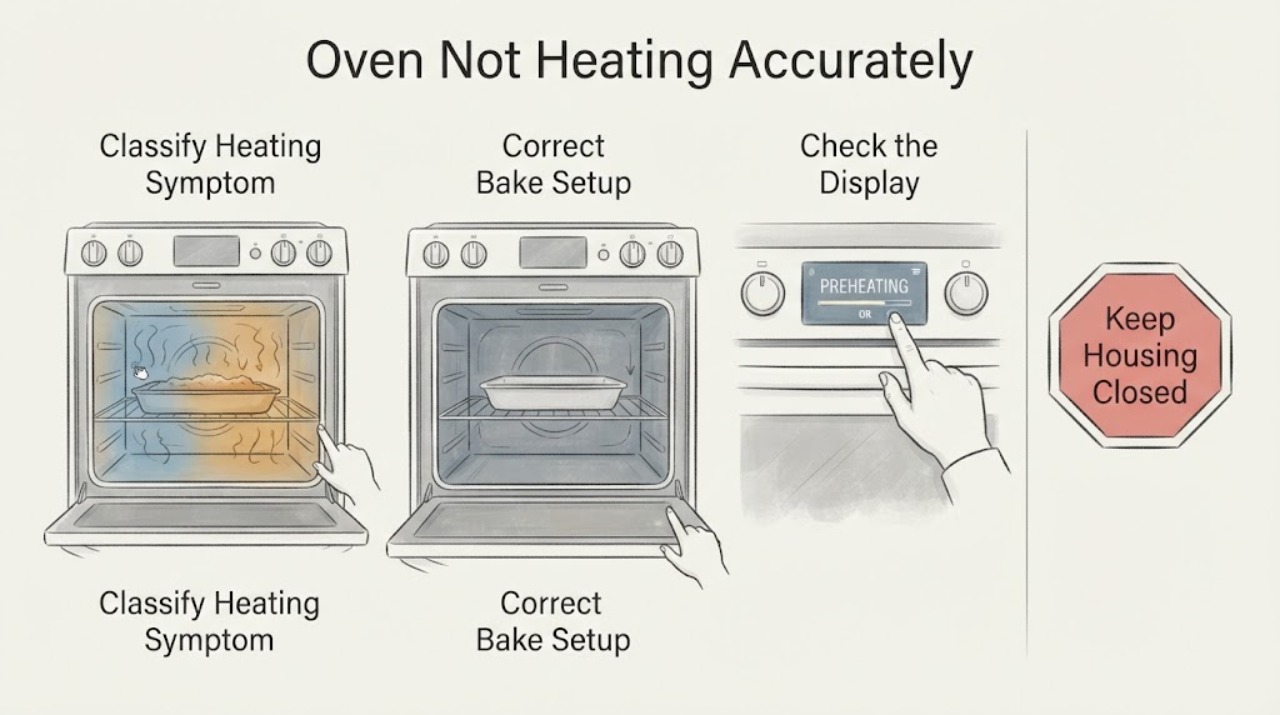
Work through in order
Diagnostic checks
Use only checks that match the exact appliance or system and its official guide.
-
Check 1
Write down whether the problem is long preheat, uneven browning, consistently early/late cooking, or no heat at all, including the cycle and set temperature.
Expected result: The oven reaches heat but the result is inconsistent, or it never reaches useful heat/has a recurring display message.
Next step: Use the bake-setup and controlled-test branches only for an oven that heats; stop testing and arrange service for no-heat, recurring-message or damaged-door conditions.
Why this matters
Why: A repeatable bake offset can be evaluated for calibration; no heat, a recurring message or a damaged door is a functional/service problem and is not proven by the phrase “not accurate.”
-
Check 2
Use the recipe-recommended bakeware and rack, allow full preheat, keep clearance around the pan, avoid covering the rack or oven floor, and keep the door closed during the test.
Expected result: The result improves after setup is corrected, or the same offset remains under the documented setup.
Next step: If setup changes resolve the result, keep the model-specific calibration untouched; if the offset remains, perform KitchenAid’s controlled bake-performance check.
Why this matters
Why: KitchenAid identifies pan material, rack position, airflow, preheat and door opening as factors that can change browning and cooking time; persistence under controlled setup is stronger evidence for an oven-level offset.
-
Check 3
Follow KitchenAid’s bake-performance test with its specified biscuit test, rack position, clearance, full preheat and package time range; do not open the door during the test or use an instant thermometer as the deciding measurement.
Expected result: The biscuits are evenly browned and done within the package time range, or they are not.
Next step: If the test passes, investigate recipe/bakeware expectations rather than changing calibration; if it fails consistently, retrieve the exact model manual before any adjustment.
Why this matters
Why: KitchenAid treats an evenly browned result within the stated range as evidence the oven is calibrated for the test; a repeatable failure supports checking calibration or service, but does not identify a failed part.
-
Check 4
Use only the exact KitchenAid Owner’s Manual calibration method after a repeatable controlled-test offset has been documented.
Expected result: The model manual provides a calibration control, or it does not match the controls on the oven.
Next step: Follow the matching manual only; if no matching instructions are available, or the oven has no-heat, code, power or door symptoms, stop and arrange service.
Why this matters
Why: KitchenAid states that calibration interfaces and allowable adjustments vary by model; an unmatched procedure can change the wrong setting or conceal a fault.
-
Check 5
Stop the bake test and arrange licensed KitchenAid service when the oven does not heat, a code returns, the door will not close, power or gas supply is uncertain, or the next step requires internal parts, wiring or fuel work.
Expected result: A functional/safety condition is present, or the controlled test fails after exact-model setup and documented calibration guidance.
Next step: Keep the oven out of service when unsafe, do not open panels or test live wiring/gas, and provide the model, observations and test result to a licensed technician.
Why this matters
Why: KitchenAid lists elements, sensors, power/installation and control conditions as possible causes but does not establish one from a general symptom; complex repairs need qualified service.
Use your observations
Decision map
Find the observation that best matches what you see, then follow the next safe action.
-
PATH 01Next step
What you see
The oven reaches heat and the result becomes acceptable after full preheat, correct rack/pan placement and closed-door cooking.
Do this next
Keep the documented setup and do not change calibration unless a controlled test shows a repeatable offset.
Why this path and its safety boundary
Why it matters: The original complaint was likely affected by bake setup or cooking expectations; it does not prove an internal temperature fault.
-
PATH 02Next step
What you see
A controlled KitchenAid bake-performance test repeatedly produces biscuits outside the package time/browning range while the setup is correct.
Do this next
Retrieve the exact model manual and use only its calibration method; if the issue persists or calibration is unavailable, schedule KitchenAid service.
Why this path and its safety boundary
Why it matters: KitchenAid says the oven may need calibration to fit expectations, but the result does not identify the sensor, element or control causing it.
-
PATH 03Next step
What you see
The oven never heats, has a recurring display message, loses power, the door will not close, or gas/electrical installation is uncertain.
Do this next
Stop testing, do not open the oven or alter wiring/fuel connections, and arrange licensed KitchenAid service or an electrician as appropriate.
Why this path and its safety boundary
Why it matters: This is a functional or safety condition outside a simple calibration adjustment.
-
PATH 04Next step
What you see
The exact model manual is unavailable or the proposed calibration sequence does not match the oven controls.
Do this next
Locate the complete model/serial information and obtain the matching manual or service support before changing settings.
Why this path and its safety boundary
Why it matters: KitchenAid’s calibration methods are model-specific, so another model’s button sequence or offset range is not reliable evidence.
Helpful context
Understand the symptom
Define what “not accurate” means
Record whether the complaint is a long preheat, food browning too much on one side, food finishing too early or late, or an oven that never reaches heat. A single reading or one recipe result cannot identify a failed sensor or control. KitchenAid notes that ovens cycle their elements and can cook differently from an older oven even when the set temperature is being controlled normally.
Correct the bake setup before changing settings
Use the recipe's recommended bakeware, allow the oven to complete preheat, place the rack as directed and leave clearance around the pan so air can circulate. Do not cover the entire rack or oven floor with foil or another liner. Keep the door closed during the test; opening it releases heat and changes the result.
Use KitchenAid’s bake-performance check
For a controlled check, follow KitchenAid's bake-performance procedure with the specified biscuit test, rack position, pan and clearance. Preheat completely, bake for the package time range without opening the door, and compare the finished browning and doneness with the instructions. Do not use an instant oven thermometer as the deciding test: KitchenAid warns that cycling elements and slow thermometer response can make that reading misleading.
Calibrate only after a repeatable offset
If the controlled result consistently indicates an offset, retrieve the owner manual for the complete model and use its calibration control. KitchenAid lists several common interfaces, but says the method is model-specific. Do not copy a hold-button sequence or an offset range from another KitchenAid oven, and do not use calibration to mask an oven that is not heating or that has a recurring error.
Separate temperature accuracy from a no-heat fault
If the oven never heats, takes abnormally long to preheat, loses power, shows a recurring message, or the door will not close, treat that as a functional or safety issue rather than a calibration adjustment. KitchenAid identifies possible supply, door, sensor, element and control conditions, but says complex parts, fuel connections and electrical work should go to licensed service.
Give service the evidence
Provide the exact model and serial information, the selected cycle and set temperature, preheat behavior, bakeware/rack setup, controlled test result, any display message and whether the door closes fully. This lets KitchenAid match the owner manual and decide whether a repeatable offset, a heating fault or an installation/service issue is involved.
When checks do not resolve it
Need a professional?
Use KitchenAid service or a licensed technician for no heat, recurring messages, damaged doors, uncertain power/gas installation, persistent test failure or internal part diagnosis.
Safety scope: Limit owner checks to recipe/setup observations, door closure, rack/pan placement, a controlled bake-performance test and the exact model manual. Do not open panels, test live circuits, alter gas connections, replace elements/sensors or copy another model’s calibration procedure.
Common questions
FAQ
Can I use an oven thermometer to prove my KitchenAid oven is inaccurate?
KitchenAid advises against using a thermometer as the deciding test because heating elements cycle and thermometer response can lag. Use the brand’s controlled bake-performance procedure and compare the food result with the package range.
Should I calibrate immediately when food browns too fast?
No. First verify full preheat, rack/pan placement, airflow, bakeware and closed-door cooking. If a controlled test still shows a repeatable offset, use only the calibration method in the exact model manual.
Does calibration fix an oven that never heats?
No. KitchenAid treats no-heat conditions separately and lists power, door, sensor, heating and control possibilities; internal or fuel/electrical work should be handled by licensed service.
Read the exact guide
Official sources
- Oven Temperature Incorrect (Too Hot or Too Cold)KitchenAid Product Help · Official KitchenAid family-level product-help guidance; exact controls and calibration method remain model-specific.
- How to Evaluate if Temperature Calibration is NeededKitchenAid Product Help · Official KitchenAid family-level test guidance across range/oven types; rack placement and calibration controls remain model-dependent.
- Oven Not Heating Up: Possible Causes and FixesKitchenAid · Official KitchenAid guidance for separating no-heat symptoms from temperature calibration and routing complex element, sensor, power, gas and control work to qualified service.
- How to Correct Uneven Baking or BrowningKitchenAid Product Help · Official KitchenAid Product Help article for bake setup, rack placement, preheat and bakeware effects; it does not diagnose a part fault.
Community feedback
Share a repair observation
Share a plain-text repair observation. Accepted observations are published automatically; this page may take a moment to update.