
On this page
Start here
Quick answer
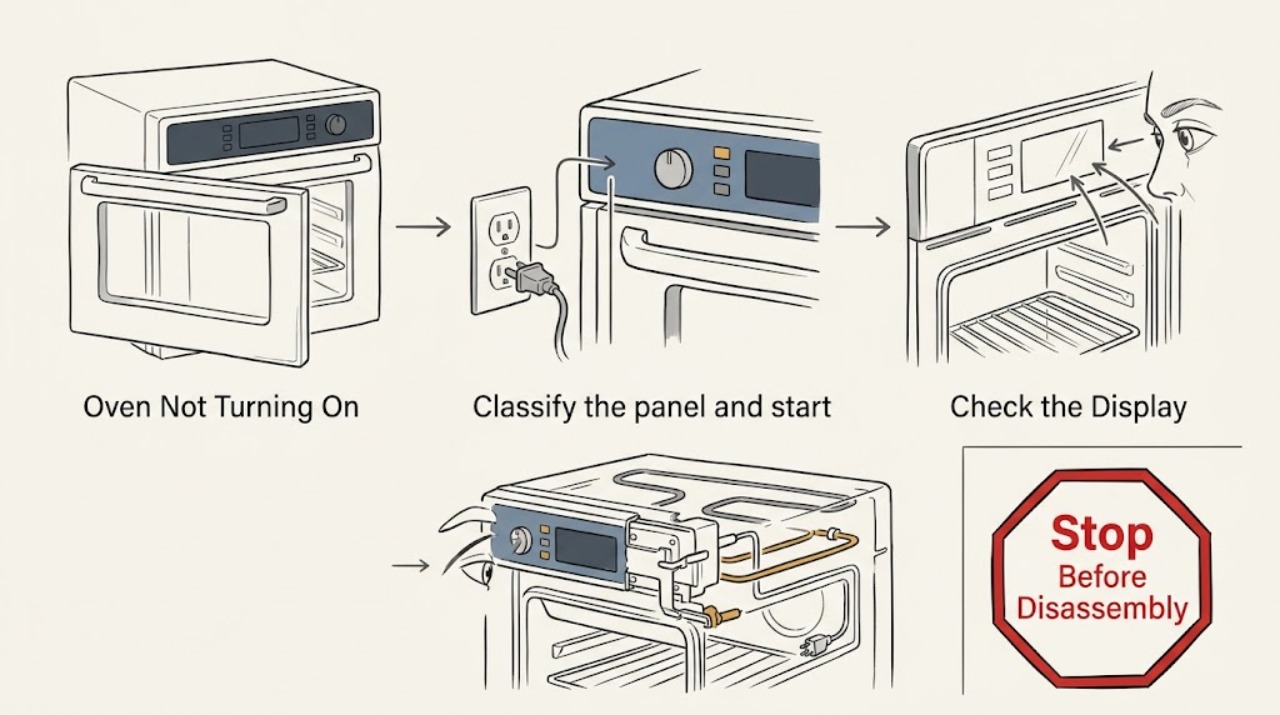
First separate a GE oven with a blank control panel from one that has power but will not start a cooking cycle. For a blank panel, check the plug and all relevant breakers or fuses from a dry, safe position. If the display or oven light works, confirm the clock, control lock, display setting, cooking mode, temperature, Start command, and any self-clean latch or Sabbath Mode setting. On a gas oven, confirm the gas supply is available and observe the igniter only as the model instructions allow; never relight, adjust gas parts, or open panels. Stop immediately for a gas odor, delayed ignition or boom, smoke, sparks, electrical arcing, a hot or damaged cord, or a breaker that trips again, and arrange qualified service.
Work through in order
Diagnostic checks
Use only checks that match the exact appliance or system and its official guide.
-
Classify the panel and start symptom
From a dry, safe position, note whether the GE oven is part of a range or a wall oven, whether the control panel is blank, whether the clock or indicators light, whether the oven light works, and whether the control accepts input. If the panel works, note whether the oven fails before Start, after Start, or only when Bake or Broil is selected.
Expected result: The panel is completely blank, the panel works but ignores input, the panel accepts settings but does not begin heating, or the oven starts but does not produce heat.
Next step: Use the safe power check first for a blank panel, then use the matching powered, gas, or electric path. Skip testing and follow the stop branch for gas odor, smoke, arcing, a boom, or a repeated breaker trip.
Why this matters
Why: A blank panel points first to the plug, household supply, or control power. A working panel with no start points toward a clock, lock, mode, door-latch, or Start-command state. A started gas oven with no heat needs a separate ignition or gas-supply path; an electric oven with no heat may have an element or control fault.
-
Check the plug and household circuit safely
With the range or wall-oven area dry and undamaged, verify that the plug is firmly seated where it is user-accessible and inspect the household breaker or fuse state. A range may use more than one breaker; do not remove panels or pull a cord through water. Do not repeatedly reset a breaker that opens again.
Expected result: The plug is loose, one or more breakers or a fuse is open, the circuit will not stay on, or the oven still has a blank panel after supply appears normal.
Next step: Correct a clearly loose plug only when the area is dry and safe, and restore a clearly open breaker once. If the panel remains blank, the circuit will not hold, or the outlet or cord is damaged, leave the oven off and arrange qualified electrical or appliance service.
Stop if: Stop for water near the connection, a hot or scorched cord, exposed wiring, smoke, sparks, arcing, or a breaker that trips again.
Why this matters
Why: GE identifies a loose plug, a tripped breaker, or a blown fuse as causes of a blank oven display. A circuit that trips again may indicate an overload, short, or appliance fault and needs qualified diagnosis rather than repeated resets.
-
Clear a powered control or mode block
If the panel or oven light works, check the exact owner's manual for the model's clock requirement, control or child lockout, display-off setting, cooking mode, temperature, and Start command. If the range has a self-clean latch, verify from outside that it is in the unlocked position; also check whether Sabbath Mode is active. Do not force a knob or latch.
Expected result: The clock is unset, a lock indicator is present, the display is intentionally off, no cooking mode or temperature was entered, Start was not pressed, the latch is locked, or Sabbath Mode is active.
Next step: Apply only the model-documented control, clock, display, mode, or latch setting, then make one supervised start attempt with no safety warning. If the control remains locked, the oven ignores correct settings, or the problem returns, arrange qualified service.
Stop if: Stop if the panel is hot, cracked, sparking, smoky, or the door latch is damaged or jammed.
Why this matters
Why: GE says these settings can make an oven appear not to start even though it has power. A latch that remains locked or a control that will not accept the model's unlock procedure is a safety-control fault, not a reason to bypass it.
-
Use the safe gas-oven ignition branch
For a gas GE oven, confirm the cooking controls are set to Bake or Broil and, only if the model instructions identify it as a user-accessible check, observe through the open door for the igniter's expected glow while standing clear of the burner. Do not use a match or lighter, adjust the regulator, remove the oven bottom, or reach near the igniter or gas valve.
Expected result: The surface burners work but the oven does not heat, the gas supply or regulator state is not confirmed, the igniter glows and the burner does not establish heat, or no igniter glow is visible.
Next step: Check only the external gas shutoff or model-documented setting when there is no odor or abnormal ignition. If there is no glow, no ignition, repeated clicking, an unstable flame, or no heat after safe settings are correct, turn the oven off and arrange qualified gas-appliance service.
Stop if: For gas odor, delayed ignition, a boom, an abnormal flame, or continuous ignition attempts, turn controls off, avoid flames and electrical switches, leave the area, and contact the gas supplier or emergency service from a safe location.
Why this matters
Why: GE notes that an oven can fail while surface burners still work if the oven gas-regulator path is off, settings are wrong, or the Glo-Bar igniter, controls, or other electrical components have a fault. No glow is a service clue, not permission to replace or test an energized part.
-
Use the safe electric-oven heat branch
For an electric GE oven or electric range oven, confirm that Bake or Broil and a temperature are selected and that Start has been pressed. After turning the oven off and allowing it to cool, look only from outside for a visibly cracked or broken lower bake element; do not touch it, remove it, or test live terminals.
Expected result: The oven has power but does not respond, it responds without heating, the bake element is visibly damaged, or the element appears intact but the oven still does not heat.
Next step: Leave a cracked or broken element and the oven off, and provide the model to qualified appliance service. If the element looks intact but heating does not start, stop after the control check and arrange service rather than opening the cabinet.
Stop if: Stop for a glowing element with arcing, smoke, a burning odor, exposed wiring, or a breaker that trips during heating.
Why this matters
Why: A damaged element can explain a no-heat symptom, while a powered oven that will not respond can still be blocked by settings or a control fault. Visual inspection cannot prove an element or wiring fault and does not establish a safe DIY replacement.
-
Do not mistake a door or latch fault for a dead oven
With the oven cool, verify that the door closes normally and that a self-clean latch is visibly in its model-specified unlocked position before starting a normal cycle. Do not force the door, bypass a latch or switch, or use self-clean to test a no-start condition.
Expected result: The door closes and the latch is unlocked, the latch remains locked after self-clean, the door does not align or close, or the oven starts only after manipulating the door.
Next step: Use only the owner's manual procedure to finish or exit a mode and restore the normal latch position. If the door, latch, or safety interlock remains abnormal, leave the oven off and arrange qualified appliance service.
Why this matters
Why: GE identifies a self-clean latch left locked as a cause of a range oven not coming on. A door or latch that fails to close or detect safely can prevent operation and requires service; manipulating it can create a heat or interlock hazard.
-
Record the failure and make a professional handoff
Record the exact model, range or wall-oven type, gas or electric configuration if known, whether the panel or light works, the breaker result, control or mode state, door-latch result, and any igniter or element observation. Include any error message and whether there was gas odor, delayed ignition, smoke, arc, burning smell, hot cord, or repeated trip.
Expected result: The oven remains blank after a safe supply check, remains unresponsive with correct settings, has a gas ignition symptom, has a visibly damaged electric element, or has any stop-condition hazard.
Next step: Leave the oven off and arrange qualified GE appliance service for an unresolved no-start or no-heat condition. Use qualified electrical service for a circuit issue and qualified gas service for gas supply or ignition symptoms; do not dismantle the appliance.
Why this matters
Why: These details distinguish a household supply issue from control, latch, igniter, gas-regulator, element, or internal wiring faults. They do not establish that a replacement part fits or that the oven is safe to open.
Use your observations
Decision map
Find the observation that best matches what you see, then follow the next safe action.
-
PATH 01Next step
What you see
The control panel is blank and the oven light is also unavailable.
Do this next
Check the accessible plug and all relevant breakers or fuses from a dry, safe position. If supply is present but the panel remains blank, leave the oven off and arrange qualified electrical or appliance service.
-
PATH 02Next step
What you see
The breaker or fuse opens again, the plug or cord is hot or damaged, or the area is wet.
Do this next
Stop resetting or testing. Keep clear of the connection and arrange qualified electrical or appliance service; do not pull a cord through water or open the appliance.
-
PATH 03Next step
What you see
The panel works, but the clock, control lock, display setting, cooking mode, temperature, Start command, Sabbath Mode, or self-clean latch is not in the required state.
Do this next
Use the exact owner's manual to correct only that setting, then make one supervised start attempt. If the controls or latch still do not respond, arrange qualified appliance service.
-
PATH 04Next step
What you see
A gas oven has surface burners but no oven heat, no igniter glow, delayed ignition, repeated clicking, or an abnormal flame.
Do this next
Turn the oven off and arrange qualified gas-appliance service. Do not use a match or lighter, adjust the gas regulator, remove panels, or keep relighting the oven.
-
PATH 05Next step
What you see
There is an unburned-gas odor, a boom or delayed ignition, smoke, an electrical arc, or a burning smell.
Do this next
Turn controls off if safe, avoid flames and electrical switches for a gas odor, leave the area, and contact the gas supplier or emergency service from a safe location. Otherwise keep the oven off and use qualified appliance or electrical service.
-
PATH 06Next step
What you see
An electric oven has power but still will not start or heat, or its lower bake element is visibly cracked or broken.
Do this next
Do not touch the element or access live terminals. Leave the oven off and arrange qualified appliance service for an element, control, wiring, or supply diagnosis.
-
PATH 07Next step
What you see
The door or self-clean latch will not close, unlock, or detect correctly.
Do this next
Do not bypass or force the latch. Leave the oven off and arrange qualified appliance service for the safety interlock or door mechanism.
Helpful context
Understand the symptom
Start by separating no power from no start
A dark display and an oven that has a working clock or light are different faults. GE's range and wall-oven guidance treats the power supply, controls, door latch, and cooking mode as separate checks. An electric oven may have power but be locked, have an unset clock, or have its display turned off. A gas oven still needs electrical power for electronic controls and ignition, so a power outage is not a safe opportunity to light the oven manually.
Keep gas, heat, and electrical hazards out of the test
Only observe external controls and cool, accessible surfaces. Do not remove a lower panel, reach toward an igniter, probe wiring, bypass a door latch, or repeat a start attempt to recreate a bang. If there is an unburned-gas odor, delayed ignition, smoke, a spark or arc, a burning smell, a hot cord, or a repeated breaker trip, leave the oven off and use qualified appliance, gas, or electrical service.
Safety boundary
Stop conditions
- Stop immediately for an unburned-gas odor, delayed ignition, a boom, an abnormal flame, smoke, sparks, electrical arcing, or a burning smell.
- Stop for water near the plug or controls, a hot or damaged cord, exposed wiring, or a breaker or fuse that opens again.
- Do not use a match or lighter to operate an electronic-ignition oven during a power outage, and do not adjust a gas regulator or safety valve.
- Do not bypass a door latch, child lock, or safety interlock; do not open panels, probe live wiring, or touch an energized heating element or igniter.
- Leave the oven off and arrange qualified appliance, electrical, or gas service when safe external checks do not restore operation.
Only after diagnosis
Potential parts
- electronic control board
Consider this only after a qualified diagnosis confirms correct household power and settings but a control-panel or oven-control fault prevents the model from starting.
Control boards are model-specific and involve electrical hazards; confirm exact model fit and use qualified installation. - gas oven igniter
Consider this only when a qualified gas-appliance diagnosis isolates a no-glow or failed-ignition condition to the igniter after safe supply and control checks.
Gas ignition parts and access vary by model; do not infer fit from the brand alone or replace one as a test. - electric bake element
Consider this only when a qualified appliance diagnosis confirms that a visibly or electrically failed bake element is the cause of no heat.
Heating elements are model-specific and may remain hazardous when connected; verify exact fit and use qualified service. - oven door latch assembly
Consider this only when a qualified diagnosis confirms a failed self-clean or door safety-latch mechanism after the model's normal latch state is checked.
Latch assemblies vary by model and access; verify the exact model and safe installation procedure.
When checks do not resolve it
Need a professional?
Arrange qualified GE appliance service when the oven remains dead after a safe plug and breaker check, the control panel accepts correct settings but will not start, a door or self-clean latch will not operate, a gas oven has no igniter glow or delayed ignition, or an electric oven has a failed or visibly damaged heating element. Use qualified electrical service for a circuit or breaker fault and qualified gas service for gas supply or ignition concerns. Provide the exact model, oven type, settings, display state, and safety symptoms.
Common questions
FAQ
Why is my GE oven completely blank?
Check the accessible plug and all relevant breakers or fuses from a dry, safe position. A range may use two breakers. If the panel stays blank with confirmed supply, or the circuit trips again, leave the oven off and arrange qualified electrical or appliance service.
Why does my GE oven have power but not start?
Check the model's clock, control or child lockout, display setting, cooking mode, temperature, Start command, Sabbath Mode, and self-clean latch. Use only the owner's manual procedure. If the control or latch still will not respond, arrange service.
Why does my GE gas oven not turn on even though the burners work?
GE identifies the oven settings, gas-regulator path, and Glo-Bar igniter as possible distinctions between working surface burners and an oven that does not heat. Observe only as the model instructions permit. Do not relight, adjust gas parts, or open panels; delayed ignition, a boom, gas odor, or an abnormal flame requires immediate stopping and qualified gas service.
Can I reset a GE oven that will not turn on?
GE documents a one-minute breaker reset for electronic controls on models so equipped, but do it only once when the area is dry and there is no damage or odor. If the breaker trips again, there is smoke or arcing, or the oven remains unresponsive, stop and arrange qualified service.
When should I stop troubleshooting a GE oven?
Stop for unburned-gas odor, delayed ignition or a boom, abnormal flame, smoke, sparks, electrical arcing, burning smell, a hot or damaged cord, water near an electrical connection, a repeated breaker trip, or a damaged door latch. Do not relight, force, bypass, dismantle, or repeatedly cycle the oven.
Read the exact guide
Official sources
- Gas Range & Wall Oven - Oven Will Not Come OnGE Appliances · GE gas range and wall-oven no-start, power, gas supply, igniter, control reset, latch, and Sabbath Mode troubleshooting
- Range & Wall Oven - No PowerGE Appliances · GE range and wall-oven blank display, plug, dual-breaker, and fuse troubleshooting
- Gas Range - Oven Does Not Heat, But The Burners HeatGE Appliances · GE gas range oven no-heat with working surface burners, regulator, settings, and Glo-Bar igniter troubleshooting
- Electric Range & Wall Oven - Oven Has Power But Does Not WorkGE Appliances · GE electric range and wall-oven powered-but-not-starting, clock, lockout, and display troubleshooting
- Range & Wall Oven - Oven Will Not Come OnGE Appliances · GE range and wall-oven control, power, reset, self-clean latch, bake-element, Sabbath Mode, and no-start troubleshooting
Community feedback
Share a repair observation
Share a plain-text repair observation. Accepted observations are published automatically; this page may take a moment to update.