
On this page
Start here
Quick answer
First separate a dead dispenser panel from a panel that lights but will not dispense water or ice. GE says a dark or unresponsive dispenser may recover after a 30-second power reset, while a locked control, closed water shutoff, disconnected door harness after installation, frozen reservoir or tubing, clogged filter, kinked supply line, or an ice jam can produce different symptoms. Check only the model-appropriate external controls, filter seating, visible supply line and dispenser bucket/chute. A filter bypass comparison is useful only when the exact model has a supplied bypass plug. If the panel stays dead, water remains unavailable after the filter/supply checks, ice re-jams, a leak appears, or service is needed to access a valve, harness or internal tubing, stop disassembly and arrange qualified GE service.
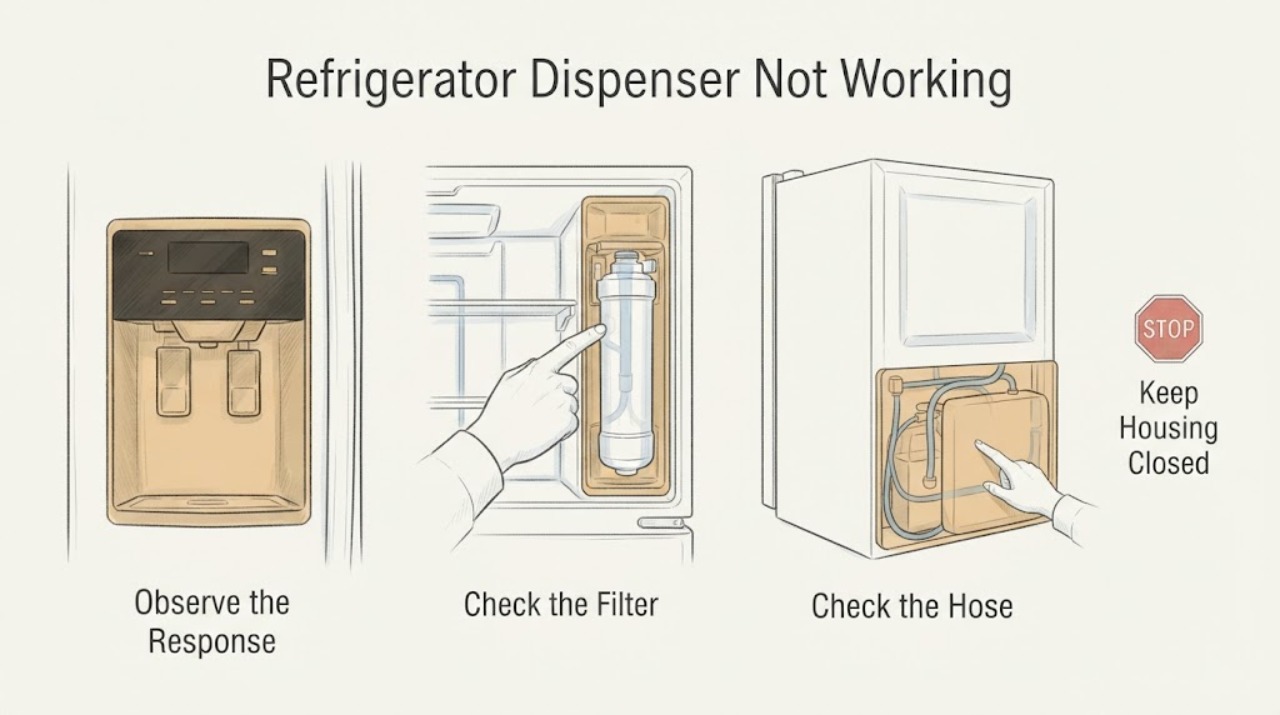
Work through in order
Diagnostic checks
Use only checks that match the exact appliance or system and its official guide.
-
Check 1
With the refrigerator stable and its doors closed, identify the failed function from a safe position: is the dispenser panel dark, does it light but give no water, is the water slow, or is only ice unavailable? Note whether the icemaker is still making ice and whether the unit was newly installed or recently filtered.
Expected result: The panel is dark/unresponsive; the panel works but water is absent or slow; only ice is absent; or both water and ice are affected.
Next step: If the symptom can be classified, continue with the matching external check rather than replacing a component from the phrase “not working.”
Stop if: If the symptom cannot be observed safely or the refrigerator has exposed damage, stop and arrange service.
Why this matters
Why: These are different GE support paths. A dark panel points to power/control or installation wiring; water-only symptoms point to the water path; ice-only symptoms point to the bucket/chute; both functions suggest a shared supply or filter issue.
-
Check 2
If the dispenser panel is dark or does not respond, check that the refrigerator has normal power, then disconnect power for 30 seconds and restore it once. For a newly installed refrigerator whose doors were removed, use the exact model installation instructions to verify the door harness location; do not remove covers.
Expected result: The panel returns after the reset, remains dark, or lights but still will not accept dispenser commands.
Next step: If the panel returns, check the control-lock state and water supply before dispensing. If it remains dark or unresponsive, leave the refrigerator intact and arrange qualified service.
Stop if: Do not repeatedly reset a panel that remains dead, and do not open electrical covers.
Why this matters
Why: GE says a temporary lock-up can follow installation static and that a brief power cycle may correct it. A persistent dark panel or a harness question needs model-specific service rather than repeated cycling or internal electrical work.
-
Check 3
If the panel works but water is absent, check the model’s control-lock state, confirm the refrigerator water shutoff is open, and inspect only the visible supply line for a kink. If the refrigerator was just installed or the filter was just replaced, follow the exact model instructions for purging air from the reservoir/tubing.
Expected result: The lock is active, the shutoff is closed, the visible line is kinked, air clears after the model-approved purge, or the visible supply looks normal but no water arrives.
Next step: If the lock, shutoff, kink or trapped air explains the symptom, correct only that external condition and recheck once. If the supply looks normal and water remains absent, stop at the user boundary and arrange service.
Stop if: Do not pull the refrigerator apart or disconnect internal tubing to chase the cause.
Why this matters
Why: GE lists lock state, supply position, installation air, frozen reservoir/tubing and filter conditions as possible explanations. A normal external supply does not prove a failed inlet valve, dispenser switch or control board.
-
Check 4
If the water is slow and the exact refrigerator has a supplied filter bypass plug, dispense into a measuring cup for 20 seconds, then repeat the comparison only as the model instructions allow with the bypass plug installed. Do not improvise a plug or force the filter.
Expected result: The amount is under 8 ounces, at least 8 ounces, or flow improves only with the supplied bypass plug.
Next step: If the bypass comparison improves flow, use only the exact model’s genuine filter guidance. If it does not, check the visible line and have the water supply or service provider assess pressure; do not open the refrigerator water circuit.
Stop if: If the model has no bypass plug or the test is not in its manual, skip it and arrange model-specific support for persistent slow flow.
Why this matters
Why: GE says under 8 ounces in 20 seconds suggests inadequate flow and that improvement with the bypass plug points toward a clogged filter. Failure with the bypass in place points instead toward supply tubing, a shutoff/saddle valve or incoming pressure; it is not proof of a refrigerator valve failure.
-
Check 5
If only ice will not dispense, confirm the doors are fully closed, then inspect the removable ice bucket and visible chute for clumped or jammed ice. Follow GE’s model-appropriate bucket removal instructions; use only a non-sharp utensil at the visible chute and keep hands out of the auger area.
Expected result: Ice is clumped in the bucket, the chute is visibly jammed, moisture/frost is suspected, or the bucket/chute is clear but ice still will not dispense.
Next step: If a visible clump or chute obstruction is safely removable, clear only that obstruction and reassemble the bucket as the exact manual directs. If the jam returns or the bucket/chute is clear, stop and arrange service.
Stop if: Do not remove the auger motor, reach behind the freezer wall or apply heat to internal components.
Why this matters
Why: GE identifies closed doors, clumped bucket ice, chute jams and moisture/frost around the auger area as possible causes. A recurring jam can reflect overfilling or leaking and needs service; clearing the visible obstruction does not diagnose the motor.
-
Check 6
After the external checks, record the full model/serial information, dispenser type, whether water or ice still works, filter history, reset result, visible supply condition and any leak or frost. Keep the refrigerator connected only if it is dry and otherwise safe; do not access valves, wiring, internal tubing or control boards.
Expected result: The dispenser remains dead, water remains absent or slow, ice re-jams, a leak is present, or the symptom is resolved by an external condition.
Next step: If unresolved, arrange qualified GE appliance service and provide the recorded observations. If a leak is present, close the refrigerator water shutoff if safely reachable and keep the area dry; if water reaches electrical parts, disconnect power only if safe.
Stop if: If the symptom is resolved, monitor for recurrence and retain the model-specific filter and manual instructions.
Why this matters
Why: GE routes unresolved dispenser concerns to service and requires model-specific instructions for harness, lock and filter details. A symptom that returns after an external correction needs diagnosis rather than a guessed part.
Use your observations
Decision map
Find the observation that best matches what you see, then follow the next safe action.
-
PATH 01Next step
What you see
The dispenser panel is dark or remains unresponsive after one 30-second power reset.
Do this next
Keep the refrigerator intact, verify only normal external power, and arrange model-specific service; do not remove covers or repeat resets.
Why this path and its safety boundary
Why it matters: GE treats this as a power/control or installation-wiring path, not as proof that the water valve or ice motor failed.
-
PATH 02Next step
What you see
The panel lights, the icemaker makes ice, but no water comes from the dispenser.
Do this next
Check the exact model’s lock and filter instructions, visible shutoff/line and approved purge; if water remains absent, arrange service.
Why this path and its safety boundary
Why it matters: GE’s water-dispenser guidance points toward lock state, reservoir/tubing, frozen tubing, filter, air after installation/filter change or the visible supply path.
-
PATH 03Next step
What you see
Both the water dispenser and icemaker have no water or very slow flow.
Do this next
Use the supplied bypass plug only if the exact model supports it, inspect the visible line, and involve a qualified water/service provider if flow remains poor.
Why this path and its safety boundary
Why it matters: A shared filter, supply line, shutoff or incoming-pressure issue becomes more plausible than a dispenser-only control problem; GE’s flow test is model-dependent.
-
PATH 04Next step
What you see
Only ice fails, while the water dispenser works.
Do this next
Clear only a visible obstruction using the model-approved external procedure; if the jam returns or the chute is clear, arrange service.
Why this path and its safety boundary
Why it matters: GE lists closed doors, clumped bucket ice, chute obstruction and moisture/frost near the auger as possible ice-dispenser paths.
-
PATH 05Next step
What you see
There is a leak, water near electrical parts, damaged wiring, or an obstruction that cannot be removed without opening the appliance.
Do this next
Stop dispensing, close the water shutoff if safely accessible, disconnect power only when safe, keep the area dry and arrange qualified service.
Why this path and its safety boundary
Why it matters: The condition is outside a safe user check and may create water or electrical risk.
Helpful context
Understand the symptom
Identify which dispenser function failed
“Dispenser not working” can mean a panel that is dark, a panel that lights but gives no water, slow water, or an ice chute that will not deliver cubes. Record which buttons light, whether the icemaker is making ice, whether the refrigerator was newly installed or recently filtered, and whether the failure is water, ice or both. GE publishes separate guidance for these paths, so a silent water dispenser is not automatically a failed valve or control board.
Keep model-specific controls model-specific
GE says to use the owner manual for control-lock operation and the exact installation instructions for a door harness. The task has no model, so use the rating label or model/serial support path before following a lock sequence, filter procedure or access instruction. The checks below stay at the external user boundary.
Use the ice-maker result as a branch
If the icemaker is making ice but the water dispenser is dry, GE points to the dispenser water path, reservoir/tubing, filter or a frozen section rather than treating the whole refrigerator as without water. If both water and ice are affected, inspect the shared supply and filter path first. If only ice fails, inspect the bucket and chute without reaching into the auger or removing internal panels.
When checks do not resolve it
Need a professional?
Arrange qualified GE refrigerator service when the panel stays dead after the model-appropriate external reset, water remains unavailable after lock/filter/supply checks, flow remains poor with the approved bypass comparison, ice re-jams, a leak persists, wiring or electrical parts are exposed, or the next step would require internal tubing, a valve, auger or control access.
Have this ready
- full model and serial information
- whether the panel is dark, locked or responsive
- whether water, ice or both are affected
- filter replacement history and any approved bypass comparison
- visible supply-line, leak, frost or chute observations
- whether a 30-second power reset changed the panel
Common questions
FAQ
Why does the GE dispenser panel light up but dispense no water?
GE lists the control lock, closed water supply, air after installation or a filter change, frozen reservoir/tubing, filter restriction and visible supply problems. Check the exact model instructions and external supply path; the symptom alone does not identify a failed valve or control board.
What if the GE refrigerator dispenser panel is completely dark?
GE recommends disconnecting refrigerator power for 30 seconds. If the panel remains dark, service may be needed; a newly installed refrigerator may also require a model-specific door-harness check without removing covers.
How can I tell whether a slow dispenser is caused by the filter?
For models with a supplied bypass plug, GE describes a 20-second comparison: under 8 ounces suggests inadequate flow, and improvement with the bypass plug points toward the filter. Do not improvise a plug or apply this procedure when the exact model does not support it.
Why does the GE ice dispenser not work when water still dispenses?
GE lists fully closed doors, clumped ice in the bucket, a jammed chute and moisture or frost around the auger area. Clear only a visible obstruction using the exact model’s instructions; recurring jams or a clear chute require service.
Read the exact guide
Official sources
- Refrigerator - Dispenser Water Flow TestGE Appliances · Official GE support article for slow water flow; the bypass plug and filter procedure apply only to compatible models.
- Refrigerator and Freezer Troubleshooting and Support | GE AppliancesGE Appliances · Official GE refrigerator support hub; used for model-specific support routing and symptom separation, not for a component diagnosis.
- Refrigerator - Dispenser Control Panel Not WorkingGE Appliances · Official GE support article for new and existing refrigerators; control-lock operation and harness details must follow the exact owner manual.
- Refrigerator - Not Dispensing IceGE Appliances · Official GE support article for an ice dispenser that does not dispense; exact bucket access and layout remain model-dependent.
- Refrigerator - No Power to the DispenserGE Appliances · Official GE support article for a dark or non-responsive dispenser panel; model-specific wiring location remains manual-dependent.
- Refrigerator - Dispenser Not Getting WaterGE Appliances · Official GE support article for refrigerator water-dispenser symptoms; exact model controls lock, filter and installation details.
Community feedback
Share a repair observation
Share a plain-text repair observation. Accepted observations are published automatically; this page may take a moment to update.