
On this page
Start here
Quick answer
When a GE refrigerator is not working, first check whether the interior light/display is completely dead or whether the refrigerator has power but is not running or cooling. Confirm the plug is fully inserted and the outlet has power, then verify the temperature controls were not turned off and the refrigerator is not in Demo Mode. GE says the compressor and fans can stop during a model-dependent defrost cycle, which may last about 30 to 45 minutes; after a short outage, compressor overload protection may also delay restart automatically. If the unit is newly installed, allow about 24 hours to cool and stabilize. Check that doors close and gaskets seal, large items do not block cold-air vents, and only clean condenser coils when the exact manual says they are owner-accessible—unplug first. If it remains dead or warm after these external checks, or there is smoke, burning odor, sparks, water near electrical parts, a hot cord, or repeated breaker tripping, stop using it and arrange qualified service. Do not remove panels, bypass protection, add refrigerant, or make live electrical measurements.
Before you begin
Safety first
- Do not remove interior, rear, compressor, or sealed-system panels; test live wiring; add refrigerant; pierce tubing; chip hidden ice; bypass controls or thermal protection; or continue operating when water is near electrical parts or there are fire/electrical signs.
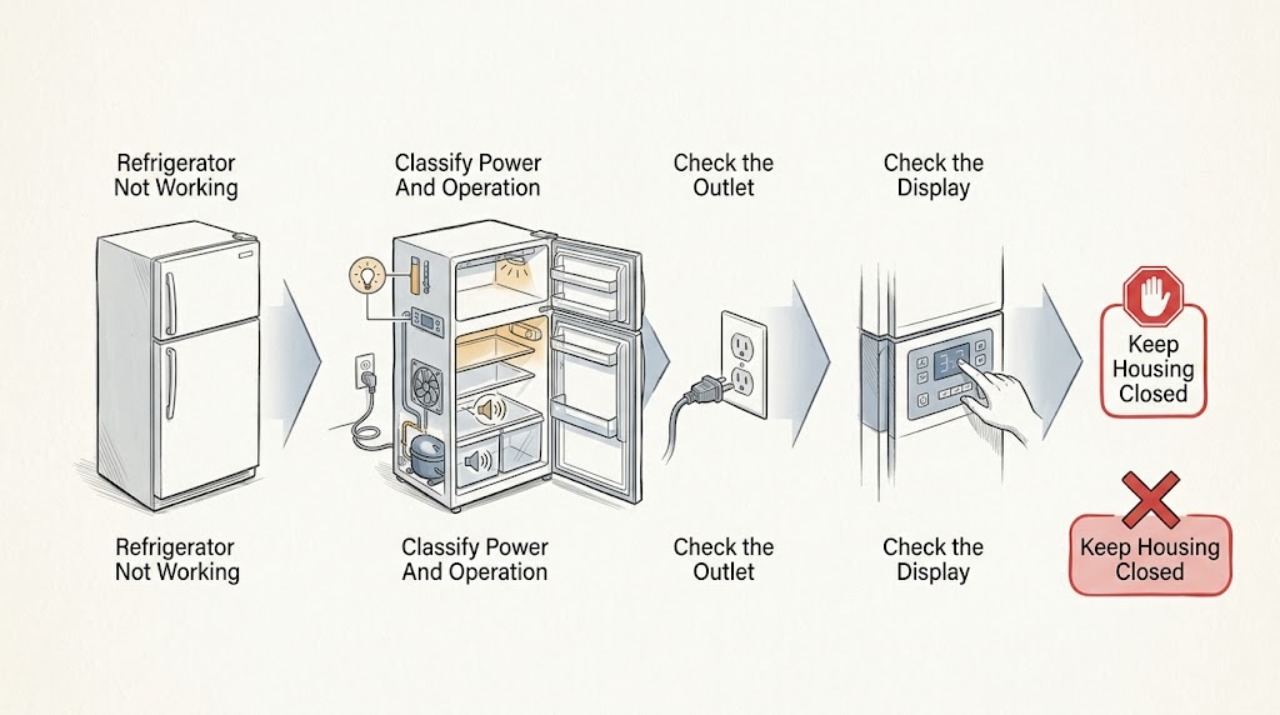
Work through in order
Diagnostic checks
Use only checks that match the exact appliance or system and its official guide.
-
Check 1
Open the fresh-food door and observe the interior light/display. Without removing panels, listen briefly for compressor or fan operation and note whether the freezer, refrigerator section, or both are warm. Record the model, control state, recent outage/service, defrost timing, and any frost, water, odor, smoke, or error indication.
Expected result: The light/display is dark; the light works but no compressor/fan runs; the unit is quiet for a limited period; or the unit runs but compartments remain warm.
Next step: Follow the matching branch below and move food to another cold source if temperatures are rising. Stop immediately for a hazard symptom.
Stop if: Do not keep cycling power or open panels to identify a component.
Why this matters
Why: A dark light points first to power; lights with no operation shift attention to controls, Demo Mode, defrost, or internal service; a temporary quiet period can be normal defrost or post-outage protection; running with warmth points toward settings, sealing, airflow, condenser, or internal cooling.
-
Check 2
For a dark refrigerator, check the household breaker or fuse once and confirm the visible plug is fully inserted in the wall outlet. If the receptacle is dry and accessible, verify it with a small lamp; do not remove the outlet cover or test hardwired conductors.
Expected result: The breaker/fuse is off; the outlet does not power the lamp; the breaker trips again; or the outlet has power but the refrigerator remains dark.
Next step: Have an electrician address a dead outlet, hardwiring, or recurring trip. If the outlet is live and the refrigerator remains dead, unplug it and arrange qualified appliance service.
Stop if: Stop for a hot/discolored outlet, damaged plug/cord, smoke, sparks, burning odor, or repeated breaker trips.
Why this matters
Why: No power at the outlet is a house-circuit or installation issue. A live outlet with a dark refrigerator points toward the appliance power path or control, while a repeat trip is a fault warning rather than a reset instruction.
-
Check 3
If the light/display works, verify the fresh-food and freezer controls are not Off and are set according to the exact Owner's Manual. Check the display and manual for Demo Mode or a service/diagnostic state; do not enter undocumented key sequences.
Expected result: A control was Off; Demo Mode is displayed; the refrigerator was recently serviced; settings appear normal; or changing the documented setting has no effect.
Next step: Exit Demo Mode or diagnostic state only using the exact model instructions. If settings are correct and the refrigerator remains warm, continue the external checks once and arrange service.
Stop if: Do not force controls, bypass sensors, or remove the control panel.
Why this matters
Why: An Off control, Demo Mode, or post-service diagnostic state can make a powered refrigerator seem not working without proving a mechanical failure. Correct settings with no cooling response move the problem toward service.
-
Check 4
If the refrigerator recently stopped after a power interruption or appears quiet for a limited period, note when it stopped and wait without repeatedly unplugging or resetting it. Compare the timing with the exact model manual; GE says defrost can stop the compressor and fans for about 30 to 45 minutes.
Expected result: Cooling resumes after the defrost interval; the stop followed a short outage and the compressor restarts later; the refrigerator stays quiet beyond the model's documented behavior; or compartments continue warming.
Next step: Allow the automatic process to finish and monitor one normal cycle. If it does not recover, do not keep cycling power; continue with door/airflow checks and contact service.
Stop if: Do not bypass overload/defrost protection or restore power to a wet or electrically damaged unit.
Why this matters
Why: A normal defrost cycle or automatic compressor overload protection is more likely when operation returns without intervention. No recovery or continuing warmth outside that behavior requires further checks and possibly service.
-
Check 5
If the refrigerator has power but is warm, allow about 24 hours for a new installation to stabilize. Otherwise check that packages do not hold the doors open, gaskets contact the cabinet, tall containers do not block interior cold-air vents, and the unit has the model-required external clearance.
Expected result: The unit is newly installed; a door or gasket has a gap; a package blocks closure or an air vent; the refrigerator is crowded against a wall; or these conditions are clear.
Next step: Remove only visible loading obstructions and correct closure or clearance as the model manual directs. If cooling remains inadequate after stabilization, arrange service.
Stop if: Do not force a misaligned door, remove a gasket with tools, or chip hidden ice behind panels.
Why this matters
Why: GE identifies insufficient stabilization, poor door sealing, blocked interior airflow, and inadequate clearance as possible causes of warm compartments. Clear conditions make internal airflow, defrost, control, compressor, or sealed-system faults more likely.
-
Check 6
Check the exact Owner's Manual to determine whether the condenser is owner-cleanable. If it is, unplug the refrigerator before any permitted cleaning and restore the grille/clearance afterward. If the model has a NeverClean or inaccessible condenser, do not dismantle the machine compartment; record the result and arrange service if the refrigerator remains warm.
Expected result: The manual authorizes accessible coil cleaning; it identifies a NeverClean/non-accessible condenser; cooling returns after permitted cleaning; or the unit remains warm or repeatedly stops.
Next step: Monitor only a stable, hazard-free refrigerator after one permitted cleaning. For persistent warmth, repeated stops, frost behind panels, abnormal heat/noise, or any hazard, leave internal diagnosis to qualified service.
Stop if: Do not clean while powered, reach into moving fans, open sealed-system covers, add refrigerant, or make live measurements.
Why this matters
Why: A dirty, owner-accessible condenser can reduce efficiency, but GE says many models do not require owner cleaning. Persistent failure after the model-authorized check may involve the fan, defrost system, control, compressor, or sealed system and cannot select a part.
Use your observations
Decision map
Find the observation that best matches what you see, then follow the next safe action.
-
PATH 01Safety boundary
What you see
The interior light/display is dark and the outlet or breaker check shows no power, a recurring trip, or visible electrical damage.
Do this next
Leave the refrigerator off and have an electrician or installer correct the supply. Move food to another safe cold source.
Why this path and its safety boundary
Why it matters: The immediate issue is more likely the home circuit, outlet, plug, or installation than a cooling setting.
Safety stop: Do not repeatedly reset the breaker or touch a hot/wet/damaged connection.
-
PATH 02Safety boundary
What you see
The interior light/display works, but a control is Off, Demo Mode is active, or the refrigerator was recently serviced and may be in diagnostic mode.
Do this next
Restore the documented normal setting or exit the documented mode using the exact model manual, then monitor cooling. Call service if warmth remains.
Why this path and its safety boundary
Why it matters: A control or operating state is more likely than a total power failure.
Safety stop: Do not enter undocumented service modes or bypass controls.
-
PATH 03Safety boundary
What you see
The refrigerator became quiet after a short outage or for a limited period consistent with the model's defrost cycle, and no hazard is present.
Do this next
Wait for the model-dependent cycle/protection to complete without repeatedly unplugging. Arrange service if it does not restart or cooling does not return.
Why this path and its safety boundary
Why it matters: Automatic defrost or compressor overload protection is more likely than a permanent failure when operation returns on its own.
Safety stop: Do not bypass protection or keep cycling power.
-
PATH 04Safety boundary
What you see
The refrigerator has power and runs, but one or both sections are warm while a door gap, blocked vent, new-installation period, or inadequate clearance is present.
Do this next
Correct only the visible, model-supported issue and allow stabilization. Call service if temperatures remain high after the documented recovery period.
Why this path and its safety boundary
Why it matters: Loading, sealing, installation, or airflow is more likely than a completely dead cooling system.
Safety stop: Do not remove hidden panels or chip ice around internal passages.
-
PATH 05Safety boundary
What you see
The refrigerator remains dead or warm after external checks, repeatedly stops, has heavy internal frost, or shows smoke, burning odor, sparks, water near electrical parts, a hot/damaged cord, or repeated breaker trips.
Do this next
For a non-hazardous persistent fault, arrange qualified refrigerator service and provide the model and observations. For a hazard, isolate power only if safe and contact appliance/electrical service; call emergency services for fire.
Why this path and its safety boundary
Why it matters: An internal control, fan, defrost, compressor, or sealed-system fault is possible; hazard signs make this an immediate stop-use condition.
Safety stop: Do not run a hazardous unit, pierce tubing, add refrigerant, bypass protection, or make live tests.
Helpful context
Understand the symptom
“Not working” can describe several different states
Record the complete model number, installation type, time since installation or service, whether the display and fresh-food light work, whether the compressor or fans run, and whether the freezer, refrigerator section, or both are warm. Note any control setting, Demo Mode message, defrost timing, recent outage, frost, blocked vent, door gap, water, odor, smoke, or breaker trip. A quiet refrigerator during defrost is different from one with no power, and a refrigerator with lights but no cooling needs a different diagnosis from a dead unit. GE directs owners to model-specific manuals and support, so do not apply another model's controls or service mode.
Use external checks before service
The safe owner checks are power delivery, the visible controls, normal defrost or post-outage behavior, door/gasket closure, food loading, air clearance, and model-authorized condenser cleaning. These observations narrow the likely path but cannot prove whether an internal fan, sensor, defrost heater, control board, compressor, or sealed system failed. Do not remove interior or rear panels, pierce tubing, add refrigerant, bypass a thermostat or door switch, or test a live circuit.
Stop for electrical, water, or fire danger
Stop using the refrigerator and isolate power only if safe for smoke, burning or electrical odor, sparks, a hot or damaged cord, repeated breaker trips, water reaching electrical components, exposed wiring, or a damaged cabinet. Do not touch wet controls or restore power to reproduce a hazard. Move perishable food to another safe cold source, keep clear, and arrange qualified appliance or electrical service; call emergency services for an active fire. Never open a sealed-system or compressor compartment as a DIY repair.
When checks do not resolve it
Need a professional?
Call an electrician for a dead outlet, hardwiring, or recurring breaker trip. Call qualified refrigerator service when the unit remains dead with a live supply, does not restart outside its model-dependent defrost/outage behavior, remains warm after settings, sealing, airflow, clearance, and model-authorized condenser checks, or shows recurrent frost or internal cycling. Stop immediately for smoke, burning odor, sparks, water near electrical parts, a hot/damaged cord, or fire.
Safety scope: Do not remove interior, rear, compressor, or sealed-system panels; test live wiring; add refrigerant; pierce tubing; chip hidden ice; bypass controls or thermal protection; or continue operating when water is near electrical parts or there are fire/electrical signs.
Have this ready
- Provide the full model and serial information, installation type, time since installation/service, light/display state, outlet and breaker result, control/Demo Mode state, outage/defrost timing, compartment temperature pattern, door/gasket and airflow checks, clearance/room conditions, condenser-access status, frost/water, and any odor, noise, heat, or electrical symptoms.
Common questions
FAQ
Why is my GE refrigerator completely dead?
Check the interior light, plug, wall outlet, and breaker or fuse. If the outlet has power but the refrigerator remains dark, unplug it and arrange appliance service; do not open the cabinet or repeatedly reset the breaker.
Can a GE refrigerator be quiet and still be normal?
Yes. GE says the compressor and fans do not run during defrost, which can last about 30 to 45 minutes depending on the model. A short power outage can also activate automatic compressor overload protection. If it does not restart or cooling does not return, schedule service.
What if the refrigerator has lights but is not cooling?
Verify the controls were not turned off or placed in Demo Mode, then check door closure, gaskets, blocked cold-air vents, installation clearance, room conditions, interior-light behavior, and the model-specific condenser instructions. Persistent warmth needs service.
How long should a newly installed GE refrigerator run before it is cold?
GE says to allow about 24 hours for a new refrigerator to cool down and stabilize. If it remains warm after that time with the controls correctly set, arrange service.
Can I clean the condenser or test the compressor myself?
Clean a condenser only when the exact Owner's Manual says it is owner-accessible, and unplug before permitted cleaning. Do not test compressor wiring, open the sealed system, or add refrigerant; those require qualified service.
Read the exact guide
Official sources
- Refrigerator - Cleaning Condenser CoilsGE Appliances · Cleaning steps depend on condenser location and exact model; many newer models use NeverClean condensers.
- Refrigerator - Does Not Run or CoolGE Appliances · General GE refrigerator support article; exact controls and defrost behavior vary by model.
- Refrigerator and Freezer Troubleshooting and SupportGE Appliances · GE refrigerator support hub; exact troubleshooting and manuals are model-specific.
- Troubleshooting for GNE27JGMWWGE Appliances · Exact GNE27JGMWW model identity and support layout only; used to reinforce model-specific manuals and troubleshooting.
- GE Appliances Service and Support by Product LineGE Appliances · GE appliance support hub; exact manuals and service options depend on model and region.
- Refrigerator - Not Cooling EnoughGE Appliances · General GE refrigerator support article; model controls, clearance, condenser access, and behavior vary.
Community feedback
Share a repair observation
Share a plain-text repair observation. Accepted observations are published automatically; this page may take a moment to update.