
On this page
Start here
Quick answer
A GE washer-dryer that does not spin may be paused while it pumps out, unable to balance the load, prevented from spinning by an open door, lid, drawer, or lock, restricted at the drain pump filter, or experiencing a model-specific drive or control fault. First identify whether the appliance is a front-load washer, top-load laundry center, or all-in-one combo, then check the display, wait through the normal pause and pump-out phase, and look for a door or lid that is not securely closed. If the load is safe to handle, redistribute it and use the model's Drain & Spin or equivalent cycle. Do not force the door, bypass the lock, open the cabinet, or keep restarting a machine that hums without spinning, leaks, smells hot, or trips power; arrange qualified GE appliance service when the model-approved checks do not restore spin.
Before you begin
Safety first
- This article covers model identification, normal-cycle observation, ordinary closure and load checks, and only the filter or reset steps explicitly permitted by the exact GE documentation. Do not bypass locks, enter service mode, open the cabinet, test energized parts, or keep running a hazardous appliance.
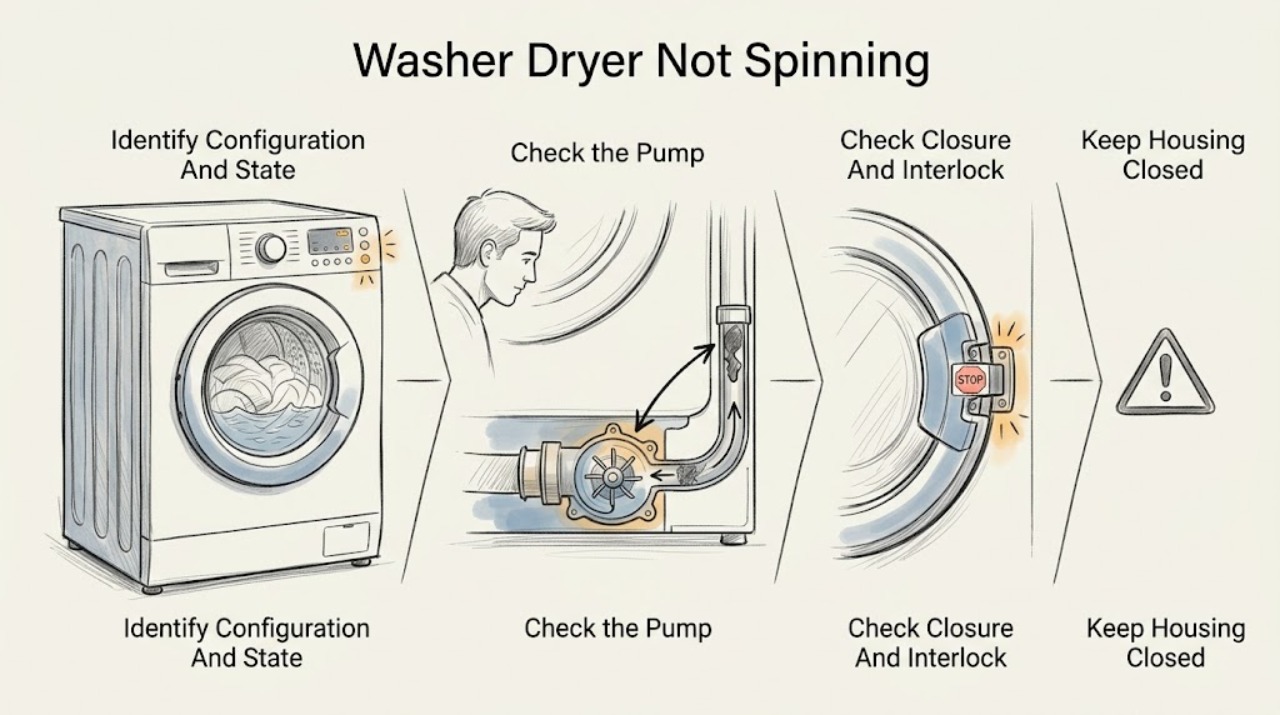
Work through in order
Diagnostic checks
Use only checks that match the exact appliance or system and its official guide.
-
Check 1
Read the GE model and serial tag and identify whether the appliance is a front-load washer, top-load washer in a laundry center, or an all-in-one combo; record the displayed message or light before changing settings.
Expected result: The washer is a front-load unit, a top-load/laundry-center unit, or a GE Profile combo; the display mentions Spin, balance, door or lid, drain, pump filter, control lock, or another condition; or there is no message.
Next step: Keep the model identity with the symptom record and follow only the matching GE support or owner-manual instructions; do not apply a top-load lid procedure to a front-load or all-in-one combo.
Stop if: Stop if the model tag is missing, the appliance is stacked or built in, water is leaking, wiring is damaged, or identifying the mechanism would require removing a panel.
Why this matters
Why: The configuration determines which lock, drawer, load, drain, and reset checks apply. A blinking Spin indicator on a GE Profile combo can indicate an out-of-balance response, while a door or lid message can prevent the spin sequence. No message does not rule out a drain, interlock, motor, belt, or control problem.
-
Check 2
If the cycle has just changed from wash or rinse to spin, leave the controls alone for the normal pause and pump-out phase described by the model instructions; do not manually advance the timer or open a locked door.
Expected result: The machine resumes spin after the pause and pump-out; it continues to drain without spinning; it remains paused with a message; or water remains in the drum or tub.
Next step: If spin begins normally, observe one cycle for recurrence. If the appliance remains full, shows a drain-related message, or never transitions after the permitted pause, stop the cycle and follow the exact model's drain or pump-filter guidance.
Stop if: Do not force a locked door, reach into standing water, disconnect hoses, or repeatedly restart a machine that cannot drain.
Why this matters
Why: GE notes that some washers can pause between agitation and spin while pumping out, and manually advancing the timer can skip the pump-out portion. Continued water, a drain message, or a pump that runs without a spin transition points toward a drain or control condition rather than a simple timing delay.
-
Check 3
With the basket stopped, check that the front door, top lid, or dispenser drawer is fully closed as applicable; inspect only the visible latch area, gasket edge, lid bumpers, or drawer track for clothing or debris preventing closure.
Expected result: The door, lid, or drawer closes and locks normally; it stays open or does not latch; the display says door or lid open; or a visible obstruction or damaged bumper is present.
Next step: Remove only a plainly accessible obstruction without tools, close the closure normally, and retry the model's Drain & Spin or equivalent once; arrange service if the lock does not engage or the problem returns.
Stop if: Do not hold down, bypass, tape, pry, or defeat a door or lid lock, and do not run the appliance with a damaged gasket, lid, latch, or glass.
Why this matters
Why: GE states that a front-load washer will not spin with the dispenser drawer open and that a top-load or laundry-center spin cycle requires the lid to close and lock. A visible obstruction or damaged bumper can prevent the interlock signal, but the lock mechanism itself cannot be diagnosed from appearance alone.
-
Check 4
If the load is safe to handle and the door or lid can be opened normally, redistribute heavy or tangled items evenly; for an all-in-one combo, use the model's Drain & Spin or Rinse & Spin option as GE directs rather than forcing a high-speed setting.
Expected result: Spin completes after redistribution; the Spin light blinks or a balance message returns; the basket rocks violently; or the load remains wet even though water leaves the appliance.
Next step: Use the exact model's load-size guidance and observe whether the basket reaches spin without excessive movement; stop and request service if the appliance repeatedly rebalances, bangs, or leaves the load wet.
Stop if: Do not hold the basket, add an unsafe amount of laundry, spin with the door or lid open, or continue when the appliance walks, bangs, or damages hoses or surrounding surfaces.
Why this matters
Why: GE says an out-of-balance combo may be unable to reach full spin speed and recommends an even load followed by a Drain & Spin or Rinse & Spin cycle. Repeated balance failure, severe movement, or wet clothes after confirmed draining means the issue is not solved by adding more cycles and may involve suspension, sensing, drain, or drive components.
-
Check 5
If the display identifies a pump-filter or drain restriction, follow the exact GE owner-manual procedure for that model to inspect or clean the accessible pump filter; if the model documentation provides a reset, use it only as written and only after the appliance is safe to handle.
Expected result: The filter or drain path is visibly restricted and the model-approved cleaning restores draining; the pump-filter area is clear but spin still fails; a reset restores one cycle only; or the filter and reset procedure cannot be safely accessed.
Next step: Restore the filter exactly as the manual specifies and run one model-approved Drain & Spin observation; arrange qualified service if the restriction returns, the unit still will not spin, or access requires cabinet disassembly.
Stop if: Do not open an energized appliance, reach into moving parts, force a filter cap, disconnect internal hoses, or use a reset recipe from a different GE model family.
Why this matters
Why: GE explains that loose items can restrict the pump-filter area and that a drain restriction can leave loads very wet or prevent a normal spin sequence. A temporary reset result does not prove the underlying fault is fixed, and a clear filter does not rule out an interlock, drive, sensor, motor, or control issue.
Use your observations
Decision map
Find the observation that best matches what you see, then follow the next safe action.
-
PATH 01Safety boundary
What you see
The washer drains and begins spinning after the model's normal pause and pump-out phase.
Do this next
Let the cycle finish and record the program, load, and whether the result recurs; use the model manual for cycle-specific behavior.
Why this path and its safety boundary
Why it matters: The observed delay may be normal for that cycle rather than a failed drive system.
Safety stop: Do not manually advance the timer or interrupt a locked door to shorten a normal transition.
-
PATH 02Safety boundary
What you see
The front door, top lid, or dispenser drawer does not close or lock as required for the appliance configuration.
Do this next
Remove only a visible obstruction, close the closure normally, and arrange service when the latch, lock, bumper, gasket, or drawer still fails to register.
Why this path and its safety boundary
Why it matters: The safety interlock can prevent spin even when the motor and controls otherwise appear active.
Safety stop: Do not bypass or hold the interlock closed and do not run with a damaged closure.
-
PATH 03Safety boundary
What you see
Redistribution does not restore spin, the Spin indicator keeps blinking, or the appliance moves or bangs during attempted spin.
Do this next
Stop repeating cycles, keep the load and display information, and request qualified GE appliance service.
Why this path and its safety boundary
Why it matters: The load remains unbalanced or another suspension, sensing, installation, or drive condition needs diagnosis.
Safety stop: Do not hold the machine in place, add more laundry to force balance, or continue with severe movement.
-
PATH 04Safety boundary
What you see
Water remains, a pump-filter or drain message appears, or the pump runs but the washer never reaches spin.
Do this next
Use only the exact model's accessible pump-filter or drain procedure; if the path is clear or the problem returns, arrange service.
Why this path and its safety boundary
Why it matters: A drain restriction or pump condition can block the spin sequence and leave clothes unusually wet.
Safety stop: Do not enter standing water, force a filter, disconnect internal plumbing, or keep cycling a non-draining appliance.
-
PATH 05Safety boundary
What you see
The door or lid locks, the appliance drains, the load is balanced, but the basket never spins; or the motor runs while the tub remains still.
Do this next
Leave the appliance out of service and arrange qualified diagnosis using the model, cycle, display, and test results.
Why this path and its safety boundary
Why it matters: GE's top-load guidance treats a running motor with a non-spinning tub as a service condition; a drive, belt, sensing, control, or mechanical fault cannot be safely distinguished from the outside.
Safety stop: Do not remove panels, test live terminals, release a belt, enter service mode, or order a drive part from the symptom alone.
-
PATH 06Safety boundary
What you see
The washer-dryer trips power, smells hot or burnt, leaks near electrical parts, shows damaged wiring, or makes a harsh mechanical noise while trying to spin.
Do this next
Stop the appliance, keep people away from the hazard, and arrange urgent qualified appliance service; seek emergency help for an active fire or immediate electrical danger.
Why this path and its safety boundary
Why it matters: The condition exceeds ordinary user troubleshooting and may create electrical, fire, water, or mechanical risk.
Safety stop: Do not restart, bypass protection, touch damaged wiring, or move a leaking or stacked unit without qualified assistance.
Helpful context
Understand the symptom
First determine which GE appliance is failing to spin
A GE front-load washer, a top-load washer in a laundry center, and a GE Profile UltraFast all-in-one combo do not share the same controls or access points. A front-load unit may wait for pump-out and may refuse to spin with the dispenser drawer open; a top-load unit uses a lid and lid lock; a combo can show a blinking Spin indicator or a pump-filter message. Read the model and serial tag and use the matching GE owner information before using a reset or cleaning procedure.
Wet clothes do not prove that the motor has failed
The washer may be waiting to rebalance the load or finish draining before high-speed spin. GE says an out-of-balance combo can blink the Spin light and may not reach full speed, while a restricted pump filter can leave loads very wet. A load that drains but never starts spin, a basket that starts and stops, or a motor that runs while the tub remains still needs a model-specific diagnosis rather than a guessed belt, pump, sensor, or control board.
Use only the checks your model permits
Ordinary user checks are limited to the controls, load, visible door or lid closure, and any filter or reset procedure explicitly described for the exact GE model. Do not enter service mode, remove panels, test live wiring, defeat a lid or door lock, or reach into a moving basket. If the appliance is stacked, built in, full of water, or connected to damaged hoses or wiring, stop and arrange qualified service.
Safety boundary
Stop conditions
- Do not bypass, tape, hold, or defeat a GE door or lid lock, and do not reach into a moving basket or drum.
- Do not apply a reset, pump-filter, service-mode, or lid procedure from another GE model family.
- Do not remove panels, test live wiring, release belt tension, or select a motor, sensor, pump, or control part from the symptom alone.
- Stop for standing water that cannot drain, leaks near electrical parts, smoke, burning odor, damaged wiring, severe movement, or repeated breaker trips.
- Stop and arrange qualified service when the machine drains and locks normally but still cannot spin after the model-approved load and control checks.
Only after diagnosis
Potential parts
- GE-compatible door or lid lock assembly
Consider this category only if qualified diagnosis confirms that the exact GE washer configuration is not receiving a valid closure or lock signal.
Confirm the exact model, lock design, gasket or lid alignment, and manufacturer fit information; do not bypass the existing interlock. - GE-compatible drain pump assembly
Consider this category only if the exact model's filter and hose checks are complete and service diagnosis confirms a failed pump rather than a restriction or control issue.
Confirm the appliance configuration, model, pump revision, hose connections, and safe installation procedure with qualified service. - GE-compatible spin drive or motor component
Consider this category only after diagnosis confirms a drive, belt, motor, sensor, or related spin component is responsible for the failure.
Do not infer fit or failure from a no-spin symptom; confirm the exact model, component revision, electrical requirements, and repair procedure with a qualified technician.
When checks do not resolve it
Need a professional?
Arrange qualified GE appliance service when the washer-dryer still will not spin after the exact model's pause, closure, load-balance, and permitted drain or reset checks; when the basket starts and stops; when the motor runs but the tub remains still; when the pump filter is clear but wet loads persist; or when the appliance shows a lock, drive, sensing, control, leak, or mechanical fault that cannot be resolved through ordinary access. Seek urgent service for smoke, burning odor, damaged wiring, standing water near electrical parts, severe movement, or repeated power trips.
Safety scope: This article covers model identification, normal-cycle observation, ordinary closure and load checks, and only the filter or reset steps explicitly permitted by the exact GE documentation. Do not bypass locks, enter service mode, open the cabinet, test energized parts, or keep running a hazardous appliance.
Common questions
FAQ
Why does my GE washer drain but not spin?
After draining, spin can still be blocked by a door or lid interlock, an unbalanced load, a model-specific sensing or control condition, or a drive fault. Check the exact configuration, closure, load balance, and any model-approved drain or reset guidance. If the motor runs but the tub does not spin, GE treats that as a service condition.
How long should a GE washer pause before spin?
Some GE washers pause while the pump-out phase completes before spin. Use the timing and cycle behavior in the exact owner's manual and do not manually advance the timer. If the appliance remains full, shows a drain message, or never transitions after the permitted pause, investigate the model-approved drain path or call for service.
Can an unbalanced load stop a GE washer-dryer from spinning?
Yes. GE says an out-of-balance combo may not reach full speed and recommends redistributing the load and using a Drain & Spin or Rinse & Spin cycle. If the Spin light keeps blinking, the machine bangs or moves, or wet loads continue after redistribution, stop repeating cycles and arrange service.
What should I check if my GE washer-dryer says the door or lid is open?
Confirm whether your machine is front-load, top-load, laundry-center, or combo, then check that the door, lid, or dispenser drawer closes normally and has no plainly visible obstruction. Do not bypass or hold the lock closed. If it does not latch or the message returns, the interlock or alignment needs qualified diagnosis.
Should I replace the belt or pump when my GE washer-dryer will not spin?
Not from the symptom alone. A no-spin condition can involve normal pump-out timing, load balance, a lock, a filter restriction, sensing, controls, the drive, or the motor. Use the exact model's permitted checks first and let a qualified technician identify the failed component and compatible repair.
Read the exact guide
Official sources
- GE Top Load Washer Agitates, Drains, but Won’t SpinReddit · A user-reported GE top-load no-spin case used as an anecdotal example of competing interlock, sensing, software, control, and drive hypotheses; it is not a general diagnosis.
- GE Profile™ UltraFast Combo Washer/Dryer - Fault & Error Codes and Status MessagesGE Appliances · Directly applies to GE Profile UltraFast all-in-one washer-dryer combos; use only for matching combo configurations or as a clearly labeled model-specific example.
- Support for GE Washers and DryersGE Appliances · Use to identify the installed GE washer-dryer configuration and reach the matching support content before applying a procedure.
- Front Load Washer - Does Not SpinGE Appliances · Applies to GE front-load washer configurations; do not transfer its drawer or cycle controls to a top-load or different combo model.
- Unitized Spacemaker Washer - Washer Will Not Start / Lid Not LockedGE Appliances · Applies to the listed GE Unitized Spacemaker laundry-center models; use the lid and bumper observations only when the installed configuration matches.
- Top Load Washer - Does Not SpinGE Appliances · Applies to GE top-load washer mechanisms, including top-load units within some washer-dryer laundry centers; confirm the exact model first.
- GE Profile™ UltraFast Combo Washer/Dryer - Will Not Start or RunGE Appliances · Applies to GE Profile UltraFast all-in-one washer-dryer controls and start behavior; it does not replace the exact owner's manual for another GE washer-dryer.
Community feedback
Share a repair observation
Share a plain-text repair observation. Accepted observations are published automatically; this page may take a moment to update.