
On this page
Start here
Quick answer
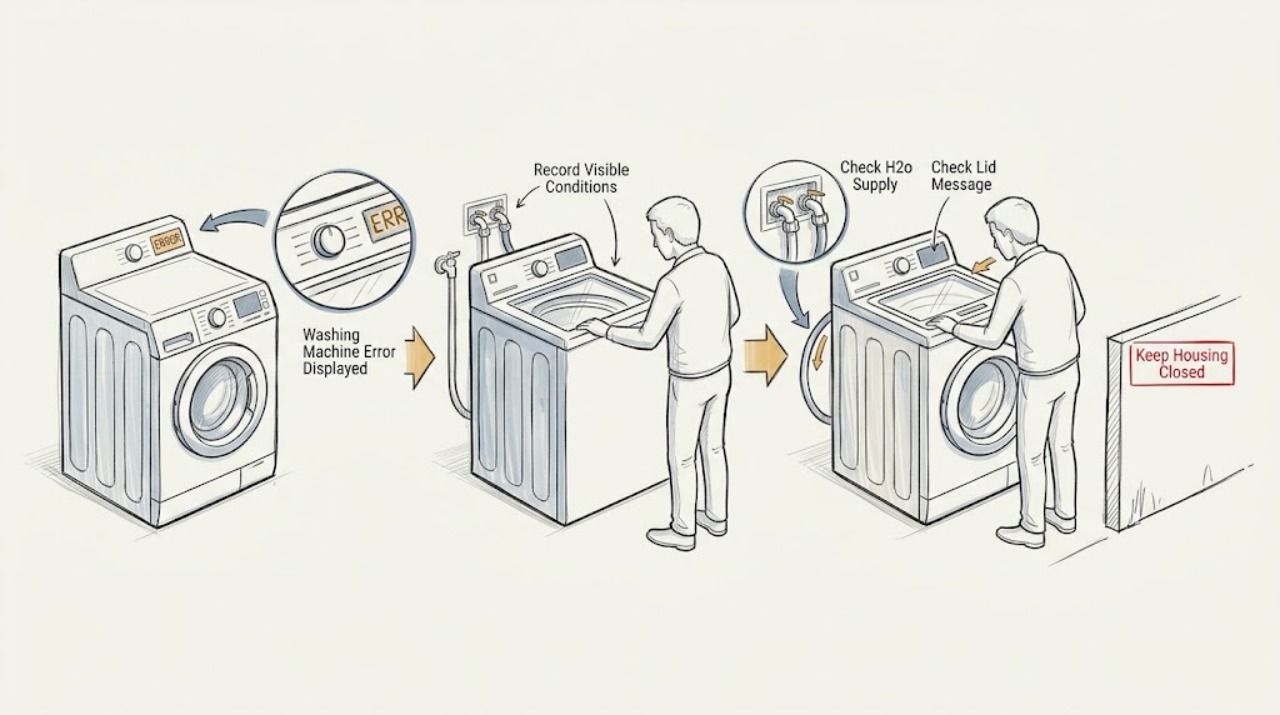
First photograph the complete message and model tag, because GE display messages and remedies vary by washer model. A message such as H2O SUPPLY or IE points first to the household water supply and inlet path; dE or LId points to the lid being open; UE or a flashing Spin light points to an unbalanced load. CAnCELEd or a control that remains stuck can follow a prolonged pause or interruption and may clear after the documented two-minute control reset. FE is a critical water-level warning: turn off the water and power and arrange service. Do not keep restarting a repeating code, bypass a lid lock, or guess at a code without the model's Owner's Manual.
Before you begin
Safety first
- User checks are limited to reading the display, checking accessible supply valves and visible obstructions, redistributing a stopped load, and following the model's documented control reset. Do not bypass a lid lock or sensor, open energized panels, disconnect pressurized hoses, repeatedly cycle a breaker, or operate a leaking, overfilling, smoking, sparking, overheating, or violently vibrating washer.
Work through in order
Diagnostic checks
Use only checks that match the exact appliance or system and its official guide.
-
Check 1
From a dry, safe position, photograph the complete display, note every blinking status light and the point in the cycle when it appeared, then record the washer model number from its rating label.
Expected result: Classify the display as a normal status such as SEnSIng, FILL, PAUSE, or bALAnCINg, a consumer-help message such as H2O SUPPLY, LId, UE, or FE, or an unrecognized code; note whether the washer is filling, draining, spinning, or idle.
Next step: Use the matching branch below and verify the interpretation in the model's Owner's Manual; do not guess a meaning from a similar-looking code.
Stop if: Stop if the display is accompanied by smoke, a burning smell, exposed wiring, a hot cord or outlet, uncontrolled filling, or water near electrical parts; isolate power only if it is safe and arrange service.
Why this matters
Why: A status message may describe a normal phase, while an error or consumer-help message selects a different check. GE states that messages vary by model, so an exact model and message are necessary before applying code-specific advice.
-
Check 2
If the message is H2O SUPPLY, IE, or the wash and rinse lights indicate water is not entering, confirm that both household washer supply valves are fully open and that the inlet hoses are not visibly kinked or crushed; do not disconnect a pressurized hose for this check.
Expected result: The valves are open and the hoses are unobstructed, or a valve is closed, the hose is kinked, or the home's water supply is absent or unusually weak.
Next step: Correct only an accessible closed valve or hose kink, wait through any model-imposed lockout, and retry once. If supply is confirmed but the code returns, preserve the code and request service rather than replacing a valve by guesswork.
Stop if: Stop immediately for a leaking hose connection, burst hose, flooding, or water close to electrical parts; shut off the water supply if safe and obtain qualified help.
Why this matters
Why: A closed valve or restricted supply can explain the message. GE also notes that H2O SUPPLY on front-load models can involve a pressure sensor or very low water pressure, so open valves alone do not rule out a washer fault.
-
Check 3
If the display reads LId or dE, or the Lid/Lid Locked indicator is active, stop the cycle and inspect the lid or door edge from the outside for a garment, detergent residue, or another obstruction; close it normally without pressing, bypassing, or defeating the lock.
Expected result: The lid or door closes fully and the indicator changes, or it remains open, misaligned, locked at the wrong time, or unable to sense closure.
Next step: Open and close the lid once as directed, then start one supervised test. If the message remains or the lock behaves abnormally, use the Owner's Manual and arrange service.
Stop if: Never reach into a moving basket, force the lid or door, defeat a lock, or remove panels while energized or while water is present.
Why this matters
Why: GE identifies dE as an open lid and says LId can appear after cycles are started without opening the lid. A clean closure that does not change the message points to a sensing, alignment, or control issue rather than a reason to force the lock.
-
Check 4
If UE appears or the Spin light flashes, pause only when the washer permits it, wait for the basket to stop and the lock to release, then redistribute the load evenly; check that the washer stands level without rocking before selecting the model's Drain & Spin or Spin cycle.
Expected result: The load is clumped to one side or the cabinet rocks, or the load is even and the washer is stable but the message returns.
Next step: Run one supervised Drain & Spin or Spin test after redistributing and leveling. If the code or excessive vibration returns, stop using the high-speed cycle and record load size, cycle, and repeat behavior for service.
Stop if: Stop for walking, severe banging, cabinet movement, a damaged floor, a loose power cord, or any water leak; do not hold the lid or bypass the lock during spin.
Why this matters
Why: GE associates UE with an unbalanced laundry load and says a flashing Spin light can mean the washer is trying to rebalance. A balanced, level machine that repeatedly reports the condition needs diagnosis rather than repeated high-speed tests.
-
Check 5
If CAnCELEd is displayed or the controls stayed stuck after a power outage, an interrupted cycle, or a long pause, confirm that the basket is stopped and the washer is not filling, then remove power by unplugging it or switching off its breaker for two minutes.
Expected result: After power is restored, the controls respond normally, or the same display remains, the cycle cannot be selected, or the washer resumes an unsafe action.
Next step: For an electronic panel, select the cycle again and start it; for a timer knob, restore the knob as the reset guidance directs. Run one supervised test only, then stop if the condition repeats.
Stop if: Do not pull a plug through water, open energized panels, repeatedly cycle the breaker, or reset while the washer is overfilling, leaking, smoking, or making abnormal electrical noise.
Why this matters
Why: GE says an interruption can lock up electronic controls and specifies a two-minute power removal; it also notes that CAnCELEd can follow an extended pause or certain errors. A reset that fails or a code that returns is evidence for service, not proof of a failed board.
-
Check 6
If FE is shown, or water continues rising when the washer should not be filling, stay clear of the basket and turn off the household washer water valves and washer power only if both can be reached safely without standing in water.
Expected result: Water stops after the supply is shut off, or water continues, spills, reaches electrical parts, or the machine cannot be safely isolated.
Next step: Do not restart the washer or disassemble it. Protect the area from access, document the display and water level if safe, and give the technician the exact sequence of events.
Stop if: This is a hard stop: leave the area and use emergency or qualified assistance if water contacts electrical equipment, the supply cannot be shut off, or anyone faces shock or flood risk.
Why this matters
Why: GE defines FE as water reaching a critical level and directs the owner to turn off water and power and call service. Continued filling or an unsafe isolation point indicates an immediate flooding and electrical hazard.
-
Check 7
Once the message-specific check is complete and no safety stop applies, use the exact GE model's Owner's Manual or support page to confirm the code, required cycle, and any model-specific lockout before a single supervised retest.
Expected result: The manual confirms the same message and remedy, or the message is absent from the manual, uses different wording, or returns after the permitted remedy.
Next step: If confirmed and safe, perform only the documented user remedy once. Otherwise stop, retain the photo and model information, and request diagnosis.
Stop if: Do not substitute another GE model's procedure, enter service mode, short a connector, bypass a sensor, or replace a part solely from an internet code list.
Why this matters
Why: GE's general display guidance is not a universal code chart. An unlisted or repeating message can represent a model-specific fault, a sensor condition, or a problem not safely resolved by a general reset.
-
Check 8
Stop troubleshooting and arrange qualified appliance service when the exact code returns after its documented remedy, the display is unknown, the washer leaks or will not drain, the lock or controls act abnormally, or the appliance trips protection or smells hot.
Expected result: The fault is repeatable or accompanied by water, electrical, mechanical, or control symptoms, or a single safe remedy restores normal operation without recurrence.
Next step: Provide the technician with the model, exact display text, photographs, cycle and load, water-supply state, what was tried, and whether the message returned immediately or after a fill, drain, or spin.
Stop if: Do not continue operating a washer that is flooding, overheating, sparking, violently vibrating, or leaving water near electrical parts.
Why this matters
Why: A repeatable or hazardous symptom needs diagnosis of the actual washer rather than more resets. GE directs owners to service when H2O SUPPLY persists with confirmed water supply, when a reset does not restore controls, and for FE.
Use your observations
Decision map
Find the observation that best matches what you see, then follow the next safe action.
-
PATH 01Safety boundary
What you see
The display shows SEnSIng, FILL, PAUSE, bALAnCINg, DELAY, or End and the washer behaves normally for that phase.
Do this next
Observe one complete phase and consult the model manual if the status never advances or the same status appears with a separate symptom.
Why this path and its safety boundary
Why it matters: The message may be a cycle or feature status rather than a failure.
Safety stop: Stop for water, smoke, electrical odor, abnormal movement, or a second error message.
-
PATH 02Safety boundary
What you see
The message is H2O SUPPLY or IE, or the machine cannot sense incoming water.
Do this next
Open accessible valves, correct a visible kink, wait out the model's lockout if applicable, and retry once; request service if it returns.
Why this path and its safety boundary
Why it matters: Start with the household valves and visible hose path, while recognizing that a confirmed supply can leave a pressure-sensing or washer fault.
Safety stop: Shut off water and stop for a leak, flood, hose damage, or water near electrical parts.
-
PATH 03Safety boundary
What you see
The display is LId or dE, or Lid/Lid Locked remains active.
Do this next
Remove an accessible obstruction, close normally, and test once; arrange service for misalignment or a persistent sensing fault.
Why this path and its safety boundary
Why it matters: The washer is reporting a lid or door closure/lock state, not inviting a lock bypass.
Safety stop: Never force the lid, reach into a moving basket, or defeat the lock.
-
PATH 04Safety boundary
What you see
UE appears or the Spin light flashes and the load is wet or the washer vibrates.
Do this next
Wait for a stop, redistribute the load, verify level, and run one documented Drain & Spin or Spin test.
Why this path and its safety boundary
Why it matters: The washer may be redistributing an unbalanced load or unable to reach full spin speed.
Safety stop: Stop for severe banging, walking, structural movement, or a repeat after a balanced and level test.
-
PATH 05Safety boundary
What you see
FE appears or water reaches a critical level.
Do this next
Turn off water and power if safe, do not restart, and arrange service with the exact code and sequence.
Why this path and its safety boundary
Why it matters: This is a water-level safety warning, not a routine reset opportunity.
Safety stop: Leave the area and obtain urgent qualified help if water contacts electrical equipment or cannot be isolated safely.
-
PATH 06Safety boundary
What you see
CAnCELEd or an unrecognized code remains after the documented reset or the model manual does not match the message.
Do this next
Use the two-minute control reset only when safe and retest once; preserve the display photo and request service if it returns.
Why this path and its safety boundary
Why it matters: The interruption may have left controls locked, or the condition may be model-specific and needs diagnosis.
Safety stop: Do not enter service mode, bypass sensors, repeatedly cycle power, or continue with electrical, water, or overheating symptoms.
Helpful context
Understand the symptom
Read the whole message before treating it as a fault
A GE washer display may scroll a normal status such as SEnSIng, FILL, PAUSE, or bALAnCINg, or it may show a consumer-help message or error code. The same-looking symptom can have different instructions on a front-load, top-load, compact, or older model. Photograph the message exactly as shown, note which lights blink, and record the model number before clearing it. That preserves the evidence needed to match the Owner's Manual.
Use the message to choose one check
Do not run every possible repair at once. H2O SUPPLY or IE sends you toward both supply valves and the inlet path; dE or LId sends you toward the lid and its closure; UE or a flashing Spin light sends you toward load distribution and leveling. If the washer reports FE, treat the water-level warning as a stop condition. If the display is stuck after an interruption, use the model-appropriate control reset only after the washer is safe and not actively filling.
A successful reset is not a diagnosis of a repeating code
A two-minute power removal can clear a control interruption, but it does not prove that a water valve, pressure-sensing system, lid-sensing system, pump, wiring harness, or control board is healthy. After a reset, run only a supervised short test with the correct empty or small load for the model. If the same code returns, the machine leaks, fills unexpectedly, smells hot, trips a breaker, or leaves water at a critical level, stop and give the exact code and conditions to a qualified technician.
When checks do not resolve it
Need a professional?
Safety scope: User checks are limited to reading the display, checking accessible supply valves and visible obstructions, redistributing a stopped load, and following the model's documented control reset. Do not bypass a lid lock or sensor, open energized panels, disconnect pressurized hoses, repeatedly cycle a breaker, or operate a leaking, overfilling, smoking, sparking, overheating, or violently vibrating washer.
Common questions
FAQ
Why does my GE washer show H2O SUPPLY or IE?
Check that the household hot and cold supply valves are open and that visible inlet hoses are not kinked. GE also says the message can involve a pressure sensor or very low pressure; if the supply is confirmed and the message returns, stop guessing at parts and arrange service.
What does UE mean on a GE washing machine?
GE uses UE for an unbalanced laundry load. Wait for the basket to stop, redistribute the load evenly, verify that the washer is level, and run one documented Drain & Spin or Spin test. A repeat with a balanced, level load needs diagnosis.
What should I do when my GE washer displays FE?
Treat FE as a hard stop. GE identifies it as water reaching a critical level and directs you to turn off the washer's water and power and call service. Do not restart or open panels while water is present.
Can I reset a GE washer that is showing an error?
Only use a reset when the exact model's instructions support it and no filling, leaking, electrical, or mechanical hazard is present. GE's general control-reset guidance uses two minutes without power, followed by selecting and starting the cycle again; a returning code needs service diagnosis.
Why does my GE washer display LId or dE?
GE associates dE with an open lid, and LId can appear when cycles are started without opening the lid on some models. Remove only an accessible obstruction and close the lid normally. Never force or bypass the lid lock; a persistent message needs service.
Read the exact guide
Official sources
- Washer - H2O Supply ErrorGE Appliances · GE front-load washer H2O Supply guidance; other models may use different messages or procedures.
- Washer - Resetting the Electronic ControlsGE Appliances · GE washer electronic-control reset guidance; control types and model-specific procedures vary.
- Top Load Washer - Display and Status / Feature LightsGE Appliances · GE top-load electronic-control guidance; exact messages and behavior depend on the washer model.
- Washer - Consumer Help IndicatorGE Appliances · GE electronic-control washer guidance for models equipped with the Consumer Help Indicator; messages vary by model.
Community feedback
Share a repair observation
Share a plain-text repair observation. Accepted observations are published automatically; this page may take a moment to update.