
On this page
Start here
Quick answer
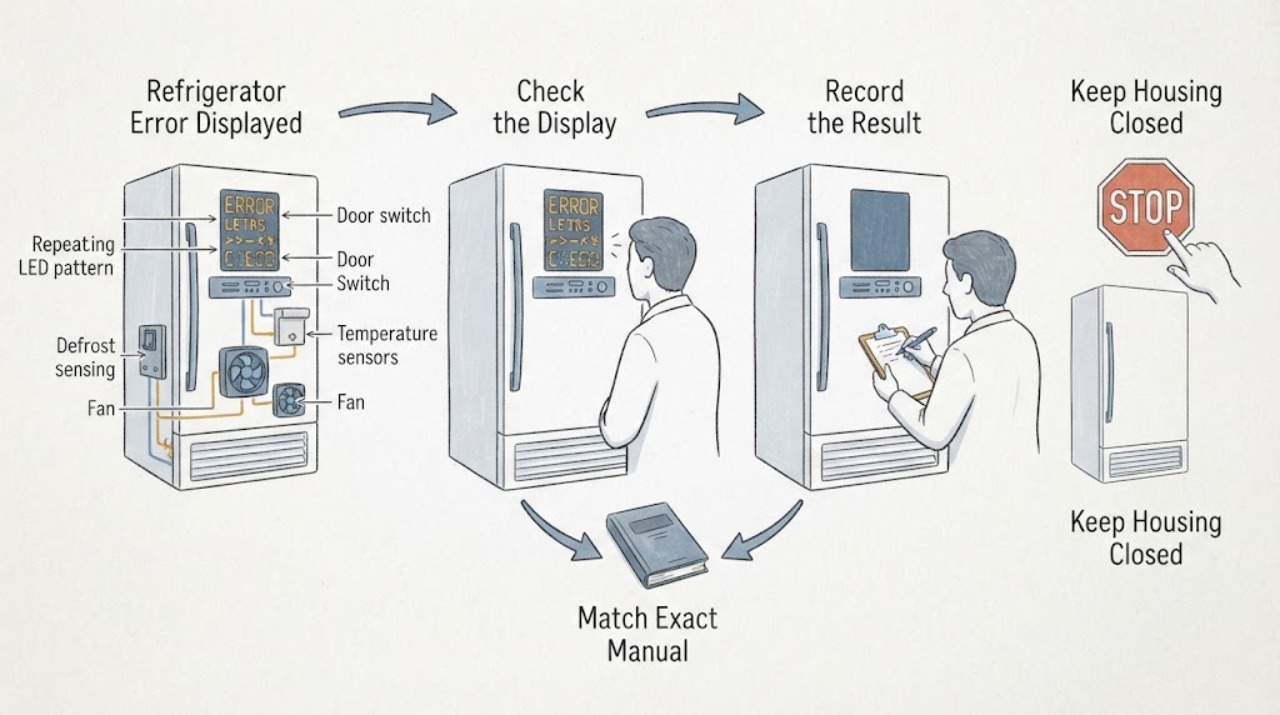
Do not apply a Haier code list from another refrigerator, wine cellar, region, or series. Photograph the display or count the repeating flashes, record the complete model and product code, and use Haier's manual-download page to locate the matching manual. Haier's official support page says different series display different error codes and that refrigerator error codes are not user-resolvable; a code that disappears after power cycling can return later. You may make only safe external observations: confirm the door closes, note whether one compartment or the whole appliance is affected, check for an accidentally selected compartment-off or holiday mode only through the exact manual, and keep vents clear if there is an accompanying temperature complaint. Do not enter an unverified test mode, repeatedly reset power, remove covers, test sensors or fans, or replace a board from a code alone. Arrange qualified service for a persistent code, recurring code after a reset, fan/sensor/defrost/ice-maker/communication indication, door-switch indication with a closed door, or any heat, smoke, damaged cord, or electrical hazard.
Before you begin
Safety first
- The user may document the code and perform dry, external checks of door closure, visible airflow, model-documented mode settings, and accessible household supply. Qualified service must handle test modes not designated for users, display and control panels, fans, sensors, defrost, ice maker, wiring, sealed-system components, live tests, and internal parts.
Work through in order
Diagnostic checks
Use only checks that match the exact appliance or system and its official guide.
-
Check 1
Before resetting or unplugging anything, photograph the display and write down the complete model or product code, every character shown, whether the code alternates, and the number and timing of any repeating LED flashes.
Expected result: The display shows a stable code, a letter or symbol, a repeating flash pattern, a blank segment, or only a temperature value; the exact model is known or missing.
Next step: Use the exact model on Haier's manual-download page and keep the image for service. If the model cannot be identified, stop at documentation and do not guess the code.
Stop if: Do not press combinations to enter test mode or clear a code before recording it.
Why this matters
Why: A stable record preserves evidence that can be lost after a power cycle. Haier says codes vary by series, so a generic interpretation is unsafe when the model or pattern is incomplete.
-
Check 2
Confirm that the appliance is a household refrigerator rather than a wine cellar, freezer, or another Haier product, then select the exact refrigerator model in Haier's manual-download system. Compare the code only with that manual or the official support page for that model.
Expected result: The model manual explicitly defines the displayed code, the displayed pattern is not in the manual, or the available page is for a different series or product type.
Next step: Follow only a model-specific owner instruction that is clearly marked as user-safe. If no exact match exists, provide the code and model to Haier or qualified service rather than applying a neighboring series' table.
Stop if: Do not infer that the same E, F, P, or letter code means the same fault across Haier models.
Why this matters
Why: Haier's official code page explicitly separates refrigerator and wine-cellar code families and says different series display different codes. A code copied from another product can lead to the wrong component diagnosis.
-
Check 3
Make only external observations: note whether the whole display is active, whether one compartment's temperature area is blank, whether the door closes without obstruction, and whether a door alarm is sounding. Do not remove the door switch or display panel.
Expected result: The door is not closing, a door alarm persists with a closed door, one compartment display is blank while others work, or the panel and door appear normal.
Next step: Remove only an obvious food or packaging obstruction and use the exact manual to check a compartment-off or holiday setting. If the alarm or code remains with a closed door, arrange service.
Stop if: Do not force the door, bridge a door switch, or remove trim or control parts.
Why this matters
Why: Haier documents door closure and a compartment that may be turned off as separate model-dependent conditions. A persistent door or display indication with normal external conditions needs service, not a universal code reset.
-
Check 4
If the code is accompanied by a temperature or compartment complaint, check from inside the cabinet that food is not blocking a clearly visible cold-air outlet and note whether one or both compartments are affected. Do not remove an interior cover or fan guard.
Expected result: The outlet is visibly blocked, the appliance has a normal display but one compartment is warm, both compartments are affected, or the outlet is clear and the code remains.
Next step: Reposition only food that visibly blocks the outlet and verify the exact manual's mode settings. If the code remains, cooling is abnormal, or the fan area requires access, keep the appliance operating only if safe and arrange service promptly.
Stop if: Do not chip ice near a fan, remove covers, or use a tool to reach the air channel.
Why this matters
Why: Haier's refrigerator guidance lists a blocked cold-air outlet as an external check and distinguishes a compartment-off or holiday setting. These observations do not prove a fan, sensor, defrost, sealed-system, or control failure.
-
Check 5
If the display is completely dark, check only from a dry, accessible position whether the refrigerator is plugged in and whether an accessible household outlet or breaker is off. Do not use repeated power cycling as a code-clearing procedure.
Expected result: The outlet or breaker is off, the refrigerator remains dark with stable household power, the display returns after one safe restoration, or the protective device trips again.
Next step: Restore only a normal accessible supply state once if safe. If the panel stays dark, the code returns, the outlet or cord is hot or damaged, or protection trips again, leave it isolated and arrange qualified service.
Stop if: Do not change breaker ratings, use an extension cord, open the outlet, or access refrigerator wiring.
Why this matters
Why: A dark panel may be a supply issue, but it is different from a refrigerator that displays an error. Haier warns that power cycling can make a code disappear temporarily while it returns later; repeated tripping is an electrical stop condition.
-
Check 6
Do not enter a diagnostic or test mode unless the exact model manual explicitly identifies the procedure and user boundary. If the display entered a test mode unexpectedly, photograph it and return to normal operation only through the exact manual.
Expected result: The code is listed in the exact manual with an owner check, the display shows a test-mode pattern, or no model-specific instruction exists.
Next step: Follow only the exact manual's safe exit or call for service. Do not replace a display, board, fan, sensor, or other part based on a generic code list.
Stop if: No hidden key sequences, live measurements, cover removal, or safety bypass.
Why this matters
Why: Haier publishes model-specific control operations and test procedures; a combination from another model can change settings or obscure the original fault. An unexpected test mode or unlisted code is a service clue.
-
Check 7
Arrange qualified refrigerator service when the exact manual does not provide a user correction, when the code returns after a permitted external check or one safe restart, or when the symptom involves a fan, sensor, defrost, ice maker, communication, door switch, or control function.
Expected result: The code clears and does not return with normal operation, or the code or affected function returns or worsens.
Next step: Keep the code photograph, model, affected temperatures or compartments, door state, and timeline for the technician. Stop immediately for smoke, burning odor, hot wiring, damaged cord, arcing, or refrigerant/oil leakage signs.
Stop if: Do not keep cycling power or deliberately reproduce a hazardous error.
Why this matters
Why: Haier's official code guidance says refrigerator error codes are not user-resolvable and that a disappearing code may return. Recurrence is evidence for model-specific service diagnosis, not proof of one replacement part.
Use your observations
Decision map
Find the observation that best matches what you see, then follow the next safe action.
-
PATH 01Safety boundary
What you see
The complete model is known and the exact official manual clearly defines the displayed code and a user-safe external check.
Do this next
Follow only that manual's instruction once, record the result, and call service if the code remains or returns.
Why this path and its safety boundary
Why it matters: A model-supported check may be appropriate, but it does not make a code portable to another Haier refrigerator.
Safety stop: Do not add a code from a different series to the diagnosis.
-
PATH 02Safety boundary
What you see
The model is missing, the code is not in the exact manual, or the display is a repeating pattern that cannot be identified confidently.
Do this next
Preserve a photo or flash count, locate the model label, and arrange Haier or qualified service. Do not guess a sensor, fan, or board.
Why this path and its safety boundary
Why it matters: The evidence is insufficient for a code-specific repair decision; Haier's code families vary by series.
Safety stop: No unverified reset sequence or test mode.
-
PATH 03Safety boundary
What you see
A door alarm remains with the door closed, one temperature area is blank, or the display shows a compartment-specific state without a confirmed hardware fault.
Do this next
Correct only a visible obstruction or model-documented setting. Persistent alarm or blank display with a closed door requires service.
Why this path and its safety boundary
Why it matters: A door closure, compartment-off, or holiday setting may be involved, but Haier says controls differ by model.
Safety stop: Do not bridge the door switch or open the display panel.
-
PATH 04Safety boundary
What you see
The error is accompanied by one warm compartment, both compartments warming, a blocked visible air outlet, or an unusual fan or defrost symptom.
Do this next
Clear only visible food obstruction and verify the exact manual's mode setting. If cooling remains abnormal or the code persists, arrange prompt service and protect perishable food.
Why this path and its safety boundary
Why it matters: An external airflow or mode issue is possible, but the official code categories also include fan, sensor, defrost, and communication faults that require model-specific diagnosis.
Safety stop: Do not remove interior covers, chip ice near a fan, or test refrigeration components.
-
PATH 05Safety boundary
What you see
The code returns after one permitted check or safe restart, the panel stays dark with known household power, a protective device trips, or there is smoke, odor, heat, arcing, or damaged wiring.
Do this next
Leave the refrigerator isolated when safe and arrange qualified appliance or electrical service. Give the technician the exact code image and model rather than recreating the fault.
Why this path and its safety boundary
Why it matters: This is outside owner code interpretation. Haier directs technician assessment for refrigerator error codes, and electrical or heat hazards require isolation.
Safety stop: No repeated reset, live test, cover removal, or internal part replacement.
Helpful context
Understand the symptom
An error display is a symptom, not a universal code
Haier's own support material says refrigerator and wine-cellar series use different code families and lists sensor, communication, fan, ice-maker, defrost, and door or switch categories. Those categories are not a license to assign a meaning to an unidentified code. The code, exact model, display type, and affected function must stay together.
Start with the model record
Find the complete model or product code on the rating label or in the appliance documents and photograph the display before pressing buttons. Haier's manual-download page is organized around selecting a refrigerator model. Save the exact characters, capitalization, decimal points, and repeating flash pattern; do not translate a blinking pattern into a code from another series.
Keep owner checks external
A code associated with a sensor, fan, defrost system, ice maker, communication link, or control needs service diagnosis. External checks can establish whether a door is closed, a compartment was intentionally turned off, or a food load blocks a visible air outlet, but they cannot prove which internal part failed. Do not open the cabinet or use a hidden test mode unless the exact manual explicitly designates it for the user.
Safety boundary
Stop conditions
- Stop and isolate the appliance for smoke, burning odor, visible arcing, a hot or damaged cord, water near electrical parts, or a protective device that trips again.
- Do not apply error-code meanings from another Haier refrigerator series, wine cellar, freezer, region, or online list. Use the exact model manual.
- Do not repeatedly cycle power, enter an unverified test mode, remove covers, bridge a door switch, chip ice near a fan, or perform live tests.
- Haier's official guidance says refrigerator error codes are not user-resolvable; persistent or recurring codes and any internal diagnosis require qualified service.
Only after diagnosis
Potential parts
- door switch or display/control interface
Consider this category only when the exact model manual and service diagnosis connect a persistent door or display symptom to that component.
Haier controls and switch arrangements vary by series. A blank display or door code alone does not establish fit or failure. - fan, temperature sensor, or defrost component
Consider this category only when the exact model's code table and qualified diagnosis identify a fan, sensor, or defrost fault.
Do not infer the component from a generic F/E/P code; refrigerator series use different codes and internal arrangements. - ice-maker assembly
Consider this category only when the exact model manual identifies an ice-maker code or the technician confirms an ice-maker fault.
An ice-maker indication is not a universal code and does not establish part fit across Haier models. - main control board or communication harness
Consider this category only after model-specific service diagnosis confirms a communication or control fault.
Never select a board from a displayed code alone; model, revision, connectors, and firmware must be verified by qualified service.
When checks do not resolve it
Need a professional?
Arrange qualified Haier refrigerator service when the exact model manual does not provide a clear user-safe correction, the code is unmatched or returns after one permitted check, a door or compartment indication persists with normal external conditions, or the symptom involves a fan, sensor, defrost system, ice maker, communication, or control. Use qualified electrical service for a hot, damaged, dead, or repeatedly tripping outlet, cord, or circuit. Treat smoke, arcing, burning odor, and water near electrical parts as immediate stop-use conditions.
Safety scope: The user may document the code and perform dry, external checks of door closure, visible airflow, model-documented mode settings, and accessible household supply. Qualified service must handle test modes not designated for users, display and control panels, fans, sensors, defrost, ice maker, wiring, sealed-system components, live tests, and internal parts.
Common questions
FAQ
Can I use a Haier refrigerator error-code list from another model?
No. Haier explicitly says different refrigerator series display different error codes. Record the exact model and code, then use the matching official manual; do not assign a component from a neighboring series.
What if the Haier error disappears after I unplug the refrigerator?
A temporary disappearance does not prove the fault is fixed. Haier says a code may disappear after power cycling and return after several hours. Keep the original code record and arrange service if it returns or any function remains abnormal.
What information should I give Haier service for a displayed error?
Provide the complete model or product code, a photograph or exact flash pattern, the affected compartment or function, when it began, and whether it returned after a permitted external check. Do not recreate a hazardous event to obtain another code.
Could a blank refrigerator temperature area be a setting rather than a failed part?
It can be model-dependent. Haier's guidance says a refrigerator with a display may have a compartment turned off, and that holiday mode can affect the displayed refrigerator temperature. Check only the exact manual's control procedure; persistent blank display or alarm needs service.
Should I enter a Haier refrigerator test mode to identify an error?
Not unless the exact model manual explicitly provides a user procedure and boundary. A key combination from another model can change settings or obscure the original fault. Photograph the display and use the matching manual or qualified service instead.
Read the exact guide
Official sources
- Fridge compartment does not workHaier India · Haier India guidance with related models listed on the page; controls differ by model.
- Display panel is always onHaier India · Official Haier India refrigerator support page; the page gives a general external door check and directs persistent conditions to service.
- The error code for the refrigerator and freezerHaier India · Official Haier India support page with series-specific examples; not a universal code table for every Haier refrigerator.
- Haier Manual DownloadHaier India · Official Haier support tool; available models and regional documents vary.
Community feedback
Share a repair observation
Share a plain-text repair observation. Accepted observations are published automatically; this page may take a moment to update.